Skip to content
| Marketplace
Sign in
Visual Studio>Controls>SSIS Amazon Redshift Destination
SSIS Amazon Redshift Destination

SSIS Amazon Redshift Destination

ZappySys

|
120 clicks
| (0) | Free Trial
Load data into Amazon Redshift from SSIS without custom code. Configure Redshift connection, choose load options, map columns, and run high-volume inserts using a drag-and-drop destination component with execution-time visibility. Part of ZappySys SSIS PowerPack.
Get Started

Load Amazon Redshift tables from SSIS with high-speed bulk inserts and flexible mapping controls.

SSIS Amazon Redshift Destination helps you push transformed records into Redshift using a native destination UI. Configure connection, tune load options, map source columns, and execute ETL pipelines without writing scripts.
Part of ZappySys SSIS PowerPack.

Recommended starting point
View Setup Guide & Get Started →
See features, UI & examples →
Pro Tip: The Visual Studio download installs a basic extension. Use the guide above to install and run the full SSIS PowerPack (all connectors & UI).
Compatibility: SQL Server 2012–2025+ (32/64-bit) | Azure Data Factory / Azure-SSIS IR Ready

⚡ Key Benefits

  • Fast Redshift Loads — Push ETL output directly into Amazon Redshift destination tables
  • No-Code Configuration — Setup connection, table options, and mappings in SSIS UI
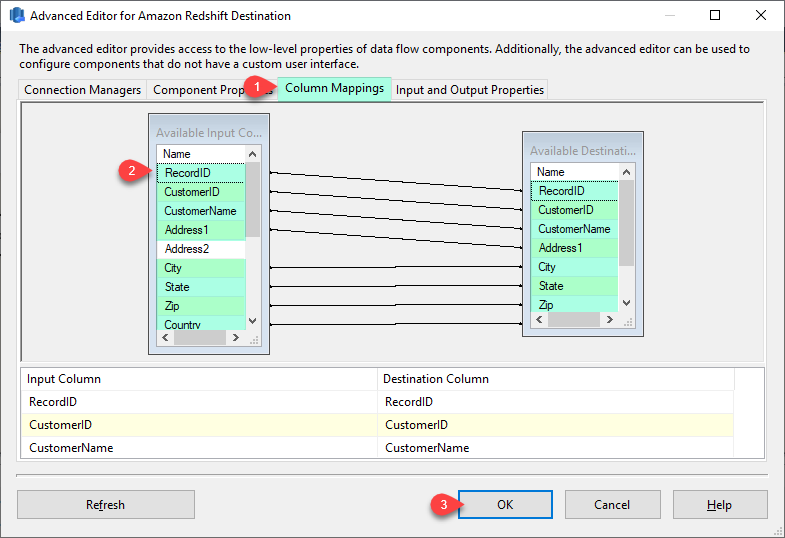
  • Column Mapping Control — Align source-to-target fields with mapping tab flexibility
  • Execution Visibility — Monitor package runs and verify load behavior quickly
  • Enterprise ETL Ready — Designed for repeatable batch data warehouse workflows

📸 Visual Overview & Setup

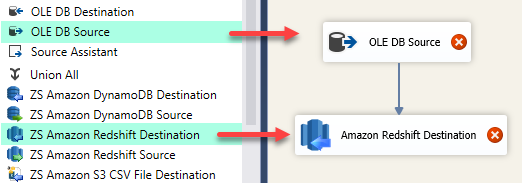
1. Drag Amazon Redshift Destination
SSIS Amazon Redshift Destination drag and drop
🔍 View Full Size
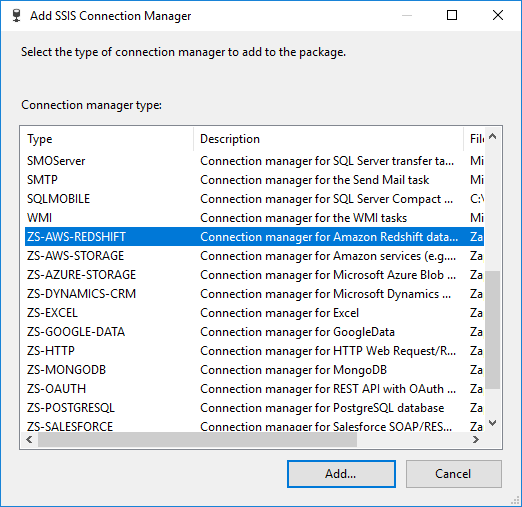
2. Add Redshift Connection Manager
Add SSIS Redshift connection manager
🔍 View Full Size
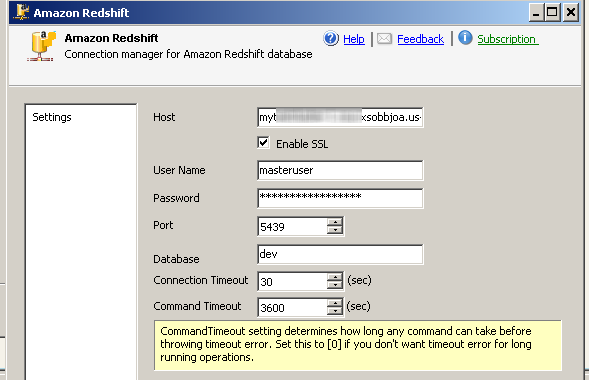
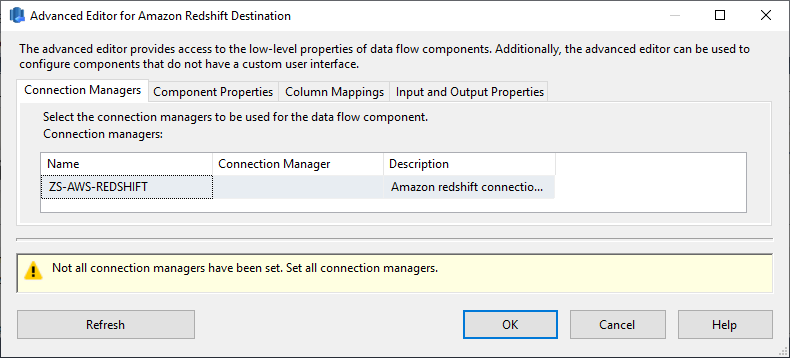
3. Configure Connection & Properties
Configure SSIS Amazon Redshift destination connection properties
🔍 View Full Size
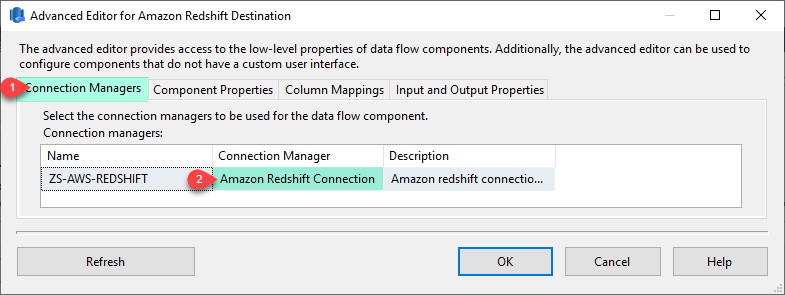
4. Select Destination Connection
Select SSIS Amazon Redshift destination connection
🔍 View Full Size
5. Map Source to Target Columns
SSIS Amazon Redshift destination column mapping
🔍 View Full Size
6. Execute & Review Settings UI
SSIS Amazon Redshift destination settings UI
🔍 View Full Size

🔧 Key Features

  • Amazon Redshift destination for SSIS Data Flow
  • Connection manager and destination configuration UI
  • Flexible target table and load-property controls
  • Source-to-target mapping tab for schema alignment
  • Execution and settings views for operational consistency

💡 Common Use Cases

  • Cloud Data Warehouse Loads: Load transformed operational data into Redshift for analytics.
  • Migration Pipelines: Move data from SQL Server or files into Redshift staging/target tables.
  • Batch ETL Jobs: Schedule recurring warehouse loads with repeatable SSIS packages.
  • Hybrid Integration: Combine on-prem data prep with cloud warehouse publishing.

🎯 Summary

SSIS Amazon Redshift Destination simplifies loading data into Redshift by combining connection setup, destination options, and mapping into a single SSIS-native workflow. It helps teams deliver reliable warehouse loads at ETL scale without custom scripting.

Trusted by Developers & IT Teams Worldwide

  • Built for SSIS Workflows: Purpose-built for high-performance ETL and complex integration scenarios.
  • Expert Technical Support: Direct access to engineers via email and remote screen-share sessions.
  • Proven Enterprise Scale: Trusted by 3000+ teams across 90+ countries, including Fortune 500.
SSIS PowerPack
Includes SSIS Amazon Redshift Destination
Capterra Rating
Read reviews on Capterra →

Start Automating Workflows with SSIS PowerPack

Includes connectors for APIs, databases & cloud apps. Build robust ETL workflows without custom scripting.

Download SSIS PowerPack (Free Trial)

Full functionality is FREE for development within Visual Studio

  • Contact us
  • Jobs
  • Privacy
  • Manage cookies
  • Terms of use
  • Trademarks
© 2026 Microsoft