Access and update Zoom using standard SQL — powered by the Zoom Connector for the ZappySys API Driver.
Connect from SQL Server, Power BI, Excel, SSIS, and any ODBC-compatible tool.
Read and write meetings, webinars, users, registrants, and reports. Target https://api.zoom.us/v2 (default base URL from the hub) and authenticate with OAuth [OAuth] using a Zoom app in Admin Console (user credentials with granular or legacy scopes, or server-to-server app credentials for account-level access); align redirect, token, and authorization URLs per the DSN wizard.
Part of ZappySys ODBC PowerPack (30+ drivers).
Recommended starting point
Pro Tip: Configure one Zoom DSN once, then reuse it across Power BI, Excel, SQL Server linked servers, and SSIS without hand-written Zoom REST calls per app.
Compatibility: Windows ODBC (32/64-bit) | Works with Visual Studio, .NET, BI tools |
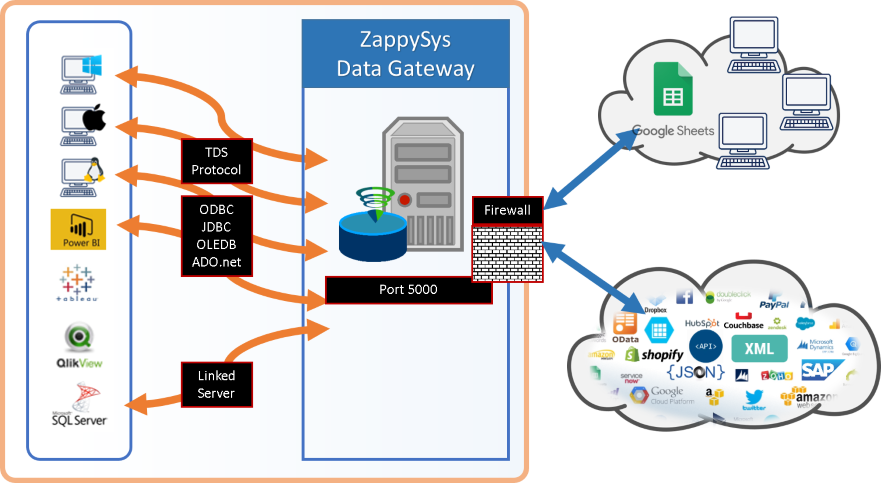
Data Gateway for SQL Server, JDBC, and non-Windows access
⚡ Key Benefits
- SQL over Zoom APIs — Query meetings, webinars, users, and report endpoints using the actions listed on the connector hub
- Flexible Zoom OAuth — User credentials (granular or legacy scopes) or app credentials (server-to-server) documented on the hub
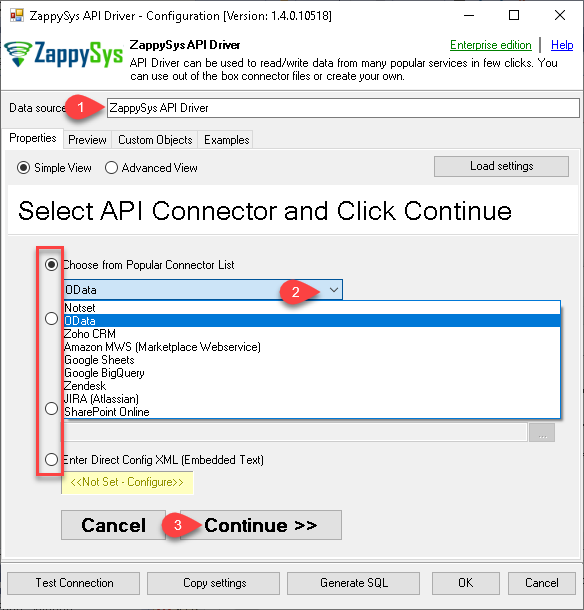
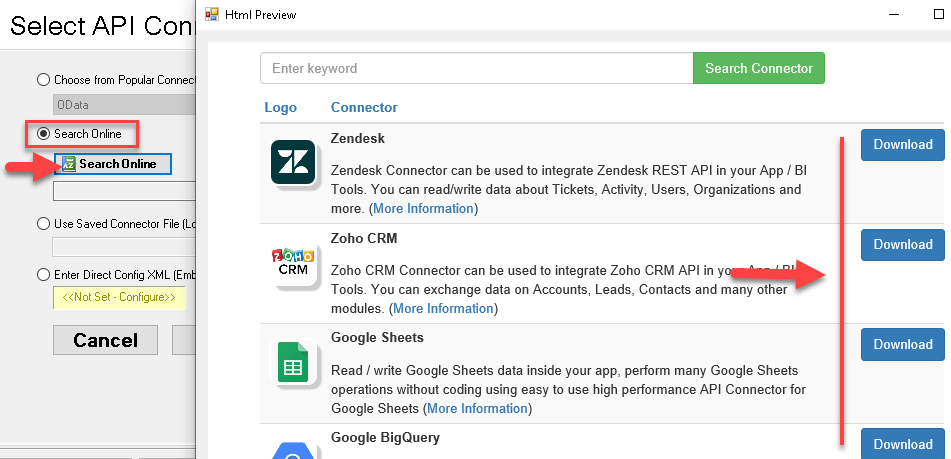
- DSN wizard workflow — Pick Zoom from Popular Connectors or use Search Online when the package is not embedded
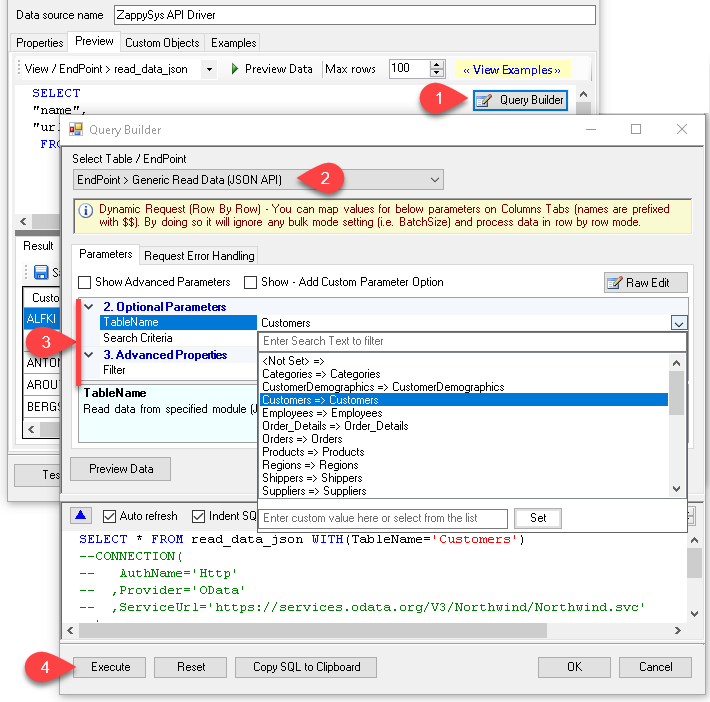
- Query Builder previews — Generate SQL such as
SELECT * FROM Meetings and preview rows before you run workloads in downstream tools
- Throttle-friendly retries — Configure RetryMode and HTTP status lists (examples include
429) with counts and multiply-wait options from the UI
- Gateway-ready sharing — Publish the DSN through ZappySys Data Gateway for JDBC or remote clients without local driver installs
📸 Visual Overview & Setup
|
1. Pick Zoom Connector
|
2. Search Online if Needed
|
3. Build & Preview SQL
|
|
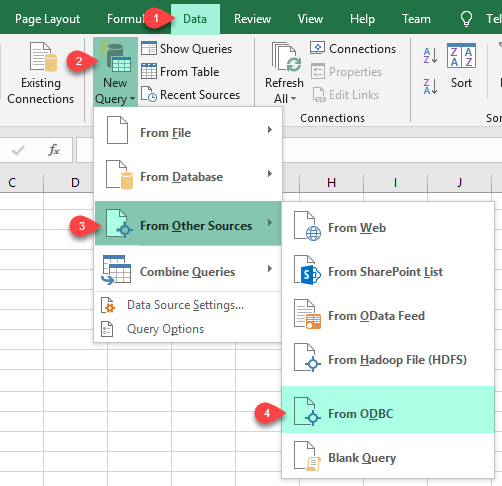
4. Load Zoom Rows into Excel
|
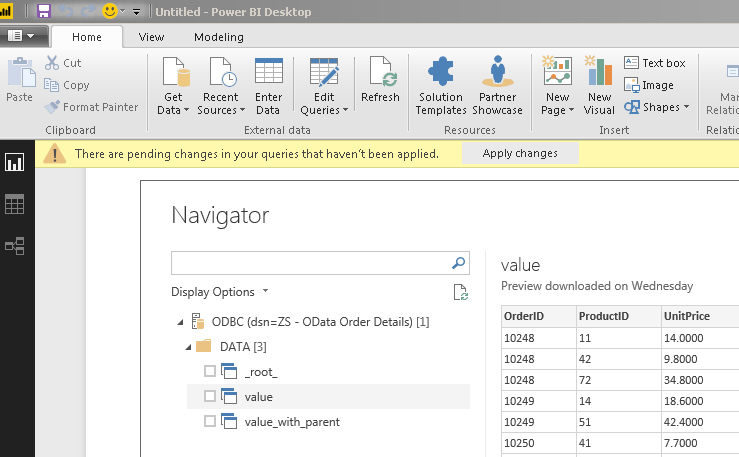
5. Connect from Power BI
|
6. Share via Data Gateway
|
🔗 Seamless SQL Query Integration
Works with REST, OData, files, and databases
-- List meetings via SQL (Zoom)
SELECT *
FROM Meetings
✔ Query APIs like a database
✔ No ETL or custom scripts needed
✔ Works inside SQL Server, Power BI, Excel
🔧 Key Features
Read & query
- Select tables such as
Meetings in Query Builder; use parameters where the UI passes filters to the Zoom API for server-side filtering
- Keep requests scoped to
https://api.zoom.us/v2 unless the setup article directs a different host for your region or scenario
- Ad-hoc
WHERE and LIMIT without Query Builder parameters may run client-side after a full fetch, as noted in the setup article
Write & automation
- Use INSERT/UPDATE and dynamic endpoints illustrated under Explore supported Zoom Connector actions on the hub
- Issue generic REST requests when you need a path not wrapped as a named table or action
Authentication
- User credentials (granular) — Create an OAuth app under Zoom Admin Console (Channel > API > Settings); add granular scopes (for example
meeting:read:list_meetings, webinar:read:list_webinars, report:read:user per the hub); supply Client Id, Secret, redirect, token, and authorization URLs; use Generate Token in the driver UI
- App credentials (server-to-server) — Use Account Id, Client Id, Client Secret, and token URL for automation without interactive login — see admin/master scope lists on the hub
- Legacy scopes — Optional flow with classic scope strings (for example
meeting:read, webinar:read) when your app still uses the legacy model
- Details: OAuth granular and related authentication topics on the hub
Platform fit
- Standard ODBC 3.x for Power BI, Excel, SQL Server, SSIS, and custom apps
- Centralized access through ZappySys Data Gateway when JDBC or non-Windows clients consume the same DSN
💡 Common Use Cases
Typical collaboration analytics scenarios for the Zoom ODBC Driver:
-
Meeting exports: Land scheduled and historical meetings in SQL Server for BI or retention.
Example: Nightly ODBC pull into a staging table.
-
Webinar metrics in Power BI: Model registrants and attendance KPIs from a shared DSN.
Example: Refresh semantic model on schedule.
-
User directory sync: Keep Zoom users aligned with HR or IdP master data.
Example: MERGE into a reference table with admin-level scopes where permitted.
-
Report aggregation: Consolidate usage report endpoints for executive dashboards.
Example: ODBC extract to Excel.
-
SSIS ODBC ETL: Reuse the DSN inside SSIS Execute SQL or ODBC sources.
Example: Incremental load by meeting start time.
-
Gateway-only access: Host the driver on a secure VM while JDBC clients use Data Gateway.
Example: Central DSN without per-desktop API Driver installs.
🎯 Summary
Query Zoom REST resources with SQL instead of bespoke API clients.
Configure OAuth or server-to-server credentials once in the DSN, generate SQL from the Query Builder, and run the same statements across BI, databases, and ETL tools.
Trusted by Developers & IT Teams Worldwide
- Built for ODBC Workloads: One driver model across BI, ETL, databases, and custom code.
- Expert Technical Support: Engineers help with DSN setup, Zoom app settings, and query tuning.
- Proven Enterprise Scale: Thousands of teams worldwide rely on ZappySys for API and cloud connectivity.
|
ODBC PowerPack
Includes Zoom ODBC Driver

Read reviews on Capterra →
|
Ready to start querying Zoom?
Install the full ODBC PowerPack to unlock all drivers and start your free trial.
| |


