Access and update Zoho CRM using standard SQL — powered by the Zoho CRM Connector for the ZappySys API Driver.
Connect from SQL Server, Power BI, Excel, SSIS, and any ODBC-compatible tool.
Read and write accounts, leads, contacts, deals, and modules. Target https://www.zohoapis.com/crm/[$Version$] (typically v2) and authenticate with OAuth [OAuth] using a Zoho API Console server-based application with a redirect URI that matches the driver (for example https://zappysys.com/oauth).
Part of ZappySys ODBC PowerPack (30+ drivers).
Recommended starting point
Pro Tip: Configure one Zoho CRM DSN once, then reuse it across Power BI, Excel, SQL Server linked servers, and SSIS without hand-written Zoho REST calls per app.
Compatibility: Windows ODBC (32/64-bit) | Works with Visual Studio, .NET, BI tools |
Data Gateway for SQL Server, JDBC, and non-Windows access
⚡ Key Benefits
- SQL over Zoho CRM APIs — Query modules, views, tags, territories, and COQL reads using the actions listed on the connector hub
- Zoho API Console OAuth — Server-based client, matching redirect URI, and Generate Token flow documented on the hub page
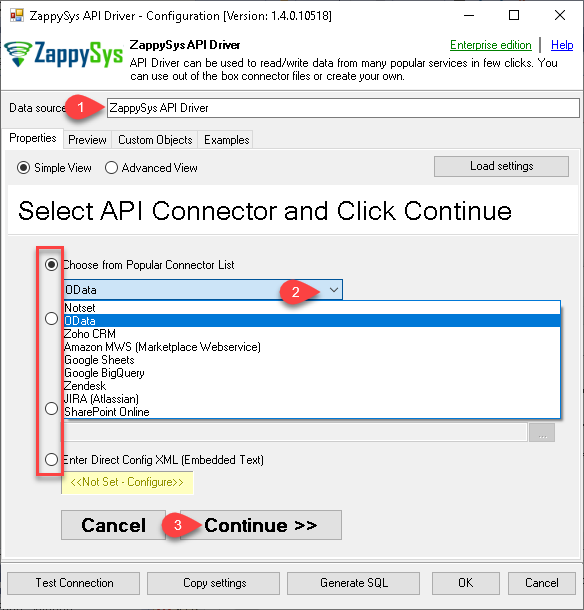
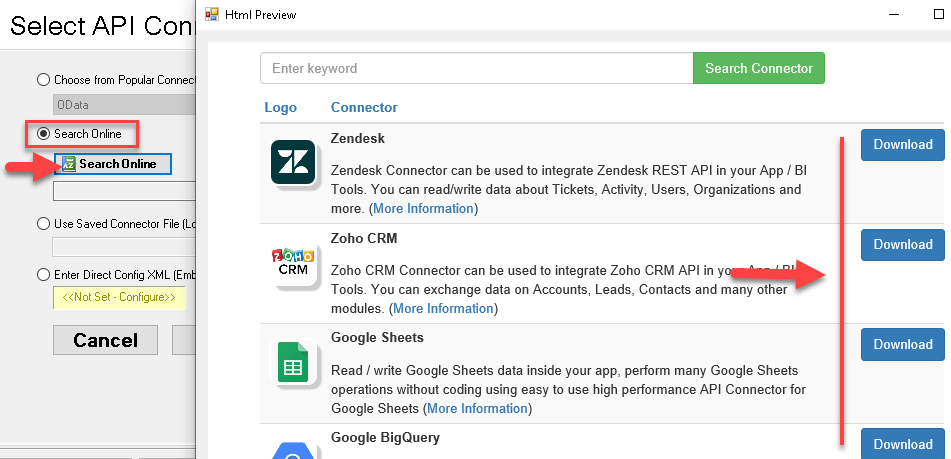
- DSN wizard workflow — Pick Zoho CRM from Popular Connectors or use Search Online when the package is not embedded
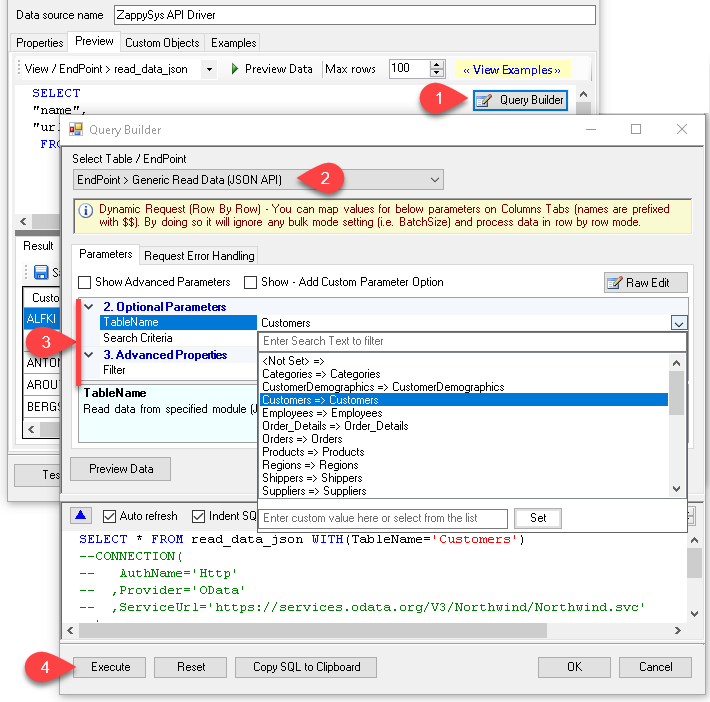
- Query Builder previews — Generate SQL such as
SELECT * FROM Accounts and preview rows before you run workloads in downstream tools
- Throttle-friendly retries — Configure RetryMode and HTTP status lists (examples include
429) with counts and multiply-wait options from the UI
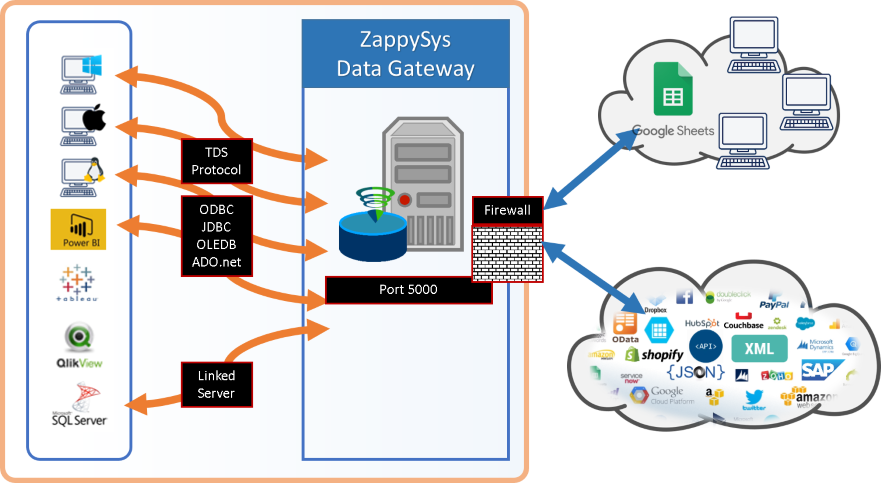
- Gateway-ready sharing — Publish the DSN through ZappySys Data Gateway for JDBC or remote clients without local driver installs
📸 Visual Overview & Setup
|
1. Pick Zoho CRM Connector
|
2. Search Online if Needed
|
3. Build & Preview SQL
|
|
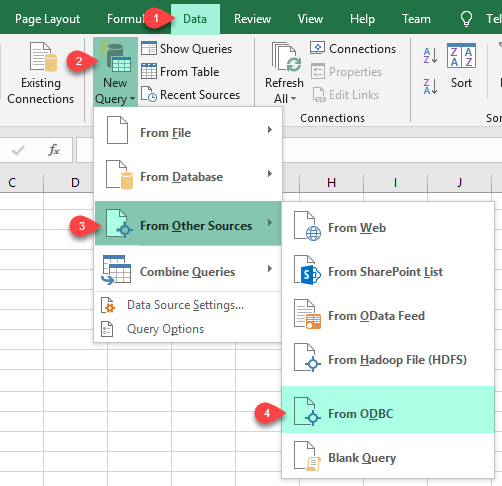
4. Load Zoho CRM Rows into Excel
|
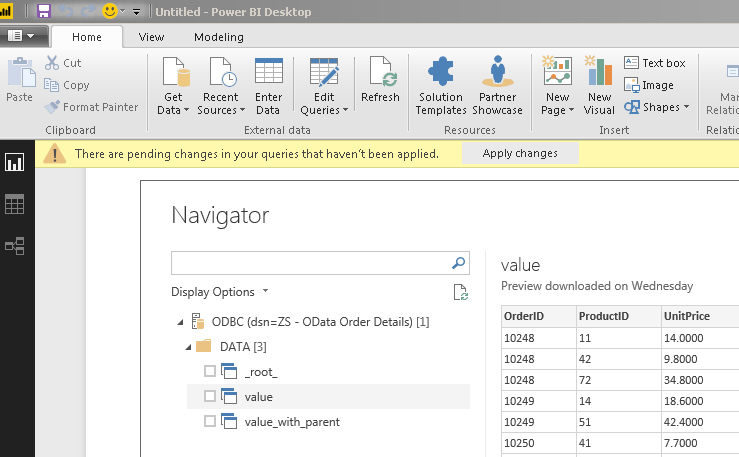
5. Connect from Power BI
|
6. Share via Data Gateway
|
🔗 Seamless SQL Query Integration
Works with REST, OData, files, and databases
-- List accounts via SQL (Zoho CRM)
SELECT *
FROM Accounts
✔ Query APIs like a database
✔ No ETL or custom scripts needed
✔ Works inside SQL Server, Power BI, Excel
🔧 Key Features
Read & query
- Select module tables such as
Accounts in Query Builder; use parameters where the UI passes filters to Zoho for server-side filtering
- Keep requests scoped to
https://www.zohoapis.com/crm/[$Version$] with API version v2 unless your org requires otherwise
- Ad-hoc
WHERE and LIMIT without Query Builder parameters may run client-side after a full fetch, as noted in the setup article
Write & automation
- Use INSERT/UPDATE, upsert, search, and dynamic endpoints illustrated under Explore supported Zoho CRM Connector actions on the hub
- Issue generic REST requests when you need a path not wrapped as a named table or action
Authentication
- OAuth [OAuth] — Register a server-based application in Zoho API Console; set Authorized Redirect URI to match the connector (for example
https://zappysys.com/oauth); copy Client ID and Secret; use Generate Token in the driver UI
- Optional scopes such as
ZohoCRM.settings.all, ZohoCRM.modules.all, and ZohoCRM.coql.READ appear in the hub examples
- Set
AccountUrl to your Zoho accounts endpoint (for example https://accounts.zoho.com) for the correct data center
Platform fit
- Standard ODBC 3.x for Power BI, Excel, SQL Server, SSIS, and custom apps
- Centralized access through ZappySys Data Gateway when JDBC or non-Windows clients consume the same DSN
💡 Common Use Cases
Typical revenue and operations scenarios for the Zoho CRM ODBC Driver:
-
Account and lead reporting: Pull CRM entities into Excel or Power BI models.
Example: Weekly pipeline snapshot by territory.
-
Data warehouse staging: ODBC extract into SQL Server for conformed dimensions.
Example: Incremental load on Modified_Time.
-
Marketing alignment: Join contacts with campaign tools via a shared DSN.
Example: Refresh opted-in lists for outbound tooling.
-
Closed-loop updates: Push enriched attributes back through supported write actions.
Example: Upsert from a scoring table.
-
SSIS ODBC loads: Reuse the same DSN in Execute SQL or data flow ODBC sources.
Example: Nightly merge into a CRM mirror database.
-
Gateway-only access: Host the driver on a secure VM while remote clients connect through the gateway.
Example: JDBC services without a local API Driver install.
🎯 Summary
Query Zoho CRM API resources with SQL instead of bespoke REST clients.
Configure OAuth once in the DSN, generate SQL from the Query Builder, and run the same statements across BI, databases, and ETL tools.
Trusted by Developers & IT Teams Worldwide
- Built for ODBC Workloads: One driver model across BI, ETL, databases, and custom code.
- Expert Technical Support: Engineers help with DSN setup, Zoho API Console settings, and query tuning.
- Proven Enterprise Scale: Thousands of teams worldwide rely on ZappySys for API and cloud connectivity.
|
ODBC PowerPack
Includes Zoho CRM ODBC Driver

Read reviews on Capterra →
|
Ready to start querying Zoho CRM?
Install the full ODBC PowerPack to unlock all drivers and start your free trial.
| |


