Connect XML files and SOAP/REST endpoints using SQL-first access from ODBC tools.
Read and write API or file data from SQL Server, Power BI, Excel, SSIS, and custom apps without hand-coding HTTP flows.
Flatten nested XML, apply SQL filters, and handle pagination and headers in one query layer.
Part of ZappySys ODBC PowerPack (30+ drivers).
Recommended starting point
Pro Tip: Configure one DSN and reuse it across BI reports, SQL workloads, and ETL jobs.
Compatibility: Windows ODBC (32/64-bit) | Works with Visual Studio, .NET, BI tools |
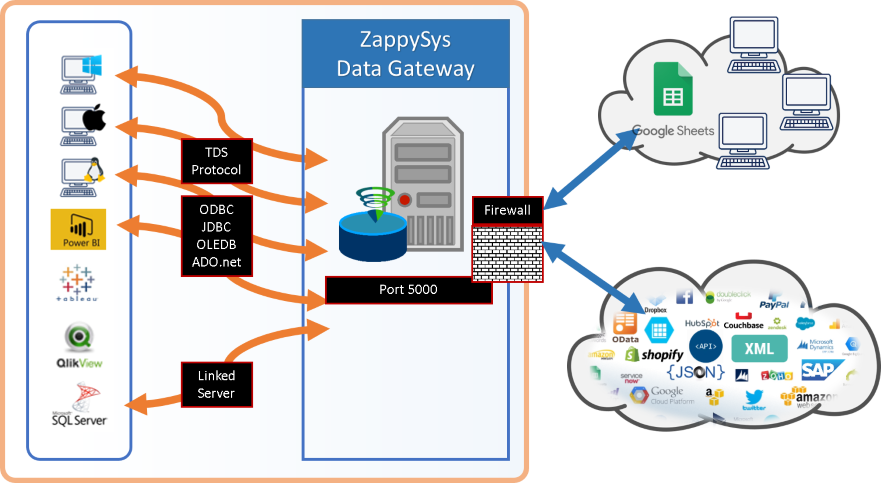
Data Gateway for SQL Server, JDBC, and non-Windows access
⚡ Key Benefits
- SQL-Based API Access — Query XML, SOAP, REST, and OData endpoints with standard SQL
- Nested Data Handling — Flatten complex XML structures into tabular output for analytics
- Secure Authentication Options — Use OAuth, JWT, X509, basic auth, and token-based flows
- Advanced Retrieval Controls — Configure headers, body, pagination, and dynamic URL patterns
- Centralized Team Connectivity — Share controlled access through Data Gateway without local installs
📸 Visual Overview & Setup
|
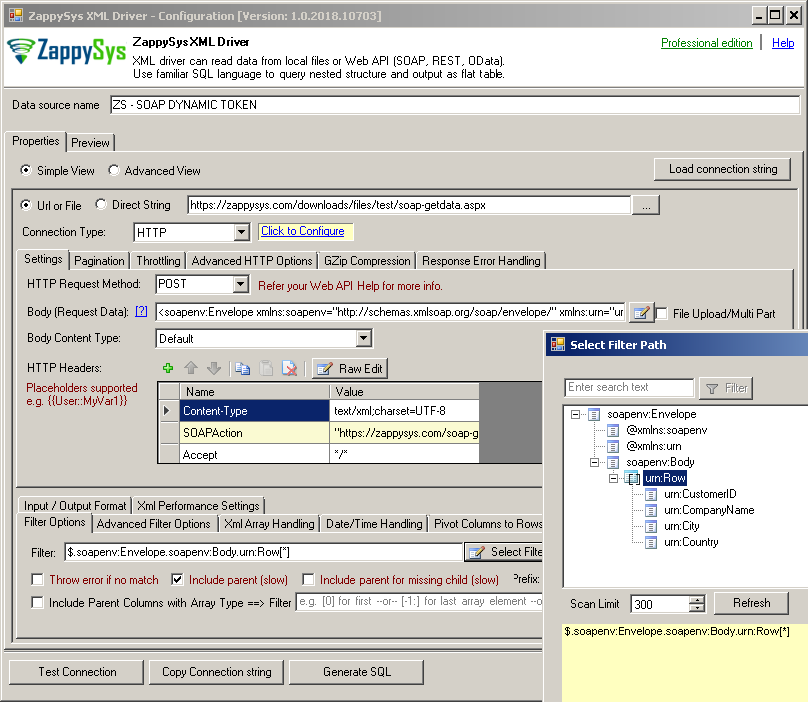
1. Configure XML/SOAP Data Source
|
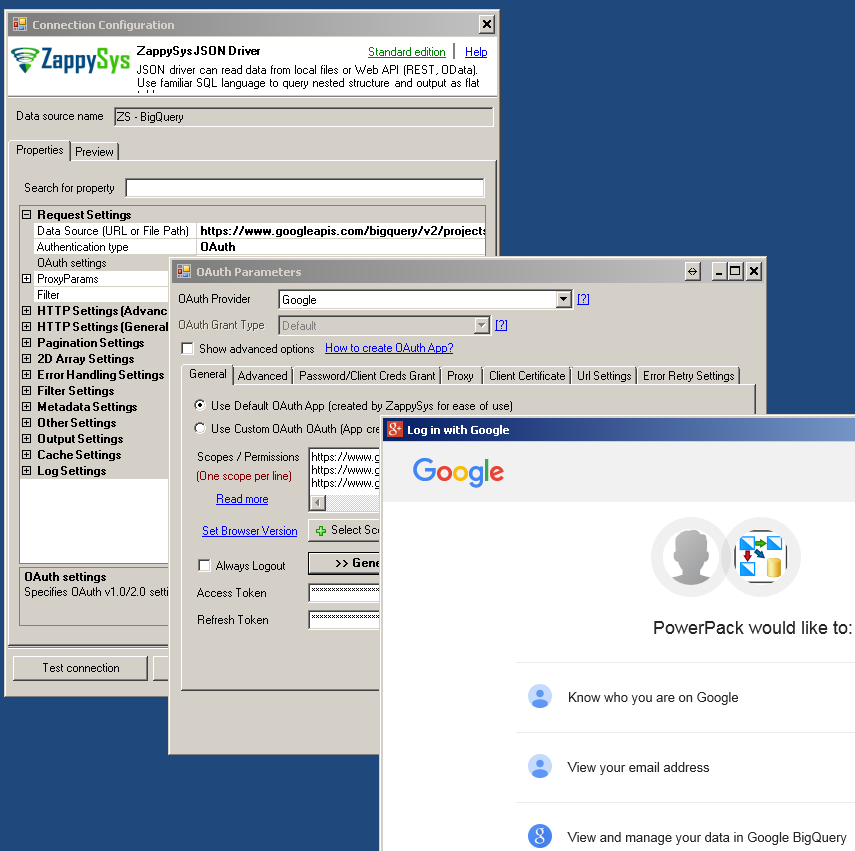
2. Set OAuth / Auth Provider
|
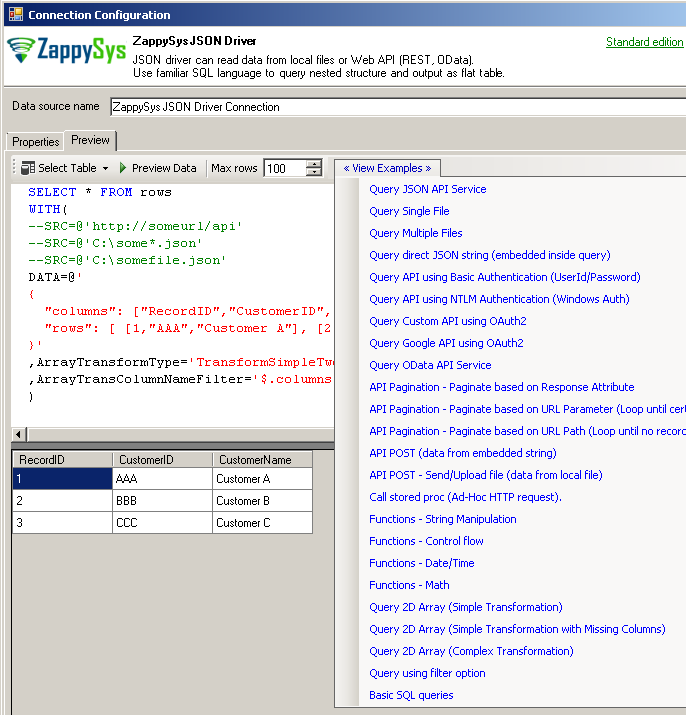
3. Build SQL Query & Preview
|
|
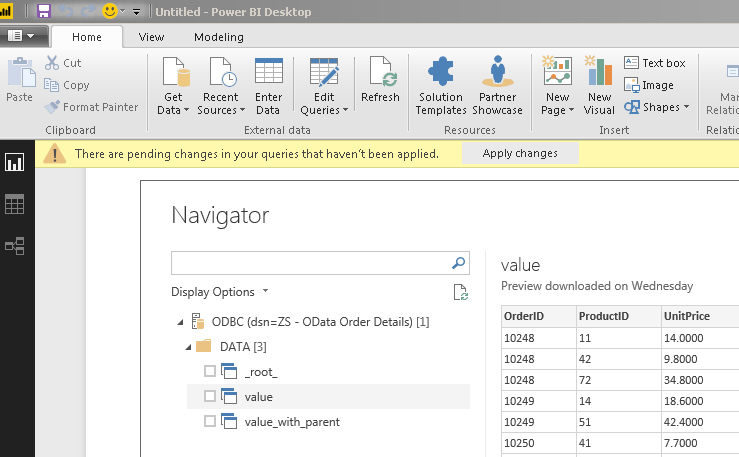
4. Consume Data in BI Tools
|
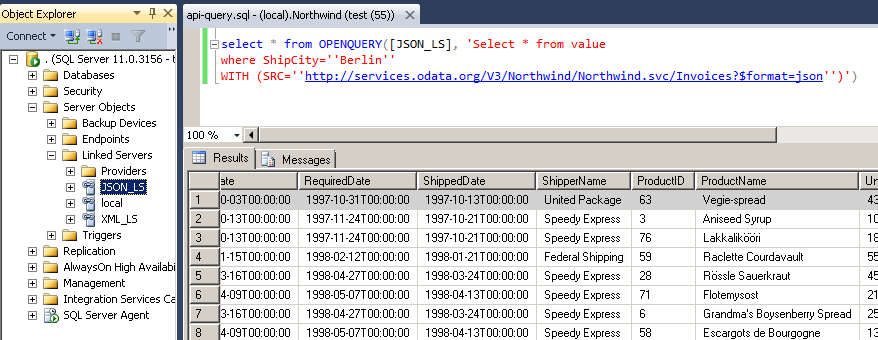
5. Query from SQL Server
|
6. Share Securely via Data Gateway
|
Seamless SQL Query Integration
Works with REST, OData, files, and databases
/* OAuth 2.0 custom API authentication */
SELECT *
FROM $
WITH (
  SRC = 'http://yourhost/api/some-service',
  DataConnectionType = 'OAuth',
  OAuthVersion = 'OAuth2',
  AuthUrl = 'https://yourhost/api/authorize',
  TokenUrl = 'https://yourhost/api/token',
  ClientId = 'xxxxxxxxxxx',
  ClientSecret = 'xxxxxxxxxxxxx',
  AccessToken = 'xxxxxxxxxxx',
  RefreshToken = 'xxxxxxxxxxx'
)
✔ Query APIs like a database
✔ No ETL or custom scripts needed
✔ Works inside SQL Server, Power BI, Excel
🔧 Key Features
Data Access and Transformation
- Read from XML files, SOAP web services, OData feeds, and generic REST endpoints
- De-normalize nested data into flat tabular output for analytics and ETL
- Use SQL clauses such as WHERE, ORDER BY, GROUP BY, and custom functions
- Read multiple files with wildcard paths for batch ingestion patterns
Authentication and API Control
- Support OAuth, JWT, X509, basic auth, token-based, and dynamic token authentication
- Set custom headers, request body, URL parameters, cookies, and HTTP methods
- Handle API pagination and multi-request looping for large datasets
- Upload files and POST payloads directly through SQL-driven API calls
Performance and Deployment
- Optimized processing engine for large API payloads and XML files
- Integrates with Power BI, Excel, SQL Server, SSRS, Informatica, and custom apps
- Use Data Gateway for centralized managed access and IP allow-listing
💡 Common Use Cases
Typical scenarios for XML SOAP API ODBC Driver in reporting, ETL, and automation:
- API reporting with SQL tools: Pull XML/SOAP/REST data directly in Power BI or SSRS.
Example: Run scheduled SQL reports against operational web services.
- Warehouse staging from XML feeds: Load local or remote XML files into relational tables.
Example: Ingest daily partner XML feeds using wildcard file patterns.
- Secure integration with OAuth APIs: Connect to protected services using OAuth/JWT/X509 options.
Example: Configure token-based access without writing custom auth code.
- Pagination-aware extraction: Iterate multi-page API responses in one query workflow.
Example: Retrieve complete result sets from paged endpoints.
- Centralized SQL Server access: Expose driver access through Data Gateway for shared usage.
Example: Query API data through linked server when server installs are restricted.
🎯 Summary
XML SOAP API ODBC Driver brings API and XML access into familiar SQL-based workflows.
Teams can standardize secure connectivity, nested data extraction, and shared deployment across BI, ETL, and database tools.
Trusted by Developers & IT Teams Worldwide
- Built for ODBC Workloads: One driver model across BI, ETL, databases, and custom code.
- Expert Technical Support: Engineers help with connection setup, SQL patterns, and tuning.
- Proven Enterprise Scale: Thousands of teams rely on ZappySys for API and cloud connectivity.
|
ODBC PowerPack
Includes XML SOAP API ODBC Driver

Read reviews on Capterra →
|
Ready to start querying?
Install the full ODBC PowerPack to unlock all drivers and start your free trial.
| |