Connect to Trino through standard ODBC by configuring the ZappySys JDBC Bridge Driver without Java coding.
Download the official Trino JDBC driver, create a DSN with a jdbc:trino URL, validate with Test Connection, and preview SQL before wiring Excel, Power BI, or ETL jobs.
Part of ZappySys ODBC PowerPack (30+ drivers).
Recommended starting point
Pro Tip: Install Java 11 minimum (Java 21 recommended). Download the JDBC driver from the Trino JDBC documentation and point the DSN at your local JAR (for example D:\Drivers\JDBC\trino-jdbc.jar). Use a User DSN for interactive design and a System DSN for Windows services; match 32-bit vs 64-bit ODBC Administrator to the host process. For help, browse ZappySys Community (Trino tag).
Compatibility: Windows ODBC (32/64-bit) | Works with Visual Studio, .NET, BI tools |
Data Gateway for SQL Server, JDBC, and non-Windows access
⚡ Key Benefits
- Trino over ODBC — Query catalogs and federated data through a JDBC Bridge DSN your ODBC tools already understand
- Official JDBC JAR — Use
trino-jdbc.jar with a standard jdbc:trino://host:port URL
- Validated connectivity — Use Test Connection plus in-DSN SQL preview before production queries
- Operational DSN patterns — Choose User DSN for desktop sessions and System DSN for service accounts (match ODBC bitness)
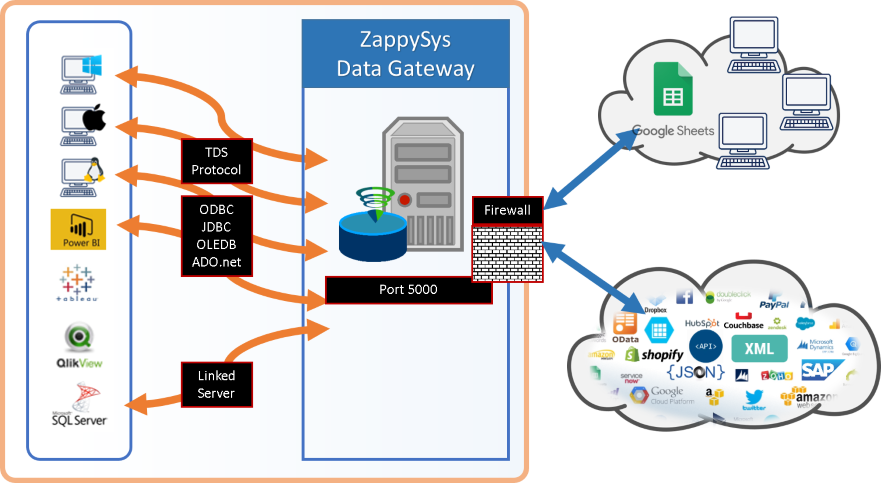
- Optional Data Gateway — Centralize
TrinoDSN for shared ODBC access and simpler control
📸 Visual Overview & Setup
|
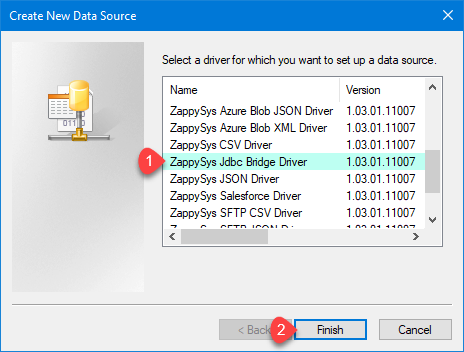
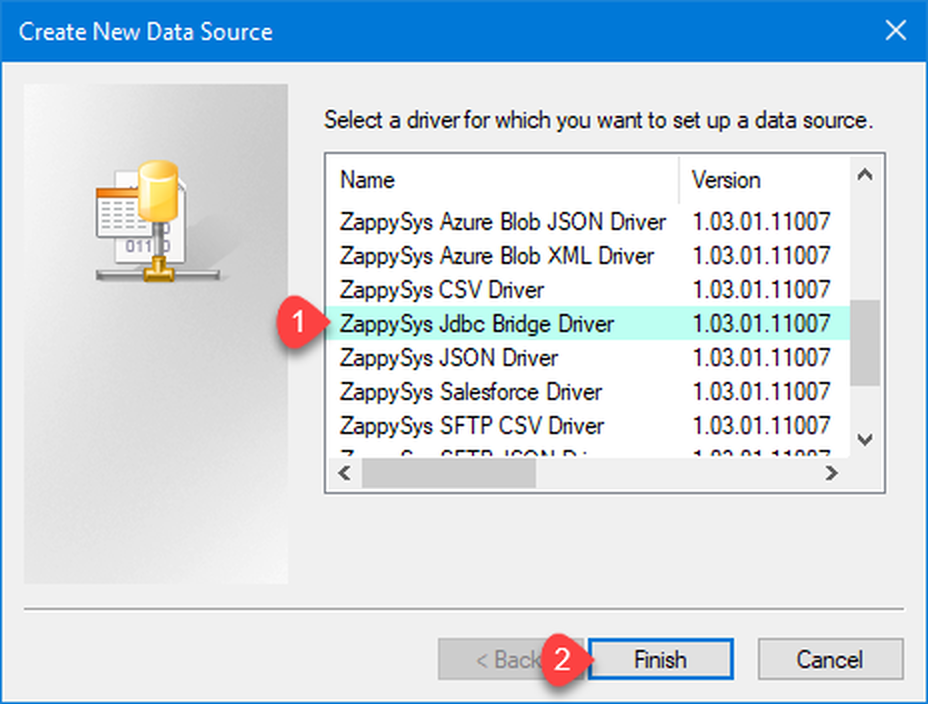
1. Choose JDBC Bridge Driver Type
|
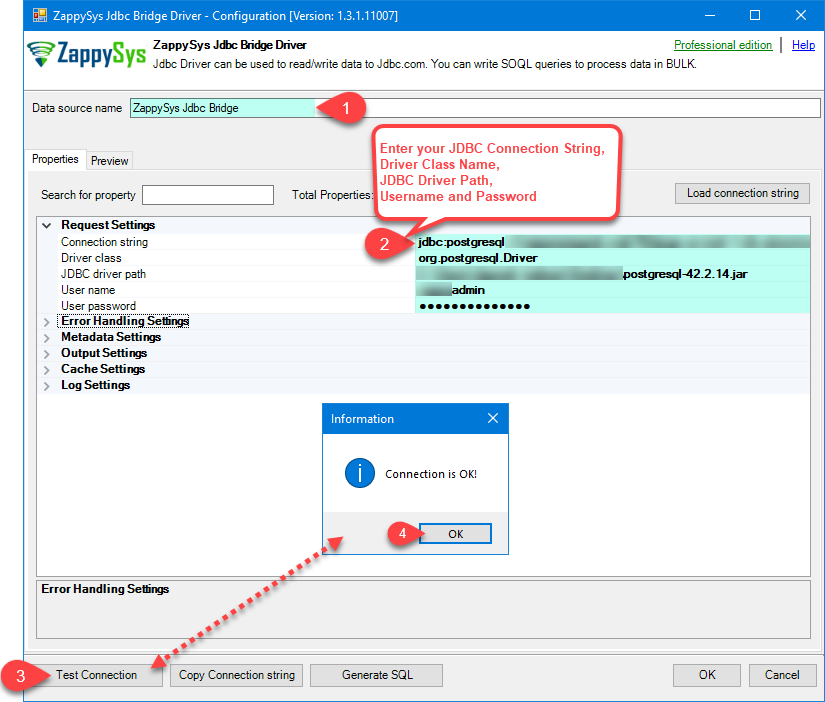
2. Enter Full Path for *.jar file (i.e. JDBC driver file)
|
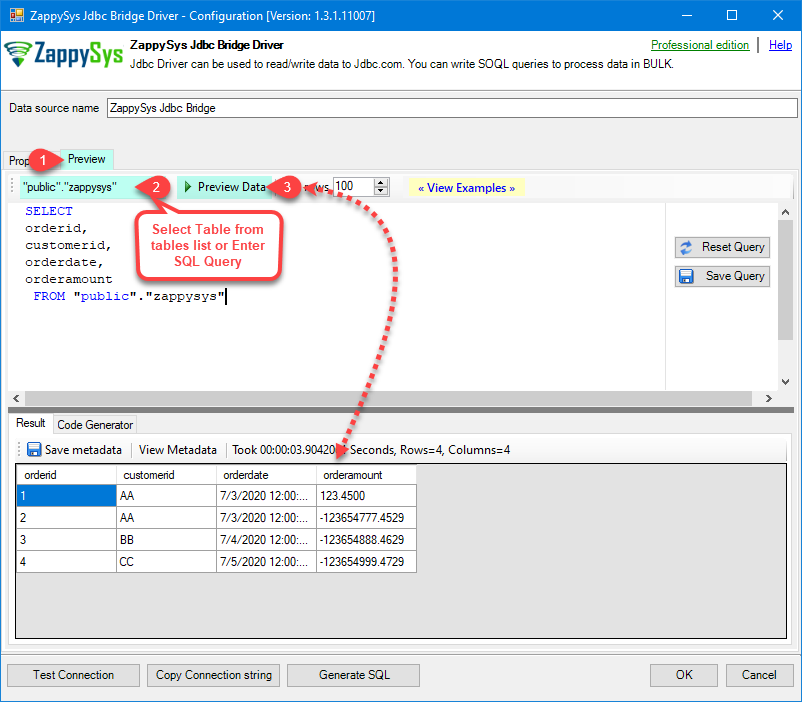
3. Preview SQL Query
|
|
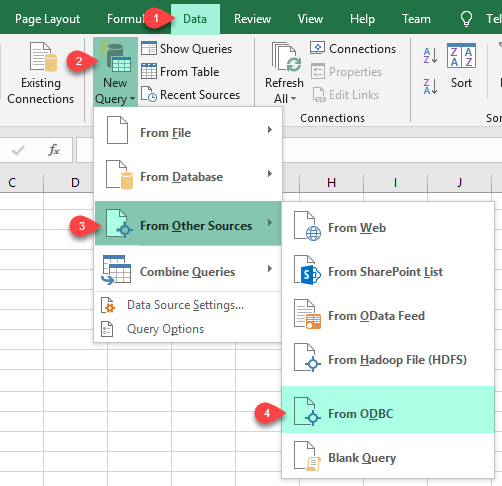
4. Load Trino Rows into Excel
|
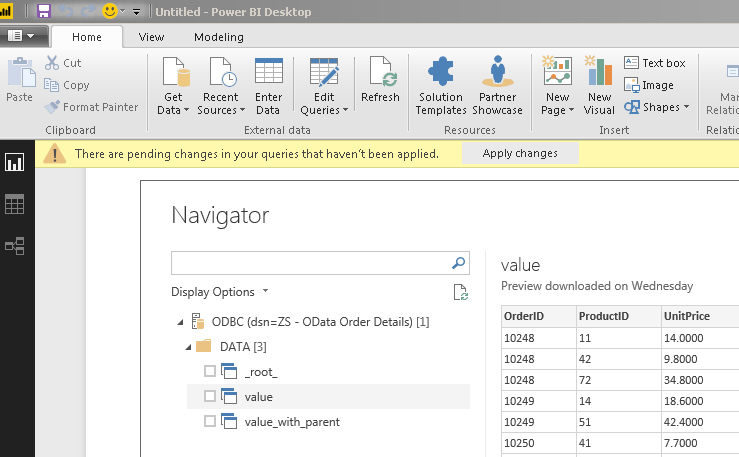
5. Connect from Power BI
|
6. Share via Data Gateway
|
🔗 Seamless SQL Query Integration
Example query from the setup guide
SELECT * FROM tpch.sf1.orders
✔ Run ANSI SQL against Trino catalogs and schemas
✔ Bridge relays SQL without rewriting it
✔ Works inside SQL Server, Power BI, Excel
🔧 Key Features
Read & Query
- Issue SQL through ODBC after the JDBC Bridge DSN points at your Trino coordinator
- Use the preview grid or Select Table metadata picker when the driver exposes catalogs such as
tpch
- See additional patterns in JDBC Bridge SQL query examples linked from the setup guide
JDBC Bridge Configuration
- Example JDBC URL from the guide:
jdbc:trino://trino-instance-host-name:8080
- Example DSN name from the guide:
TrinoDSN
- Point JDBC driver file(s) at your local JAR (example path:
D:\Drivers\JDBC\trino-jdbc.jar)
- Example credentials from the guide: user
admin with your cluster password
- Set Connection parameters to
[] when no extra properties are required, or extend per your cluster policy
- Run Test Connection to confirm Java, JAR path, and coordinator reachability before connecting client tools
Writes & Driver Behavior
- The bridge forwards SQL unchanged; INSERT/UPDATE/DELETE support depends on your Trino configuration and JDBC driver capabilities
- If you see action is not supported, that reflects the JDBC driver rather than the ZappySys bridge
Reliability & Platform Fit
- Standard ODBC 3.x for Power BI, Excel, SQL Server linked servers, SSIS ODBC Source, and custom apps
- Java 11 minimum with Java 21 recommended when your deployment allows it
- For Data Gateway deployments, copy DSN settings to the gateway host, adjust firewall rules, and restart the gateway service after edits
- Use the guide’s Troubleshooters & resources (JDBC Bridge Driver) list for Java discovery, SSL, multi-JAR merges, logging, and disconnect errors
- Learn more about the bridge in ZappySys JDBC Bridge Driver documentation
💡 Common Use Cases
Typical scenarios for the Trino ODBC Driver:
- Federated analytics: Let analysts refresh Excel or Power BI against Trino without custom JDBC hosts.
Example: preview SELECT * FROM tpch.sf1.orders in the DSN before publishing reports.
- Operational integration: Land query results into SQL Server for downstream SSIS or stored procedures.
Example: scheduled jobs using a System DSN under a service account.
- Gateway sharing: Publish
TrinoDSN on Data Gateway for ODBC Driver for SQL Server clients.
Example: teams reuse ZappySysGatewayDSN with default database set to the gateway data source name.
- Service automation: Match 32-bit vs 64-bit ODBC Administrator with the host process for Agent or Windows services.
Example: align SQL Agent steps with the correct DSN bitness.
🎯 Summary
Bring Trino into ODBC-native tools without maintaining bespoke JDBC plumbing.
Install Java 11+, add the Trino JDBC JAR, build a JDBC Bridge DSN, validate connectivity, and reuse the same DSN across Excel, Power BI, SQL Server, and optional Data Gateway deployments.
Trusted by Developers & IT Teams Worldwide
- Built for ODBC Workloads — One driver model across BI, ETL, databases, and custom code.
- Expert Technical Support — Engineers help with JDBC URLs, Java installs, and gateway networking.
- Proven Enterprise Scale — Thousands of teams worldwide rely on ZappySys for API and cloud connectivity.
|
ODBC PowerPack
Includes Trino ODBC Driver

Read reviews on Capterra →
|
Ready to query Trino over ODBC?
Install the full ODBC PowerPack to unlock all drivers and start your free trial.
| |