Access and update Stripe using familiar SQL — powered by the Stripe Connector for the ZappySys API Driver.
Connect from SQL Server, Power BI, Excel, SSIS, and any ODBC-compatible tool.
Read and write customers, products, subscriptions, and invoices with a low-code DSN wizard, Query Builder, and Stripe [Http] authentication tied to your Stripe API keys.
Part of ZappySys ODBC PowerPack (30+ drivers).
Recommended starting point
Pro Tip: Configure one Stripe DSN once, then reuse it across Power BI, Excel, SQL Server linked servers, and SSIS ODBC destinations without maintaining Stripe REST code per app.
Compatibility: Windows ODBC (32/64-bit) | Works with Visual Studio, .NET, BI tools |
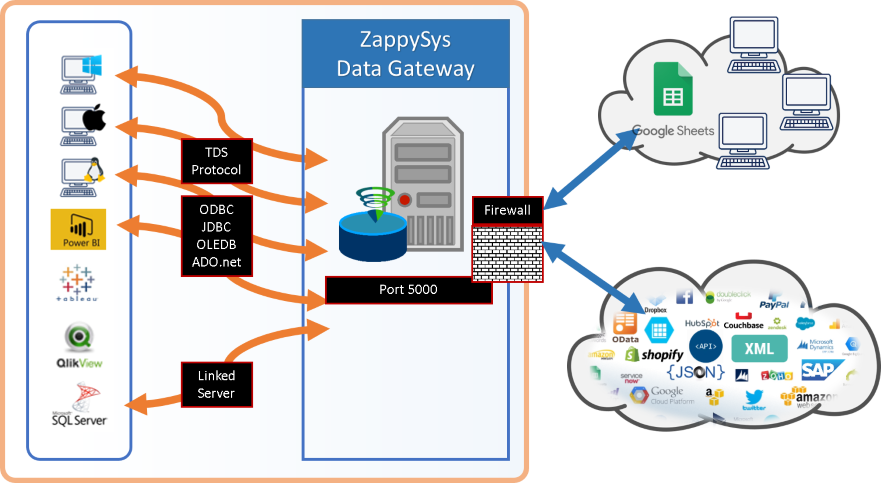
Data Gateway for SQL Server, JDBC, and non-Windows access
⚡ Key Benefits
- SQL over Stripe APIs — Query and update billing data using SELECT, INSERT, UPDATE, and DELETE patterns from the ODBC guide
- Stripe HTTP authentication — Use Authentication Type
Stripe [Http] with API keys from your Stripe dashboard
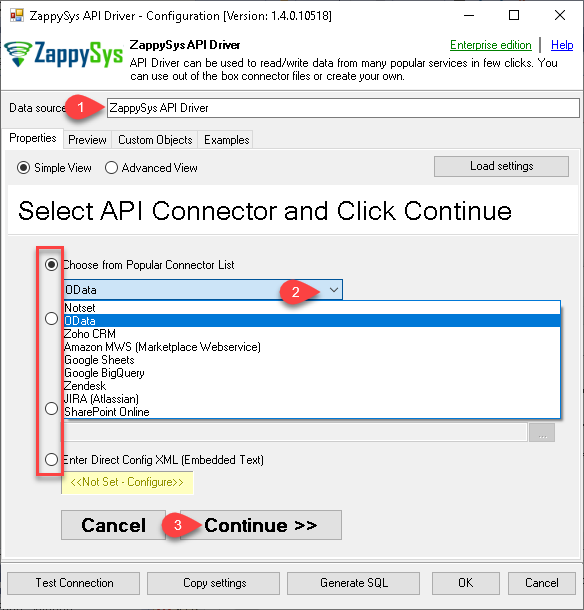
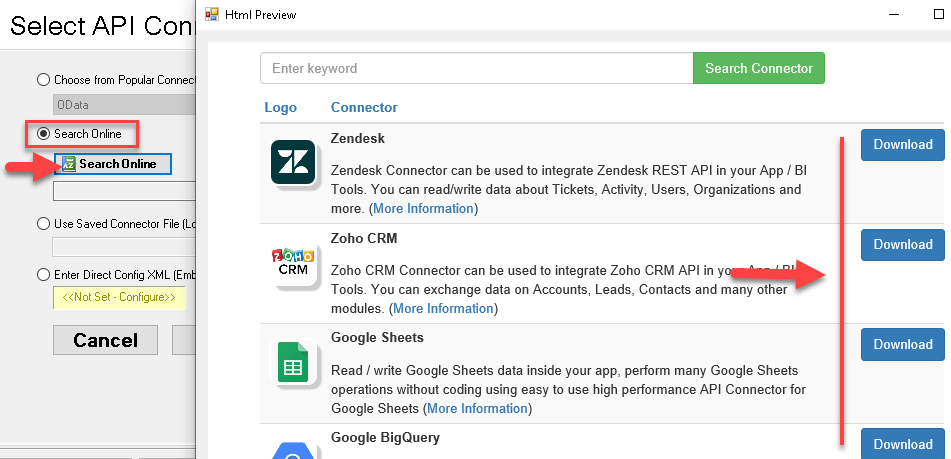
- Guided DSN setup — Pick Stripe from Popular Connectors or download it with Search Online when it is not embedded
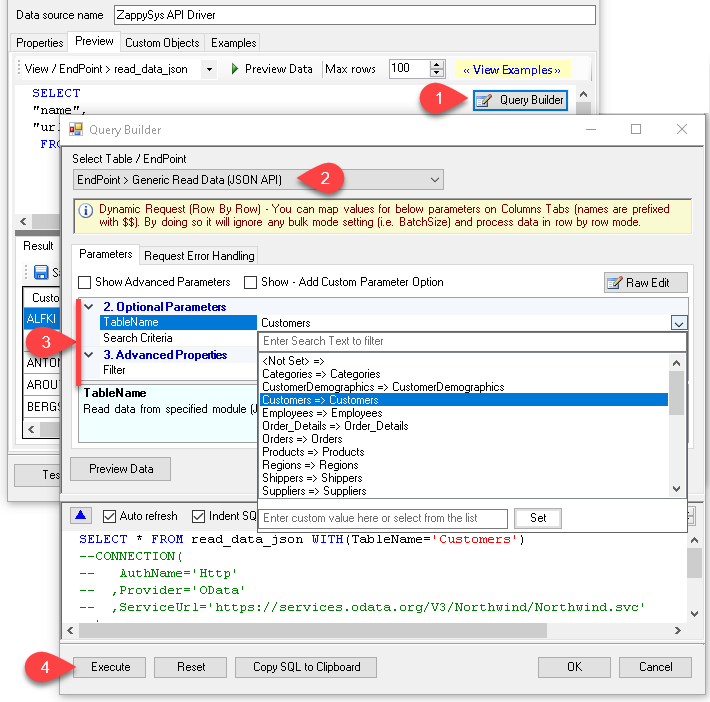
- Query Builder previews — Design filters so work happens on Stripe servers when parameters are passed through the builder
- Throttle-friendly retries — Configure RetryMode, status lists (including
429), counts, and multiply-wait options shown in the walkthrough
- Centralized ODBC access — Publish the DSN through ZappySys Data Gateway for JDBC or remote clients without local driver installs
📸 Visual Overview & Setup
|
1. Pick Stripe Connector
|
2. Search Online if Needed
|
3. Build & Preview SQL
|
|
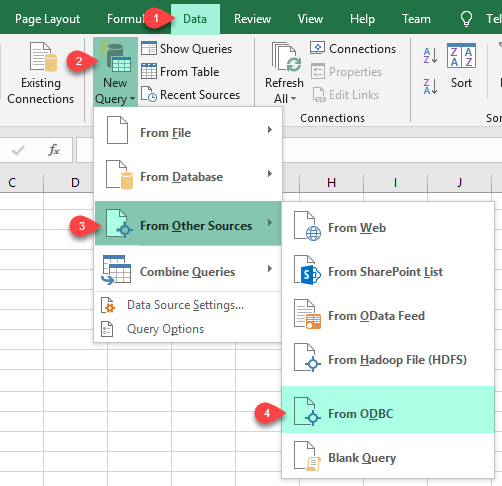
4. Load Stripe Rows into Excel
|
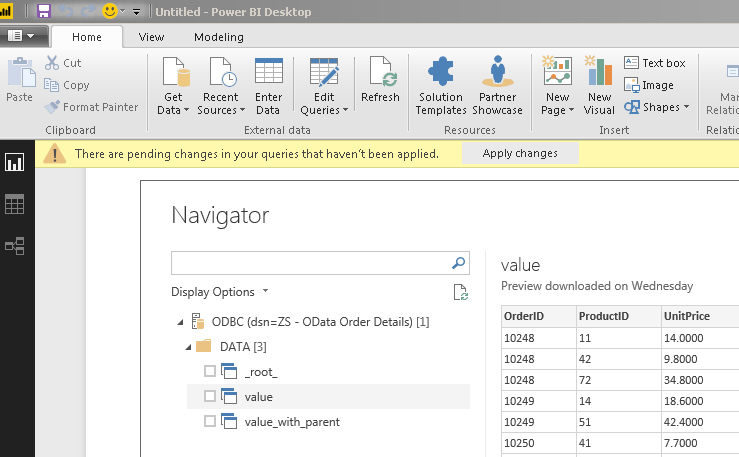
5. Connect from Power BI
|
6. Share via Data Gateway
|
🔗 Seamless SQL Query Integration
Works with REST, OData, files, and databases
-- Create a Customer via SQL (Stripe)
INSERT INTO Customers
([Name]
, [Email]
, [Description]
, [Phone]
, [Balance]
, [AddressLine1]
, [AddressLine2]
, [AddressCity]
, [AddressState]
, [AddressCountry]
, [AddressPostalCode]
, [InvoicePrefix]
)
VALUES('Cust-1'
, 'email@abc.com'
, 'Some desc'
, '+1 222-333-4444'
, 0
, '55 Main St.'
, 'Suite 100'
, 'New York'
, 'NY'
, 'USA'
, '07204' --JSON fragment
, 'INVC'
)
✔ Query APIs like a database
✔ No ETL or custom scripts needed
✔ Works inside SQL Server, Power BI, Excel
🔧 Key Features
Read & query
- Generate SELECT statements from the Query Builder and preview results before you run them in downstream apps
- Filter on the Stripe side whenever the builder exposes parameters so large result sets are not pulled in full unnecessarily
- Base URL defaults to
https://api.stripe.com/v1 as shown in the configuration placeholders
Write & actions
- Follow the documented action list (for example create customer, invoice, or subscription flows) and map columns to Stripe fields
- Use INSERT, UPDATE, or DELETE patterns illustrated in the how-to articles linked from the hub page
- Run generic REST requests when you need an endpoint that is not wrapped as a named action
Authentication & connectivity
- Stripe [Http] authentication with keys sourced from the Stripe dashboard
- Detailed parameter reference linked from the landing article for advanced HTTP options
- Standard ODBC 3.x compatibility for BI, ETL, and custom .NET clients
Platform fit
- Reuse the same DSN in Excel, Power BI, SQL Server, SSIS, and other ODBC-aware tools
- Expose the driver through ZappySys Data Gateway when JDBC or remote Windows-less clients need access
💡 Common Use Cases
Typical scenarios for the Stripe ODBC Driver in finance ops, analytics, and integration teams:
-
Billing analytics in Power BI or Excel: Model customers, subscriptions, and invoices with direct ODBC queries.
Example: Refresh a dashboard that tracks MRR without exporting CSVs from the Stripe UI.
-
Warehouse landing zones: Stage Stripe charges or balance transactions into SQL Server for accounting.
Example: Nightly ODBC pull that feeds a curated finance mart.
-
Operational writebacks: Insert or update Stripe records from approved staging tables.
Example: Create customers from an onboarding spreadsheet after validation.
-
SSIS or ETL toolchains: Use the same DSN across ODBC destinations and ADO.NET sources.
Example: Combine Stripe extracts with on-prem ERP data in one package.
-
Gateway-only deployments: Keep the driver on a secure integration host while analysts connect remotely.
Example: JDBC services query Stripe through a centralized gateway DSN.
-
Support snapshots: Materialize list-style queries for read-only reporting databases.
Example: Provide customer service teams a SQL view without granting Stripe UI access.
🎯 Summary
Bring Stripe into the ODBC stack your team already runs for BI and ETL.
Configure the API Driver once, authenticate with Stripe [Http], and read or write billing data using SQL instead of bespoke REST integrations.
Trusted by Developers & IT Teams Worldwide
- Built for ODBC Workloads: One driver model across BI, ETL, databases, and custom code.
- Expert Technical Support: Engineers help with DSN setup, Stripe HTTP authentication, and query tuning.
- Proven Enterprise Scale: Thousands of teams worldwide rely on ZappySys for API and cloud connectivity.
|
ODBC PowerPack
Includes Stripe ODBC Driver

Read reviews on Capterra →
|
Ready to start querying Stripe?
Install the full ODBC PowerPack to unlock all drivers and start your free trial.
| |


