Access and update SharePoint Online using standard SQL — no custom Microsoft Graph coding required.
Connect from SQL Server, Power BI, Excel, SSIS, Tableau, and any ODBC-compatible tool.
Read and write sites, lists, list items, files, and document libraries. Authenticate with User Credentials (OAuth), Application Credentials (client secret), or Application Credentials with a signed-JWT certificate.
Part of ZappySys ODBC PowerPack (30+ drivers).
Recommended starting point
Pro Tip: Configure one SharePoint Online DSN once, then reuse it across Power BI, Excel, SQL Server linked servers, and custom apps without touching Graph API code.
Compatibility: Windows ODBC (32/64-bit) | Works with Visual Studio, .NET, BI tools |
Data Gateway for SQL Server, JDBC, and non-Windows access
⚡ Key Benefits
- SQL over SharePoint — Query sites, lists, files, and document libraries with SELECT/INSERT/UPDATE/DELETE
- Flexible OAuth — User Credentials, Application Credentials (client secret), or signed-JWT certificate authentication
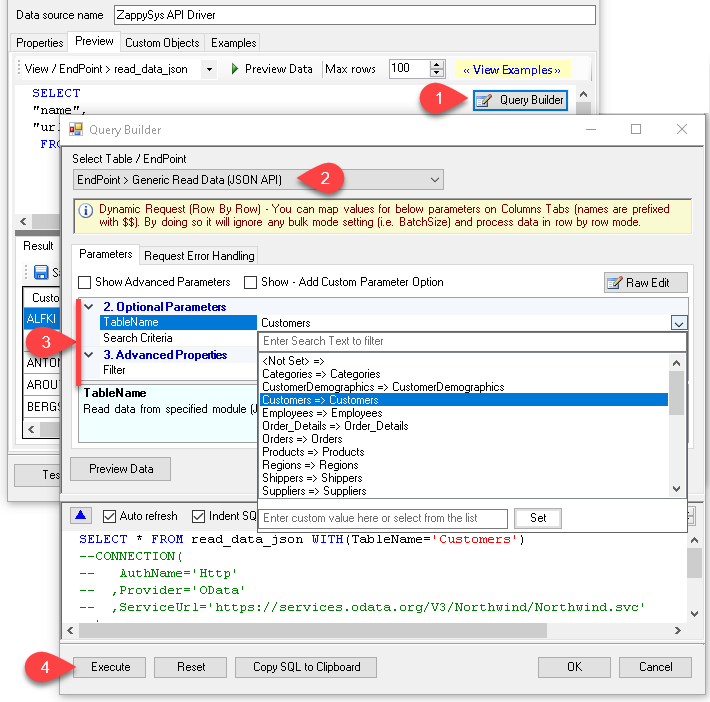
- Query Builder UI — Pick a table or endpoint, set parameters, preview rows, and copy the generated SQL
- Server-Side Filters — Pass parameters through the Query Builder so filtering happens in SharePoint, not the client
- Built-In Retry Logic — Handles throttling with configurable RetryMode, status codes, and exponential backoff
- Centralized Access — Share the DSN via ZappySys Data Gateway so JDBC, Linux, or remote apps can connect without installing the driver locally
📸 Visual Overview & Setup
|
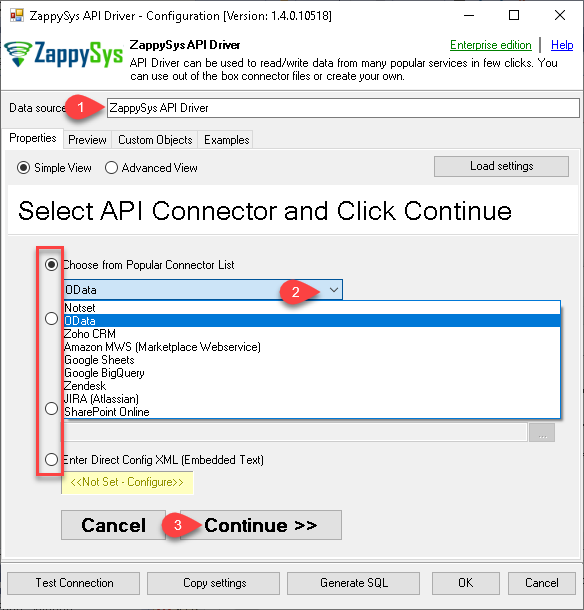
1. Pick SharePoint Online Connector
|
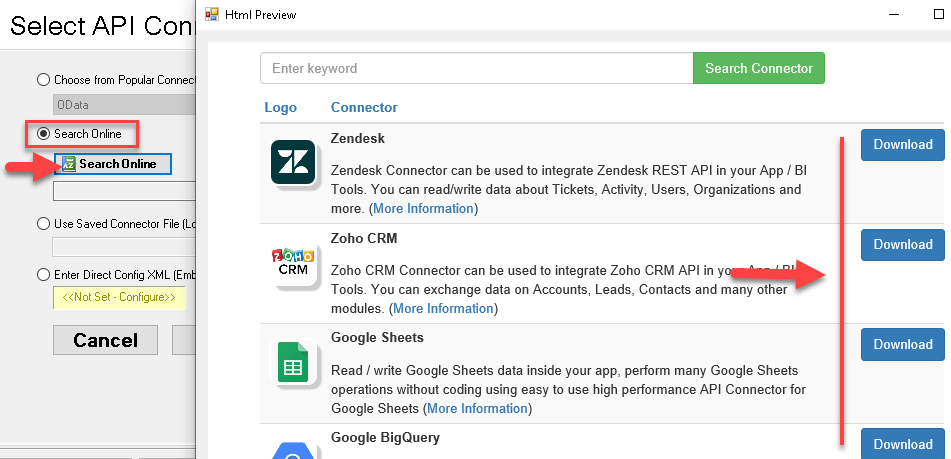
2. Search Online if Not Listed
|
3. Build & Preview SQL Query
|
|
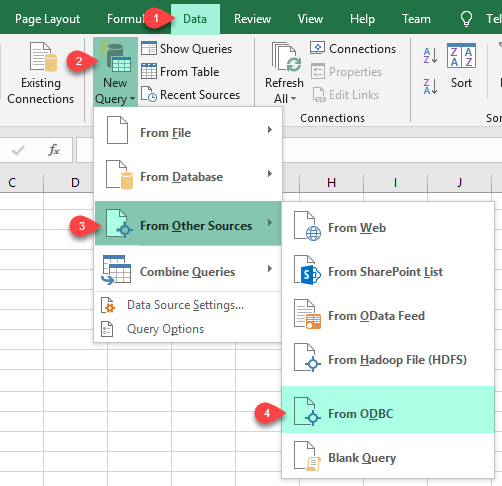
4. Load SharePoint Rows into Excel
|
5. Connect from Power BI
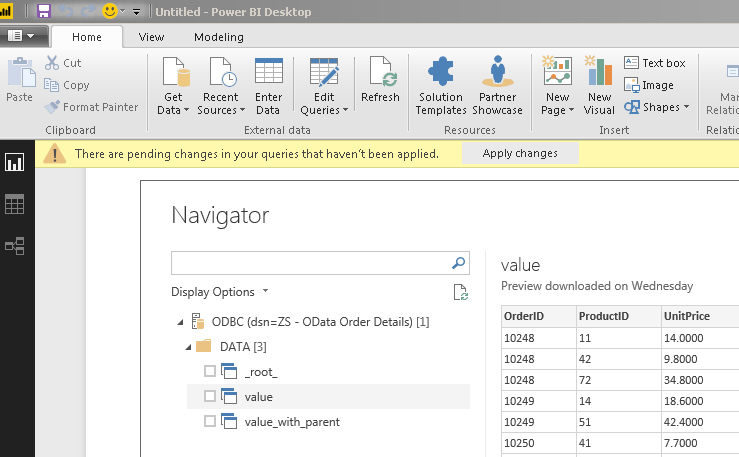
|
6. Share via Data Gateway
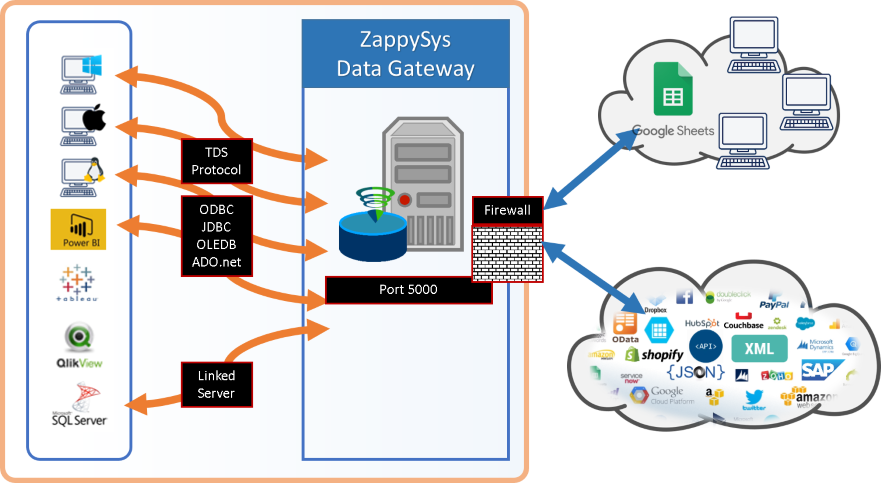
|
🔗 Seamless SQL Query Integration
Real example: copy a file between SharePoint drives using SQL
-- Copy item via SQL (SharePoint Online)
SELECT *
FROM copy_item
WITH (
    -- ##### SOURCE #####
    -- Source Site (leave blank to use default)
    -- , SiteId = 'abc.sharepoint.com,5304daff-xxxxxxxxxx'
    , DriveId        = 'b!0zqxxxxxxxxxxxxxxxxxxxxxxxx'
    -- Item to copy (choose ONE) — Path format: root:/path/to/item:
    , ItemId         = 'root:/myfile.pdf:'
    -- , ItemId       = 'root:/myfolder/myfile.pdf:'
    -- , ItemId       = '01R65QTTRARZ42C4BN6FF2WOH3AONX4GUW'  -- by ID (preferred)
    -- ##### TARGET #####
    -- Target Site (optional, only used to resolve TargetDriveId)
    -- , TargetSiteId  = 'xyz.sharepoint.com,5304daff-xxxxxxxxxx'
    -- Target drive (only required when copying to a different drive)
    -- , TargetDriveId = 'b!0zqXLXXJh0uxxxxxxxxxxxxxxxxxxxxx'
    -- ##### TARGET FOLDER ##### — choose Path OR Id (one block only)
    , TargetType       = 'Path'
    , TargetFolderPath = '/somefolder'
    -- , TargetFolderPath = '/somefolder/subfolder'
    -- , TargetFolderPath = '/somefolder/<<yyyy-MM-dd,FUN_NOW>>'  -- folder must exist
    -- , TargetType     = 'Id'
    -- , TargetFolderId = '01R65QTTTBPH6V2AP36VD33CYYDXJSNHLN'
    -- , TargetFolderId = 'root'
    -- ##### OPTIONS #####
    -- New name for copied item (omit to keep source name)
    , TargetItemName   = 'new_file_<<yyyy-MM-dd-HH-mm-ss-fff,FUN_NOW>>.pdf'
    -- , ConflictBehavior = 'replace'    -- fail | rename | replace
    -- , Prefer           = 'respond-async'  -- required for large / cross-site copies
)
✔ Query APIs like a database
✔ No ETL or custom scripts needed
✔ Works inside SQL Server, Power BI, Excel
🔧 Key Features
Read & Query
- SELECT with WHERE, ORDER BY, and parameterised Query Builder for server-side filtering
- Read Sites, Lists, List Items (including dynamic columns), Drives, Folders, and Files
- Read CSV, JSON, and Excel files stored in document libraries (auto-detect range or exact range)
- Get file data as a byte array, download files to disk, or list Excel worksheets in a file
Write & Bulk Operations
- INSERT, UPDATE, DELETE on List Items (Create / Update / Delete List Item actions)
- Upload File, Create / Update JSON or CSV file, Copy item, Move or rename item
- Generic REST API Request action for endpoints not yet wrapped by a named action
- Generic Bulk Write request for large payloads where a single call is preferable
Authentication
- User Credentials [OAuth] — delegated access on behalf of a signed-in user (Microsoft Entra ID app, public client)
- Application Credentials [OAuth] — client secret flow for automated jobs and services
- Application Credentials with Certificate — sign a JWT with a private key (PFX or PEM) instead of a shared secret
- Granular permissions via
Sites.Selected, Lists.SelectedOperations.Selected, and ListItems.SelectedOperations.Selected
Platform Fit
- Standard ODBC 3.x for Power BI, Tableau, Excel, SQL Server linked servers, SSIS, and custom apps
- Centralised access via ZappySys Data Gateway for JDBC, Linux, and remote clients without installing the driver locally
- Built-in retry with configurable status codes (429/503/423), exponential backoff, and extra headers
💡 Common Use Cases
Typical scenarios for the SharePoint ODBC Driver in reporting, ETL, and app development:
-
SharePoint list reporting in Power BI or Excel: Model List Items directly in ODBC and refresh without Graph API code.
Example: SELECT * FROM list_items WITH (ListId='My Tasks')
-
Pull documents and files from libraries: Enumerate drives and files, then download or read content as bytes.
Example: SELECT * FROM files WITH (DriveId='Documents')
-
Write back from SQL Server into SharePoint: INSERT or UPDATE list items from a staging table through an ODBC linked server.
Example: push cleansed rows into a SharePoint list as part of a nightly ETL job.
-
Copy or move files across libraries: Use Copy Item and Move or Rename Item actions to reorganise document libraries.
Example: archive processed files into a Processed folder after loading.
-
SSIS pipelines: Reuse the same DSN as other ODBC steps for consistent metadata and credentials.
Example: extract SharePoint list items with SQL, transform in SSIS, load into SQL Server.
-
Centralised access from JDBC or Linux: Route queries through ZappySys Data Gateway so non-Windows clients can read SharePoint without installing ODBC locally.
Example: a Java service queries SharePoint via a SQL Server JDBC URL pointing at the gateway.
🎯 Summary
Bring SharePoint Online into the ODBC ecosystem your team already uses.
Query lists, files, and libraries with SQL, write back with INSERT/UPDATE/DELETE, authenticate through OAuth or signed JWT, and connect from Visual Studio, BI stacks, or SQL Server — without maintaining one-off Microsoft Graph integrations.
Trusted by Developers & IT Teams Worldwide
- Built for ODBC Workloads: One driver model across BI, ETL, databases, and custom code.
- Expert Technical Support: Engineers help with OAuth setup, SharePoint permissions, and query tuning.
- Proven Enterprise Scale: Thousands of teams worldwide rely on ZappySys for API and cloud connectivity.
|
ODBC PowerPack
Includes SharePoint ODBC Driver

Read reviews on Capterra →
|
Ready to start querying SharePoint?
Install the full ODBC PowerPack to unlock all drivers and start your free trial.
| |


