Generate simple or complex XML files from relational data in SSIS — no Script Task required.
Use a drag-and-drop layout editor to visually design nested XML structures — elements, attributes, arrays,
and parent-child relationships — from one or multiple input datasets (SQL Server, Oracle, MySQL, and more).
Define the exact XML shape you need in a few clicks, without writing a single line of XSLT or custom code.
Part of ZappySys SSIS PowerPack.
Recommended starting point
Pro Tip: The Visual Studio download installs a basic extension.
Use the guide above to install and run the full SSIS PowerPack (all connectors & UI).
Compatibility: SQL Server 2012–2025+ (32/64-bit) | Azure Data Factory / Azure-SSIS IR Ready
⚡ Key Benefits
- Drag-and-Drop Layout Editor — Design complex XML structures visually — nested elements, attributes, and arrays — without writing XSLT or code
- Multi-Input XML Generation — Combine data from multiple relational sources into a single nested XML document with parent-child relationships
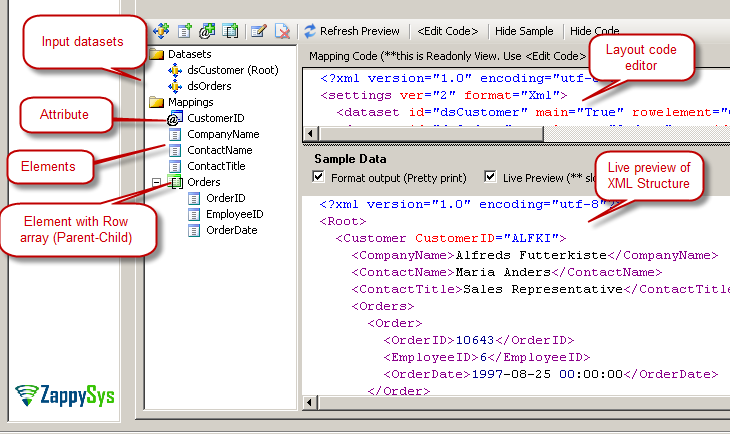
- Flexible XML Structure — Define document arrays, value arrays, sub-elements, and XML attributes all from one unified editor
- Nested Structure Support — Embed child datasets under parent nodes to produce hierarchical XML from flat relational tables
- Any Relational Source — Convert data from SQL Server, Oracle, MySQL, or any SSIS-compatible source directly into an XML file
📸 Visual Overview & Setup
|
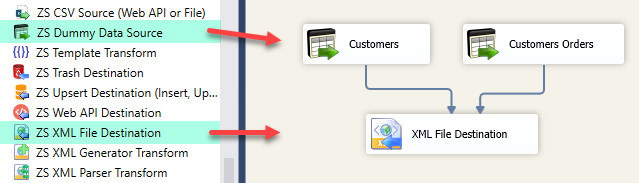
1. Drag & Drop into Data Flow
|
2. Layout Editor — Define XML Shape
|
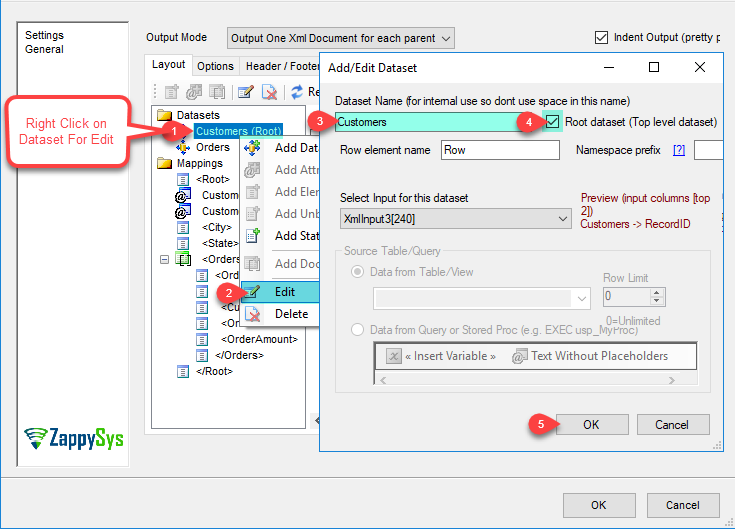
3. Add / Edit Input Dataset
|
|
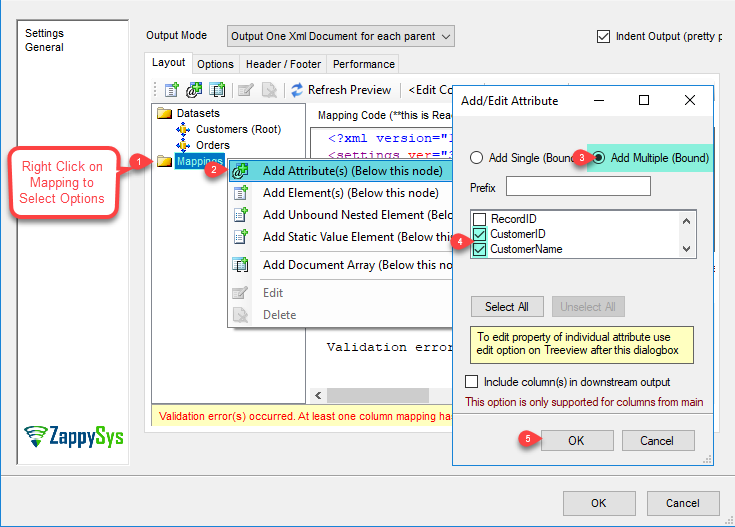
4. Add / Edit XML Attributes
|
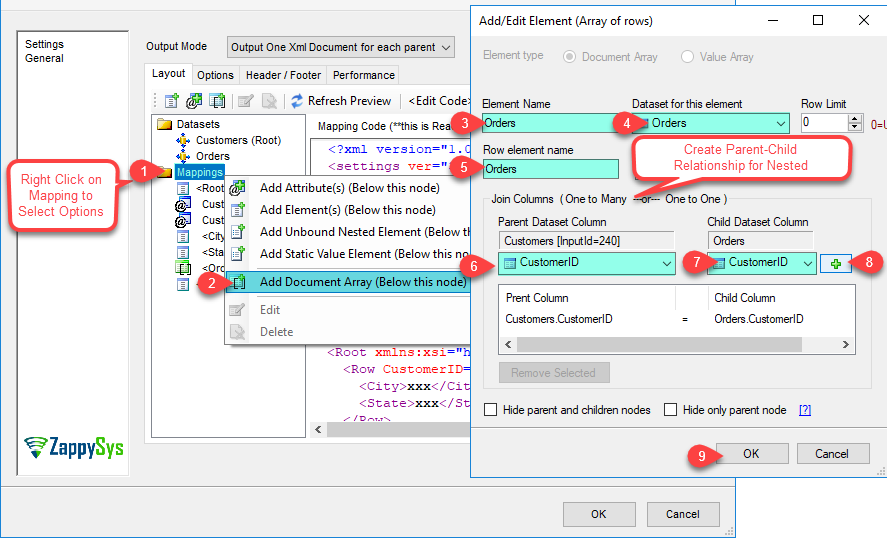
5. Add / Edit Document Array
|
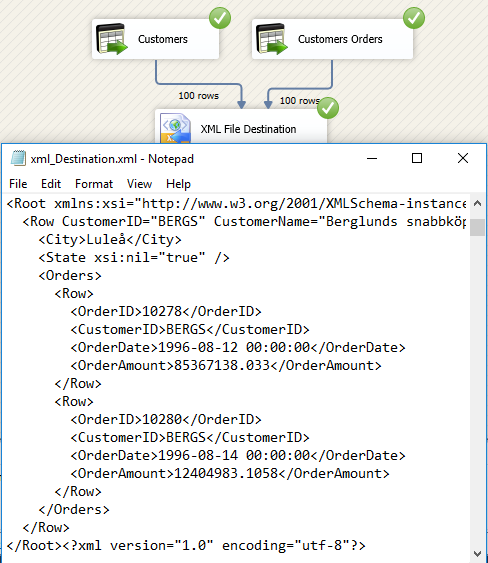
6. Execute & Verify XML Output
|
🔧 Key Features
XML Document Design
- Visual drag-and-drop layout editor — design XML shape without writing XSLT or custom code
- Support for elements, attributes, arrays, nested objects, and sub-elements
- Define parent-child relationships across multiple input datasets in a single XML file
Structure Options
- Add document arrays for repeating child node collections
- Map XML attributes directly from source columns
- Right-click context menu in the layout editor for fast structural editing
Input & Compatibility
- Connect to any SSIS-compatible source — SQL Server, Oracle, MySQL, flat files, and more
- Generate XML from single or multiple input datasets in one pipeline
- Compatible with SQL Server 2012–2025 (32/64-bit) and Azure Data Factory
💡 Common Use Cases
Common real-world scenarios for generating XML files from relational data in SSIS:
-
SOAP / XML API Payload Generation: Export SQL data as a structured XML payload for SOAP web services or legacy system integrations.
Example: Convert an orders query result into a nested XML document and write it to a file for downstream API submission.
-
Hierarchical Document Export: Produce XML with parent-child nesting from multiple related tables.
Example: Generate an XML file with customer records containing nested order elements and line item sub-elements.
-
EDI & Data Exchange: Produce XML export files in a specific schema required by partner systems or regulatory submissions.
Example: Create an XML invoice file in the required schema for an EDI trading partner.
-
Configuration File Generation: Build dynamic XML configuration files from database-driven settings at runtime.
Example: Export application configuration rows from SQL Server into a structured XML settings file for deployment.
🎯 Summary
Replace Script Tasks, XSLT transforms, and custom XML serialization with a drag-and-drop destination that shapes relational data into any XML structure.
Design nested documents visually, combine multiple inputs with parent-child relationships, define attributes and arrays in a few clicks, and write XML files — all without a single line of code.
Trusted by Developers & IT Teams Worldwide
- Built for SSIS Workflows: Purpose-built for high-performance ETL and complex integration scenarios.
- Expert Technical Support: Direct access to engineers via email and remote screen-share sessions.
- Proven Enterprise Scale: Trusted by 3000+ teams across 90+ countries, including Fortune 500.
|
SSIS PowerPack
Includes SSIS XML Destination

Read reviews on Capterra →
|
Start Automating Workflows with SSIS PowerPack
Includes connectors for APIs, databases & cloud apps. Build robust ETL workflows without custom scripting.
Full functionality is FREE for development within Visual Studio
| |

