Automate SFTP, FTPS, and FTP file operations in SSIS — no Script Task required.
Upload, download, move, rename, and delete files/folders with one task. Configure secure authentication,
encryption options, and advanced file filters; process one or many files in batch workflows; and combine with
Foreach loops for dynamic remote file processing.
Part of ZappySys SSIS PowerPack.
Recommended starting point
Pro Tip: The Visual Studio download installs a basic extension.
Use the guide above to install and run the full SSIS PowerPack (all connectors & UI).
Compatibility: SQL Server 2012–2025+ (32/64-bit) | Azure Data Factory / Azure-SSIS IR Ready
⚡ Key Benefits
- Protocol Flexibility — One task supports SFTP, FTPS (SSL/TLS), and classic FTP operations
- End-to-End File Operations — Upload, download, delete, move, rename, and create remote/local files and folders
- Advanced Security Options — Configure secure auth and advanced encryption settings for compliant transfers
- Batch Processing — Transfer one or many files using wildcard/advanced filters and loop-friendly design
- Workflow Ready — Integrate with Foreach Loop and variable-driven paths for dynamic automation
📸 Visual Overview & Setup
|
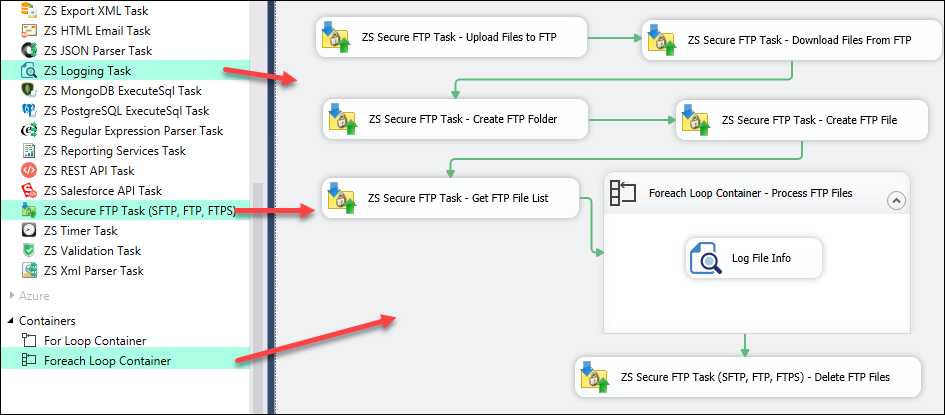
1. SFTP Task Example Workflow
|
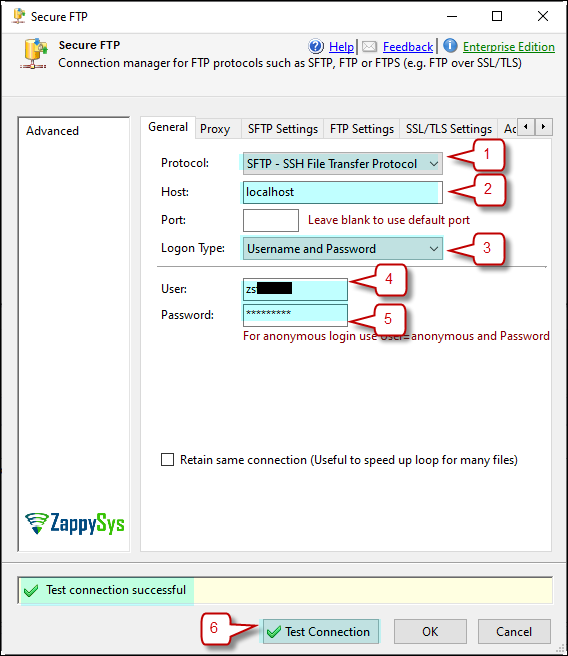
2. Configure SFTP Connection Manager
|
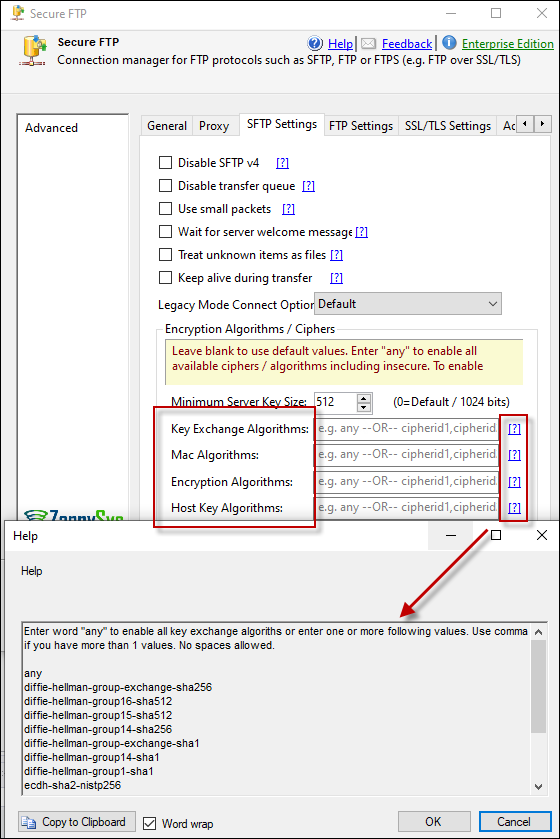
3. Advanced Encryption Options
|
|
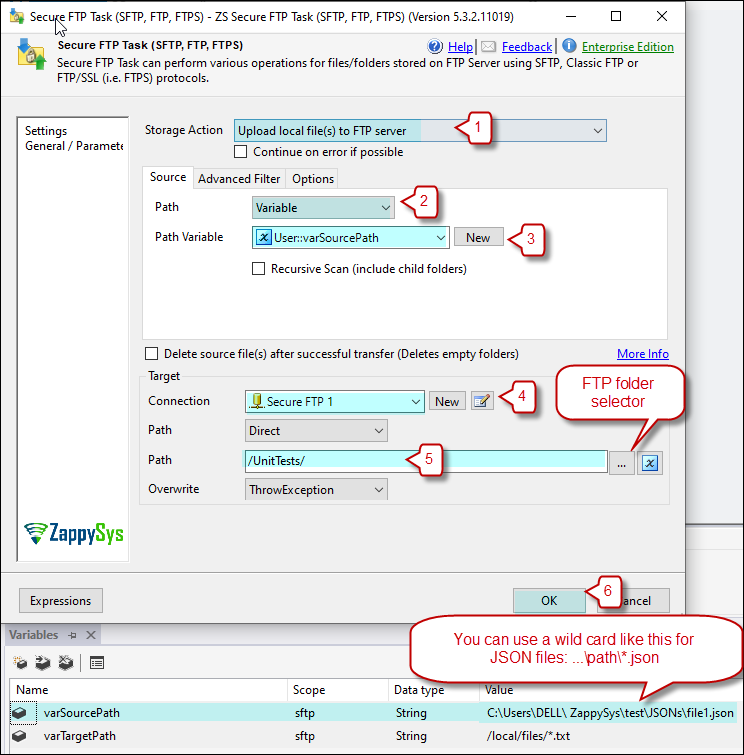
4. Upload One or Multiple Files
|
5. Download Files Configuration
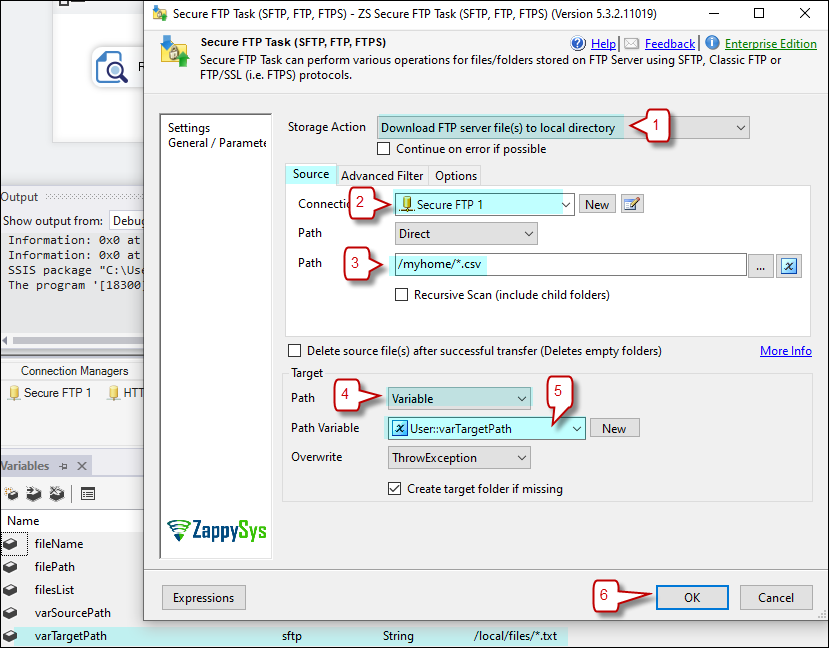
|
6. Foreach Loop Integration
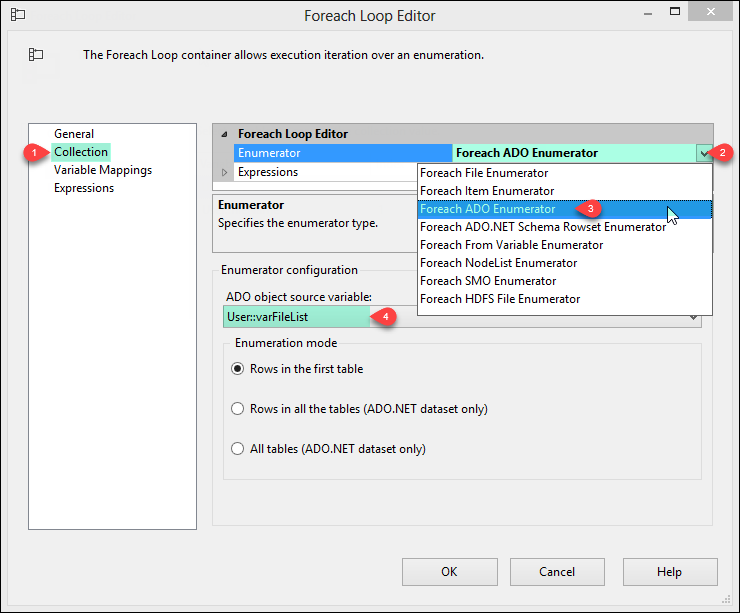
|
🔧 Key Features
Transfer Operations
- Upload and download single or multiple files/folders
- Delete, rename, move, copy, and create files/folders on remote servers
- Support variable-driven local/remote paths for dynamic packages
Filtering & Control
- Advanced filters for file selection by name, pattern, and timestamp conditions
- Batch-ready processing with options to loop through discovered remote files
- Use Foreach Loop to orchestrate sequential or conditional transfer workflows
Security & Compatibility
- Protocol support for SFTP, FTPS (SSL/TLS), and FTP
- Advanced encryption and secure authentication options
- Compatible with SQL Server 2012–2025 (32/64-bit) and Azure Data Factory
💡 Common Use Cases
Common real-world scenarios for managed file transfer in SSIS:
- Nightly Partner File Exchange: Download inbound files and upload outbound files to partner SFTP servers.
- Secure Archive Distribution: Push generated reports to remote FTPS locations with encryption enabled.
- Automated Cleanup: Move or delete processed remote files after successful ETL completion.
- Loop-Based Bulk Processing: Enumerate remote files and process each in a Foreach-driven package.
🎯 Summary
Replace custom WinSCP/PowerShell scripts with a drag-and-drop task for secure FTP automation in SSIS.
Handle upload/download/move/delete operations across SFTP, FTPS, and FTP with strong security options, advanced filtering, and loop-friendly orchestration.
Trusted by Developers & IT Teams Worldwide
- Built for SSIS Workflows: Purpose-built for high-performance ETL and complex integration scenarios.
- Expert Technical Support: Direct access to engineers via email and remote screen-share sessions.
- Proven Enterprise Scale: Trusted by 3000+ teams across 90+ countries, including Fortune 500.
|
SSIS PowerPack
Includes SSIS SFTP Task

Read reviews on Capterra →
|
Start Automating Workflows with SSIS PowerPack
Includes connectors for APIs, databases & cloud apps. Build robust ETL workflows without custom scripting.
Full functionality is FREE for development within Visual Studio
| |

