Skip to content
| Marketplace
Sign in
Visual Studio>Tools>SSIS Report Generator Task (Export SSRS Reports)
SSIS Report Generator Task (Export SSRS Reports)

SSIS Report Generator Task (Export SSRS Reports)

ZappySys

|
6,663 clicks
| (0) | Free Trial
Automate SSRS report export and email in SSIS without coding. Run server/local report modes, drive batch exports from SQL config tables, set parameters and credentials, and deliver PDF/Excel/HTML outputs to file or email recipients. Part of ZappySys SSIS PowerPack.
Get Started

Automate SSRS reporting workflows in SSIS using a task-driven export and email engine.

Export reports from server or local mode, apply parameters and credentials, and deliver output to files or email attachments. Supports data-driven batch execution with SQL-configured settings.
Part of ZappySys SSIS PowerPack.

Recommended starting point
View Setup Guide & Get Started →
See features, UI & examples →
Pro Tip: Use data-driven mode to batch-report delivery by recipient, format, and schedule without editing packages.
Compatibility: SQL Server 2012–2025+ (32/64-bit) | Azure Data Factory / Azure-SSIS IR Ready

⚡ Key Benefits

  • SSRS Automation — Export and distribute reports directly from SSIS control flow
  • Flexible Execution Modes — Run server-report mode or local RDL mode
  • Data-Driven Batch Delivery — Drive recipients, formats, and report settings from SQL tables
  • Multi-Format Output — Generate PDF, Excel, HTML, CSV, and related report formats
  • Email + File Targets — Save to disk or send as attachments in one workflow

📸 Visual Overview & Setup

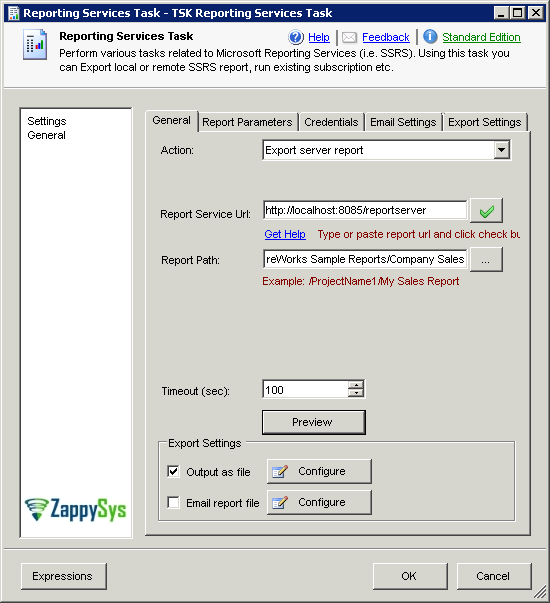
1. Export Server Report Mode
SSRS export server report mode
🔍 View Full Size
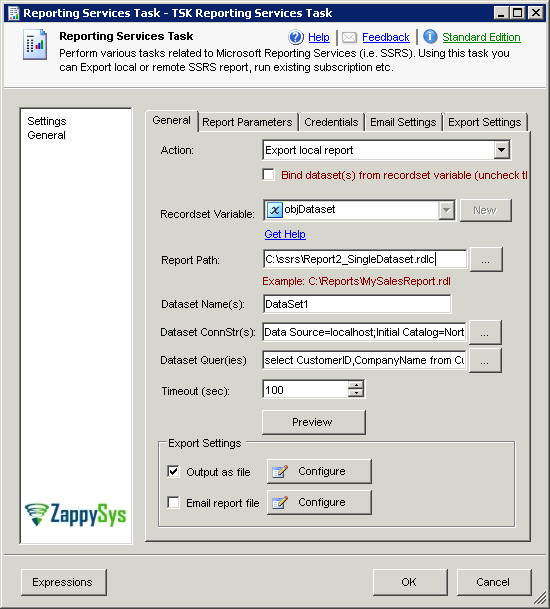
2. Export Local Report Mode
SSRS export local report mode
🔍 View Full Size
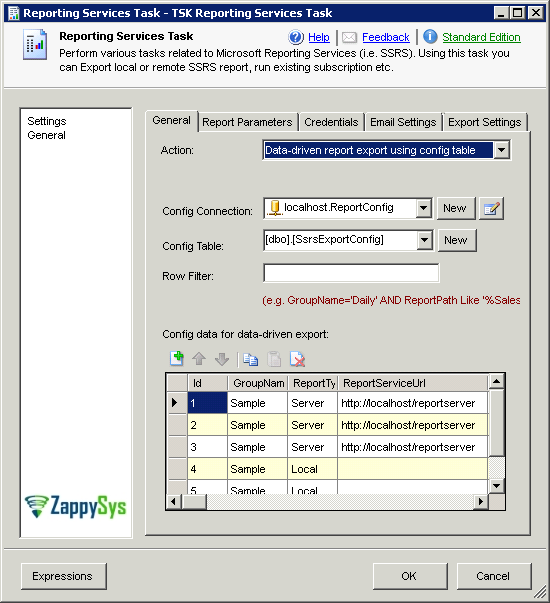
3. Data-Driven Export Mode
SSRS data-driven export mode
🔍 View Full Size
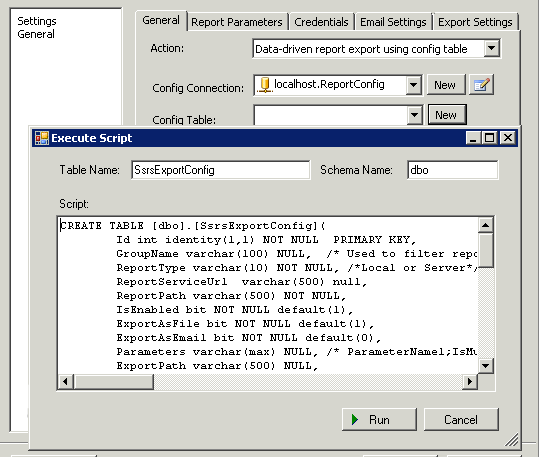
4. Create Config Table
Create config table for data-driven mode
🔍 View Full Size
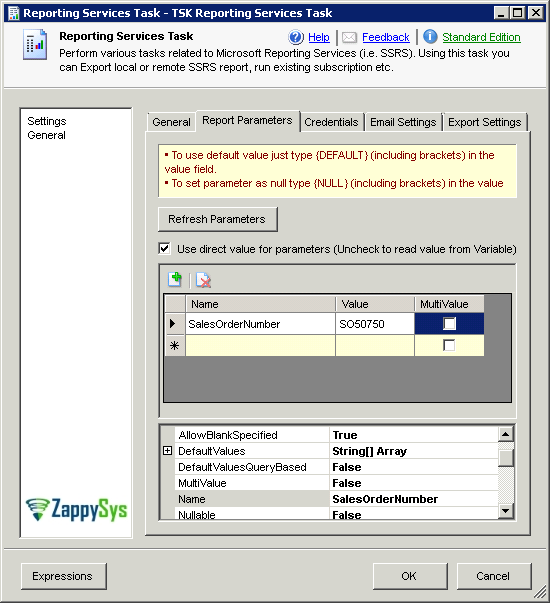
5. Set Report Parameters
Set SSRS report parameters
🔍 View Full Size
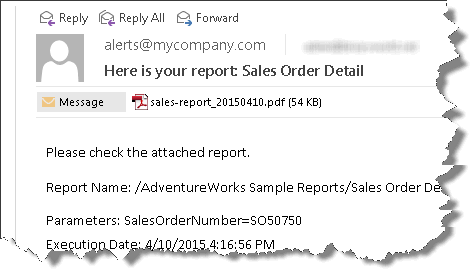
6. Email Report Attachment
Send SSRS report as email attachment
🔍 View Full Size

🔧 Key Features

  • Export SSRS reports in PDF, Excel, HTML, CSV, XML and more
  • Server mode and local report (RDL) mode support
  • Data-driven batch export via SQL configuration tables
  • Report parameter and credential handling options
  • Email attachment delivery built into task workflow

💡 Common Use Cases

  • Scheduled Report Delivery: Export and email periodic business reports automatically.
  • Multi-Recipient Distribution: Drive per-user report routing using config-table settings.
  • Hybrid Deployment: Use server mode for SSRS-hosted reports and local mode for RDL files.
  • Compliance Archiving: Save versioned report outputs to controlled file locations.

🎯 Summary

SSIS Report Generator Task helps teams operationalize SSRS report export and distribution with minimal coding. It combines flexible execution modes, delivery options, and data-driven controls to simplify enterprise reporting automation.

Trusted by Developers & IT Teams Worldwide

  • Built for SSIS Workflows: Purpose-built for high-performance ETL and complex integration scenarios.
  • Expert Technical Support: Direct access to engineers via email and remote screen-share sessions.
  • Proven Enterprise Scale: Trusted by 3000+ teams across 90+ countries, including Fortune 500.
SSIS PowerPack
Includes SSIS Report Generator Task
Capterra Rating
Read reviews on Capterra →

Start Automating Workflows with SSIS PowerPack

Includes connectors for APIs, databases & cloud apps. Build robust ETL workflows without custom scripting.

Download SSIS PowerPack (Free Trial)

Full functionality is FREE for development within Visual Studio

  • Contact us
  • Jobs
  • Privacy
  • Manage cookies
  • Terms of use
  • Trademarks
  • Your Privacy Choices
  • Consumer Health Privacy
© 2026 Microsoft