Skip to content
| Marketplace
Sign in
Visual Studio>Controls>SSIS REST API Task (Web Service Task)
SSIS REST API Task (Web Service Task)

SSIS REST API Task (Web Service Task)

ZappySys

|
10,549 clicks
| (0) | Free Trial
Call HTTP(S) APIs from SSIS without coding using GET, POST, and other methods. Configure authentication, headers, body, response save/filter rules, and validation checks, then route outputs to files or variables with robust error handling. Part of ZappySys SSIS PowerPack.
Get Started

Execute HTTP(S) API calls from SSIS using a flexible REST/Web Service task.

Send GET/POST requests, configure headers and auth, validate responses, and save outputs to variables or files for downstream orchestration. Built for reliable API integration in ETL workflows.
Part of ZappySys SSIS PowerPack.

Recommended starting point
View Setup Guide & Get Started →
See features, UI & examples →
Pro Tip: Use response validation and continue-on-error rules to make API orchestration resilient under variable endpoint behavior.
Compatibility: SQL Server 2012–2025+ (32/64-bit) | Azure Data Factory / Azure-SSIS IR Ready

⚡ Key Benefits

  • HTTP Method Coverage — Invoke GET, POST, PUT and other API methods from SSIS
  • Auth + Header Flexibility — Configure Basic/OAuth/cert auth and custom request headers
  • Response Control — Save payloads, filter JSON/XML, and extract key values
  • Validation & Error Rules — Enforce status/content checks with controllable failure behavior
  • Operational Traceability — Review execution outcomes in task-level logs and outputs

📸 Visual Overview & Setup

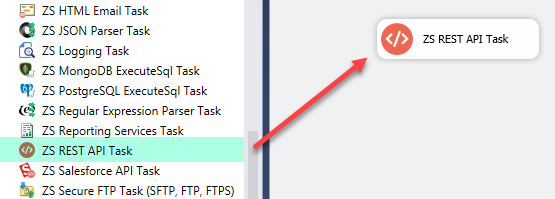
1. Drag REST API Task
Drag REST API task in SSIS
🔍 View Full Size
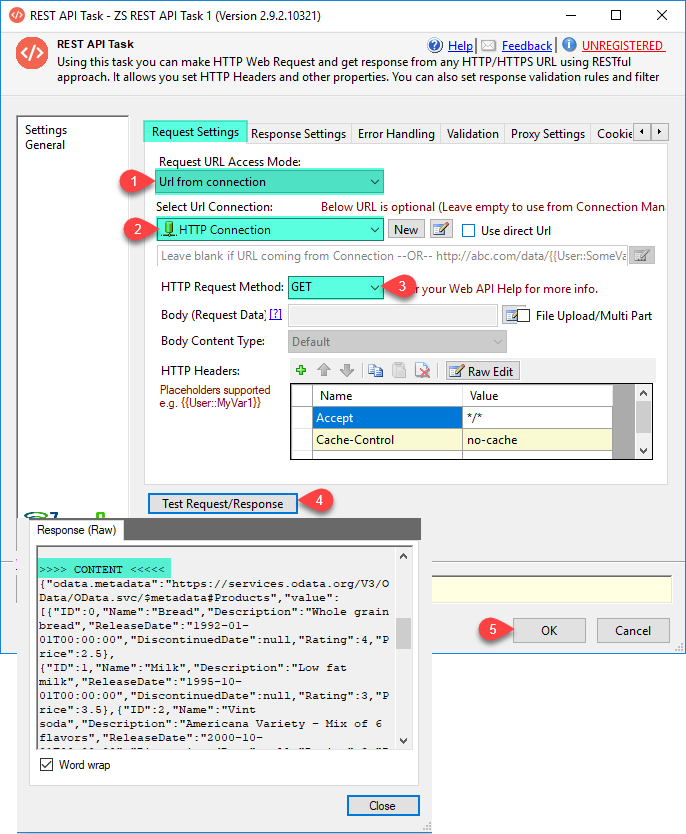
2. Configure HTTP GET Request
Configure HTTP GET request
🔍 View Full Size
3. Configure HTTP POST Request
Configure HTTP POST request
🔍 View Full Size
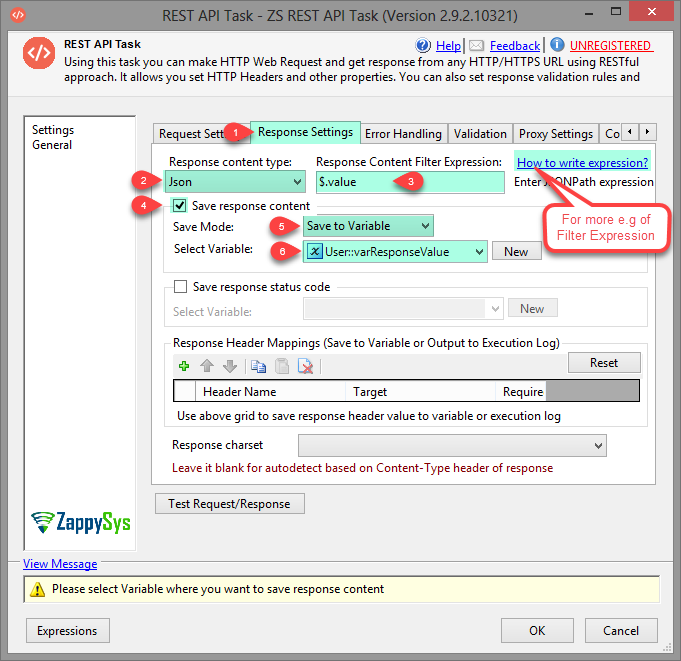
4. Response Save and Filter Options
Response save and filter options
🔍 View Full Size
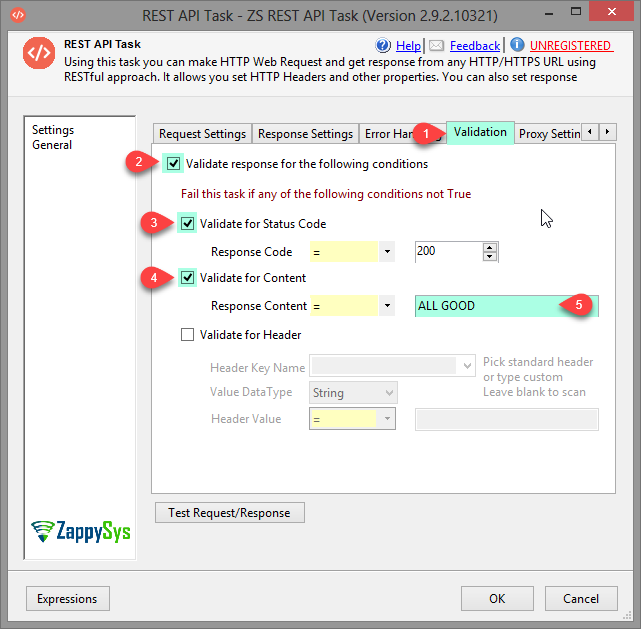
5. Validation Rule Settings
Validation rule settings
🔍 View Full Size
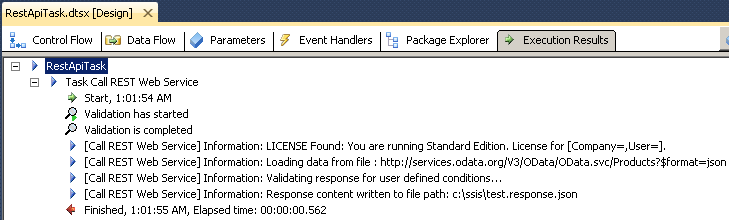
6. Execution Log Output
REST API task execution log
🔍 View Full Size

🔧 Key Features

  • Send HTTP(S) requests with GET/POST/PUT and more
  • Support for auth methods, headers, cookies, and multipart upload
  • Response save-to-file/variable with JSONPath/XPath filtering
  • Status/content/header validation and error-handling controls
  • Advanced TLS/compression/timeout settings for production reliability

💡 Common Use Cases

  • API Orchestration: Trigger and monitor REST endpoints in control flow.
  • Token/Session Workflows: Capture auth tokens from one call and reuse in next steps.
  • File Transfer APIs: Upload/download payloads via HTTP endpoints.
  • Resilient Integrations: Continue or fail based on specific response rules.

🎯 Summary

SSIS REST API Web Service Task provides a powerful low-code surface for calling APIs and operationalizing responses inside ETL pipelines. It helps teams standardize HTTP integrations with strong validation, security, and control.

Trusted by Developers & IT Teams Worldwide

  • Built for SSIS Workflows: Purpose-built for high-performance ETL and complex integration scenarios.
  • Expert Technical Support: Direct access to engineers via email and remote screen-share sessions.
  • Proven Enterprise Scale: Trusted by 3000+ teams across 90+ countries, including Fortune 500.
SSIS PowerPack
Includes SSIS REST API Web Service Task
Capterra Rating
Read reviews on Capterra →

Start Automating Workflows with SSIS PowerPack

Includes connectors for APIs, databases & cloud apps. Build robust ETL workflows without custom scripting.

Download SSIS PowerPack (Free Trial)

Full functionality is FREE for development within Visual Studio

  • Contact us
  • Jobs
  • Privacy
  • Manage cookies
  • Terms of use
  • Trademarks
© 2026 Microsoft