Skip to content
| Marketplace
Sign in
Visual Studio>Controls>SSIS MongoDB ExecuteSQL Task (Shell Commands)
SSIS MongoDB ExecuteSQL Task (Shell Commands)

SSIS MongoDB ExecuteSQL Task (Shell Commands)

ZappySys

|
800 clicks
| (0) | Free Trial
Execute MongoDB DDL/DML and JavaScript commands from SSIS without ODBC scripting. Run INSERT/UPDATE/DELETE, get result sets, and filter outputs (JSONPath) for ETL automation with runtime visibility. Part of ZappySys SSIS PowerPack.
Get Started

Execute MongoDB commands from SSIS with a no-code task.

Run DDL/DML and server-side JavaScript with runtime visibility. Save results to variables or full rowsets (ADO recordsets) for ETL branching, and filter output fields for downstream processing.
Part of ZappySys SSIS PowerPack.

Recommended starting point
View Setup Guide & Get Started →
See features, UI & examples →
Pro Tip: Use server-side JavaScript for complex transformations and return rowsets for downstream SSIS flows.
Compatibility: SQL Server 2012–2025+ (32/64-bit) | Azure Data Factory / Azure-SSIS IR Ready

⚡ Key Benefits

  • MongoDB DDL/DML Execution — Run INSERT/UPDATE/DELETE commands from SSIS
  • Server-side JavaScript — Execute advanced functions inside MongoDB
  • Result Set Visibility — Retrieve full outputs for auditing and ETL branching
  • JSONPath Filtering — Extract exact fields from response/rowsets
  • Task-driven Workflows — Keep packages maintainable without custom code

📸 Visual Overview & Setup

1. Drag ExecuteSQL Task
MongoDB ExecuteSQL task drag and drop
🔍 View Full Size
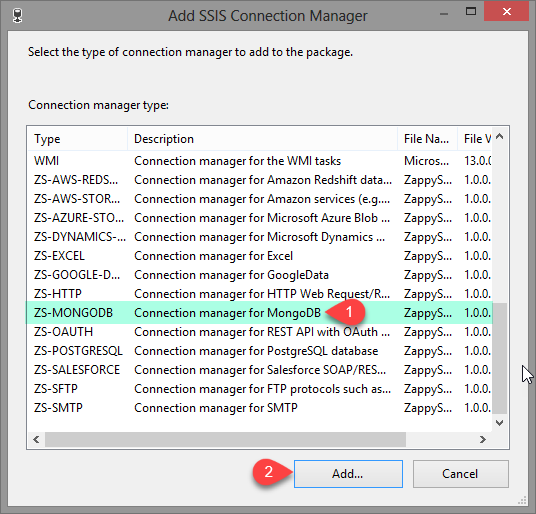
2. Create Connection
MongoDB ExecuteSQL create connection
🔍 View Full Size
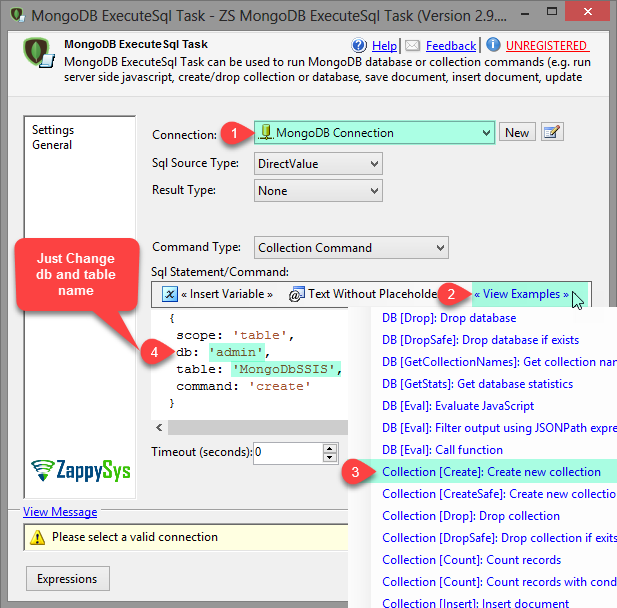
3. Create Collection
MongoDB ExecuteSQL create collection
🔍 View Full Size
4. Insert JSON Document
MongoDB ExecuteSQL insert JSON document
🔍 View Full Size
5. Get Full Result Set
MongoDB ExecuteSQL full result set
🔍 View Full Size
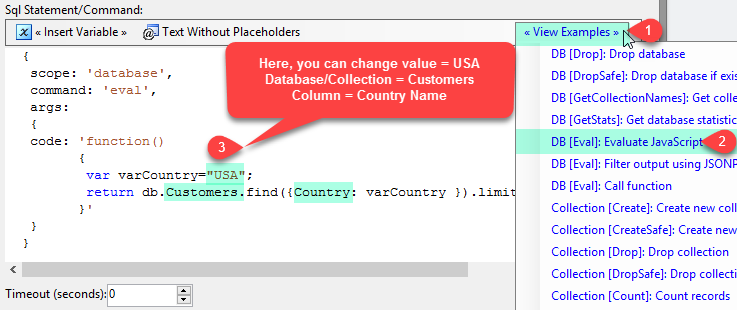
6. Execute Server-side JS
MongoDB ExecuteSQL call server-side javascript
🔍 View Full Size

🔧 Key Features

  • DDL/DML Execution — Run INSERT/UPDATE/DELETE and other commands from SSIS
  • Server-side JavaScript — Execute functions and logic inside MongoDB
  • Full Output Retrieval — Capture full responses and rowsets for downstream steps
  • Filter + Extract — Use JSONPath to extract fields used in ETL control logic
  • Maintainable Task UI — Configure everything in a drag-and-drop SSIS task

💡 Common Use Cases

  • Operational Upserts: Apply document changes in MongoDB during ETL runs.
  • ETL-driven Schema Management: Create/alter collections as part of deployments.
  • Custom Transform Logic: Use server-side JavaScript for complex JSON reshaping.
  • Response-driven Pipelines: Extract keys from results and branch SSIS workflows.

🎯 Summary

SSIS MongoDB Execute SQL Task lets teams run MongoDB commands and JavaScript logic without ODBC scripting. It returns rich results that can be filtered and used directly in SSIS data flow and control flow workflows.

Trusted by Developers & IT Teams Worldwide

  • Built for SSIS Workflows: Purpose-built for high-performance ETL and complex integration scenarios.
  • Expert Technical Support: Direct access to engineers via email and remote screen-share sessions.
  • Proven Enterprise Scale: Trusted by 3000+ teams across 90+ countries, including Fortune 500.
SSIS PowerPack
Includes SSIS MongoDB ExecuteSQL Task
Capterra Rating
Read reviews on Capterra →

Start Automating Workflows with SSIS PowerPack

Includes connectors for APIs, databases & cloud apps. Build robust ETL workflows without custom scripting.

Download SSIS PowerPack (Free Trial)

Full functionality is FREE for development within Visual Studio

  • Contact us
  • Jobs
  • Privacy
  • Manage cookies
  • Terms of use
  • Trademarks
© 2026 Microsoft