Skip to content
| Marketplace
Sign in
Visual Studio>Controls>SSIS MongoDB Destination
SSIS MongoDB Destination

SSIS MongoDB Destination

ZappySys

|
729 clicks
| (0) | Free Trial
SSIS MongoDB Destination: bulk insert, upsert, delete & reload into collections; load raw JSON from pipelines; nested array updates. Part of ZappySys SSIS PowerPack.
Get Started

Load documents into MongoDB from SSIS with a native destination component.

Bulk insert, upsert, delete, and reload into collections; load raw JSON from upstream transforms or files; and update nested arrays (for example new order lines inside an existing customer document).
Part of ZappySys SSIS PowerPack.

Recommended starting point
View Setup Guide & Get Started →
See features, UI & examples →
Pro Tip: Pair with JSON Generator or JSON Source when you want each SSIS row to become a full BSON document without hand-building field lists.
Compatibility: SQL Server 2012–2025+ (32/64-bit) | Azure Data Factory / Azure-SSIS IR Ready

⚡ Key Benefits

  • Bulk document loads — High-volume writes into MongoDB collections from any SSIS source
  • Flexible operations — Insert, upsert, delete, reload, and replace-style workflows
  • Raw JSON path — Map an entire JSON payload column when documents are already structured
  • Nested updates — Push or set values inside arrays without custom .NET scripts
  • Familiar SSIS UI — Connection, component, and mapping tabs consistent with other ZappySys destinations

📸 Visual Overview & Setup

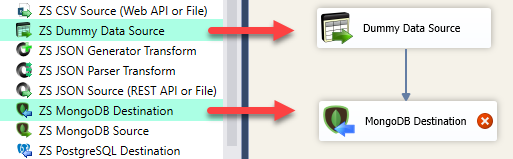
1. Drag to Data Flow
Drag MongoDB Destination into SSIS data flow
🔍 View Full Size
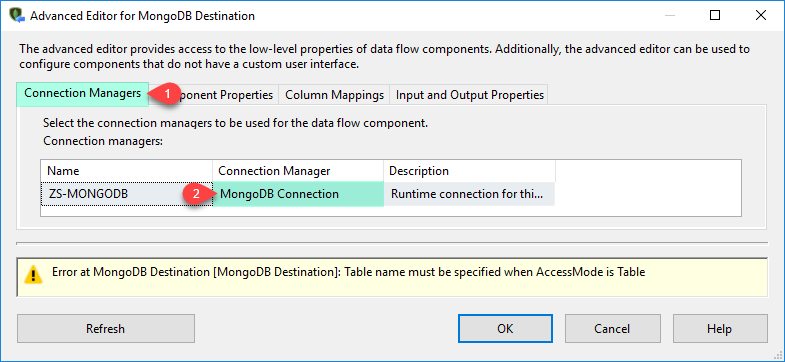
2. Connection Tab
MongoDB Destination connection tab in SSIS
🔍 View Full Size
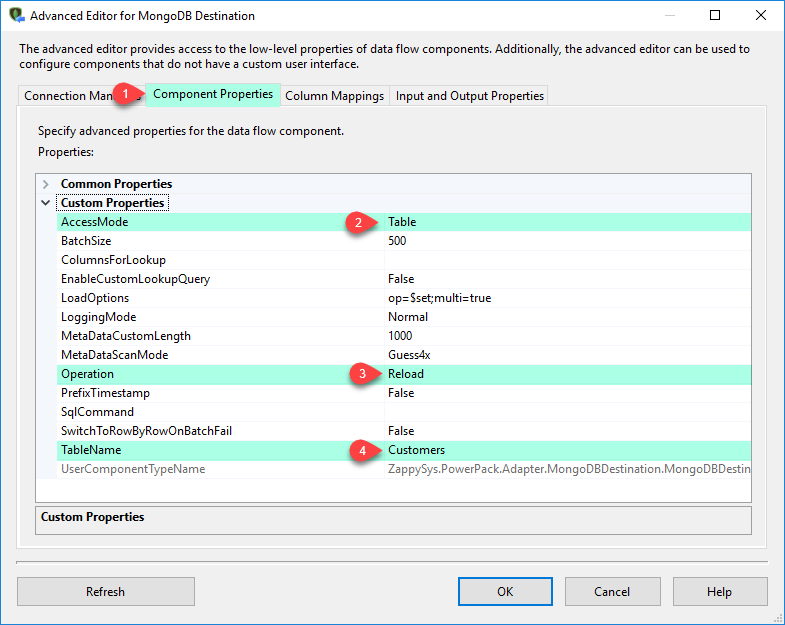
3. Component Tab
MongoDB Destination component tab — collection and action
🔍 View Full Size
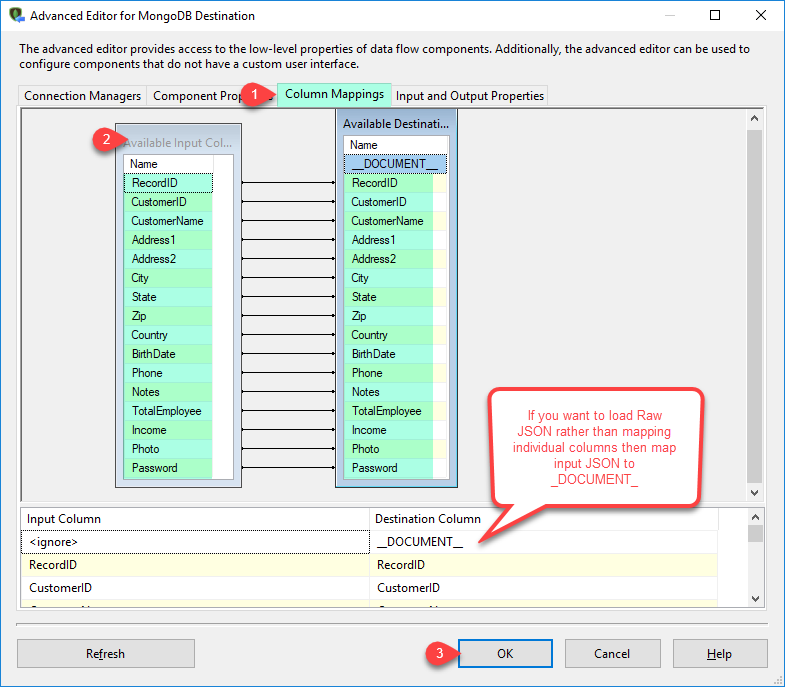
4. Mapping Tab
MongoDB Destination mapping tab
🔍 View Full Size
5. Execute Load
Run SSIS package — MongoDB destination execution
🔍 View Full Size
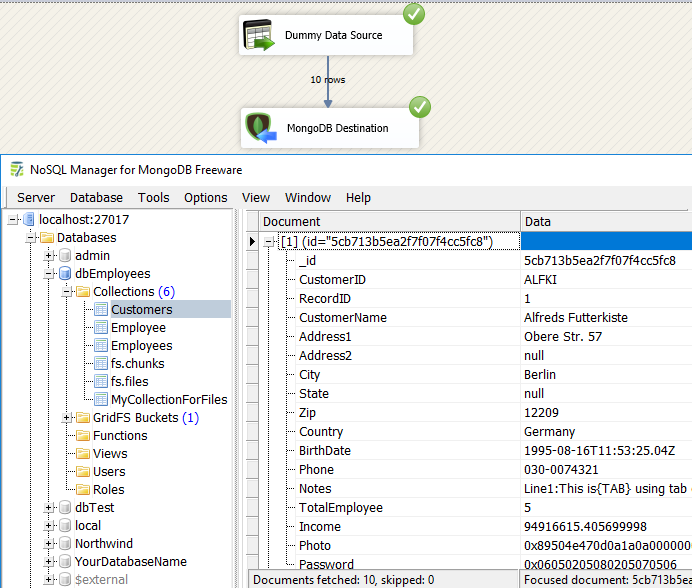
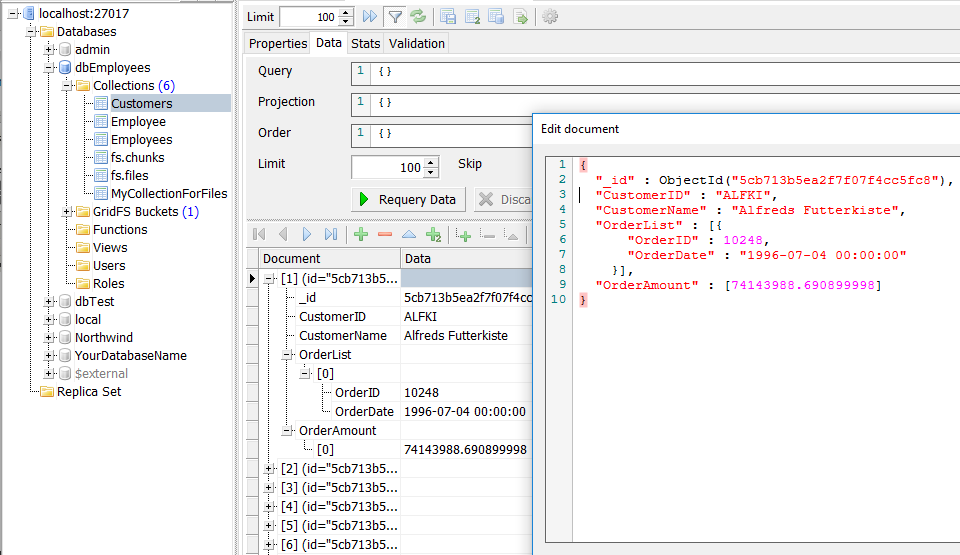
6. Verify Documents
Verify MongoDB documents in a client tool
🔍 View Full Size

🔧 Key Features

  • Bulk write modes — Reload, insert, upsert, delete, and related bulk patterns for collections
  • Raw JSON documents — Map SSIS columns to full documents (for example from JSON Generator Transform)
  • Column mapping — Standard mapping tab for field-level loads alongside JSON scenarios
  • Array & nested paths — Support for operators such as $set and $push on embedded arrays
  • MongoDB connection manager — Reusable connection setup shared with other MongoDB components
  • Enterprise SSIS targets — SQL Server 2012 through 2025 and Azure-SSIS integration runtime

💡 Common Use Cases

  • SQL-to-NoSQL migration: Land normalized rows into MongoDB as documents for app modernization.
  • API landing zone: After REST/JSON extraction, bulk load response payloads into collections.
  • Upsert-driven sync: Keep MongoDB aligned with a system of record using key-based upserts.
  • Nested order or line items: Append or update items inside a parent document’s array from SSIS.

🎯 Summary

MongoDB Destination brings bulk insert, upsert, delete, and JSON-oriented loads into standard SSIS data flows—without custom code—so teams can treat MongoDB as a first-class ETL target alongside relational warehouses.

Trusted by Developers & IT Teams Worldwide

  • Built for SSIS Workflows: Purpose-built for high-performance ETL and complex integration scenarios.
  • Expert Technical Support: Direct access to engineers via email and remote screen-share sessions.
  • Proven Enterprise Scale: Trusted by 3000+ teams across 90+ countries, including Fortune 500.

SSIS PowerPack
Includes SSIS MongoDB Destination
Capterra Rating
Read reviews on Capterra →

Start Automating Workflows with SSIS PowerPack

Includes connectors for APIs, databases & cloud apps. Build robust ETL workflows without custom scripting.

Download SSIS PowerPack (Free Trial)

Full functionality is FREE for development within Visual Studio

  • Contact us
  • Jobs
  • Privacy
  • Manage cookies
  • Terms of use
  • Trademarks
© 2026 Microsoft