Skip to content
| Marketplace
Sign in
Visual Studio>Controls>SSIS JSON Generator Transform
SSIS JSON Generator Transform

SSIS JSON Generator Transform

ZappySys

|
1,072 clicks
| (0) | Free Trial
Generate JSON documents inside SSIS Data Flow from single or multiple input datasets using a drag-and-drop layout editor. Supports nested structures, document/value arrays, parent-child relations, and direct JSON output for APIs or NoSQL targets. Part of ZappySys SSIS PowerPack.
Get Started

Generate JSON documents inside SSIS Data Flow from one or multiple sources using a visual drag-and-drop designer — no Script Task required.

Build nested JSON with attributes, document arrays, and value arrays, and join parent-child datasets to create API-ready or NoSQL-ready payloads. Generate one JSON per row or grouped batch payloads, and shape complex structures without writing custom JSON serialization code.
Part of ZappySys SSIS PowerPack.

Recommended starting point
View Setup Guide & Get Started →
See features, UI & examples →
Pro Tip: The Visual Studio download installs a basic extension. Use the guide above to install and run the full SSIS PowerPack (all connectors & UI).
Compatibility: SQL Server 2012–2025+ (32/64-bit) | Azure Data Factory / Azure-SSIS IR Ready

⚡ Key Benefits

  • Visual JSON Designer — Build nested JSON structures with drag-and-drop layout editor
  • Parent-Child Data Shaping — Combine multiple inputs into hierarchical JSON documents
  • Array Modeling — Add document arrays and value arrays for complex payload requirements
  • Flexible Output Patterns — Generate one JSON per row or grouped outputs for batch APIs
  • No-Code JSON Generation — Create advanced JSON without custom scripts or code

📸 Visual Overview & Setup

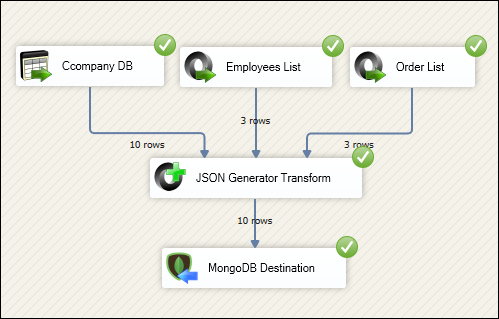
1. Generate JSON from Data Flow
JSON Generator Transform example in SSIS
🔍 View Full Size
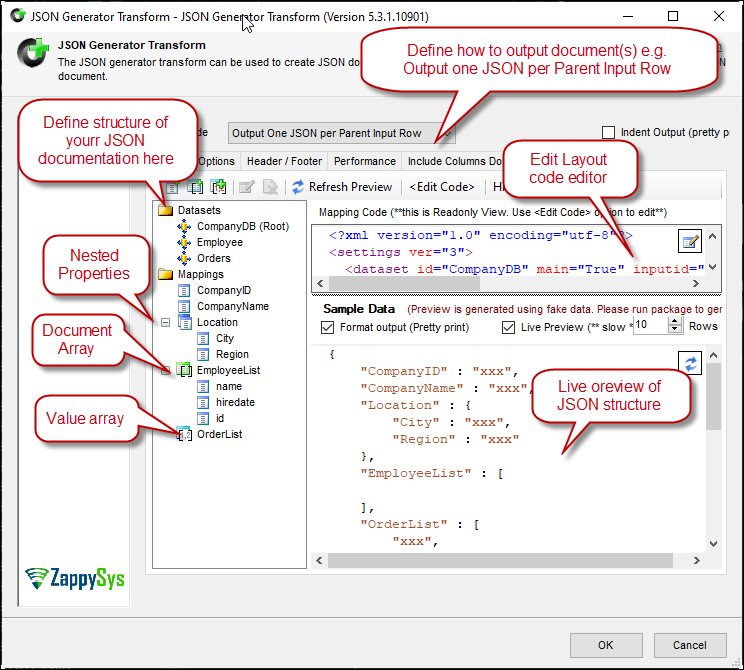
2. Layout Editor for Nested JSON
JSON Generator layout editor
🔍 View Full Size
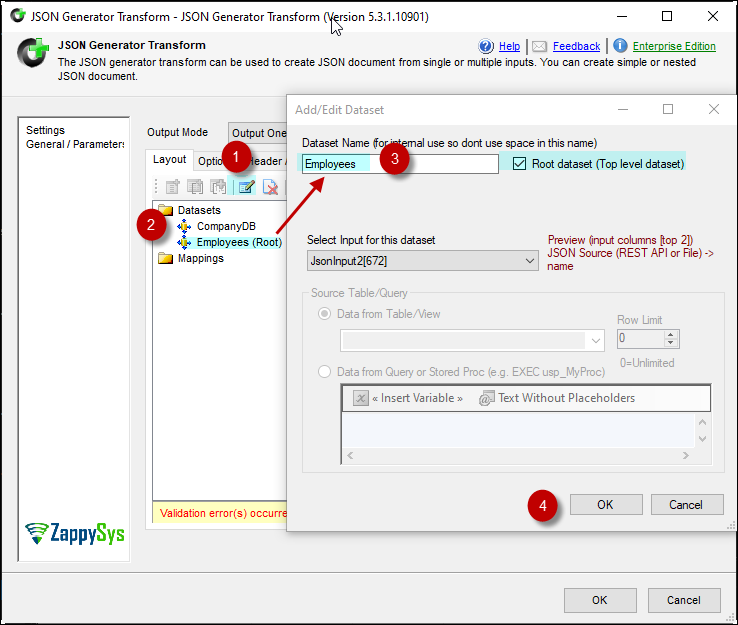
3. Add/Edit Input Dataset
JSON Generator add input dataset
🔍 View Full Size
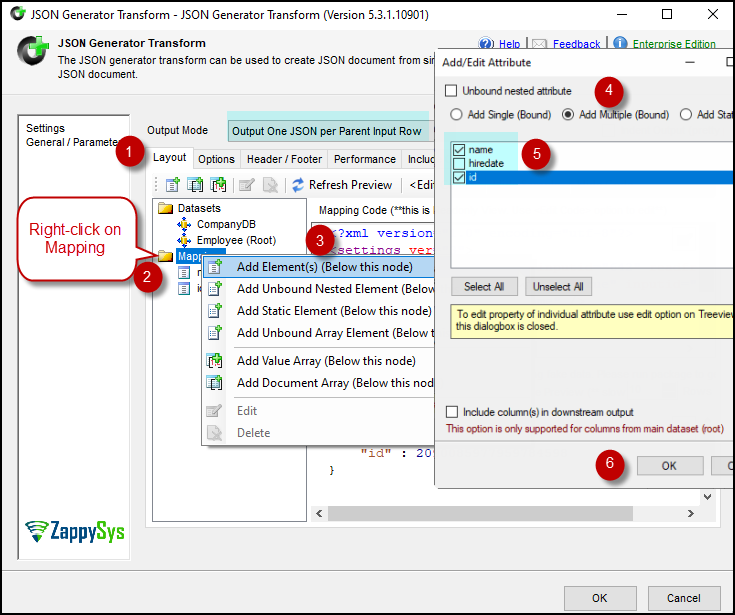
4. Add/Edit Attributes
JSON Generator add attributes
🔍 View Full Size
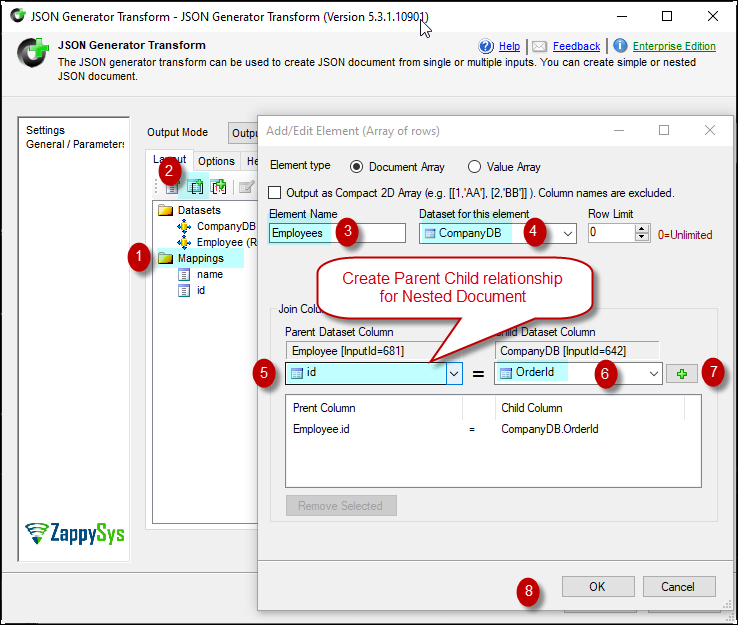
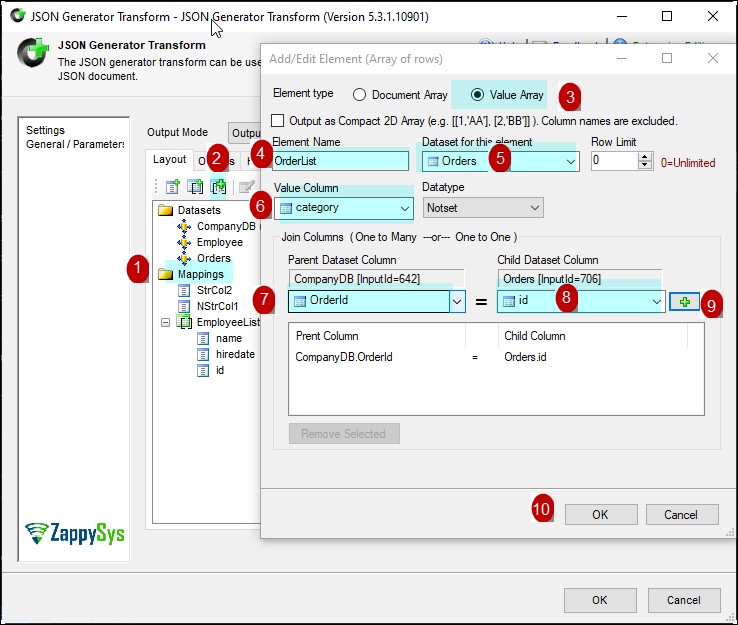
5. Add/Edit Document Array
JSON Generator document array
🔍 View Full Size
6. Generate JSON for MongoDB Load
JSON generator output for MongoDB destination
🔍 View Full Size

🔧 Key Features

JSON Structure Design

  • Visual designer for nested objects, arrays, and attributes
  • Parent-child mapping across multiple input datasets
  • Document array and value array support for complex shapes

Generation Modes

  • One JSON per row or grouped batch output modes
  • 2D array and specialized output shape options
  • Direct integration with downstream API/NoSQL destinations

Pipeline Integration

  • Run entirely in SSIS Data Flow without custom scripts
  • Works with SQL Server, flat file, and other SSIS inputs
  • Compatible with SQL Server 2012–2025 and Azure Data Factory

💡 Common Use Cases

Common real-world scenarios for JSON Generator Transform:

  • API Payload Creation: Generate nested JSON requests for bulk API operations.
  • NoSQL Ingestion: Create MongoDB-ready JSON documents from relational inputs.
  • Complex Export Shapes: Build parent-child JSON for partner integrations.
  • Batch Synchronization: Produce grouped JSON packets for scheduled transfers.

🎯 Summary

SSIS JSON Generator Transform provides a no-code path to build complex nested JSON inside Data Flow. It replaces manual serialization logic with a visual designer while preserving full control over document structure and output shape.

Trusted by Developers & IT Teams Worldwide

  • Built for SSIS Workflows: Purpose-built for high-performance ETL and complex integration scenarios.
  • Expert Technical Support: Direct access to engineers via email and remote screen-share sessions.
  • Proven Enterprise Scale: Trusted by 3000+ teams across 90+ countries, including Fortune 500.
SSIS PowerPack
Includes SSIS JSON Generator Transform
Capterra Rating
Read reviews on Capterra →

Start Automating Workflows with SSIS PowerPack

Includes connectors for APIs, databases & cloud apps. Build robust ETL workflows without custom scripting.

Download SSIS PowerPack (Free Trial)

Full functionality is FREE for development within Visual Studio

  • Contact us
  • Jobs
  • Privacy
  • Manage cookies
  • Terms of use
  • Trademarks
© 2026 Microsoft