Skip to content
| Marketplace
Sign in
Visual Studio>Controls>SSIS Export JSON File Task
SSIS Export JSON File Task

SSIS Export JSON File Task

ZappySys

|
1,347 clicks
| (0) | Free Trial
SSIS Export JSON File Task creates simple/nested JSON from SQL queries or tables, supports split/append/compress, 2D array formats, and direct cloud targets (Azure Blob, AWS S3, FTP/SFTP). Part of ZappySys SSIS PowerPack.
Get Started

Generate simple or complex JSON files from relational data using SSIS.

Export one or many tables/queries into JSON with nested layout support, split rules, append/compression options, and direct cloud delivery to Azure Blob, Amazon S3, FTP/SFTP.
Part of ZappySys SSIS PowerPack.

Recommended starting point
View Setup Guide & Get Started →
See features, UI & examples →
Pro Tip: Use split-by-column together with cloud export mode to publish partner-specific JSON files directly into partitioned cloud folders.
Compatibility: SQL Server 2012–2025+ (32/64-bit) | Azure Data Factory / Azure-SSIS IR Ready

⚡ Key Benefits

  • Relational-to-JSON export — Convert tables/views/queries into JSON documents quickly
  • Nested document design — Build parent-child JSON with visual layout tools
  • Cloud-ready delivery — Write output to Azure Blob, Amazon S3, FTP, or SFTP
  • Large-volume control — Split output by size/row count/group column and optionally compress
  • Flexible output modes — Save to file or variable, append content, and support 2D array formats

📸 Visual Overview & Setup

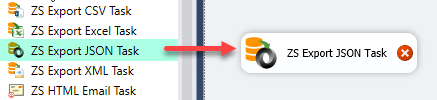
1. Drag Task in Control Flow
Drag SSIS Export JSON File Task into control flow
🔍 View Full Size
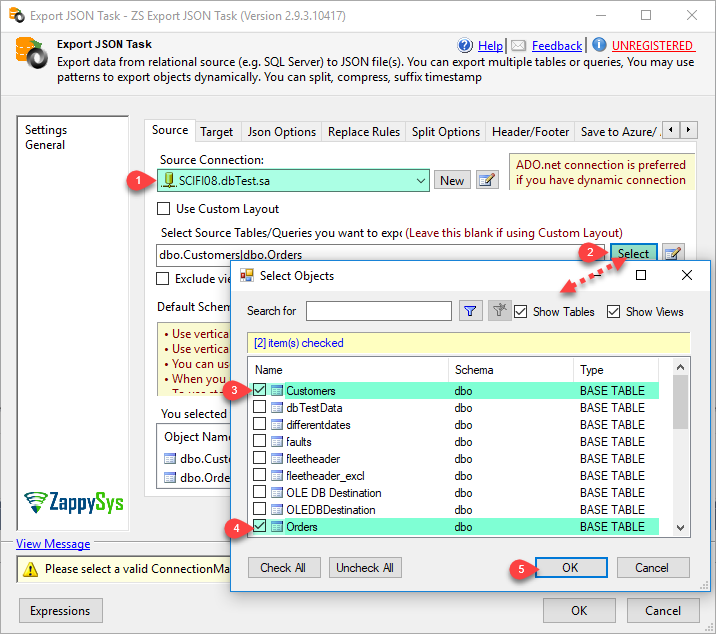
2. Select Source Tables/Query
Select source tables or SQL query for JSON export
🔍 View Full Size
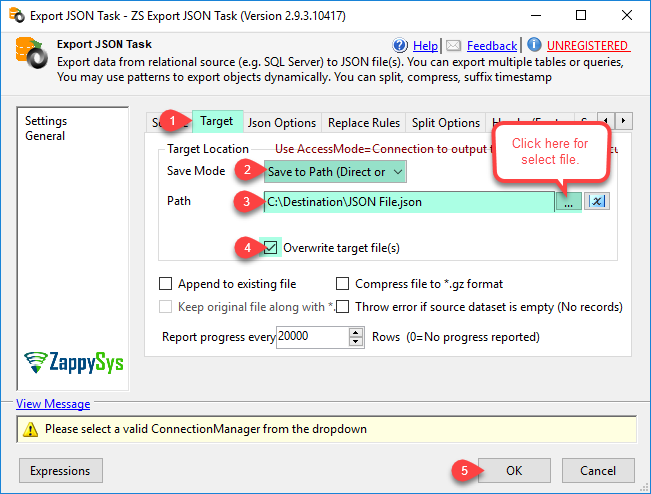
3. Set Target Path & Options
Configure local/cloud target and write options
🔍 View Full Size
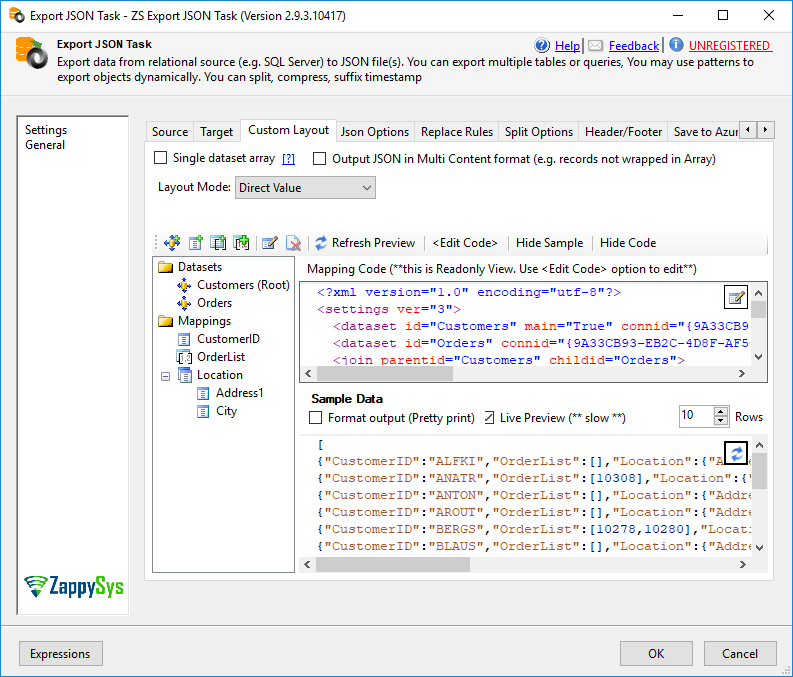
4. Design Nested Layout
Layout editor for nested JSON elements
🔍 View Full Size
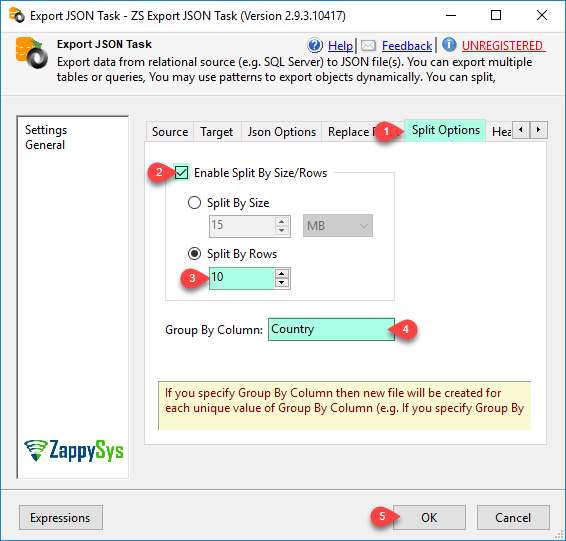
5. Split Output Files
Split JSON files by size, rows, or group column
🔍 View Full Size
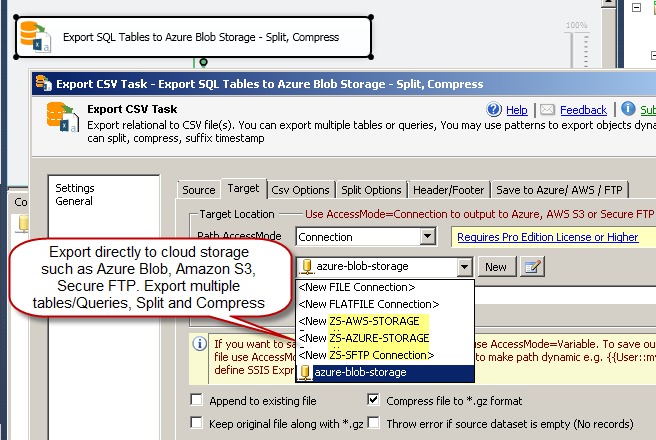
6. Cloud Export + Execute
Export JSON directly to Azure Blob, AWS S3, and SFTP
🔍 View Full Size

🔧 Key Features

  • Input options — Export one or multiple tables/views and query outputs
  • Nested JSON layout editor — Build document arrays, value arrays, and parent-child hierarchies
  • Cloud destination support — Azure Blob, Amazon S3, FTP/SFTP targets in task configuration
  • Split and compression — Split by size, row count, or column; compress and append as needed
  • Multiple JSON output styles — Includes default objects plus 2D array variants for downstream systems
  • Execution visibility — Built-in logging for troubleshooting and operational monitoring

💡 Common Use Cases

  • SQL-to-API staging: Generate JSON payload files from warehouse data for API ingestion.
  • Cloud data publishing: Export scheduled JSON drops directly to Azure Blob/S3 folders.
  • Partner feed distribution: Split files by region/customer key and compress before handoff.
  • Legacy system interchange: Use 2D array or multi-content JSON when consumers require custom formats.

🎯 Summary

SSIS Export JSON File Task provides a reliable JSON publishing pipeline from relational systems to local or cloud destinations, combining schema shaping, file management, and delivery controls in one repeatable task.

Trusted by Developers & IT Teams Worldwide

  • Built for SSIS Workflows: Purpose-built for high-performance ETL and complex integration scenarios.
  • Expert Technical Support: Direct access to engineers via email and remote screen-share sessions.
  • Proven Enterprise Scale: Trusted by 3000+ teams across 90+ countries, including Fortune 500.

SSIS PowerPack
Includes SSIS Export JSON File Task
Capterra Rating
Read reviews on Capterra →

Start Automating Workflows with SSIS PowerPack

Includes connectors for APIs, databases & cloud apps. Build robust ETL workflows without custom scripting.

Download SSIS PowerPack (Free Trial)

Full functionality is FREE for development within Visual Studio

  • Contact us
  • Jobs
  • Privacy
  • Manage cookies
  • Terms of use
  • Trademarks
© 2026 Microsoft