Skip to content
| Marketplace
Sign in
Visual Studio>Tools>SSIS Amazon Redshift Data Transfer Task (AWS)
SSIS Amazon Redshift Data Transfer Task (AWS)

SSIS Amazon Redshift Data Transfer Task (AWS)

ZappySys

|
1,644 clicks
| (0) | Free Trial
Bulk load data into Amazon Redshift from SSIS with high-performance parallel transfer, compression, and staging controls. Read from files or relational sources, apply encryption and error handling, and automate end-to-end warehouse loads. Part of ZappySys SSIS PowerPack.
Get Started

Load millions of rows into Amazon Redshift from SSIS with high-throughput transfer automation.

Transfer data from flat files or relational sources into Redshift using parallel upload, compression, staging, and COPY options. Configure end-to-end load workflow (source, target, archive, error handling) in a no-code task UI.
Part of ZappySys SSIS PowerPack.

Recommended starting point
View Setup Guide & Get Started →
See features, UI & examples →
Pro Tip: The Visual Studio download installs a basic extension. Use the guide above to install and run the full SSIS PowerPack (all connectors & UI).
Compatibility: SQL Server 2012–2025+ (32/64-bit) | Azure Data Factory / Azure-SSIS IR Ready

⚡ Key Benefits

  • Fast Bulk Redshift Loads — Parallelized transfer pipeline for high-volume ingestion
  • Source Flexibility — Load from files, OLEDB/ODBC/ADO.NET, and relational databases
  • Built-In Compression & Staging — Reduce transfer cost and improve throughput
  • Encryption & Governance — Support client/server-side encryption and audit controls
  • Operational Resilience — Rich error handling, logging, and archiving options

📸 Visual Overview & Setup

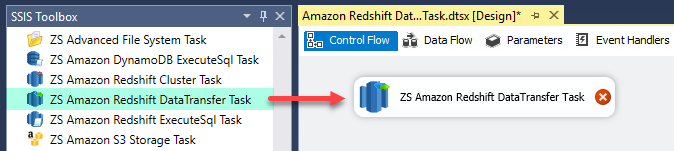
1. Drag Data Transfer Task
Drag Amazon Redshift data transfer task in SSIS
🔍 View Full Size
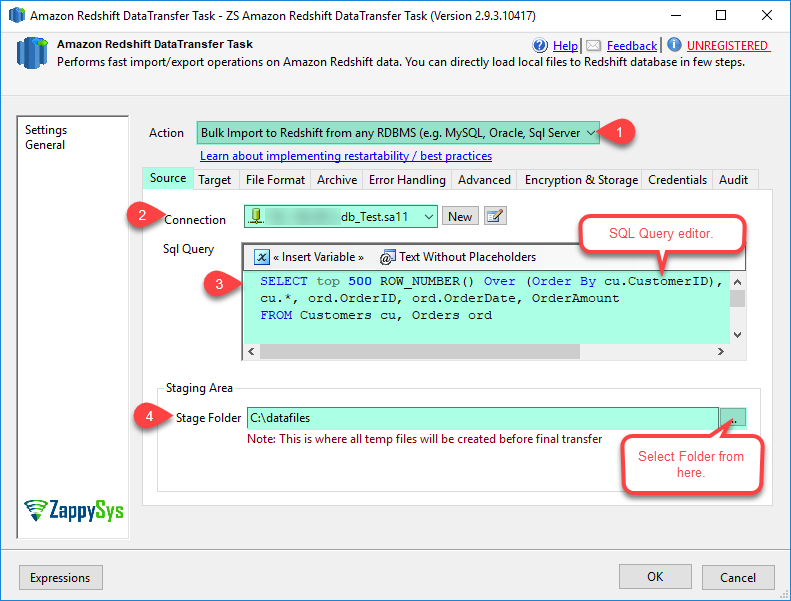
2. Configure Source (File/DB)
Configure Redshift load source from relational database
🔍 View Full Size
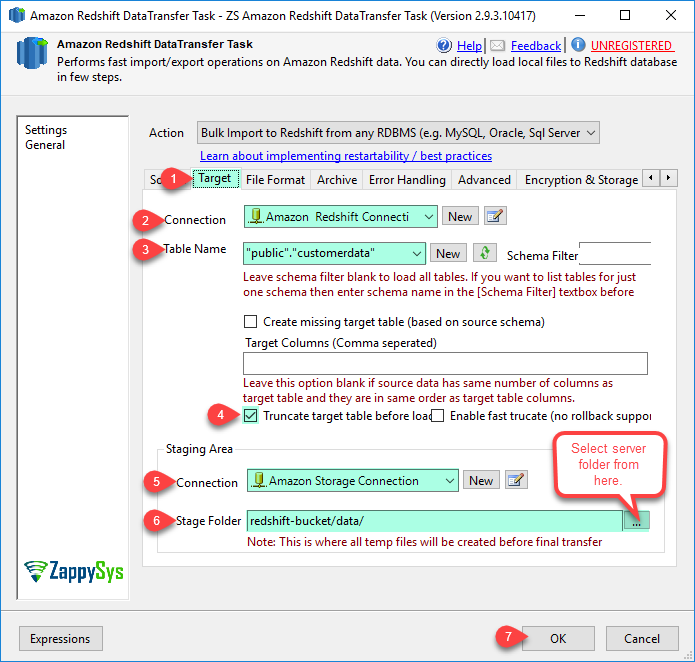
3. Configure Redshift Target
Configure Amazon Redshift target options
🔍 View Full Size
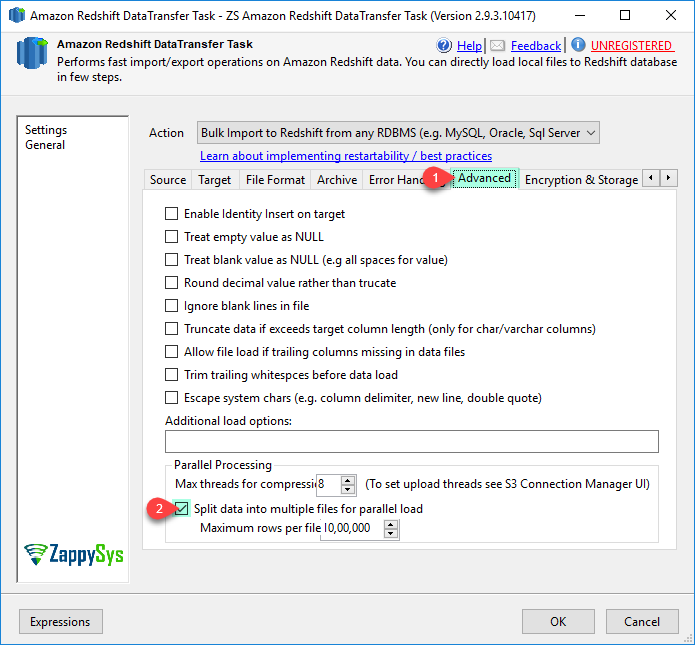
4. Set COPY and Advanced Options
Configure Amazon Redshift COPY options
🔍 View Full Size
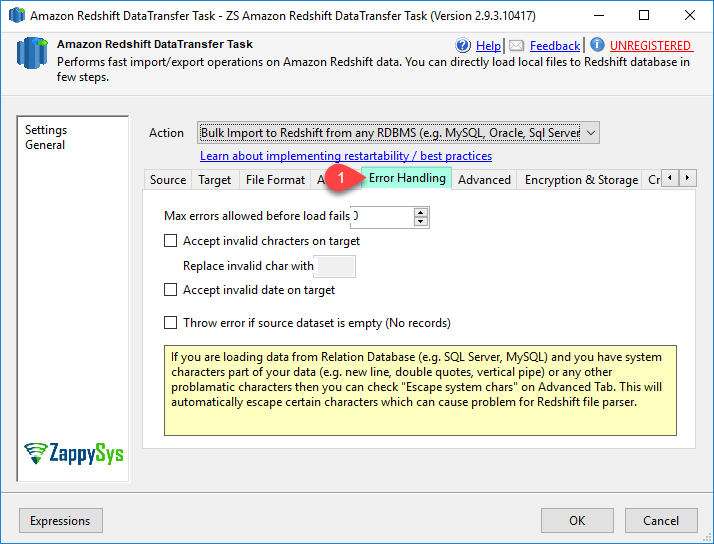
5. Configure Error Handling
Configure Redshift transfer error handling
🔍 View Full Size
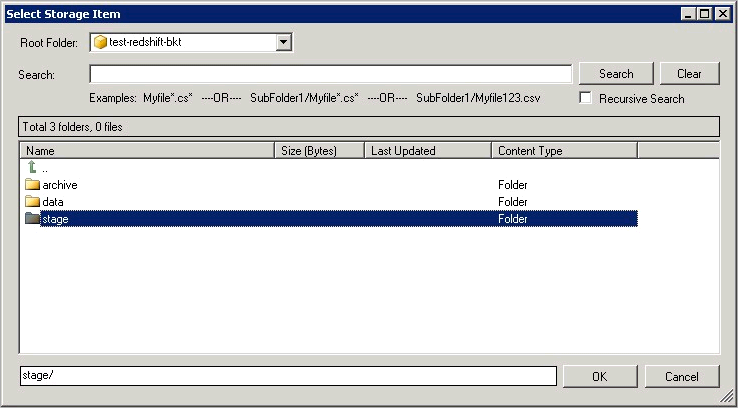
6. Pick S3 Staging Folder
Browse Amazon S3 staging location for transfer
🔍 View Full Size

🔧 Key Features

  • High-speed multi-threaded Redshift bulk load pipeline
  • Supports relational and file-based source systems
  • Compression, archiving, and staging automation
  • Client-side and server-side encryption options
  • Detailed logging and operational troubleshooting output

💡 Common Use Cases

  • Warehouse Ingestion: Move high-volume on-prem SQL data to Redshift nightly.
  • Hybrid Source Loading: Combine database and file feeds into one Redshift process.
  • Cost-Optimized Transfer: Compress and parallelize uploads to minimize runtime/bandwidth.
  • Governed Production Loads: Apply encryption, auditing, and error handling standards.

🎯 Summary

SSIS Amazon Redshift Data Transfer Task delivers enterprise-grade bulk loading into Redshift with performance, control, and reliability. It streamlines source export, S3 staging, COPY execution, and operational governance in one task.

Trusted by Developers & IT Teams Worldwide

  • Built for SSIS Workflows: Purpose-built for high-performance ETL and complex integration scenarios.
  • Expert Technical Support: Direct access to engineers via email and remote screen-share sessions.
  • Proven Enterprise Scale: Trusted by 3000+ teams across 90+ countries, including Fortune 500.
SSIS PowerPack
Includes SSIS Amazon Redshift Data Transfer Task
Capterra Rating
Read reviews on Capterra →

Start Automating Workflows with SSIS PowerPack

Includes connectors for APIs, databases & cloud apps. Build robust ETL workflows without custom scripting.

Download SSIS PowerPack (Free Trial)

Full functionality is FREE for development within Visual Studio

  • Contact us
  • Jobs
  • Privacy
  • Manage cookies
  • Terms of use
  • Trademarks
  • Your Privacy Choices
  • Consumer Health Privacy
© 2026 Microsoft