Skip to content
| Marketplace
Sign in
Visual Studio>Controls>SSIS Amazon Redshift Cluster Management Task for AWS
SSIS Amazon Redshift Cluster Management Task for AWS

SSIS Amazon Redshift Cluster Management Task for AWS

ZappySys

|
550 clicks
| (0) | Free Trial
Automate Amazon Redshift cluster operations in SSIS without scripting. Create/delete clusters, fetch cluster attributes, create/delete snapshots, and optionally wait for completion in one task-driven workflow. Part of ZappySys SSIS PowerPack.
Get Started

Automate Amazon Redshift cluster lifecycle tasks in SSIS with drag-and-drop configuration.

Manage Redshift infrastructure actions such as create/delete cluster, fetch properties, and snapshot management directly from SSIS Control Flow. Configure wait behavior, access rules, and operation parameters without custom scripts.
Part of ZappySys SSIS PowerPack.

Recommended starting point
View Setup Guide & Get Started →
See features, UI & examples →
Pro Tip: The Visual Studio download installs a basic extension. Use the guide above to install and run the full SSIS PowerPack (all connectors & UI).
Compatibility: SQL Server 2012–2025+ (32/64-bit) | Azure Data Factory / Azure-SSIS IR Ready

⚡ Key Benefits

  • Cluster Lifecycle Automation — Create and delete Redshift clusters from SSIS packages
  • Operational Visibility — Fetch cluster properties and status into SSIS variables
  • Snapshot Management — Create and remove Redshift snapshots in scheduled workflows
  • Wait & Control Options — Pause until operations complete with configurable timeout behavior
  • No Scripting Required — Use task UI instead of custom AWS SDK code

📸 Visual Overview & Setup

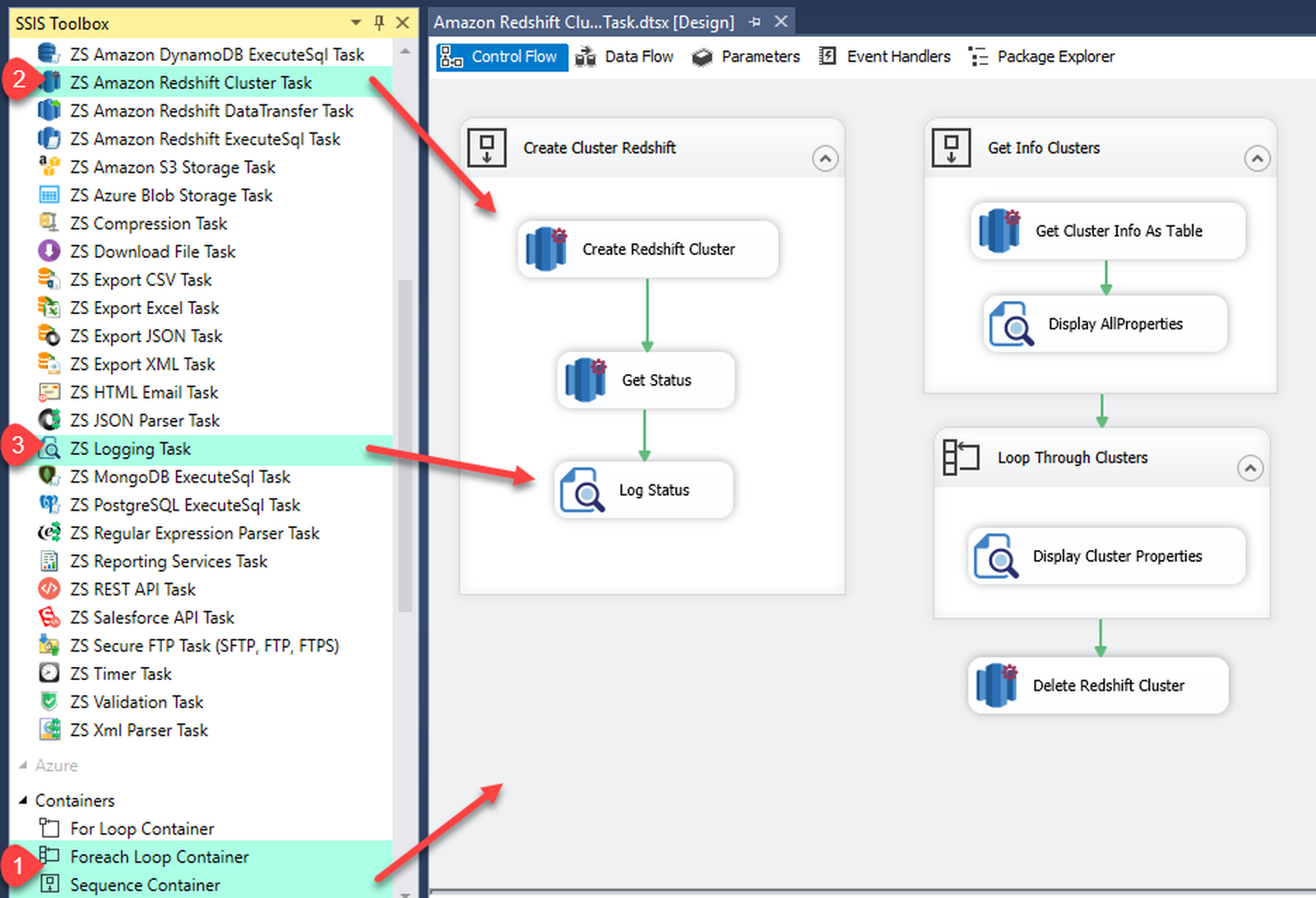
1. Task Overview (Create/Delete/List/Snapshot)
SSIS Amazon Redshift Cluster Management Task overview
🔍 View Full Size
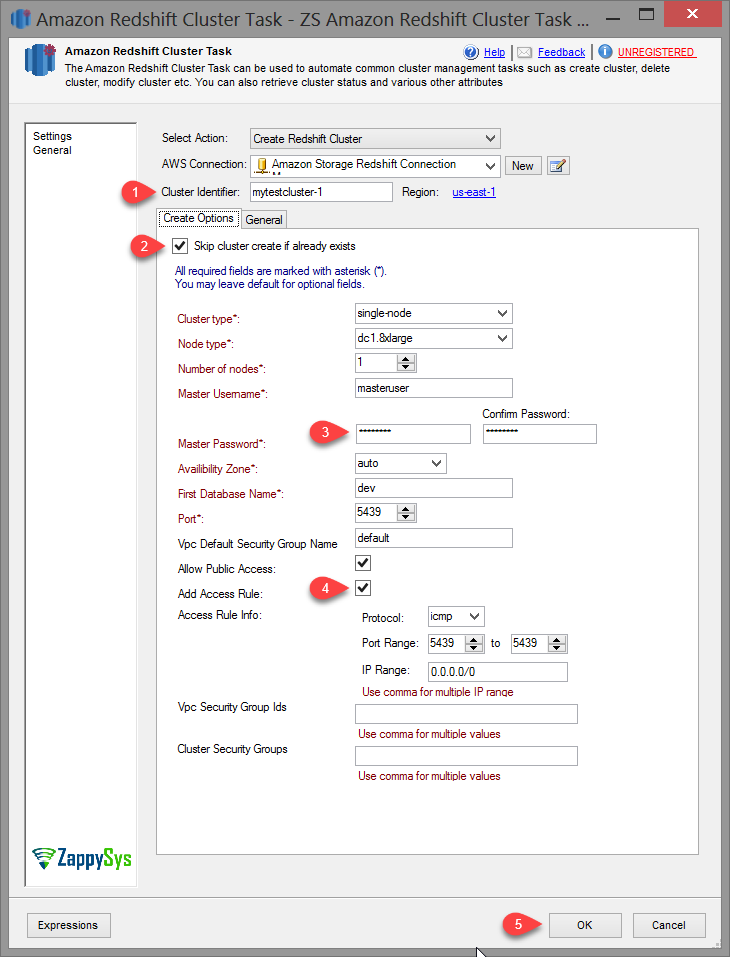
2. Configure Create Cluster Action
Configure Redshift create cluster action
🔍 View Full Size
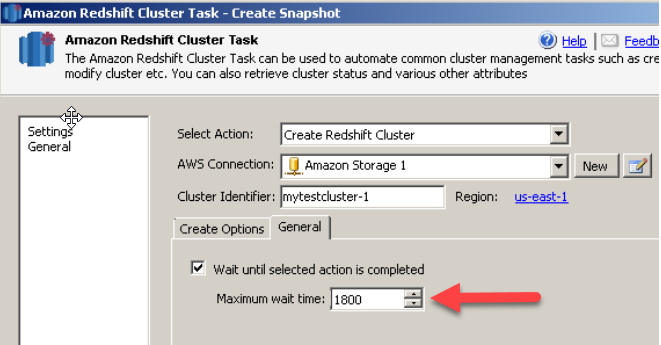
3. Set Wait Until Completion
Configure wait options for Redshift cluster operations
🔍 View Full Size
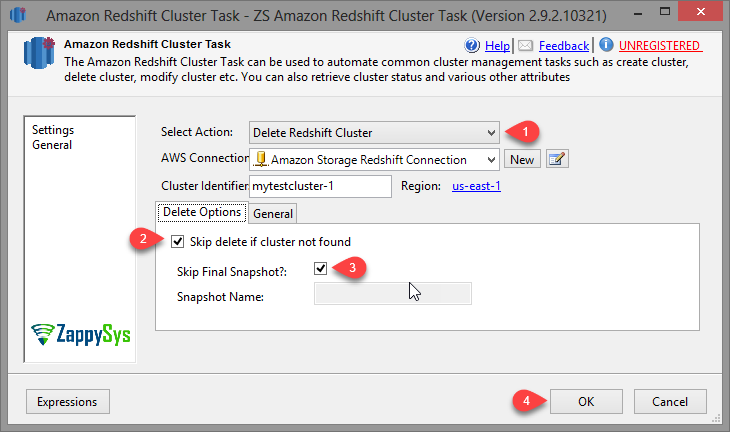
4. Delete Cluster Action
Configure delete Redshift cluster action
🔍 View Full Size
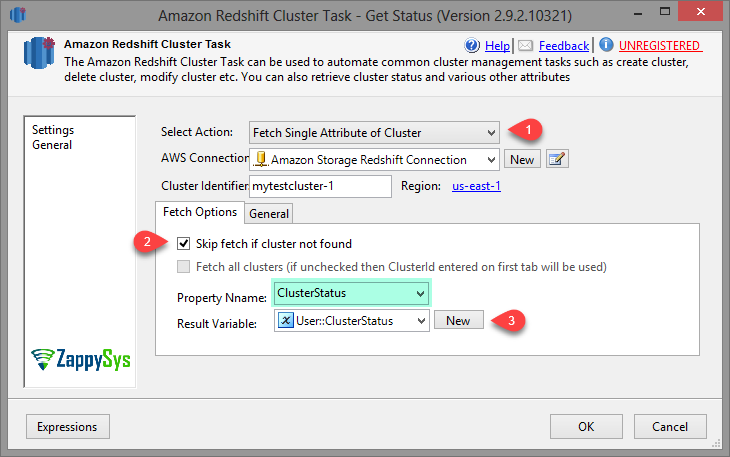
5. Fetch Cluster Attribute
Fetch Redshift cluster attribute into SSIS variable
🔍 View Full Size
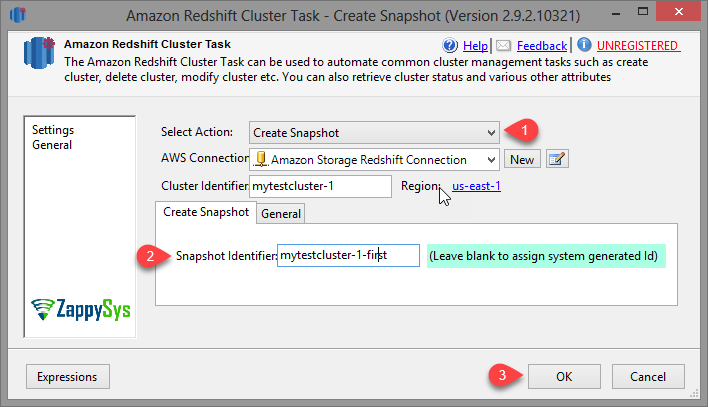
6. Create Snapshot Action
Create Redshift snapshot action configuration
🔍 View Full Size

🔧 Key Features

  • Create, delete, and inspect Redshift clusters from one SSIS task
  • Create and delete Redshift snapshots for backup workflows
  • Fetch single attribute or full cluster properties for branching logic
  • Wait-until-complete option for deterministic orchestration
  • Supports SQL Server 2012+ and Azure-SSIS IR

💡 Common Use Cases

  • Environment Provisioning: Create temporary Redshift clusters before batch loads.
  • Cost Control Automation: Delete idle clusters at the end of processing windows.
  • Backup Operations: Schedule snapshot create/delete steps in nightly pipelines.
  • Status-Driven ETL: Read cluster state and continue only when resources are ready.

🎯 Summary

SSIS Amazon Redshift Cluster Management Task brings cloud infrastructure control into SSIS packages. Teams can automate create/delete/snapshot actions and status checks in a repeatable, script-free workflow.

Trusted by Developers & IT Teams Worldwide

  • Built for SSIS Workflows: Purpose-built for high-performance ETL and complex integration scenarios.
  • Expert Technical Support: Direct access to engineers via email and remote screen-share sessions.
  • Proven Enterprise Scale: Trusted by 3000+ teams across 90+ countries, including Fortune 500.
SSIS PowerPack
Includes SSIS Amazon Redshift Cluster Management Task
Capterra Rating
Read reviews on Capterra →

Start Automating Workflows with SSIS PowerPack

Includes connectors for APIs, databases & cloud apps. Build robust ETL workflows without custom scripting.

Download SSIS PowerPack (Free Trial)

Full functionality is FREE for development within Visual Studio

  • Contact us
  • Jobs
  • Privacy
  • Manage cookies
  • Terms of use
  • Trademarks
© 2026 Microsoft