Access and update Microsoft Power BI using standard SQL — no custom REST coding required.
Connect from SQL Server, Power BI, Excel, SSIS, Tableau, and any ODBC-compatible tool.
Read workspaces, datasets, and reports; trigger refresh and manage push-dataset flows exposed on the connector page. Authenticate with User Credentials or Application Credentials OAuth using values from your Microsoft Entra (Azure AD) app registration.
Part of ZappySys ODBC PowerPack (30+ drivers).
Recommended starting point
Pro Tip: Configure one Power BI DSN once, then reuse it across Excel, SQL Server linked servers, SSIS, and custom apps without maintaining Power BI REST calls by hand.
Compatibility: Windows ODBC (32/64-bit) | Works with Visual Studio, .NET, BI tools |
Data Gateway for SQL Server, JDBC, and non-Windows access
⚡ Key Benefits
- SQL over Power BI REST — Work with workspaces, datasets, reports, and dashboards using familiar SELECT-style workflows in the driver
- OAuth in the DSN wizard — User Credentials and Application Credentials flows with authorization and token endpoints from your app registration
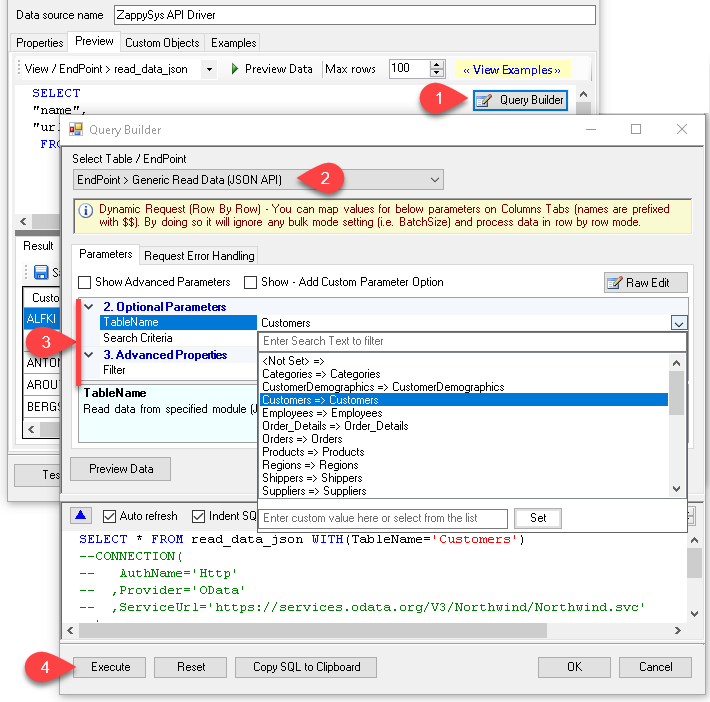
- Query Builder UI — Pick virtual tables or actions, set parameters, preview rows, and copy generated SQL
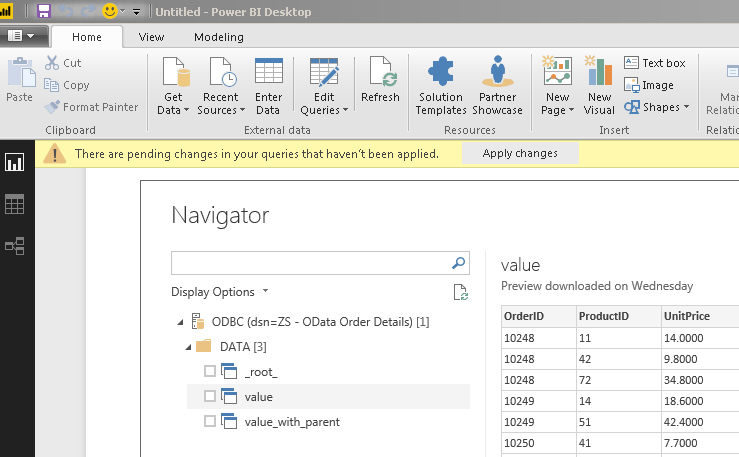
- Broad tool support — Same DSN for Power BI Desktop, Excel, SQL Server, SSIS, and other ODBC consumers
- Action catalog — Connector page lists how-to operations for datasets, refresh, push datasets, and related REST patterns
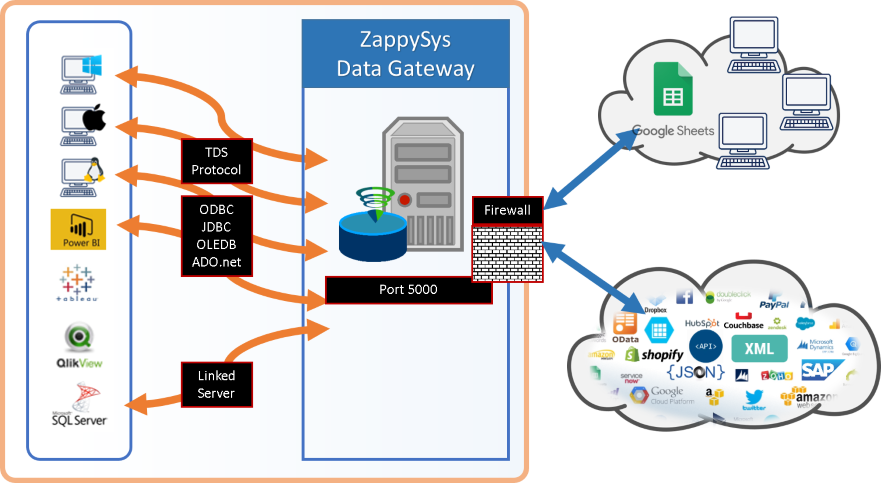
- Centralized access — Share the driver via ZappySys Data Gateway for JDBC, Linux, or remote clients without local installs
📸 Visual Overview & Setup
|
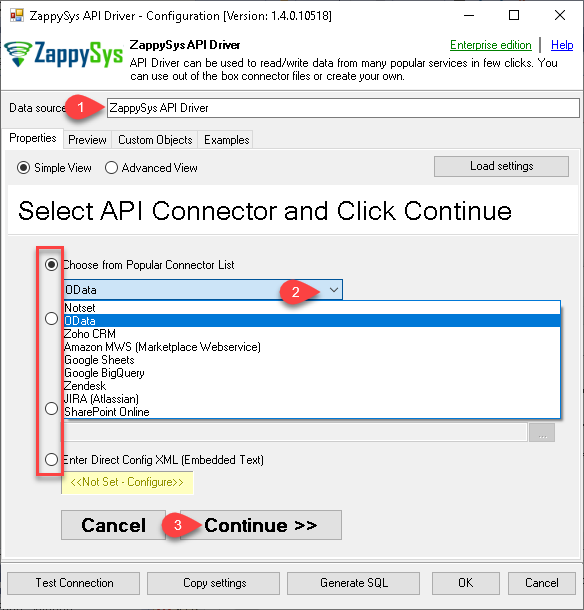
1. Pick Power BI Connector
|
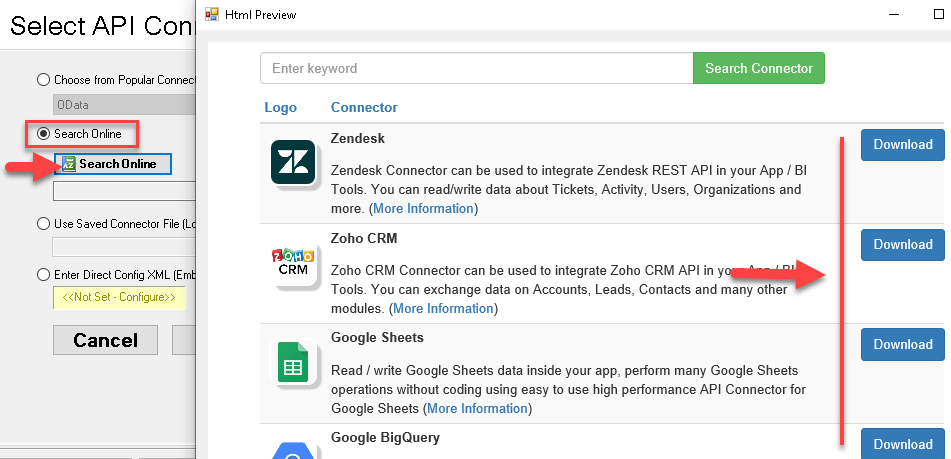
2. Search Online if Not Listed
|
3. Build & Preview SQL Query
|
|
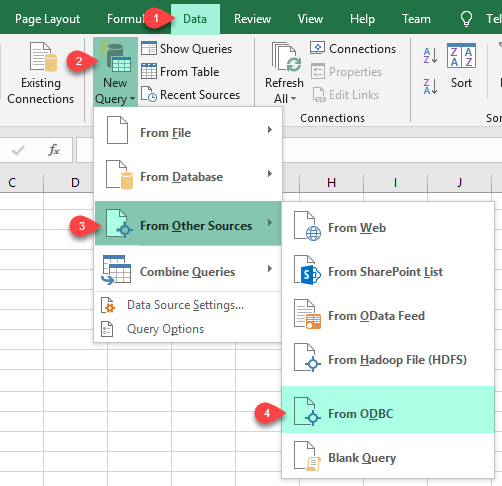
4. Load Power BI Data into Excel
|
5. Connect from Power BI
|
6. Share via Data Gateway
|
🔗 Seamless SQL Query Integration
Works with REST, OData, files, and databases
-- Read a workspace by Id (Power BI / ODBC)
SELECT *
FROM Workspaces
WHERE Id='aaaaaaaa-bbbb-cccc-dddd-eeeeeeeeeeee'
✔ Query APIs like a database
✔ No ETL or custom scripts needed
✔ Works inside SQL Server, Power BI, Excel
🔧 Key Features
Read & query Power BI data
- SELECT against virtual tables and views surfaced for workspaces, datasets, reports, dashboards, and related Power BI entities
- Use the Query Builder to choose an endpoint, supply parameters, and preview results before you paste SQL into your app
- Prefer server-side filters via Query Builder parameters when the API supports them for faster, smaller result sets
Write & operational actions
- Invoke refresh, push-dataset, and other write-oriented virtual tables using the SQL patterns documented on the connector how-to pages
- Combine with other ODBC drivers or staging tables when you prepare data in SQL Server before calling Power BI–backed actions
Authentication
- User Credentials OAuth for delegated scenarios tied to a signed-in user
- Application Credentials OAuth for automated jobs that use client secret or certificate flows described on the product page
- Paste Microsoft Entra authorization and token endpoints, client id, secret, and Power BI scopes (for example
https://analysis.windows.net/powerbi/api/*) through the DSN wizard
Platform & deployment
- Standard ODBC 3.x for BI, ETL, and custom .NET or C++ clients on Windows
- Optional Data Gateway when the driver cannot be installed on the machine that issues SQL
💡 Common Use Cases
Typical scenarios for the Power BI ODBC Driver:
-
Dataset and workspace inventory: Pull metadata into Excel or SQL for governance and lineage reporting.
Example: scheduled export of workspace and dataset lists into a staging database.
-
Post-load refresh: Trigger dataset refresh from a SQL Server job or SSIS package after upstream ETL completes.
Example: ODBC EXEC or action table wrapping the refresh API documented on the hub.
-
Push dataset feeds: Insert or truncate push-dataset rows using parameterized SQL from the Query Builder.
Example: near-real-time metrics landing in a push dataset from an operational database.
-
Power BI + Excel analytics: Reuse one DSN for analyst self-service without hand-crafted REST.
Example: direct query of workspace properties for capacity planning spreadsheets.
-
Enterprise gateway patterns: Host the DSN on Data Gateway for JDBC or remote teams.
Example: Java service querying Power BI through a centralized gateway DSN.
-
Hybrid reporting: Join Power BI API reads with other ODBC drivers in federated SQL workflows.
Example: correlate dataset refresh timestamps with warehouse job logs.
🎯 Summary
Bring Microsoft Power BI into the ODBC stack your team already runs.
Configure OAuth once in the DSN wizard, generate SQL from the Query Builder, and reuse the same connection across BI, databases, and ETL — without hand-maintained Power BI REST code.
Trusted by Developers & IT Teams Worldwide
- Built for ODBC Workloads: One driver model across BI, ETL, databases, and custom code.
- Expert Technical Support: Engineers help with connection strings, SQL, and performance tuning.
- Proven Enterprise Scale: Thousands of teams worldwide rely on ZappySys for API and cloud connectivity.
|
ODBC PowerPack
Includes Power BI ODBC Driver

Read reviews on Capterra →
|
Ready to start querying?
Install the full ODBC PowerPack to unlock all drivers and start your free trial.
| |


