Access and update Outlook Mail (Office 365) using standard SQL — no custom Microsoft Graph coding required.
Connect from SQL Server, Power BI, Excel, SSIS, Tableau, and any ODBC-compatible tool.
Read mail folders and messages, work with attachments, and perform mail actions exposed on the connector page. Authenticate with User Credentials or Application Credentials OAuth using values from your Microsoft Entra (Azure AD) app registration.
Part of ZappySys ODBC PowerPack (30+ drivers).
Recommended starting point
Pro Tip: Configure one Outlook Mail DSN once, then reuse it across Power BI, Excel, SQL Server linked servers, and custom apps without maintaining Graph REST calls by hand.
Compatibility: Windows ODBC (32/64-bit) | Works with Visual Studio, .NET, BI tools |
Data Gateway for SQL Server, JDBC, and non-Windows access
⚡ Key Benefits
- SQL over Microsoft Graph mail — Work with mail folders, messages, and attachments using familiar SELECT-style workflows in the driver
- OAuth in the DSN wizard — User Credentials and Application Credentials flows with authorization and token endpoints from your app registration
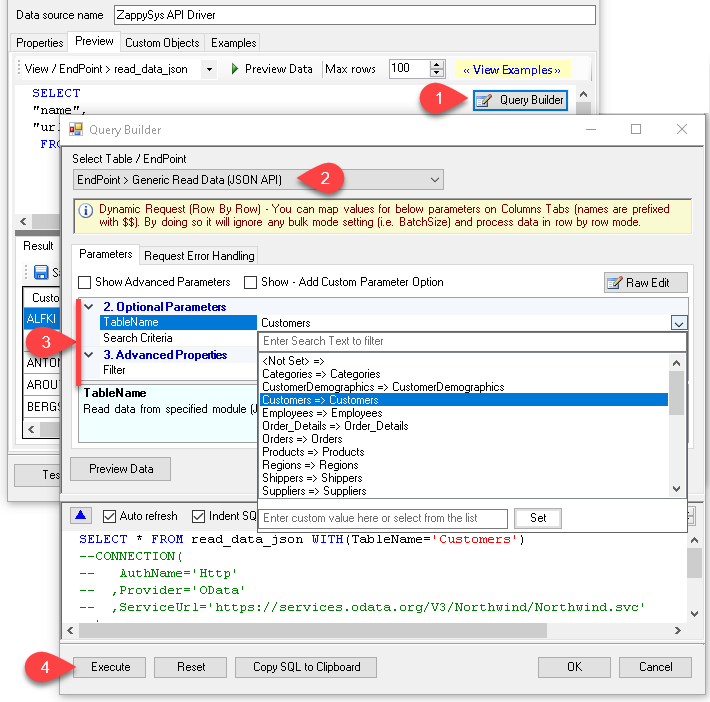
- Query Builder UI — Pick virtual tables or actions, set parameters, preview rows, and copy generated SQL
- Broad tool support — Same DSN for Power BI, Excel, SQL Server, SSIS, and other ODBC consumers
- Action catalog — Connector page lists how-to operations for mail, folders, groups, and generic REST patterns
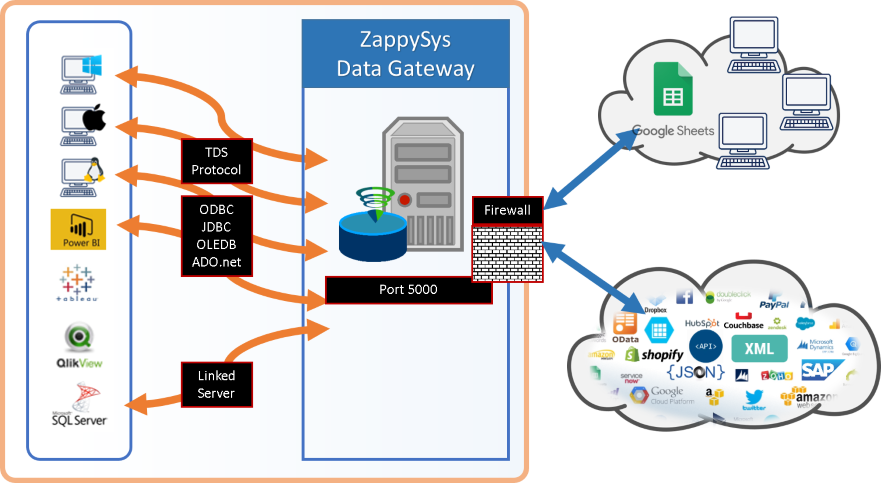
- Centralized access — Share the driver via ZappySys Data Gateway for JDBC, Linux, or remote clients without local installs
📸 Visual Overview & Setup
|
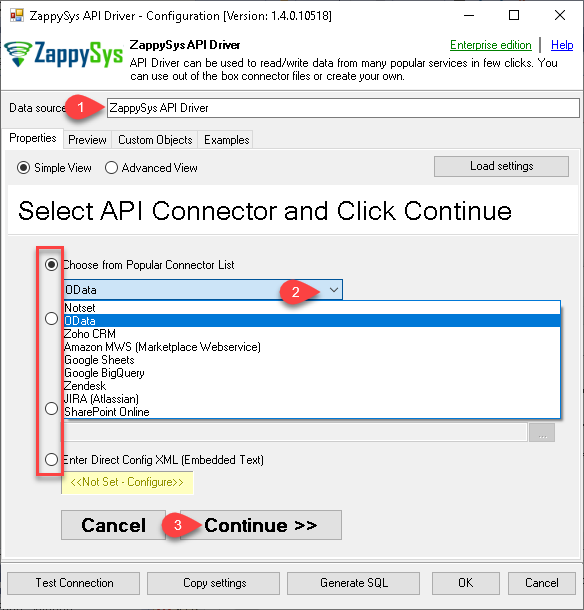
1. Pick Outlook Mail Connector
|
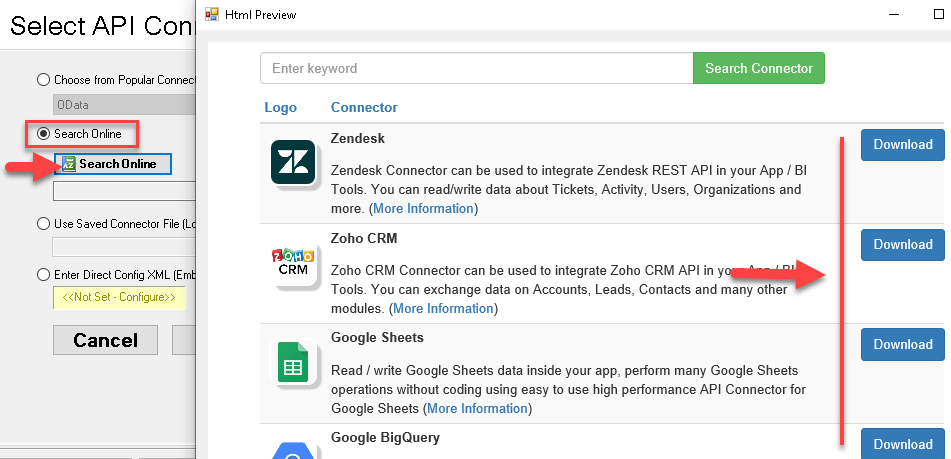
2. Search Online if Not Listed
|
3. Build & Preview SQL Query
|
|
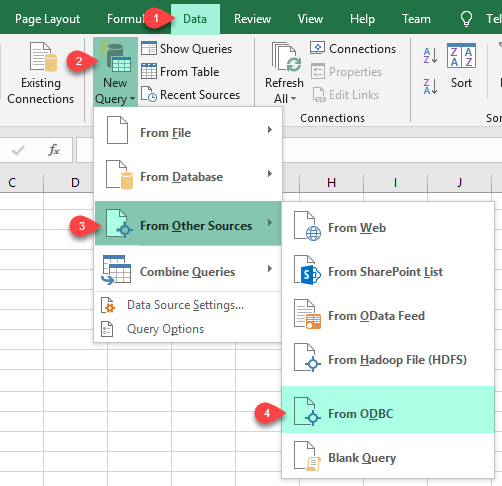
4. Load Mail Data into Excel
|
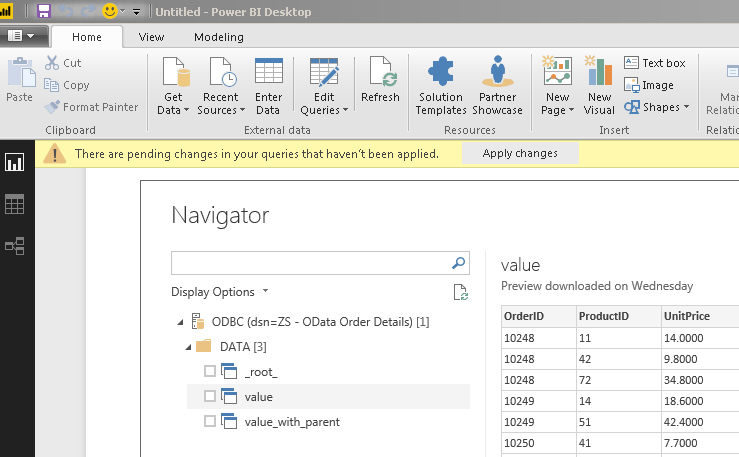
5. Connect from Power BI
|
6. Share via Data Gateway
|
🔗 Seamless SQL Query Integration
Works with REST, OData, files, and databases
-- Delete Message by Id via SQL (Outlook Mail / Office 365)
SELECT *
FROM delete_message
WITH(
  UserId='me',
  --UserId='1487fe8b-f09f-4015-a817-b8b9fe2a3edc', --OR use Id
  --UserId='myname@company.com', --OR use email
  MessageId='AAMkADliN2......iS7RK5Ny-I3JFHGAAZRll7aAAA=',
  MailFolderId='INBOX' --OR use mailbox ID
)
✔ Query APIs like a database
✔ No ETL or custom scripts needed
✔ Works inside SQL Server, Power BI, Excel
🔧 Key Features
Read & query mail data
- SELECT against virtual tables and views surfaced for mail folders, messages, attachments, and related Microsoft Graph entities
- Use the Query Builder to choose an action, supply parameters, and preview results before you paste SQL into your app
- Filter and parameterize calls so large mailboxes return only the rows you need
Write & mail actions
- Invoke write-oriented virtual tables (for example delete-by-id flows) using the SQL patterns documented on the connector how-to pages
- Combine with other ODBC drivers or SOURCE clauses when you stage data in SQL Server before calling Graph-backed actions
Authentication
- User Credentials OAuth for delegated scenarios tied to a signed-in mailbox
- Application Credentials OAuth for automated jobs that use client secret or certificate flows described on the product page
- Paste Microsoft Entra authorization and token endpoints, client id, secret, and scopes through the DSN wizard
Platform & deployment
- Standard ODBC 3.x for BI, ETL, and custom .NET or C++ clients on Windows
- Optional Data Gateway when the driver cannot be installed on the machine that issues SQL
💡 Common Use Cases
Typical scenarios for the Outlook Mail (Office 365) ODBC Driver:
-
Mailbox reporting in Power BI or Excel: Pull folder and message lists into a model for operational dashboards.
Example: scheduled refresh of unread counts or VIP sender activity.
-
ETL into a warehouse: Land message metadata or attachment references in SQL Server for downstream analytics.
Example: nightly incremental load keyed on last modified time.
-
Attachment or EML extraction: Use documented download actions to fetch files matching search criteria.
Example: archive compliance bundles to blob storage via an ODBC-driven SSIS package.
-
Operational mail sends: Drive send-mail style actions from SQL or app code through parameterized virtual tables.
Example: alert notifications triggered from a stored procedure.
-
Shared or delegated mailboxes: Configure User Credentials where the signed-in user has access to additional mailboxes.
Example: department inbox reporting with the same DSN security model.
-
Remote JDBC or Linux consumers: Route SQL through Data Gateway when ODBC cannot be installed locally.
Example: Java service querying Graph mail via a gateway-hosted DSN.
🎯 Summary
Bring Outlook Mail (Office 365) into the ODBC stack your team already runs.
Configure OAuth once in the DSN wizard, generate SQL from the Query Builder, and reuse the same connection across BI, databases, and ETL — without hand-maintained Graph REST code.
Trusted by Developers & IT Teams Worldwide
- Built for ODBC Workloads: One driver model across BI, ETL, databases, and custom code.
- Expert Technical Support: Engineers help with connection strings, SQL, and performance tuning.
- Proven Enterprise Scale: Thousands of teams worldwide rely on ZappySys for API and cloud connectivity.
|
ODBC PowerPack
Includes Outlook Mail (Office 365) ODBC Driver

Read reviews on Capterra →
|
Ready to start querying?
Install the full ODBC PowerPack to unlock all drivers and start your free trial.
| |


