Query and update Microsoft OneDrive using standard SQL from ODBC tools.
Connect from SQL Server, Power BI, Excel, Python, and other ODBC clients. Use OneDrive connector actions to list, read, copy, upload, move, and delete files or folders with flexible OAuth authentication.
Part of ZappySys ODBC PowerPack (30+ drivers).
Recommended starting point
Pro Tip: Configure one DSN once and reuse it across reporting, SQL automation, ETL, and custom apps.
Compatibility: Windows ODBC (32/64-bit) | Works with Visual Studio, .NET, BI tools | Data Gateway for SQL Server, JDBC, and non-Windows access
⚡ Key Benefits
- SQL Access to OneDrive — Query files, drives, and folders using familiar SQL from ODBC apps
- Bi-Directional Operations — Read data and execute write actions such as copy, upload, move, and delete
- Flexible OAuth Choices — Authenticate with user credentials, application credentials, or certificate-based OAuth
- Server-Side Action Parameters — Pass endpoint parameters in Query Builder for faster targeted requests
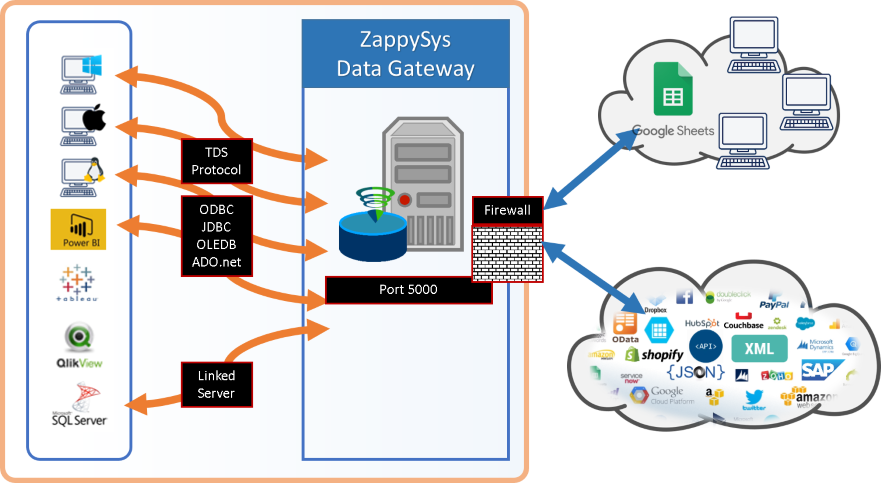
- Centralized Team Access — Share OneDrive connectivity through Data Gateway without per-user driver installs
📸 Visual Overview & Setup
|
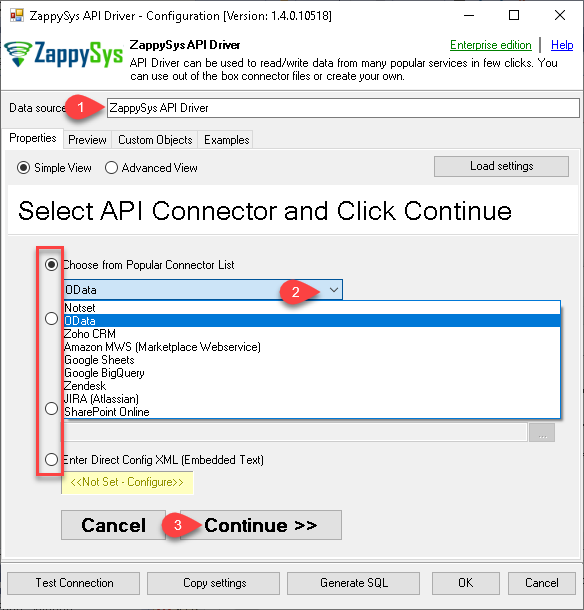
1. Pick OneDrive Connector
|
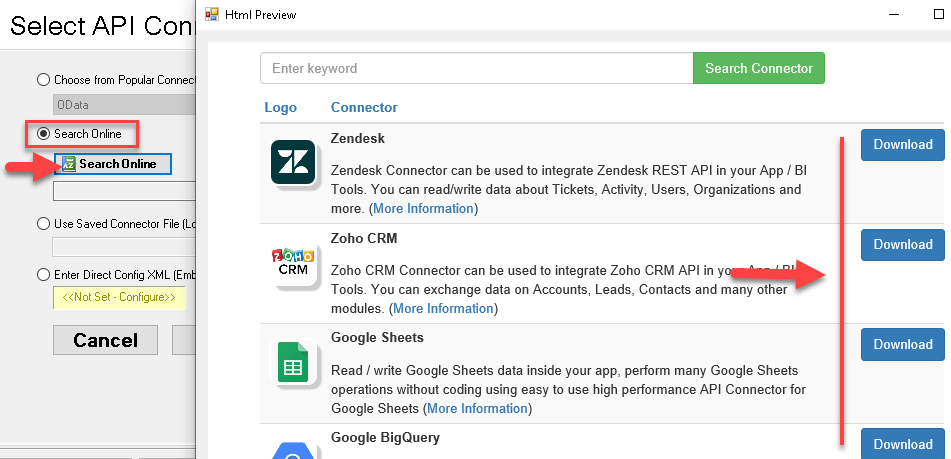
2. Search Online if Needed
|
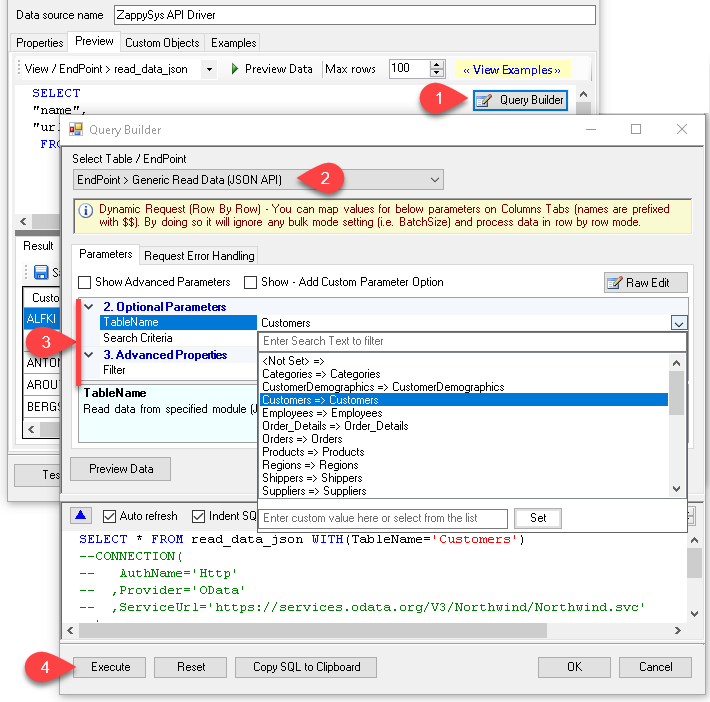
3. Build Query in Query Builder
|
|
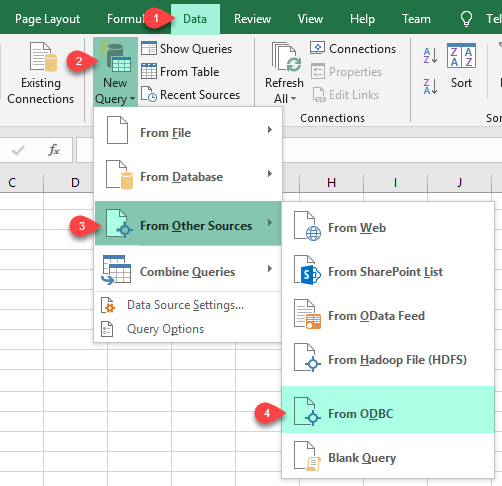
4. Load Data in Excel
|
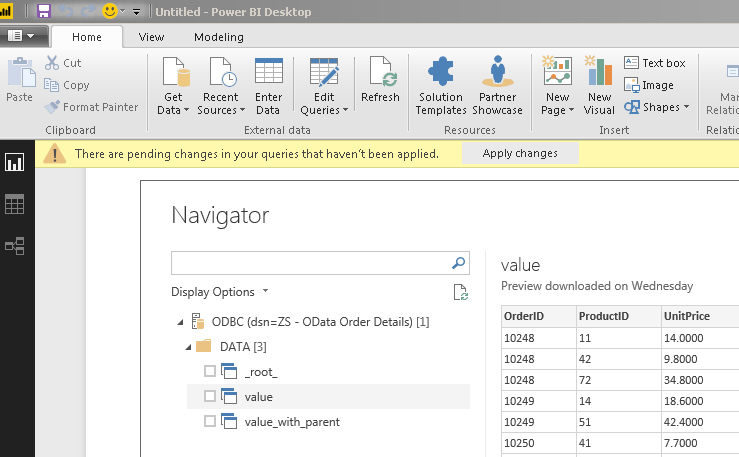
5. Connect from Power BI
|
6. Share via Data Gateway
|
🔗 Seamless SQL Query Integration
Works with REST, OData, files, and databases
-- Copy item via SQL (OneDrive)
SELECT *
FROM copy_item
WITH
(
    -- ##### SOURCE #####
    -- Source Drive
    , DriveId = 'me'
    -- OR use another user's / shared drive
    -- , DriveId = 'b!0zqXXXXXXXXXXXXXXXXXXXXXXXX'
    -- Item to copy (choose ONE)
    -- Path format: root:/path/to/item:
    , ItemId  = 'root:/myfile.pdf:'
    -- , ItemId  = 'root:/myfolder/myfile.pdf:'
    -- , ItemId = '01R65QTTRARZ42C4BN6FF2WOH3AONX4GUW'  -- by ID (preferred)
    -- ##### TARGET #####
    -- Target Drive (only required when copying across drives)
    -- , TargetDriveId = 'me'
    -- , TargetDriveId = 'b!0zqXLXXJh0uXXXXXXXXXXXXxxxxxxxxx'
    -- ##### TARGET FOLDER #####
    -- Choose ONE format: Path OR Id
    , TargetType       = 'Path'
    , TargetFolderPath = '/myfolder/subfolder'
    -- , TargetFolderPath = '/myfolder/export_<<yyyy-MM-dd,FUN_NOW>>'  -- folder must exist
    -- , TargetType     = 'Id'
    -- , TargetFolderId = '01R65QTTTBPH6V2AP36VD33CYYDXJSNHLN'
    -- , TargetFolderId = 'root'
    -- ##### OPTIONS #####
    -- New name for copied item (omit to keep source name)
    , TargetItemName = 'new_file_<<yyyy-MM-dd-HH-mm-ss-fff,FUN_NOW>>.pdf'
    -- What to do if target item already exists
    -- Ignored if TargetItemName is supplied
    -- , ConflictBehavior = 'replace'    -- fail | rename | replace
    -- Required for large items or cross-drive copies (async)
    -- , Prefer = 'respond-async'
);
✔ Query APIs like a database
✔ No ETL or custom scripts needed
✔ Works inside SQL Server, Power BI, Excel
🔧 Key Features
Read and Write OneDrive Data
- Read drive metadata, folders, files, and worksheets using SQL endpoints
- Execute write actions such as upload, copy, move, rename, and delete items
- Use generic REST request endpoints for custom Microsoft Graph calls
Authentication and Security
- User Credentials [OAuth] for delegated access to signed-in user resources
- Application Credentials [OAuth] for unattended service-style automations
- Certificate-based OAuth for secure app-to-app authentication workflows
Query Builder and Parameters
- Use Query Builder to choose actions and generate parameterized SQL
- Pass endpoint parameters in
WITH (...) for server-side processing
- Preview and test request outputs before embedding queries in downstream jobs
Platform Integration
- Connect from SQL Server, Power BI, Excel, Python, and ODBC-compatible ETL tools
- Share centrally managed access using ZappySys Data Gateway
- Use one driver model across analytics, reporting, and operational automation
💡 Common Use Cases
Typical scenarios for OneDrive ODBC integration:
- File Inventory Reporting: Query drives and folders to build visibility reports for storage usage and file activity.
- Automated File Operations: Copy, move, rename, or delete files with SQL-driven scheduled jobs.
- Data Ingestion Pipelines: Read CSV/JSON/Excel files from OneDrive and feed BI or warehouse workflows.
- Cross-Tool Analytics: Reuse the same DSN in Excel, Power BI, and SQL tools for consistent data access.
- Shared Team Connectivity: Publish OneDrive access through Data Gateway for centralized, controlled consumption.
🎯 Summary
OneDrive ODBC Driver brings OneDrive read and write operations into your SQL workflows without custom API coding.
Use OAuth-secured DSNs, action endpoints, and centralized gateway access to scale OneDrive integrations across your data stack.
Trusted by Developers & IT Teams Worldwide
- Built for ODBC Workloads: One driver model across BI, ETL, databases, and custom code.
- Expert Technical Support: Engineers help with authentication, SQL patterns, and performance tuning.
- Proven Enterprise Scale: ZappySys products power API and cloud integrations for teams worldwide.
|
ODBC PowerPack
Includes OneDrive ODBC Driver

Read reviews on Capterra →
|
Ready to start querying OneDrive?
Install the full ODBC PowerPack to unlock all drivers and start your free trial.
| |


