Access and update Salesforce using SQL or SOQL — no custom API coding required.
Connect from SQL Server, Power BI, Excel, SSIS, and any ODBC-compatible tool.
Run SELECT, INSERT, UPDATE, DELETE, perform bulk operations, and authenticate securely with OAuth (MFA supported).
Part of ZappySys ODBC PowerPack (30+ drivers).
Recommended starting point
Pro Tip: Use the guide above to configure one ODBC DSN.
Once set up, you can reuse it across Power BI, Excel, and SQL Server without extra steps.
Compatibility: Windows ODBC (32/64-bit) | Works with Visual Studio, .NET, BI tools |
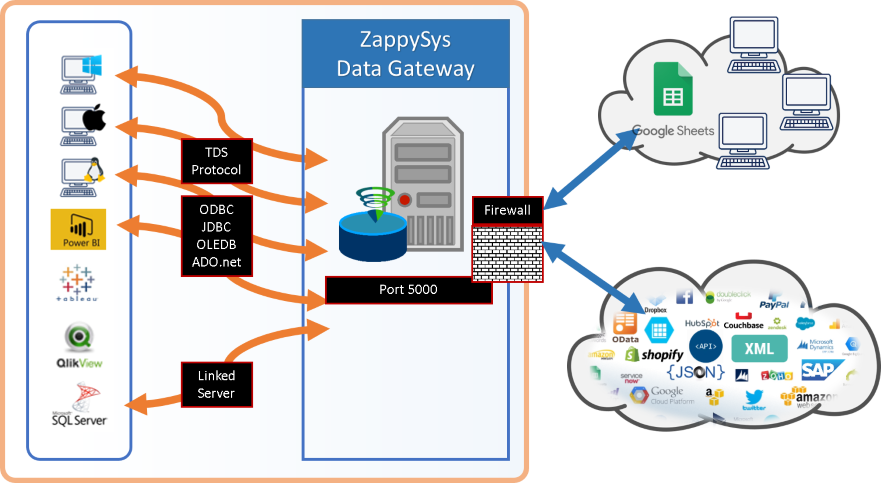
Data Gateway for SQL Server, JDBC, and non-Windows access
⚡ Key Benefits
- SQL + SOQL Access — Query Salesforce using familiar SQL and native SOQL
- Full CRUD Support — INSERT, UPDATE, DELETE, and UPSERT from any ODBC tool
- Bulk API & Parallel — Process large datasets with Bulk API and multi-threaded execution
- Cross-System Loading — Push rows from SQL Server, CSV, or other ODBC sources via SOURCE clause
- Centralized Access — Share driver via Data Gateway without local installs
📸 Visual Overview & Setup
|
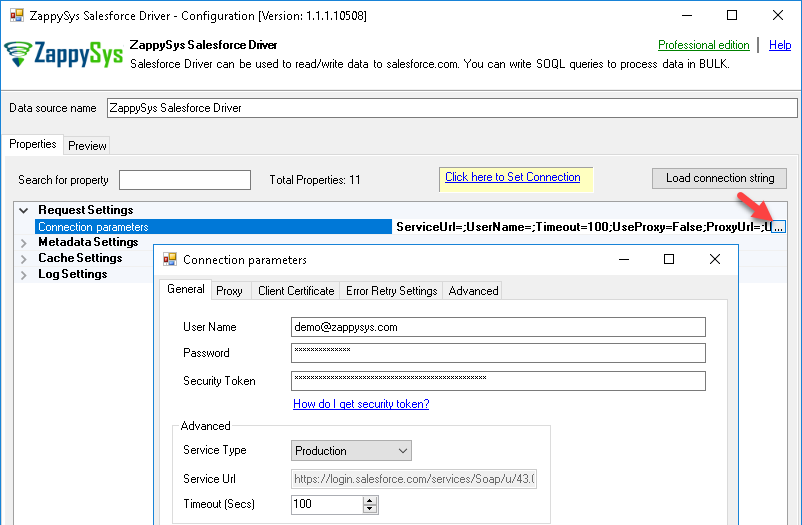
1. Configure Salesforce CRM Connection
|
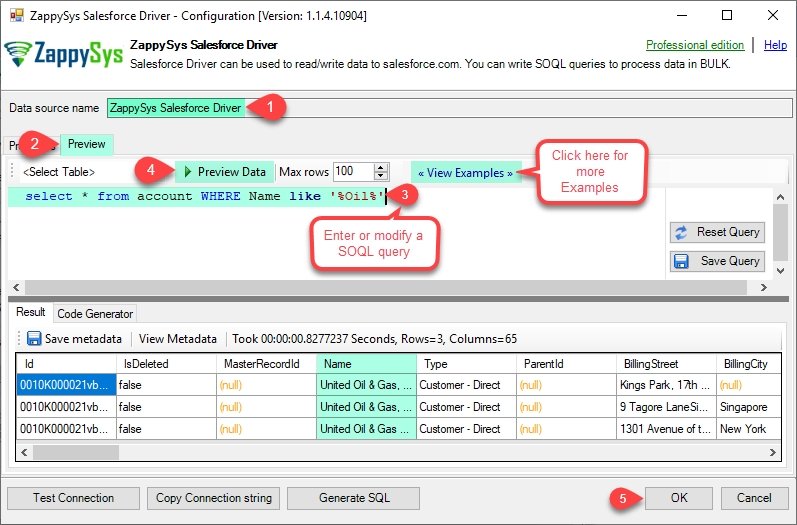
2. Salesforce Preview Data
|
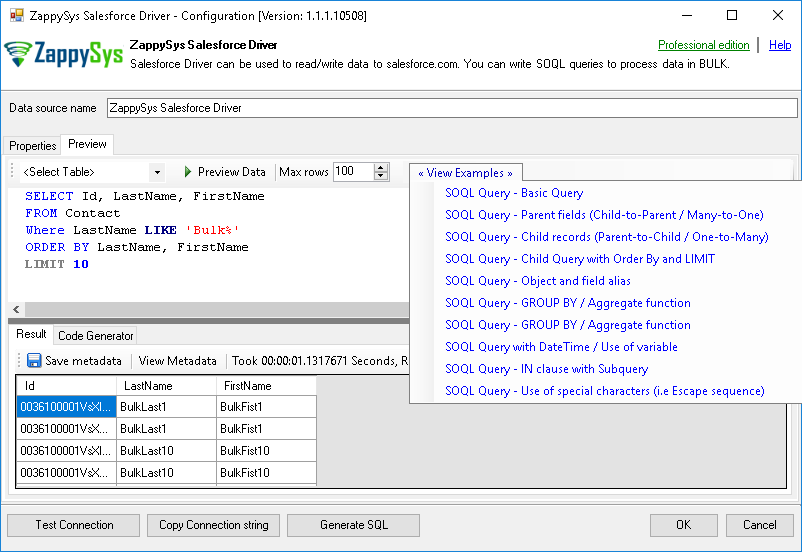
3. Write SOQL & Preview Data
|
|
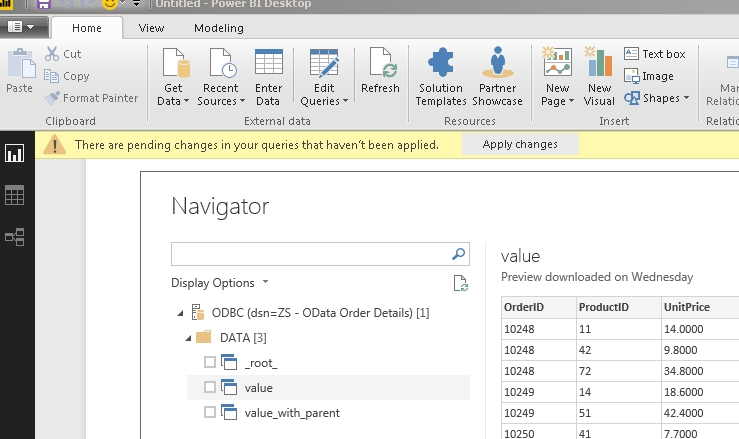
4. Use in Power BI
|
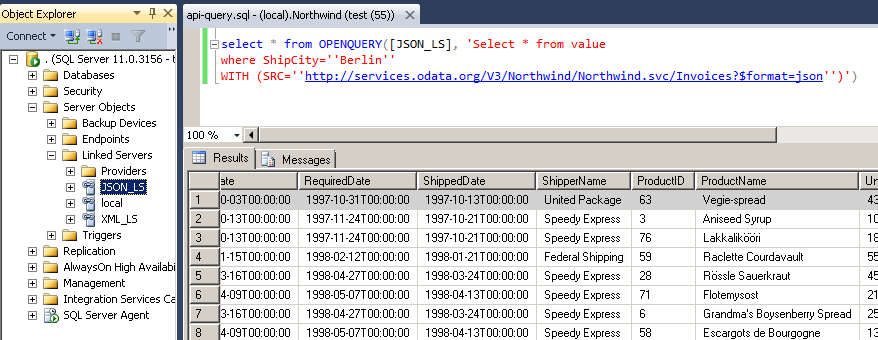
5. Query from SQL Server (T-SQL)
|
6. Share via Data Gateway
|
🔗 Seamless SQL Query Integration
Works with REST, OData, files, and databases
-- Bulk insert from SQL Server staging table into Salesforce
INSERT INTO Account
SOURCE('MSSQL',
    'Data Source=localhost;Initial Catalog=tempdb;Integrated Security=true',
    'select C_NAME as Name, C_CITY as BillingCity,
     C_LOC as NumberofLocations__c
     From very_large_staging_table'
)
WITH(
    Output=1,
    EnableBulkMode=1,
    EnableParallelThreads=1,
    MaxParallelThreads=6
)
✔ Query APIs like a database
✔ No ETL or custom scripts needed
✔ Works inside SQL Server, Power BI, Excel
🔧 Key Features
Read & Query (SOQL)
- SELECT with WHERE, ORDER BY, LIMIT, and relationship queries (parent / child subqueries)
- Aggregations: GROUP BY, HAVING, COUNT, and field aliases in aggregate queries
- Date/time filters, SOQL date literals, and driver variable placeholders for dynamic windows
- IN with subqueries; escape sequences for reserved characters in literals
Write & Bulk Operations
- INSERT, UPDATE, DELETE with optional
WITH (Output=…) for row-level status columns
- UPSERT with external key via
WITH (KEY='YourExternalId__c')
- Bulk API mode for very large INSERT/UPDATE/DELETE batches
- Parallel processing (
EnableParallelThreads, MaxParallelThreads) for high-throughput loads
External & Staging Sources
SOURCE('MSSQL'|'ODBC'|'OLEDB', …) to push many rows from another database or file driver- Column mapping driven by the source query; tune bulk vs. parallel per workload
Security & Platform
- OAuth tokens instead of storing passwords where policies require it (MFA/2FA compatible)
- Standard ODBC for Power BI, Tableau, Qlik, Excel, SSRS, Informatica, Talend, SSIS, and custom apps
- Tight SQL Server story: linked server / OPENQUERY patterns via Data Gateway when you cannot install the driver on the server
💡 Common Use Cases
Typical scenarios for the Salesforce ODBC Driver in reporting, ETL, and app development:
-
CRM reporting in Power BI or Excel: Model Accounts, Contacts, and Opportunities with direct SOQL.
Example: SELECT Id, Name, AnnualRevenue FROM Account WHERE Industry = 'Technology' LIMIT 5000
-
Incremental loads into a warehouse: Filter on
LastModifiedDate using date literals or variables.
Example: sync only rows changed since the last package run.
-
Upsert from staging SQL tables: Push cleansed rows into Salesforce with an external id.
Example: UPSERT INTO Account(Name, SupplierId__c) VALUES (…) WITH (KEY='SupplierId__c', Output=1)
-
Bulk delete or update from ids: Feed ids from SQL or CSV through
SOURCE with Bulk API enabled.
Example: retire thousands of legacy records after validation in the warehouse.
-
SSIS or ETL tool pipelines: Use the same DSN as other ODBC steps for consistent metadata and credentials.
Example: extract with SOQL, transform in SSIS, load to SQL Server or back to Salesforce.
-
Server-side SQL without local ODBC: Route queries through Data Gateway from JDBC or non-Windows clients.
Example: Java or Linux services query Salesforce using a SQL Server JDBC URL to the gateway.
🎯 Summary
Bring Salesforce into the ODBC ecosystem your team already uses.
Query with SOQL, write with SQL DML, scale with bulk and parallel options, and connect from Visual Studio, BI stacks, or SQL Server — without maintaining one-off REST integrations.
Trusted by Developers & IT Teams Worldwide
- Built for ODBC Workloads: One driver model across BI, ETL, databases, and custom code.
- Expert Technical Support: Engineers help with connection strings, SOQL, and performance tuning.
- Proven Enterprise Scale: Thousands of teams worldwide rely on ZappySys for API and cloud connectivity.
|
ODBC PowerPack
Includes Salesforce ODBC Driver

Read reviews on Capterra →
|
Ready to start querying?
Install the full ODBC PowerPack to unlock all drivers and start your free trial.
| |


