Read JSON files from FTP, SFTP, and FTPS servers using familiar SQL queries — no custom file-transfer code required.
Connect from SQL Server, Power BI, Excel, SSIS, and any ODBC-compatible tool.
Run SELECT with WHERE, GROUP BY, ORDER BY on JSON files hosted on FTP sites. Flatten nested arrays, read compressed files, and query multiple files with wildcards.
Part of ZappySys ODBC PowerPack (30+ drivers).
Recommended starting point
Pro Tip: Use the guide above to configure one ODBC DSN.
Once set up, you can reuse it across Power BI, Excel, and SQL Server without extra steps.
Compatibility: Windows ODBC (32/64-bit) | Works with Visual Studio, .NET, BI tools |
Data Gateway for SQL Server, JDBC, and non-Windows access
⚡ Key Benefits
- SQL on FTP/SFTP JSON — Query JSON files on FTP, SFTP, or FTPS servers using SELECT, WHERE, GROUP BY syntax
- Wildcard & Multi-File — Read single or multiple files using pattern matching (e.g.,
folder/cust*-?.json)
- Array Flattening — Automatically flatten nested JSON arrays and transform complex 2D arrays into tabular rows
- Compressed File Streaming — Read GZip and Zip JSON files directly without pre-extraction
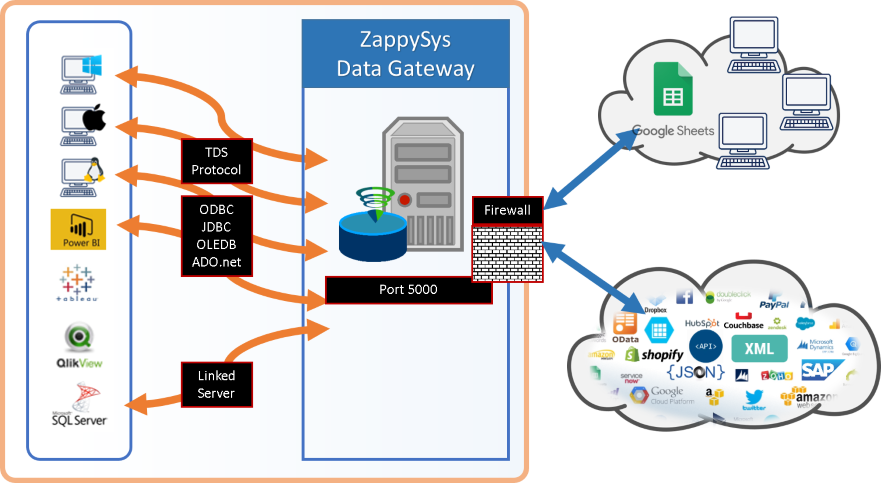
- Centralized Access — Share driver via Data Gateway without local installs on client machines
📸 Visual Overview & Setup
|
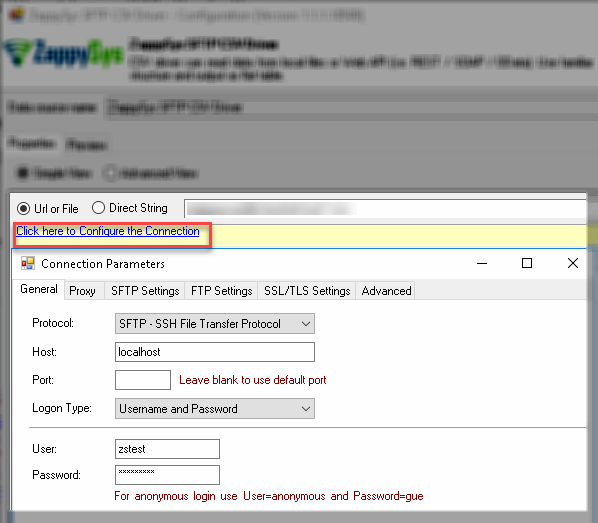
1. Configure FTP / SFTP Connection
|
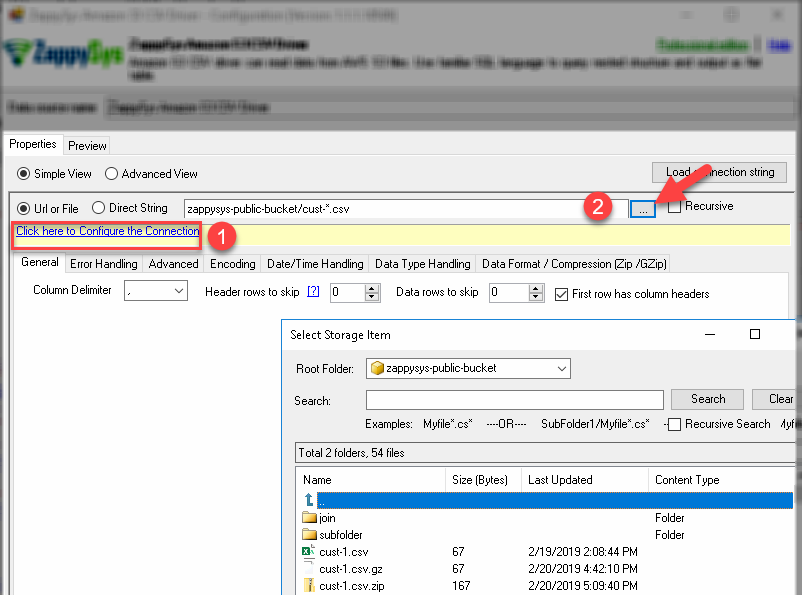
2. Browse FTP/SFTP JSON Files
|
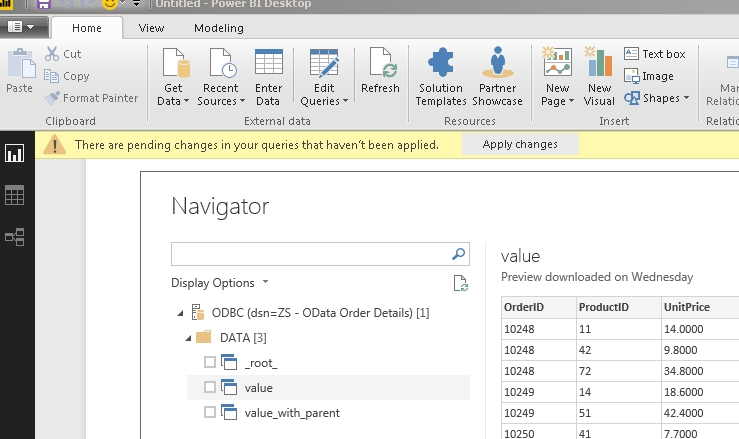
3. Use in Power BI
|
|
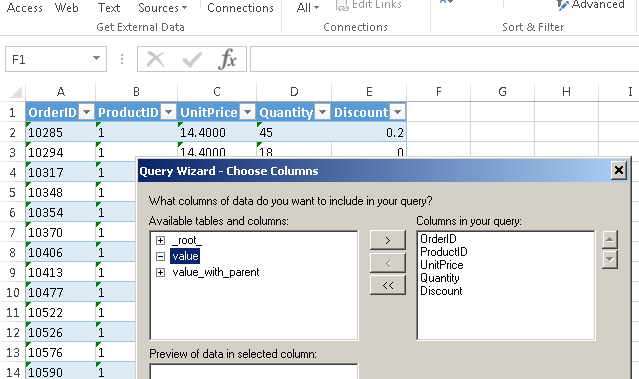
4. Use in Excel
|
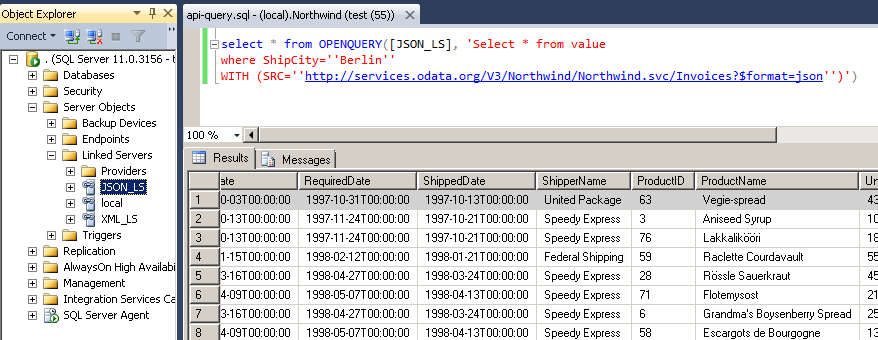
5. Query from SQL Server (T-SQL)
|
6. Share via Data Gateway
|
🔗 Seamless SQL Query Integration
Works with REST, OData, files, and databases
-- Aggregate JSON invoice data from FTP/SFTP server
SELECT
    Country AS Invoice_Country,
    SUM(UnitPrice * Quantity) AS Invoice_Total
FROM $
WHERE Discount > 0
GROUP BY Country
HAVING SUM(UnitPrice * Quantity) > 1000
ORDER BY Invoice_Total DESC
LIMIT 3
WITH (SRC='zappysys-public-bucket/invoices.json')
✔ Query APIs like a database
✔ No ETL or custom scripts needed
✔ Works inside SQL Server, Power BI, Excel
🔧 Key Features
Read & Query JSON from FTP / SFTP
- SELECT with WHERE, ORDER BY, GROUP BY, LIMIT, and HAVING on FTP/SFTP-hosted JSON files
- Read single file (
folder/cust-1.json) or multiple files via wildcard (folder/cust*-?.json)
- Embedded JSON queries — pass inline JSON strings with
DATA='...' for testing or static lookups
- UNION ALL and temp tables (
#tbl) for combining results from multiple queries
Array Flattening & Transforms
- Flatten nested JSON arrays using
FILTER='$.path[*]' JSONPath expressions
- Transform simple 2D arrays into tabular rows with
ArrayTransformType='TransformSimpleTwoDimensionalArray'
- Pivot data — transform JSON object keys into rows with
EnablePivot='True'
- Auto-fill missing columns with null values for inconsistent JSON structures
JSON & SQL Functions
- JSON:
json_value, json_array_first, json_array_last, json_array_nth
- String:
substr, printf, upper, lower, replace, trim, length
- Date/time:
DATE, DATETIME, STRFTIME, JULIANDAY with modifiers
- Control flow:
COALESCE, IFNULL, NULLIF, CASE
File Handling & Compression
- Read GZip and Zip compressed JSON files in streaming mode
- Wildcard pattern matching for multi-file reads across FTP directories
- Recursive sub-folder scanning with
RECURSIVE='True'
Security & Platform
- FTP, SFTP (SSH), and FTPS (TLS/SSL) protocols with username/password or key-based authentication
- Standard ODBC for Power BI, Tableau, Qlik, Excel, SSRS, Informatica, Talend, SSIS, and custom apps
- Server-side access via Data Gateway — no local driver install required
💡 Common Use Cases
Typical scenarios for the FTP / SFTP ODBC Driver for JSON Files in reporting, ETL, and app development:
-
FTP JSON reporting in Power BI or Excel: Query JSON files on FTP/SFTP servers and load into BI dashboards.
Example: SELECT * FROM $ WITH (SRC='uploads/cust-1.json')
-
Multi-file aggregation: Read and aggregate many JSON files using wildcard patterns.
Example: SELECT * FROM $ WITH (SRC='data/logs*.json', RECURSIVE='True')
-
Flatten nested JSON arrays: Convert deeply nested JSON structures into flat, queryable rows.
Example: SELECT * FROM $ WITH (SRC='folder/data.json', FILTER='$.records[*]')
-
Pivot JSON objects to rows: Transform key-value JSON objects into tabular data for analytics.
Example: use EnablePivot='True' to convert object properties into separate rows.
-
Query compressed FTP files: Read GZip or Zip JSON files directly without extracting first.
Example: the driver streams and decompresses on-the-fly.
-
Server-side access without local ODBC: Route queries through Data Gateway from SQL Server Linked Server or JDBC clients.
Example: Java or Linux services query FTP/SFTP JSON data via the gateway JDBC connection.
🎯 Summary
Bring FTP/SFTP JSON data into the ODBC ecosystem your team already uses.
Query with SQL, flatten nested arrays, pivot objects, aggregate across multiple files, and connect from Power BI, SQL Server, Excel, or code — without writing custom file-transfer integrations.
Trusted by Developers & IT Teams Worldwide
- Built for ODBC Workloads: One driver model across BI, ETL, databases, and custom code.
- Expert Technical Support: Engineers help with connection strings, SQL queries, and FTP/SFTP configuration.
- Proven Enterprise Scale: Thousands of teams worldwide rely on ZappySys for API and cloud connectivity.
|
ODBC PowerPack
Includes FTP / SFTP ODBC Driver for JSON Files

Read reviews on Capterra →
|
Ready to start querying?
Install the full ODBC PowerPack to unlock all drivers and start your free trial.
| |