Read CSV and TSV files from Azure Blob Storage containers using familiar SQL queries — no custom Azure SDK code required.
Connect from SQL Server, Power BI, Excel, SSIS, and any ODBC-compatible tool.
Run SELECT with WHERE, GROUP BY, ORDER BY on delimited files stored in Azure containers. Use custom delimiters, read compressed files, and query multiple blobs with wildcards.
Part of ZappySys ODBC PowerPack (30+ drivers).
Recommended starting point
Pro Tip: Use the guide above to configure one ODBC DSN.
Once set up, you can reuse it across Power BI, Excel, and SQL Server without extra steps.
Compatibility: Windows ODBC (32/64-bit) | Works with Visual Studio, .NET, BI tools |
Data Gateway for SQL Server, JDBC, and non-Windows access
⚡ Key Benefits
- SQL on Azure CSV — Query CSV/TSV files in Azure Blob containers using SELECT, WHERE, GROUP BY syntax
- Wildcard & Multi-File — Read single or multiple blobs using pattern matching (e.g.,
container/cust*-?.csv)
- Custom Delimiters — Parse comma, tab, pipe, or any character-delimited files with header row control
- Compressed File Streaming — Read GZip and Zip CSV files directly without pre-extraction
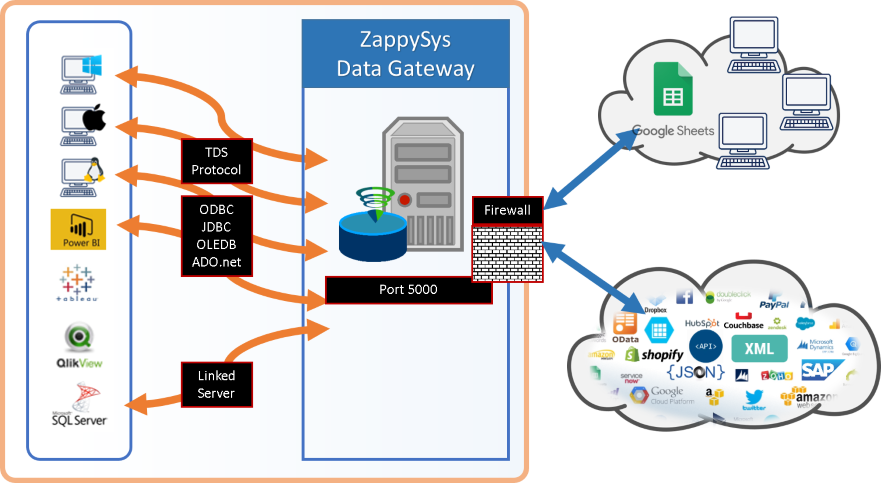
- Centralized Access — Share driver via Data Gateway without local installs on client machines
📸 Visual Overview & Setup
|
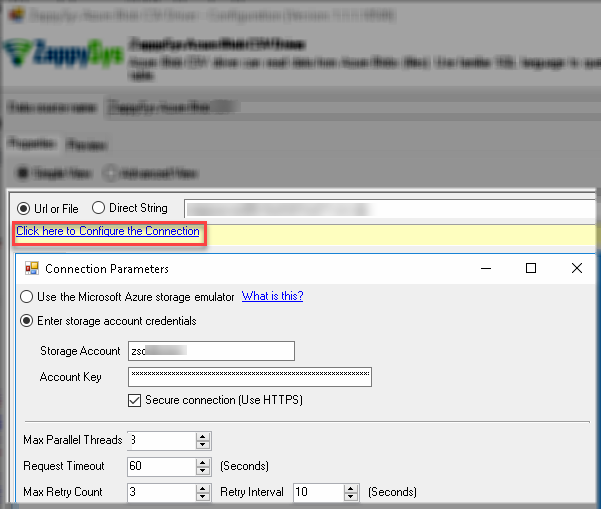
1. Configure Azure Blob Connection
|
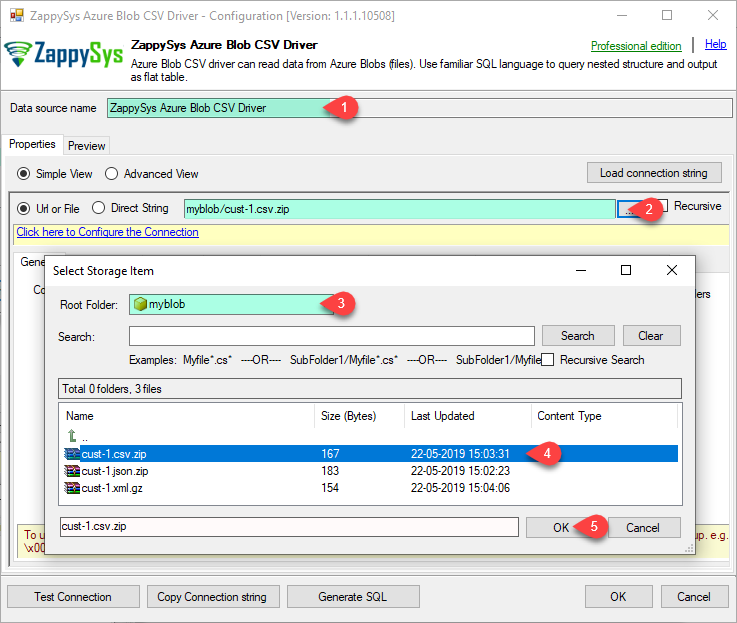
2. Browse Container CSV Files
|
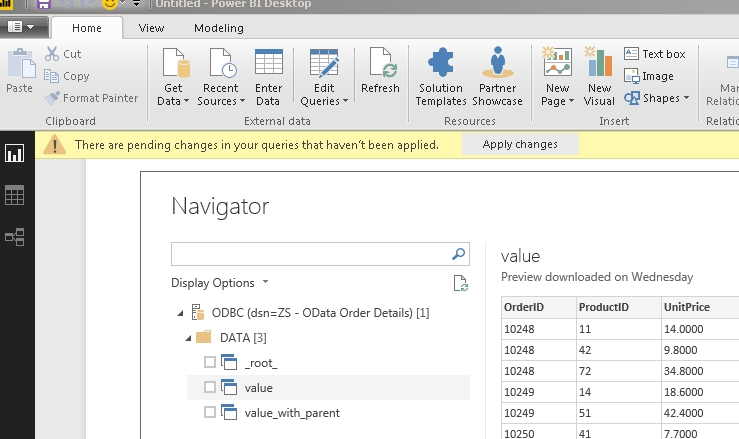
3. Use in Power BI
|
|
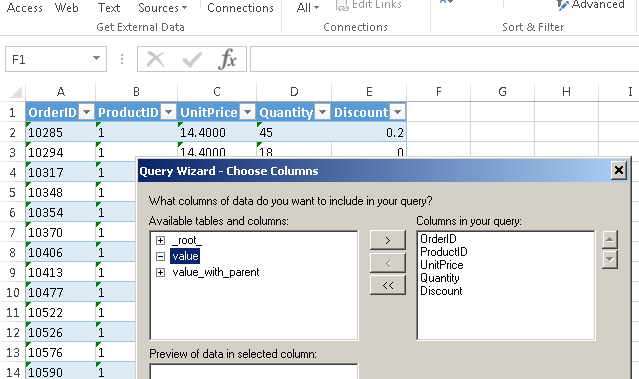
4. Use in Excel
|
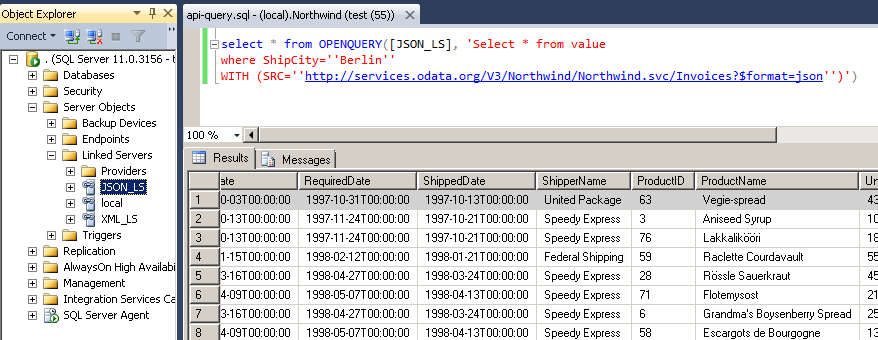
5. Query from SQL Server (T-SQL)
|
6. Share via Data Gateway
|
🔗 Seamless SQL Query Integration
Works with REST, OData, files, and databases
-- Aggregate CSV invoice data from Azure Blob container
SELECT
    Country AS Invoice_Country,
    SUM(UnitPrice * Quantity) AS Invoice_Total
FROM $
WHERE Discount > 0
GROUP BY Country
HAVING SUM(UnitPrice * Quantity) > 1000
ORDER BY Invoice_Total DESC
LIMIT 3
WITH (SRC='zappysys-public-bucket/invoices.csv')
✔ Query APIs like a database
✔ No ETL or custom scripts needed
✔ Works inside SQL Server, Power BI, Excel
🔧 Key Features
Read & Query CSV from Azure Blob
- SELECT with WHERE, ORDER BY, GROUP BY, LIMIT, and HAVING on Azure-hosted CSV/TSV files
- Read single file (
container/cust-1.csv) or multiple files via wildcard (container/cust*-?.csv)
- Custom column delimiter: comma, tab, pipe, or any character (
ColumnDelimiter='|')
- UNION ALL and temp tables (
#tbl) for combining results from multiple queries
CSV Parser Options
- Header row detection with
HasColumnHeaderRow option
- Skip rows, trim fields, trim headers for messy input files
- Ignore blank lines and blank rows (no data for each column)
- Allow comments inside CSV files
- Error handling: throw on empty file or column count mismatch
SQL Functions & Language
- String:
substr, printf, upper, lower, replace, trim, length
- Date/time:
DATE, DATETIME, STRFTIME, JULIANDAY with modifiers
- Math:
abs, round, random
- Control flow:
COALESCE, IFNULL, NULLIF, CASE
File Handling & Compression
- Read GZip and Zip compressed CSV files in streaming mode
- Auto-fill missing columns with null values
- Pivot data — transform columns into rows
- Recursive sub-folder scanning with
RECURSIVE='True'
Security & Platform
- Azure Storage account key or SAS token authentication for container access
- Standard ODBC for Power BI, Tableau, Qlik, Excel, SSRS, Informatica, Talend, SSIS, and custom apps
- Server-side access via Data Gateway — no local driver install required
💡 Common Use Cases
Typical scenarios for the Azure Blob ODBC Driver for CSV Files in reporting, ETL, and app development:
-
Azure CSV reporting in Power BI or Excel: Query CSV files in Blob containers and load into BI dashboards.
Example: SELECT * FROM $ WITH (SRC='my-container/cust-1.csv')
-
Multi-file aggregation: Read and aggregate many CSV files using wildcard patterns.
Example: SELECT * FROM $ WITH (SRC='my-container/logs*.csv', RECURSIVE='True')
-
Parse pipe-delimited or TSV files: Use custom delimiter settings for non-comma-separated data.
Example: SELECT * FROM $ WITH (SRC='container/data.tsv', ColumnDelimiter='|')
-
Handle messy CSV files: Skip header rows, trim fields, ignore blank lines, and handle column mismatches.
Example: configure skip rows, trim headers, and error handling in the DSN or WITH clause.
-
Query compressed Azure blobs: Read GZip or Zip CSV files directly without extracting first.
Example: the driver streams and decompresses on-the-fly.
-
Server-side access without local ODBC: Route queries through Data Gateway from SQL Server Linked Server or JDBC clients.
Example: Java or Linux services query Azure Blob CSV data via the gateway JDBC connection.
🎯 Summary
Bring Azure Blob CSV data into the ODBC ecosystem your team already uses.
Query with SQL, handle custom delimiters and messy files, aggregate across multiple blobs, and connect from Power BI, SQL Server, Excel, or code — without writing custom Azure SDK integrations.
Trusted by Developers & IT Teams Worldwide
- Built for ODBC Workloads: One driver model across BI, ETL, databases, and custom code.
- Expert Technical Support: Engineers help with connection strings, SQL queries, and Azure configuration.
- Proven Enterprise Scale: Thousands of teams worldwide rely on ZappySys for API and cloud connectivity.
|
ODBC PowerPack
Includes Azure Blob ODBC Driver for CSV Files

Read reviews on Capterra →
|
Ready to start querying?
Install the full ODBC PowerPack to unlock all drivers and start your free trial.
| |


