Access and update ManageEngine ServiceDesk Plus (Zoho) using standard SQL through ODBC.
Connect from SQL Server, Power BI, Excel, SSIS, Python, and other ODBC-compatible tools. Read and write requests, tasks, comments, and worklogs with OAuth authentication, query preview, and action-based SQL operations.
Part of ZappySys ODBC PowerPack (30+ drivers).
Recommended starting point
Pro Tip: Configure one DSN once and reuse it across BI, SQL, ETL, and script workloads.
Compatibility: Windows ODBC (32/64-bit) | Works with Visual Studio, .NET, BI tools | Data Gateway for SQL Server, JDBC, and non-Windows access
⚡ Key Benefits
- SQL-Driven Service Desk Access — Query and act on requests and related entities with familiar SQL syntax
- Action-Based Operations — Execute endpoint-specific actions like request deletion through SQL commands
- OAuth Authentication Flow — Configure token-based access directly in the DSN wizard
- Query Builder Productivity — Build, test, and preview API queries before downstream use
- Centralized Connectivity — Share access through Data Gateway for broad client compatibility
📸 Visual Overview & Setup
1. Pick ManageEngine Connector 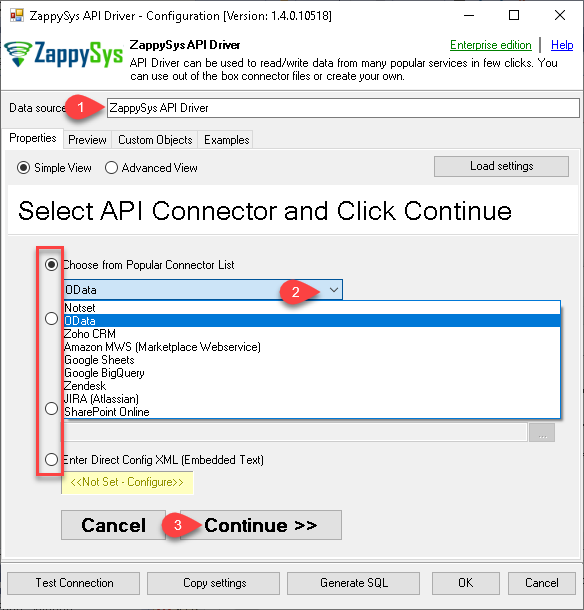 |
2. Search Online if Needed 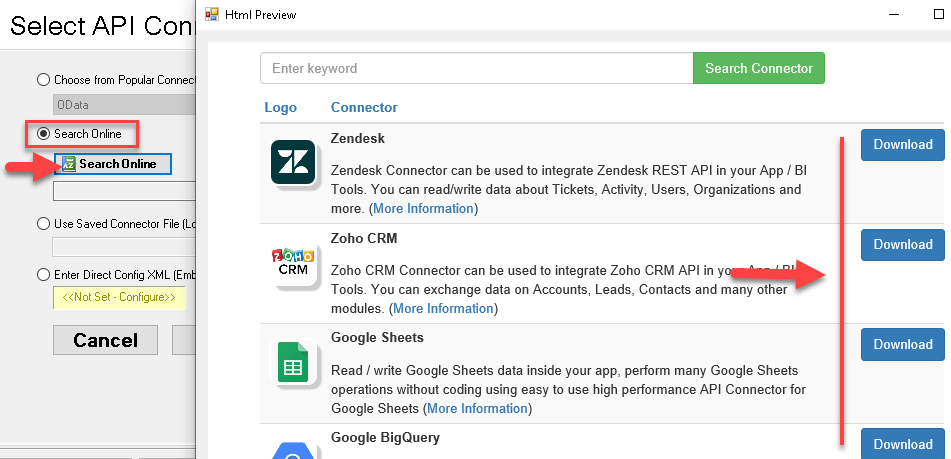 |
3. Build Query in Query Builder 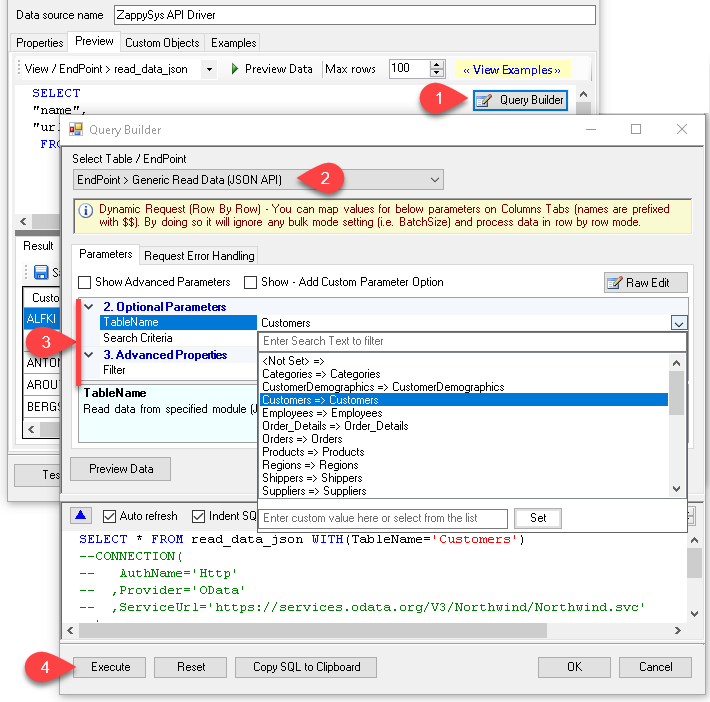 |
4. Load Data in Excel 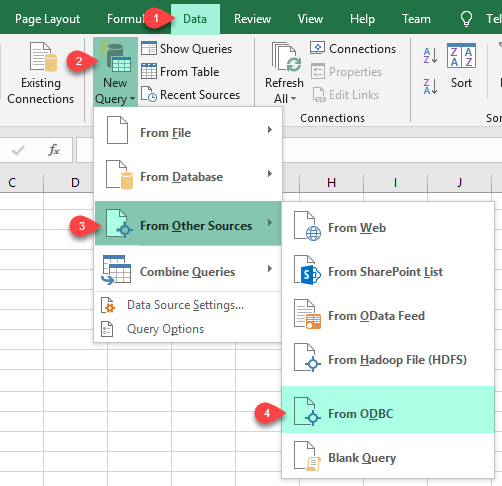 |
5. Connect from Power BI 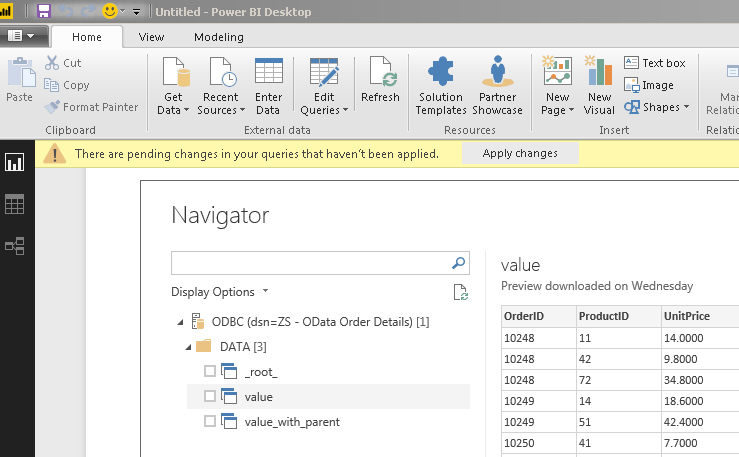 |
6. Share via Data Gateway 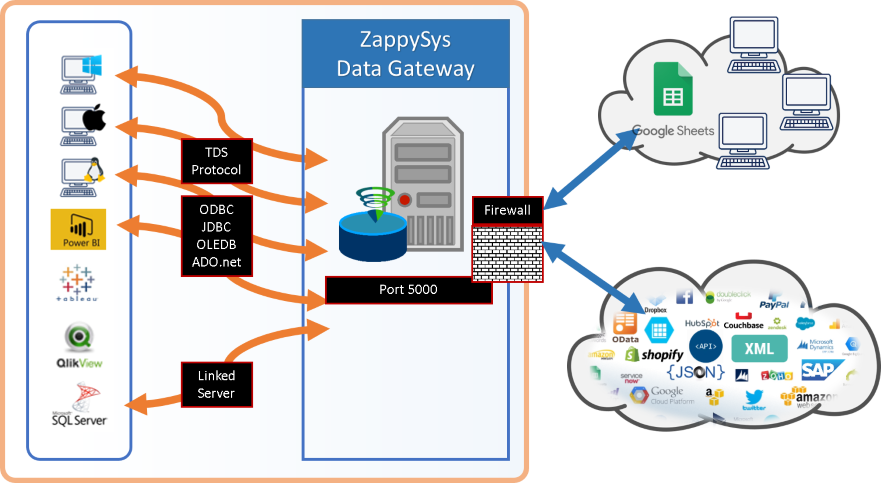 |
🔗 Seamless SQL Query Integration
Works with REST, OData, files, and databases
-- Delete Request via SQL (ManageEngine ServiceDesk Plus Zoho)
DELETE FROM Requests WHERE id=111112345
✔ Query APIs like a database
✔ No ETL or custom scripts needed
✔ Works inside SQL Server, Power BI, Excel
🔧 Key Features
Query and Action Execution
- Read requests and related entities using SQL queries
- Execute endpoint actions such as request deletion through SQL commands
- Use query builder output for rapid onboarding and validation
Authentication and Reliability
- OAuth authentication flow with guided DSN configuration
- Retry mode, status list, and retry count controls for throttling scenarios
- Preview capability before running production queries
Platform Integration
- Use across SQL Server, BI tools, scripting, and ETL pipelines
- Centralized sharing via Data Gateway for distributed consumers
- Compatible with standard ODBC workflows and tooling
💡 Common Use Cases
Common patterns for operations and analytics teams:
- Service Request Analytics: Pull request and task data into reporting platforms.
- Operational Actions: Trigger endpoint actions using SQL in controlled workflows.
- Automation Pipelines: Integrate service desk operations into scheduled ETL jobs.
- Cross-Tool Access: Reuse one DSN across BI, SQL, and development tools.
- Centralized Access: Expose governed connectivity via Data Gateway.
🎯 Summary
ManageEngine ServiceDesk Plus (Zoho) ODBC Driver enables SQL-based access and action workflows for service operations data.
Configure once, authenticate securely, and run read/write or action-driven integrations across your ODBC ecosystem.
Ready to start querying? Install the full ODBC PowerPack to unlock all drivers and start your free trial. | |


