Query and update Jira records through ODBC SQL workflows.
Configure Jira authentication (API Key, PAT, or OAuth), use Query Builder to generate endpoint SQL, and read or write issues, projects, worklogs, and comments from SQL tools, BI apps, and ETL pipelines.
Part of ZappySys ODBC PowerPack (30+ drivers).
Recommended starting point
Pro Tip: Configure one DSN and reuse it across SQL Server, Power BI, Excel, and script-based workloads.
Compatibility: Windows ODBC (32/64-bit) | Works with Visual Studio, BI apps, and SQL tools | Data Gateway for shared remote access
⚡ Key Benefits
- Jira Read + Write — Access and update Jira entities from ODBC-capable tools
- Multiple Auth Modes — Choose API Key, PAT, or OAuth based on Jira environment needs
- Server-Side Filtering — Generate parameterized endpoint queries for efficient API calls
- Rich Query Options — Use key/project/jql search patterns through `WITH(...)` configuration
- Centralized Deployment — Publish DSN access via Data Gateway to reduce per-machine setup
📸 Visual Overview & Setup
|
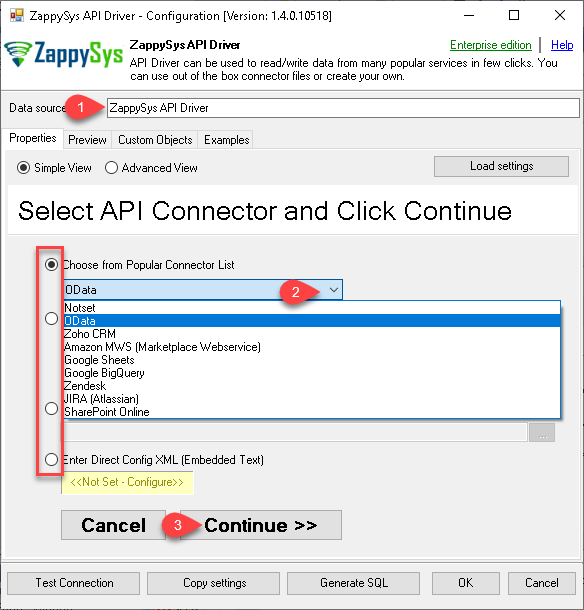
1. Configure DSN with Embedded Connectors
|
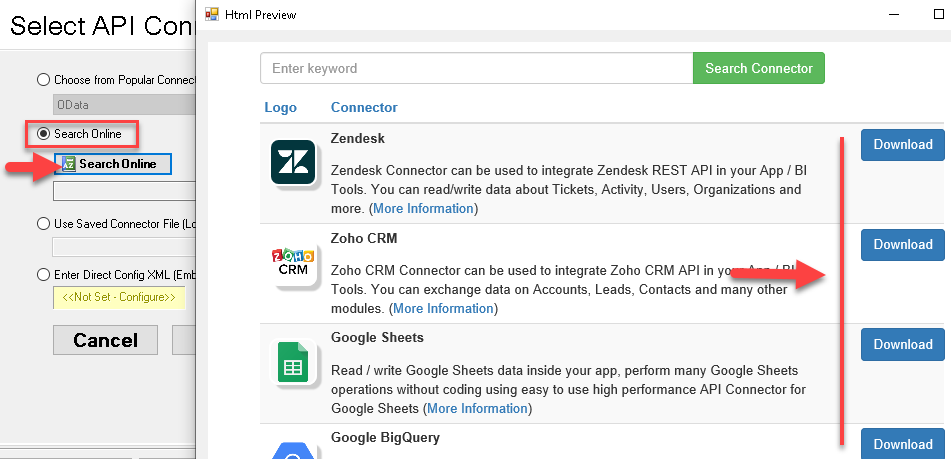
2. Search and Download Jira Connector
|
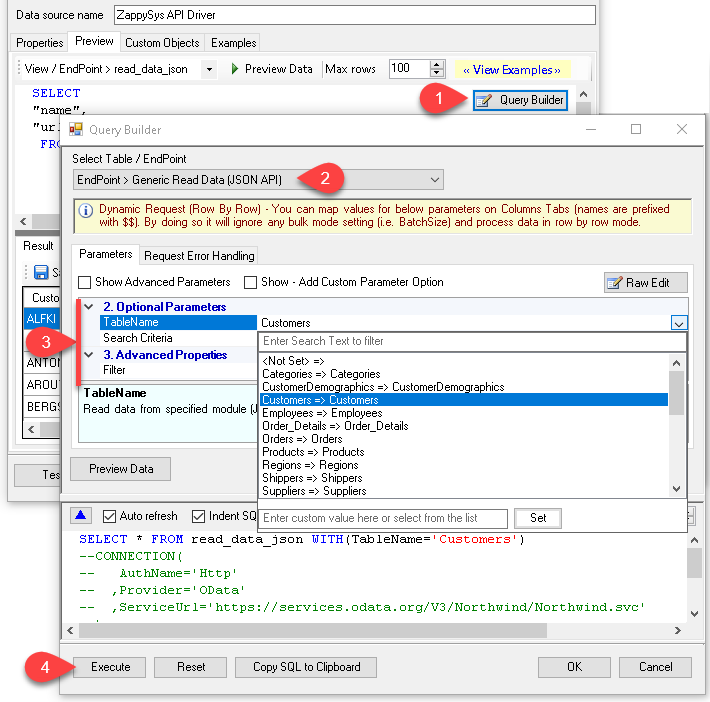
3. Build SQL with Query Builder
|
|
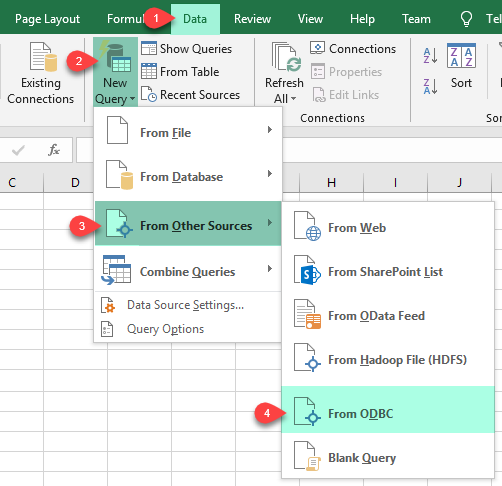
4. Load Data in Excel via ODBC
|
5. Use Data in Power BI
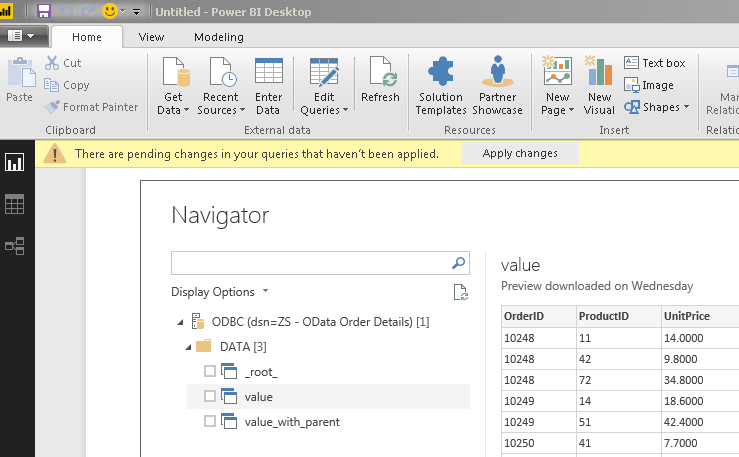
|
6. Centralize Access with Data Gateway
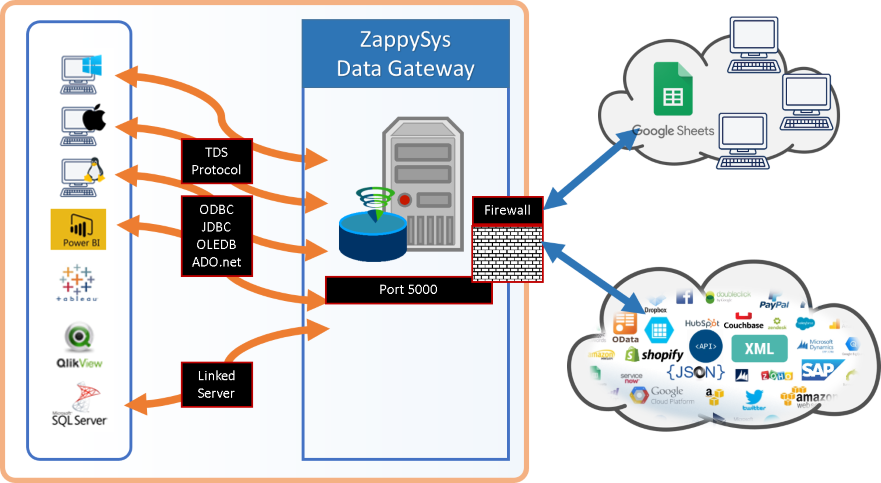
|
Seamless SQL Query Integration
Works with REST, OData, files, and databases
-- Query Jira issues by project and JQL via SQL
SELECT * FROM Issues
WITH (
  SearchBy='Jql',
  Jql='status IN (Done, Closed) AND created > -5d',
  RetryMode='RetryWhenStatusCodeMatch',
  RetryStatusCodeList=429,
  RetryCountMax=5
);
✔ Query APIs like a database
✔ No ETL or custom scripts needed
✔ Works inside SQL Server, Power BI, Excel
🔧 Key Features
Authentication and Access Modes
- API Key authentication with Atlassian user email and token
- Personal Access Token (PAT) authentication for bearer token workflows
- OAuth app flow with scope and token generation controls
Jira Query Patterns
- Query issues by key, project, or JQL expression via `WITH(...)` parameters
- Preview generated SQL in Query Builder before using in client tools
- Push server-side filters to Jira API for more efficient retrieval
ODBC Tool Integration
- Use same DSN in SQL tools, BI platforms, ETL products, and scripts
- Consume data in Excel, Power BI, and SQL Server workloads
- Reuse query templates for repeatable reporting and automation jobs
Data Gateway Option
- Centralize DSN management on one gateway host
- Control remote access with gateway users and network rules
- Avoid per-user driver installations for shared enterprise access
💡 Common Use Cases
Typical scenarios for Jira ODBC Driver in analytics, reporting, and automation:
- Issue Dashboards: Pull Jira issue data into BI models for sprint and service analytics.
- Project Health Tracking: Query projects, statuses, and worklogs for portfolio-level reporting.
- JQL-Driven Extraction: Use JQL filters in SQL to fetch only meaningful subsets from Jira.
- ODBC Data Federation: Join Jira data with database sources inside SQL-based reporting pipelines.
- Centralized Access Patterns: Publish Jira DSNs through Data Gateway for team-wide access.
- Operational Automations: Feed Jira data into scheduled jobs for alerts and SLA monitoring.
🎯 Summary
Jira ODBC Driver helps teams query and integrate Jira data using familiar SQL across ODBC-compatible tools while retaining authentication flexibility and query control.
Use one DSN model for local workflows or centralized gateway-based access in larger environments.
Trusted by Developers & IT Teams Worldwide
- Built for ODBC Workloads: Consistent connection model for reporting, ETL, and app integrations.
- Expert Technical Support: Guidance for driver setup, authentication, and performance tuning.
- Proven Enterprise Adoption: Widely used for API-driven connectivity in production environments.
|
ODBC PowerPack
Includes Jira ODBC Driver

Read reviews on Capterra →
|
Ready to start querying?
Install the full ODBC PowerPack to unlock all drivers and start your free trial.
| |

