Query and update HubSpot data with standard ODBC SQL workflows.
Configure HubSpot in ZappySys API Driver, authenticate with Private App token or OAuth, and read or write contacts, companies, deals, and tickets from SQL Server, Excel, Power BI, and other ODBC tools.
Part of ZappySys ODBC PowerPack (30+ drivers).
Recommended starting point
Pro Tip: Configure one DSN once, then reuse it across reporting tools, scripts, and database workloads.
Compatibility: Windows ODBC (32/64-bit) | Works with Visual Studio, .NET, BI tools | Data Gateway for centralized remote access
⚡ Key Benefits
- HubSpot Read + Write — Run select and write operations against HubSpot objects from ODBC clients
- Flexible Authentication — Configure Private App token or OAuth app credentials in one DSN flow
- Query Builder Workflow — Generate endpoint-driven SQL and preview records before consumption
- API Retry Controls — Handle throttling with RetryMode, status-code list, and retry count settings
- Centralized Connectivity — Share secured access through Data Gateway instead of per-machine driver setup
📸 Visual Overview & Setup
|
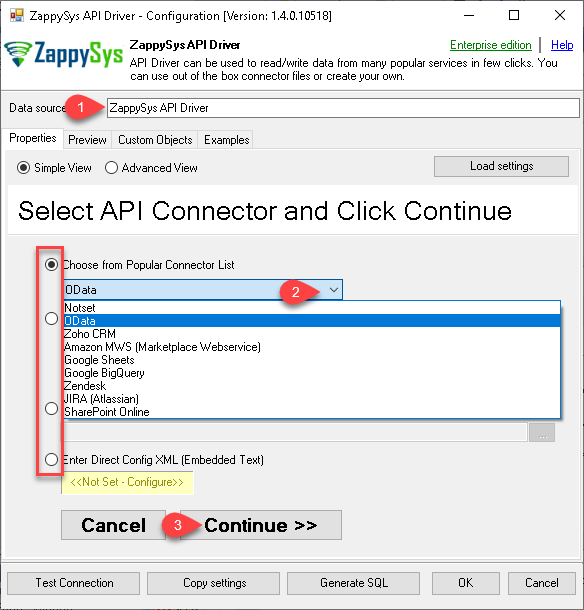
1. Configure DSN with Embedded Connectors
|
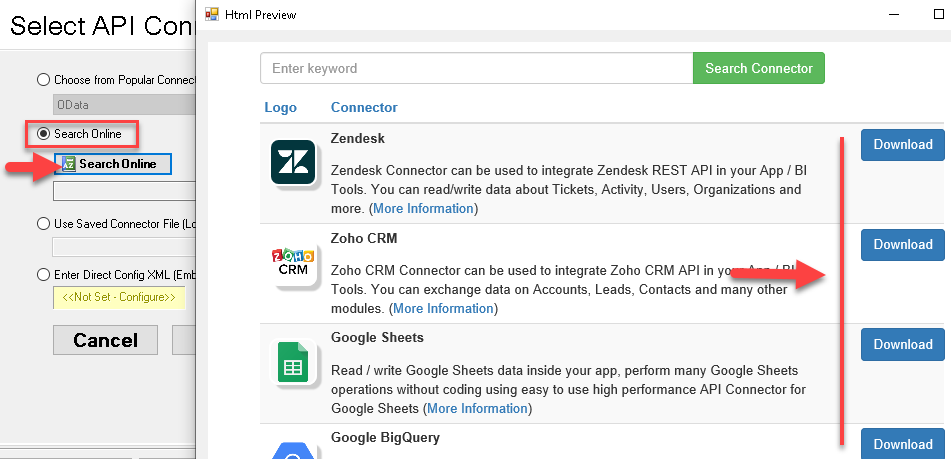
2. Search and Download HubSpot Connector
|
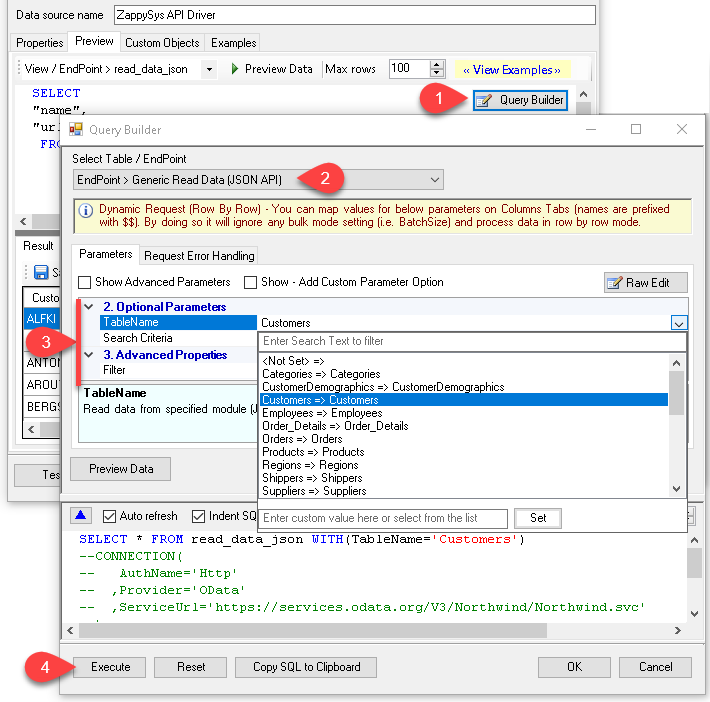
3. Build SQL with Query Builder
|
|
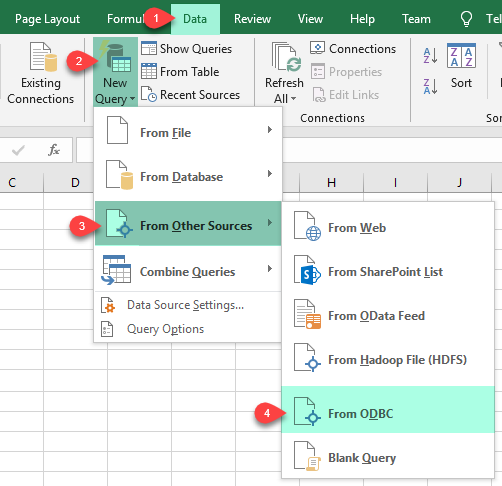
4. Load Data in Excel via ODBC
|
5. Use Data in Power BI
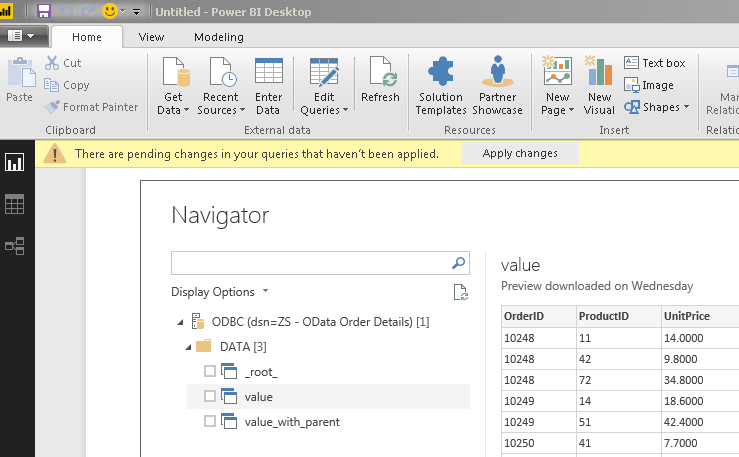
|
6. Centralize Access with Data Gateway
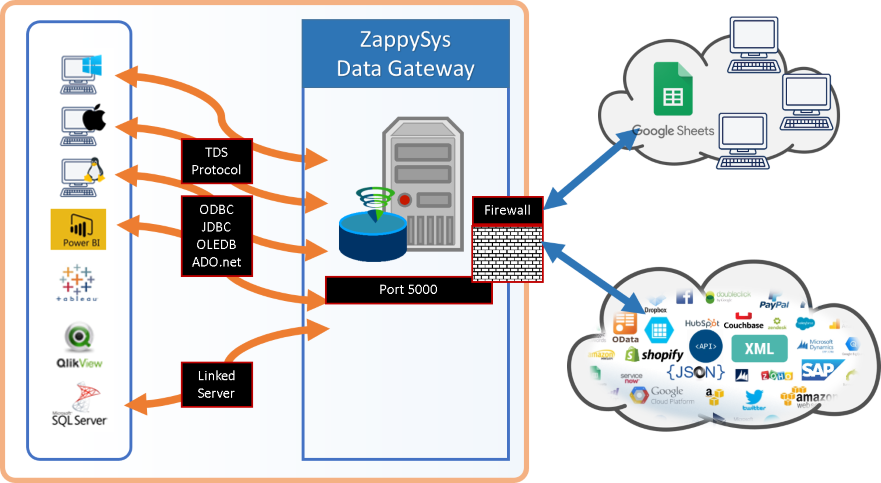
|
Seamless SQL Query Integration
Works with REST, OData, files, and databases
-- HubSpot companies query via SQL
SELECT *
FROM Companies
WITH (
  ApiBaseUrl='https://api.hubapi.com',
  AuthType='Private app (Static Access Token) [Http]',
  RetryMode='RetryWhenStatusCodeMatch',
  RetryStatusCodeList=429,
  RetryCountMax=5
);
✔ Query APIs like a database
✔ No ETL or custom scripts needed
✔ Works inside SQL Server, Power BI, Excel
🔧 Key Features
HubSpot Connector Configuration
- Select HubSpot from embedded popular connectors or download via Search Online
- Save connector settings in DSN and reuse query patterns across ODBC apps
- Use Query Builder to generate table and endpoint SQL quickly
Authentication and API Controls
- Private app (Static Access Token) support for server-to-server scenarios
- Public app OAuth flow with custom app scope and token generation
- Retry configuration for throttling with 429 status handling controls
Read and Write Workloads
- Query HubSpot objects for extraction and reporting workflows
- Use SQL from ODBC clients to integrate with ETL and BI pipelines
- Apply server-side parameters through connector settings for efficient calls
Centralized Deployment Option
- Configure once on Data Gateway for shared access across users and services
- Control inbound access with gateway user management and network rules
- Enable remote client access without driver installation on every machine
💡 Common Use Cases
Typical scenarios for Hubspot ODBC Driver in analytics and integration pipelines:
- CRM Reporting: Query companies, contacts, deals, and tickets in Power BI, Excel, and SQL-based tools.
- Operational Sync: Pull HubSpot records to staging databases for downstream analytics and quality checks.
- API-Aware DSN Design: Use Query Builder parameters to push filtering toward HubSpot API calls.
- Secure App Connectivity: Standardize authentication with Private App token or OAuth app settings per environment.
- Shared Enterprise Access: Publish one configured data source through Data Gateway for multi-user usage.
- Hybrid Tooling: Reuse the same HubSpot DSN from desktop BI, ETL packages, and custom ODBC applications.
🎯 Summary
Hubspot ODBC Driver lets teams query and integrate HubSpot data through familiar ODBC workflows with guided connection setup, authentication choices, and SQL-driven access.
Use one DSN across BI, ETL, and app ecosystems while keeping centralized control with Data Gateway when needed.
Trusted by Developers & IT Teams Worldwide
- Built for ODBC Workloads: One connection model across BI tools, ETL pipelines, and custom apps.
- Expert Technical Support: Get help with driver setup, query tuning, and authentication patterns.
- Proven Enterprise Scale: Trusted globally for API and cloud data connectivity.
|
ODBC PowerPack
Includes Hubspot ODBC Driver

Read reviews on Capterra →
|
Ready to start querying?
Install the full ODBC PowerPack to unlock all drivers and start your free trial.
| |

