Query and update Google Ads using standard SQL over ODBC from tools your team already uses.
Google Ads ODBC Driver helps you configure DSN authentication, browse connector actions, and execute read/write API endpoints through SQL views from SQL Server, Power BI, Excel, Python, and other ODBC clients.
Part of ZappySys ODBC PowerPack (30+ drivers).
Recommended starting point
Pro Tip: Configure one DSN and reuse it across dashboards, ad-hoc analysis, and scheduled jobs.
Compatibility: Windows ODBC (32/64-bit) | Works with SQL Server, BI tools, and custom apps | Data Gateway for centralized shared access
⚡ Key Benefits
- SQL-First Connectivity — Query Google Ads endpoints with familiar ODBC query patterns
- Guided DSN Setup — Configure auth and connection settings through connector-aware UI
- Action-Driven Queries — Execute connector operations from SQL views without custom API code
- Cross-Tool Reuse — Use one DSN across SQL Server, Excel, Power BI, Python, and apps
- Centralized Sharing — Publish governed access via Data Gateway for team-wide consumption
📸 Visual Overview & Setup
1. Pick Google Ads Connector 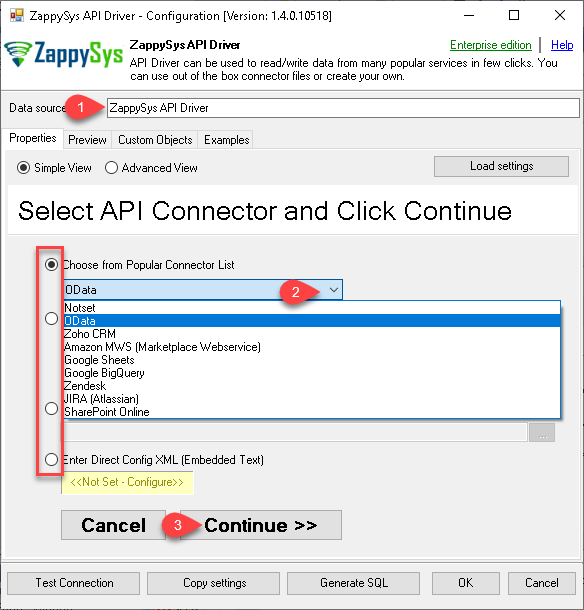 |
2. Search Connector Online 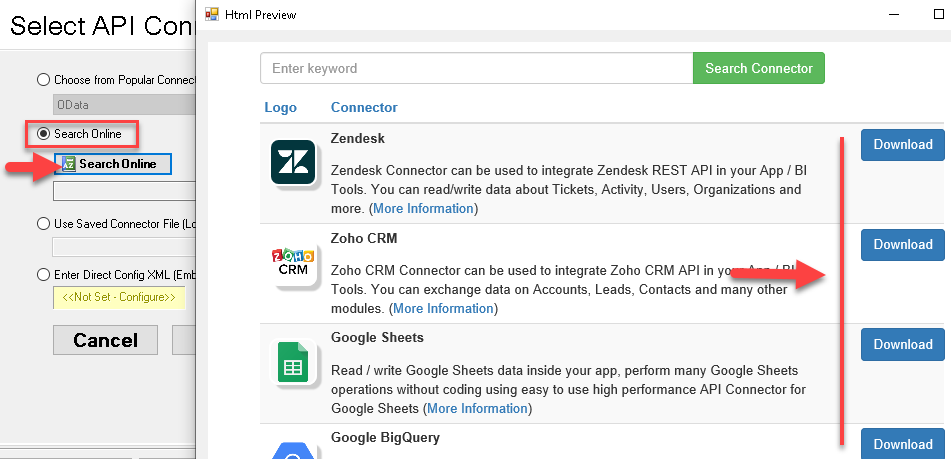 |
3. Build Query in Wizard 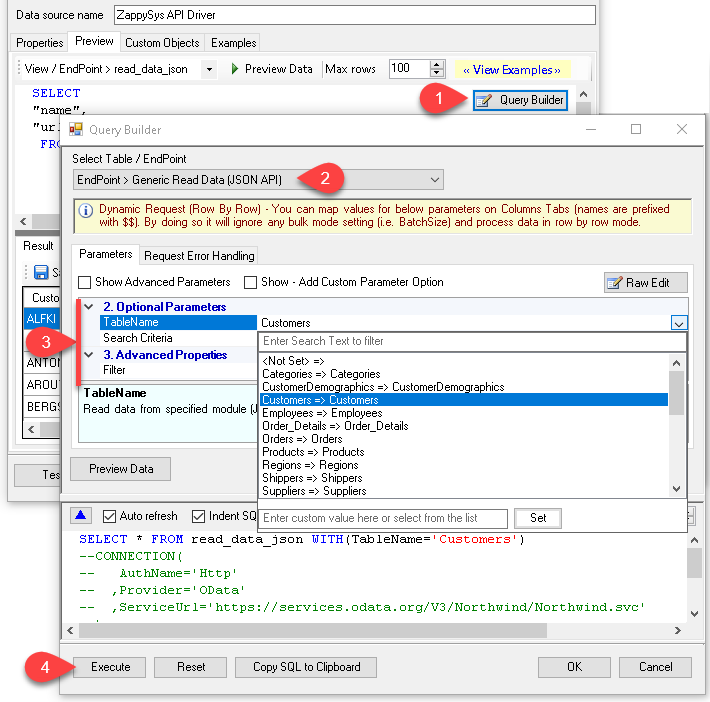 |
4. Load Data into Excel 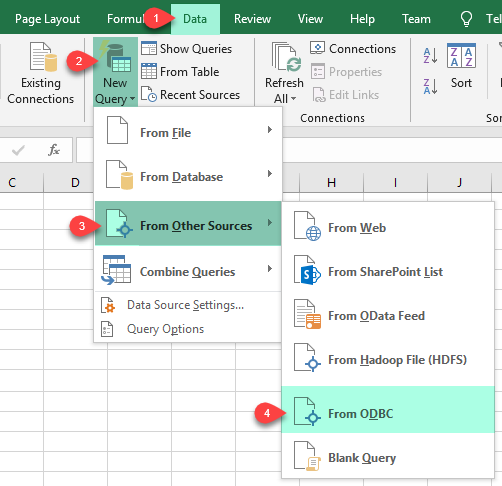 |
5. Connect from Power BI 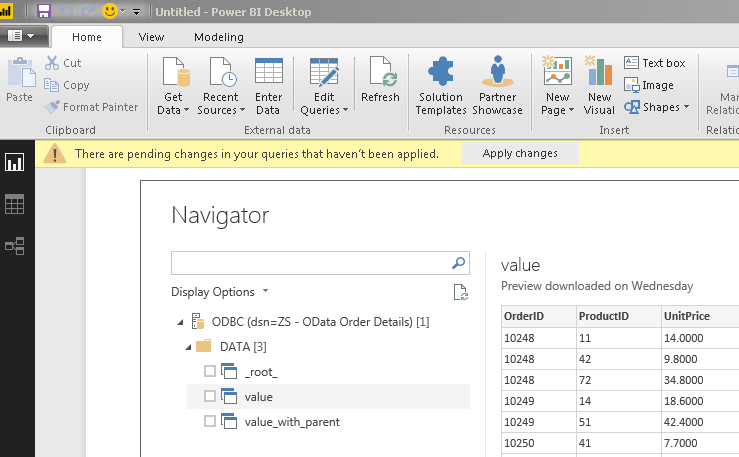 |
6. Share via Data Gateway 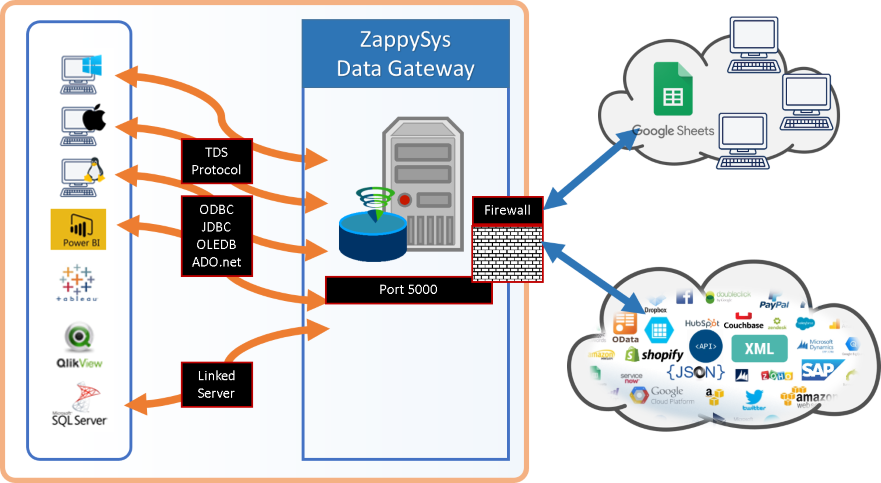 |
🔗 Seamless SQL Query Integration
Works with REST, OData, files, and databases
-- Query Google Ads data via SQL
SELECT *
FROM get_campaigns
WITH(
  CredentialType='User Account [OAuth]',
  RetryMode='RetryWhenStatusCodeMatch',
  RetryStatusCodeList='429',
  RetryCountMax=5
)
✔ Query APIs like a database
✔ No ETL or custom scripts needed
✔ Works inside SQL Server, Power BI, Excel
🔧 Key Features
- Connector-driven DSN setup with guided authentication and query configuration
- SQL-based read/write support for API endpoints exposed as SQL views
- Query Builder for endpoint selection, parameterization, and preview before execution
- ODBC compatibility for SQL Server, BI tools, ETL jobs, and custom applications
- Data Gateway support for centralized, secure, shared access management
💡 Common Use Cases
Typical scenarios for Google Ads ODBC Driver in reporting and integration workflows:
- Operational analytics: Analyze campaigns, ad groups, and keyword performance via SQL queries.
- Warehouse integration: Join ad metrics with first-party data in SQL Server and BI models.
- Self-service BI: Automate periodic extracts for reporting and budget monitoring workflows.
- Team-wide governed access: Provide centralized governed access through Data Gateway.
🎯 Summary
Google Ads ODBC Driver brings connector-based API access into SQL-first workflows with minimal setup. Configure DSN once, query from familiar tools, and scale governed access with Data Gateway.
Trusted by Developers & IT Teams Worldwide- Built for ODBC Workloads: One driver model across BI, ETL, databases, and custom code.
- Expert Technical Support: Engineers help with DSN setup, SQL queries, and performance tuning.
- Proven Enterprise Scale: Teams worldwide rely on ZappySys for API and cloud connectivity.
| ODBC PowerPack Includes Google Ads ODBC Driver  Read reviews on Capterra → |
Ready to start querying? Install the full ODBC PowerPack to unlock all drivers and start your free trial. | |

