Connect Dropbox to SQL-first tools with an ODBC DSN and query-based workflow.
Dropbox ODBC Driver enables read and write access to files and folders from SQL Server, Power BI, Excel, Python, and other ODBC clients. Configure OAuth user account authentication, then drive operations through SQL and query builder endpoints.
Part of ZappySys ODBC PowerPack (30+ drivers).
Recommended starting point
Pro Tip: Use a shared automation account to generate and maintain OAuth tokens for scheduled data jobs.
Compatibility: Windows ODBC (32/64-bit) | Works with SQL Server, Power BI, Excel, Python |
Data Gateway for centralized shared access
⚡ Key Benefits
- SQL-Driven Operations — Read and write Dropbox entities through familiar SQL statements
- OAuth Authentication — Secure user-account access for file and folder operations
- Endpoint Coverage — List, upload, download, and delete workflows from one DSN
- Performance Controls — Push parameterized calls via query builder execution paths
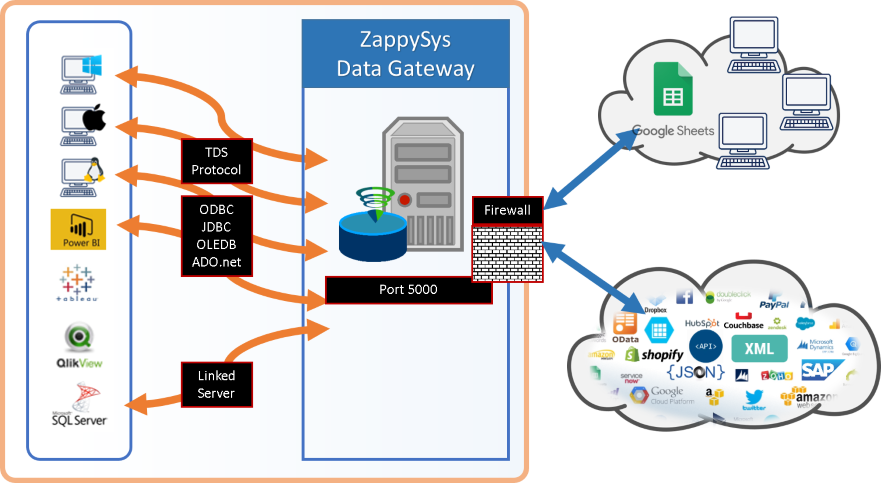
- Centralized Governance — Publish one connection through Data Gateway for multiple clients
📸 Visual Overview & Setup
|
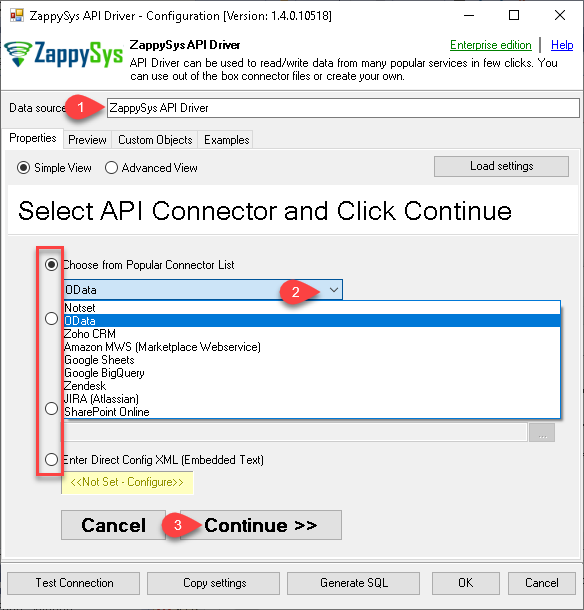
1. Pick Dropbox Connector
|
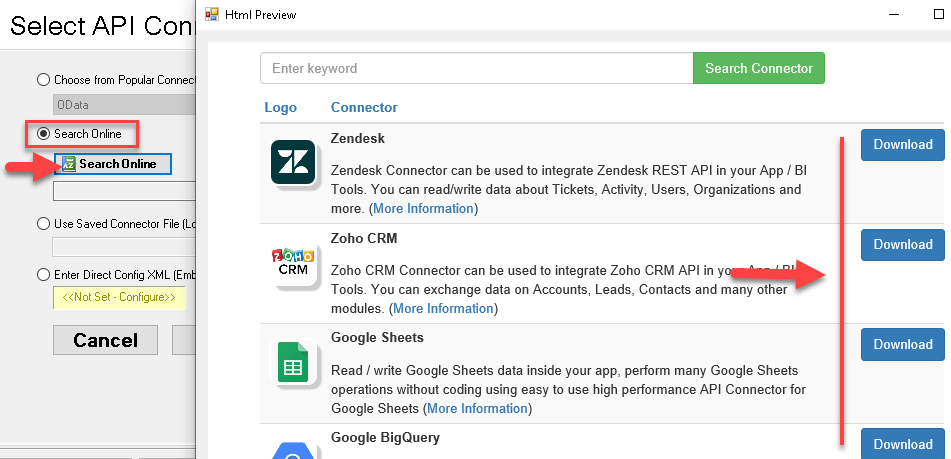
2. Search Online if Not Listed
|
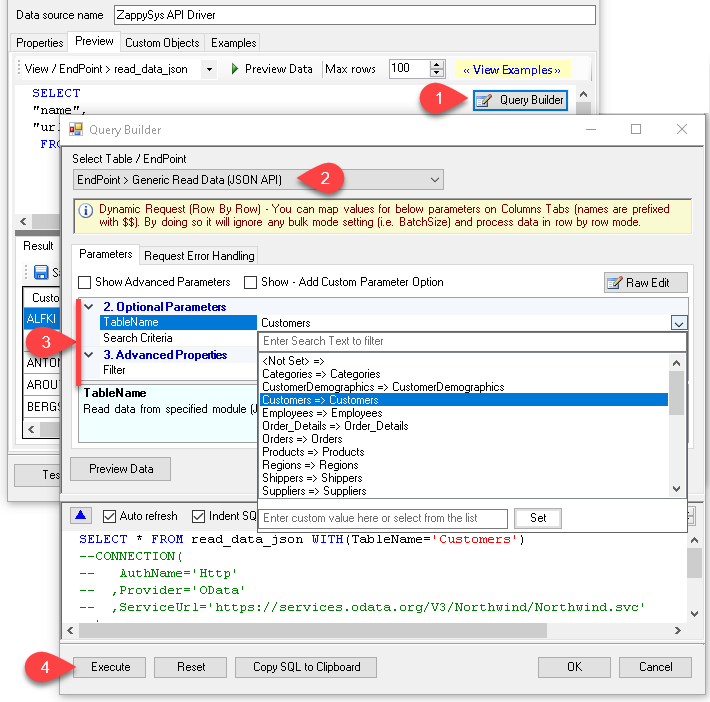
3. Build & Preview SQL Query
|
|
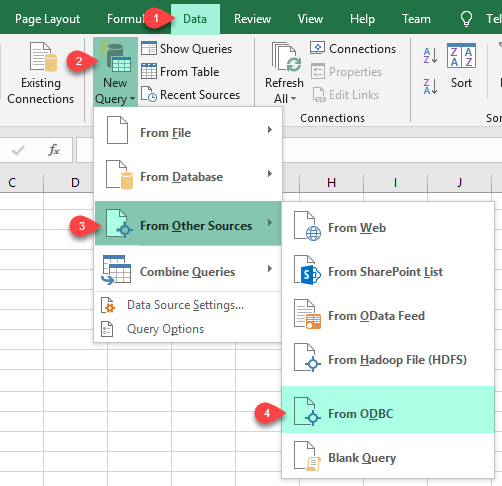
4. Load Dropbox Rows into Excel
|
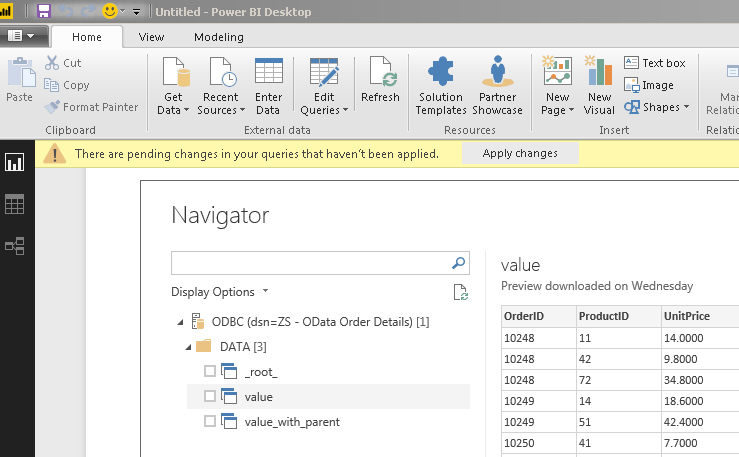
5. Connect from Power BI
|
6. Share via Data Gateway
|
🔗 Seamless SQL Query Integration
Works with REST, OData, files, and databases
-- Upload file to Dropbox via SQL
SELECT *
FROM upload_file
WITH (
  TargetFilePath='/MySubfolder/file-I-want-to-upload-to-dropbox.dat',
  SourceFilePath='C:\file\I\want\to\upload.dat'
)
✔ Query APIs like a database
✔ No ETL or custom scripts needed
✔ Works inside SQL Server, Power BI, Excel
🔧 Key Features
Read and Write Coverage
- Query files and folder structures through table-like endpoints
- Upload and manage file operations via SQL-driven actions
- Use generic request endpoints for advanced Dropbox API scenarios
Authentication and Security
- OAuth user-account authentication with custom Dropbox app setup
- Support for client id, secret, scope, and redirect URI controls
- Token-based access for governed API usage in data workflows
Operational Fit
- Use query builder parameters for endpoint-specific operations
- Run file workflows directly from SQL and BI automation tools
- Share one connection across users using Data Gateway
💡 Common Use Cases
- File delivery automation: Upload generated exports from ETL jobs to Dropbox.
- Document retrieval: Query and process files from shared Dropbox paths.
- Cross-tool reporting: Reuse one DSN across SQL Server, Power BI, and Excel.
- Centralized access: Govern shared Dropbox API access via Data Gateway.
- Operational scripting: Execute repeatable file management workflows from SQL jobs.
🎯 Summary
Bring Dropbox into your ODBC ecosystem with SQL-driven access patterns.
Configure once and integrate from reporting, automation, and data engineering tools without custom API wrappers.
Trusted by Developers & IT Teams Worldwide
- Built for ODBC Workloads: One integration model across SQL, BI, and code.
- Expert Technical Support: Help with auth setup, query design, and troubleshooting.
- Proven Enterprise Scale: Used globally for API and cloud data integration projects.
|
ODBC PowerPack
Includes Dropbox ODBC Driver

Read reviews on Capterra →
|
Ready to query Dropbox via ODBC?
Install the full ODBC PowerPack to unlock all drivers and start your free trial.
| |


