Read and write Asana data via SQL from ODBC tools using a DSN-driven setup.
Asana ODBC Driver lets you connect from SQL Server, Power BI, Excel, Python, and any ODBC-compatible app. Configure PAT or OAuth app authentication in the driver UI, then query tasks, projects, workspaces, and time entries without hand-coding REST calls.
Part of ZappySys ODBC PowerPack (30+ drivers).
Recommended starting point
Pro Tip: Use User DSN for design-time tools and System DSN for service-account workloads like SQL Agent jobs.
Compatibility: Windows ODBC (32/64-bit) | Works with SQL Server, Power BI, Excel, Python |
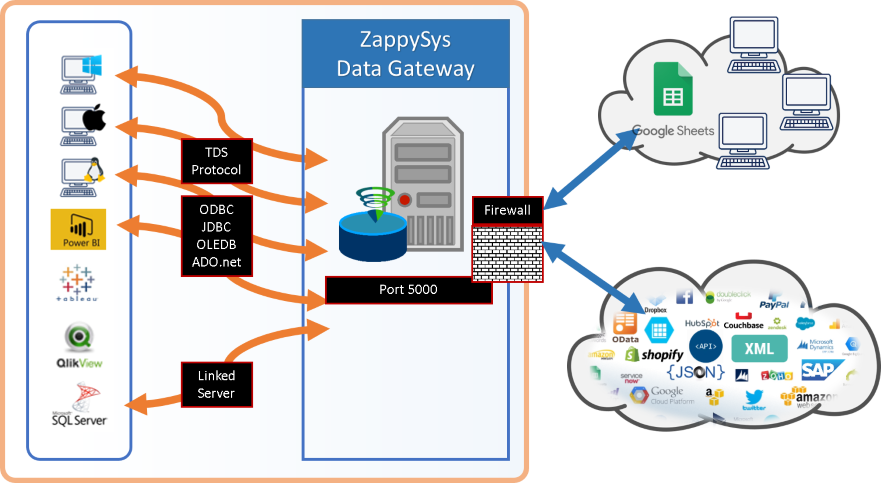
Data Gateway for centralized remote access
⚡ Key Benefits
- Bidirectional Access — Query and update Asana entities from one ODBC connection
- Flexible Authentication — Configure PAT or OAuth app modes in driver UI
- Server-Side Filtering — Use Query Builder parameters to push filters to Asana API
- Retry Controls — Handle throttling with RetryStatusCodeList and retry limits
- Centralized Connectivity — Share one configured source via Data Gateway
📸 Visual Overview & Setup
|
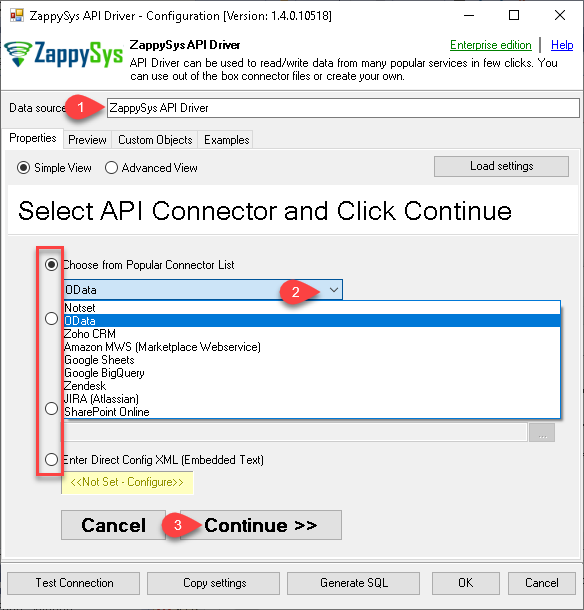
1. Pick Asana Connector
|
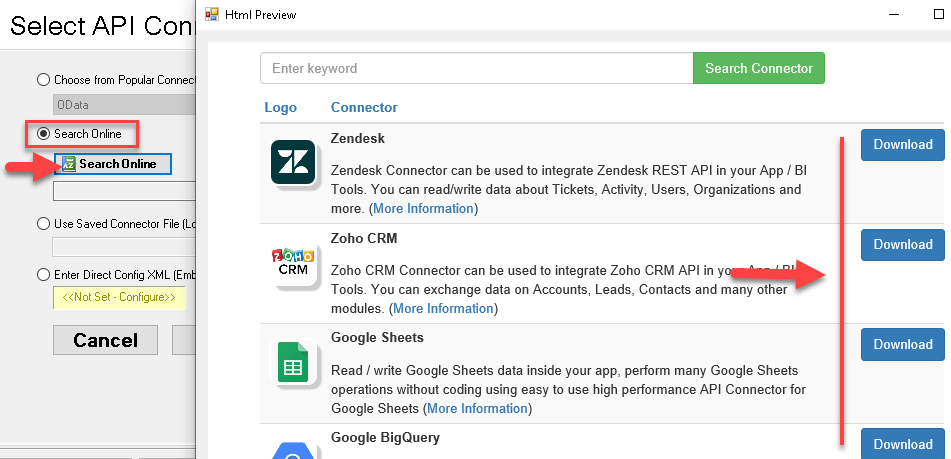
2. Search Online if Not Listed
|
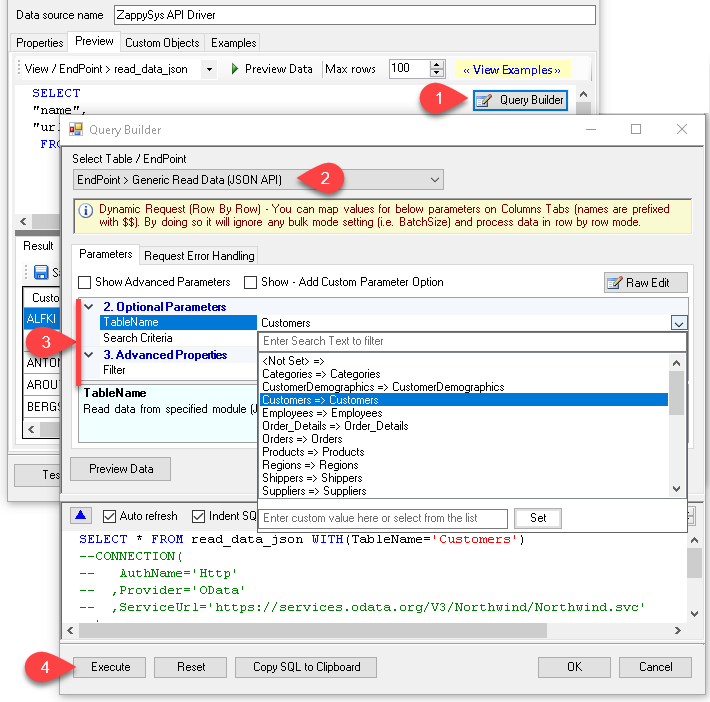
3. Build & Preview SQL Query
|
|
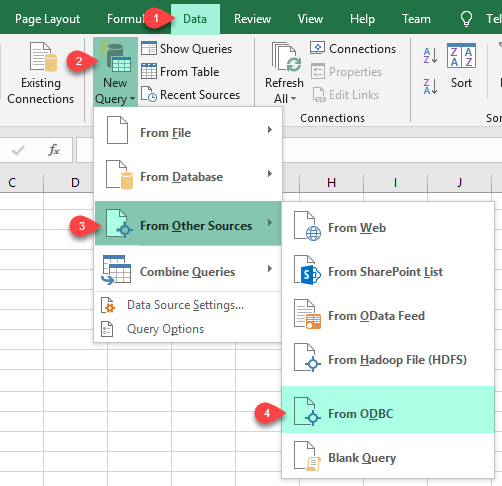
4. Load Asana Rows into Excel
|
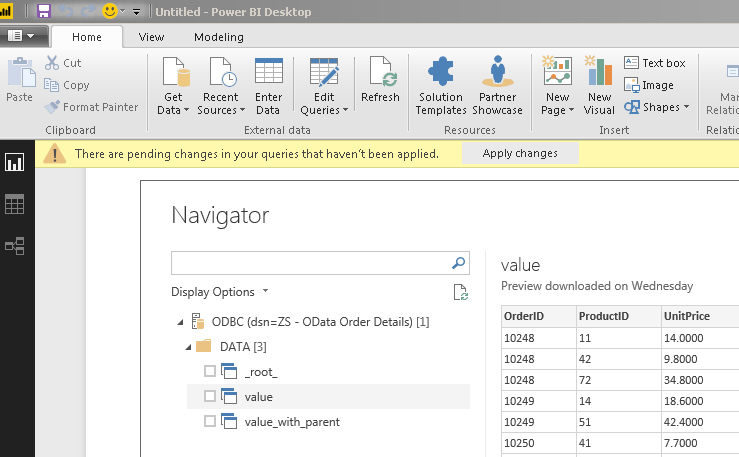
5. Connect from Power BI
|
6. Share via Data Gateway
|
🔗 Seamless SQL Query Integration
Works with REST, OData, files, and databases
-- Download Attachment via SQL (Asana)
SELECT *
FROM download_attachment
WITH (
   AttachmentId='1208216218258030'
 , TargetFilePath='c:\temp\1208216218258030_AWS-refund-request.png'
 , FileOverwriteMode=0 --0=AlwaysOverwrite, 1=FailIfExists, 2=SkipIfExists
)
✔ Query APIs like a database
✔ No ETL or custom scripts needed
✔ Works inside SQL Server, Power BI, Excel
🔧 Key Features
Connectivity and Querying
- Use DSN-based SQL access to Asana from ODBC-compliant tools
- Generate endpoint queries with Query Builder and preview before execution
- Use endpoint parameters for server-side filtering where available
Authentication and Control
- Personal Access Token mode with workspace and project selection
- OAuth app mode with ClientId, Client Secret, Redirect URL, and token generation
- Retry controls for throttling with RetryStatusCodeList and RetryCountMax
Operational Extensions
- Create SQL views or virtual tables for apps that do not accept custom SQL
- Define stored procedures for reusable API operations in ODBC workflows
- Publish the connection through Data Gateway for centralized administration
💡 Common Use Cases
- Task analytics in BI: Pull Asana workspaces/projects into Power BI or Excel reports.
- Operational downloads: Use attachment endpoints to retrieve files through SQL.
- Cross-tool integration: Reuse the same DSN in SQL Server, Python, and ETL processes.
- OAuth-governed enterprise access: Connect with app-level consent and token lifecycle controls.
- Team-wide access model: Host one source in Data Gateway and share securely across users.
🎯 Summary
Bring Asana into your ODBC ecosystem without maintaining custom REST wrappers.
Configure once, then query and automate from the SQL-first tools your team already uses.
Trusted by Developers & IT Teams Worldwide
- Built for ODBC Workloads: One driver model for BI, ETL, SQL, and code.
- Expert Technical Support: Get help with auth flows, DSN configuration, and query setup.
- Proven Enterprise Scale: Used across thousands of teams and deployment scenarios.
|
ODBC PowerPack
Includes Asana ODBC Driver

Read reviews on Capterra →
|
Ready to start querying Asana?
Install the full ODBC PowerPack to unlock all drivers and start your free trial.
| |


