Query and update Amazon Athena using standard ODBC and your official Athena JDBC driver — no Glue or custom API glue code.
The Amazon Athena ODBC Driver is built on the ZappySys JDBC-ODBC Bridge: you point a DSN at the Athena JDBC JAR, set the JDBC URL and driver class, and every compatible SQL statement is relayed unchanged to Athena. Connect from SQL Server, Power BI, Excel, Python, SSIS, Tableau, and any ODBC 3.x client.
Part of ZappySys ODBC PowerPack (30+ drivers).
Recommended starting point
Pro Tip: Install Java 8+ (Java 21 recommended per the guide), download the Athena JDBC JAR from the AWS Athena JDBC documentation, and point the DSN at that file.
Use a User DSN for interactive design and a System DSN for Windows services and SQL Agent.
Match 32-bit vs 64-bit ODBC Administrator to your app (and to a 32-bit service, use the 32-bit administrator).
If the bridge cannot find Java, confirm JAVA_HOME / PATH or install Corretto alongside your existing JRE.
Compatibility: Windows ODBC (32/64-bit) | Works with Visual Studio, .NET, BI tools |
Data Gateway for SQL Server, JDBC, and non-Windows access
⚡ Key Benefits
- Pass-through SQL — The bridge relays queries directly to the Athena JDBC driver; nothing is rewritten in the ODBC layer
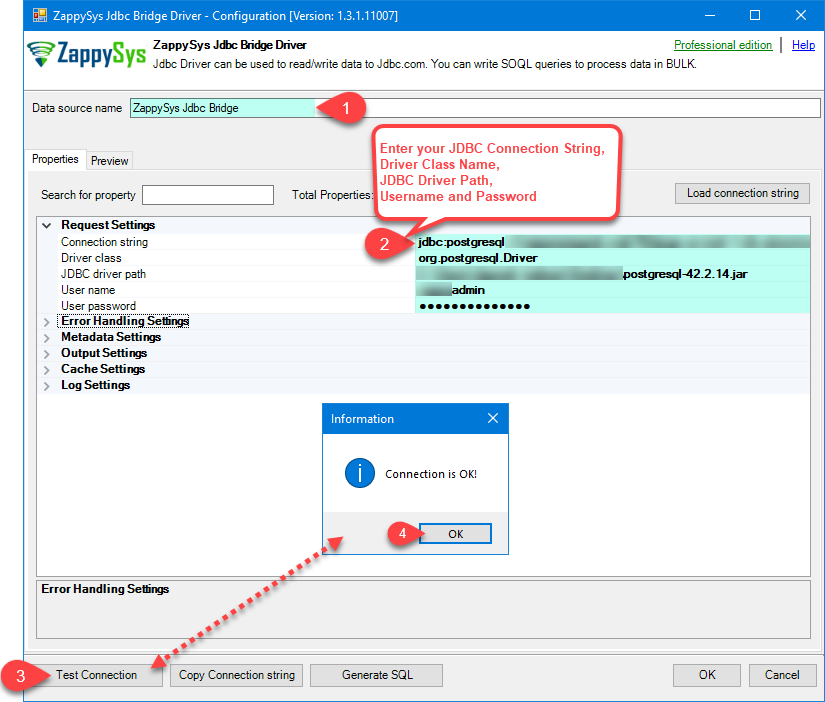
- Low-code DSN — Set JDBC URL, driver class (
com.amazon.athena.jdbc.AthenaDriver), JAR path, AWS access key in the user name field, secret in the password field, and optional connection parameters in one wizard
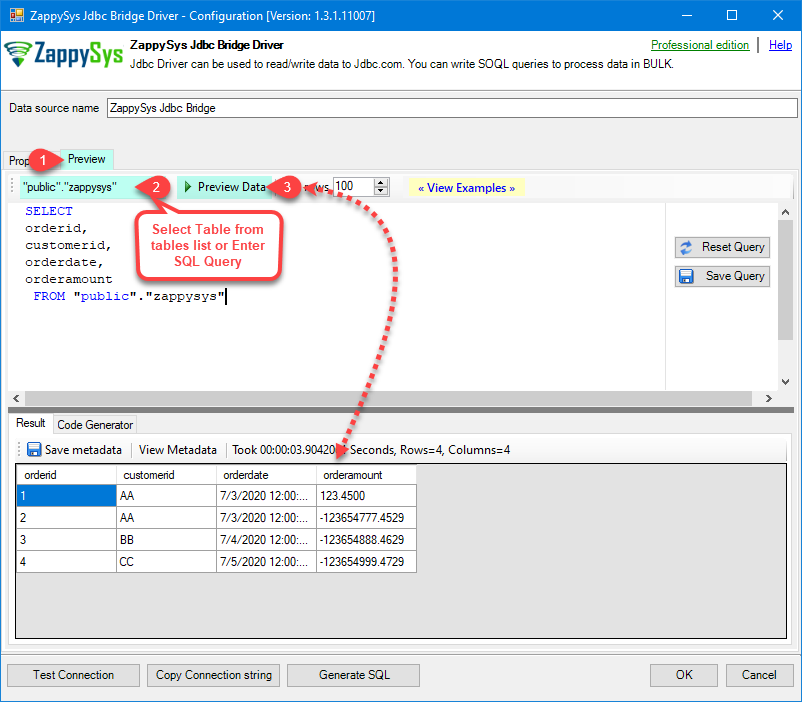
- Table picker & preview — Use the DSN preview window or Select Table dropdown before wiring tools like Power BI or Excel
- User vs System DSN — Match interactive accounts (User DSN) vs service accounts (System DSN) for production scheduling
- Optional Data Gateway — Publish the Athena data source once; clients connect through ODBC Driver for SQL Server to the gateway host
📸 Visual Overview & Setup
|
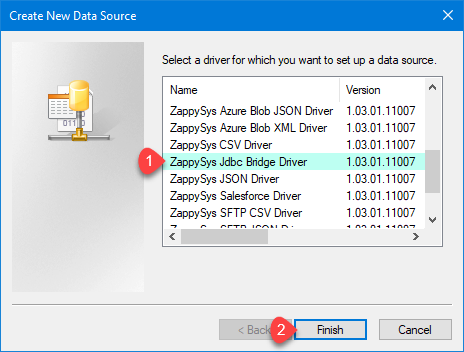
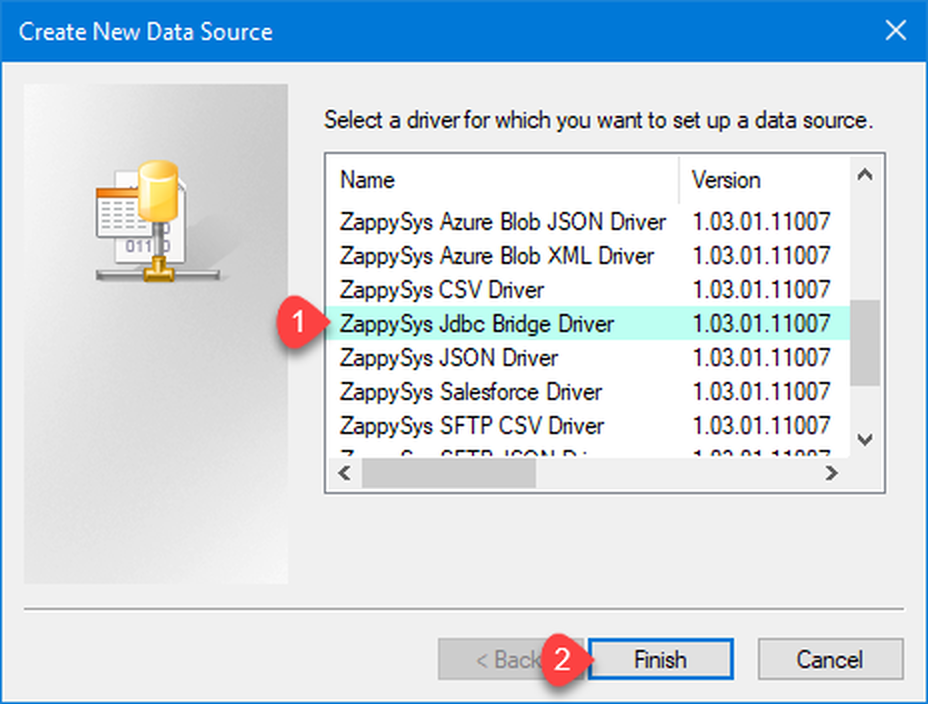
1. Choose JDBC Bridge Driver Type
|
2. Enter Full Path for *.jar file (i.e. JDBC driver file)
|
3. Preview SQL Query
|
|
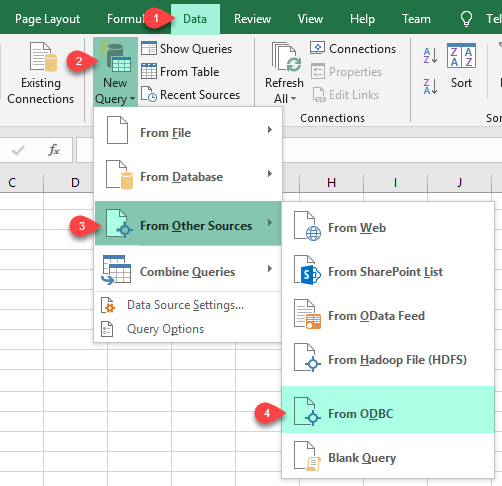
4. Load Amazon Athena Rows into Excel
|
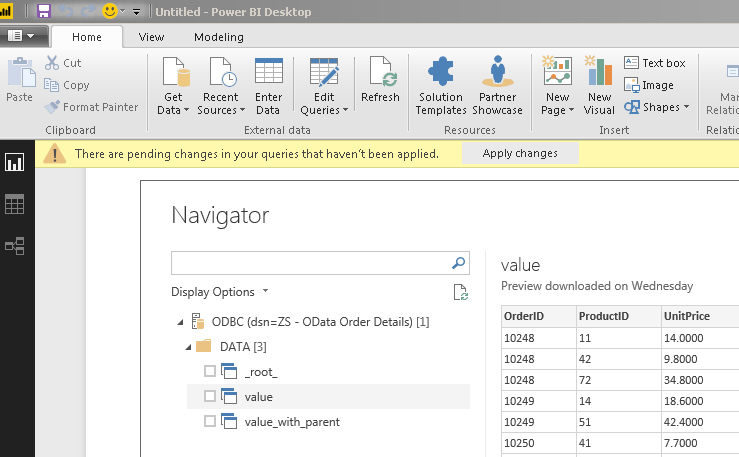
5. Connect from Power BI
|
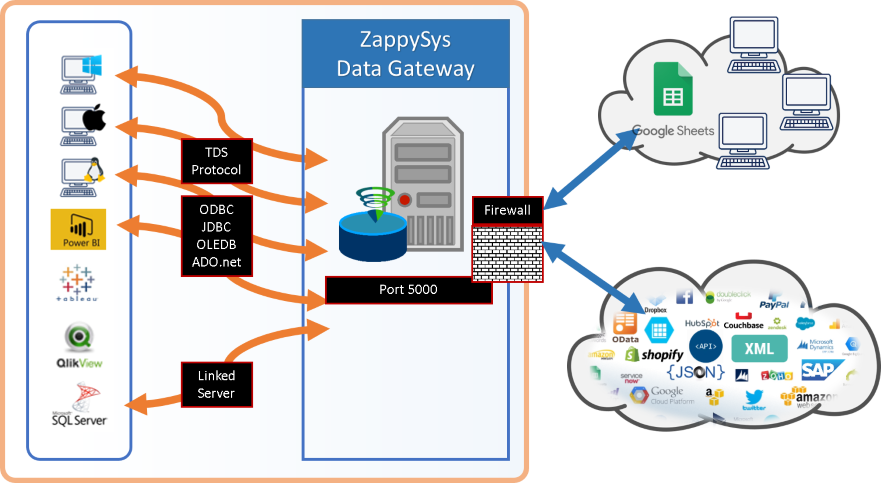
6. Share via Data Gateway
|
🔗 Seamless SQL Query Integration
Works with REST, OData, files, and databases
-- Verbatim preview example from the setup guide (DSN stores JDBC URL, driver class, JAR, and credentials)
SELECT *
FROM "r53_rlogs"
ORDER BY query_timestamp DESC
✔ JDBC driver executes the SQL — bridge does not modify statements
✔ Works in Excel, Power BI, SQL Server linked servers, and custom ODBC apps
✔ If INSERT/UPDATE/DELETE fails, check Athena JDBC capabilities (not a bridge limitation)
🔧 Key Features
Read & Query
- Run
SELECT with filters, joins, and ordering supported by the Athena engine
- Use the DSN preview window or client tool to validate results before production loads
- Pick catalog, database, and tables from the metadata browser when the JDBC driver exposes them
- For more JDBC Bridge SQL patterns, see the JDBC Bridge SQL query examples linked from the setup guide
JDBC Bridge Configuration
- Download the JDBC driver from AWS and save locally (example path from the guide:
D:\Drivers\JDBC\athena-jdbc.jar)
- Connection string pattern:
jdbc:athena://WorkGroup=primary;Region=us-east-1;Catalog=MyAwsDataCatalog;OutputLocation=s3://my-s3-bucket/;
- Driver class:
com.amazon.athena.jdbc.AthenaDriver
- Map AWS access key and secret key through the DSN user name and password fields; use
Connection parameters (for example [] as in the article) when you need extra JDBC properties instead of embedding them only in the URL
- Use Test Connection in the DSN wizard to confirm Java, the JAR, and your
WorkGroup / Region / Catalog / OutputLocation values before wiring client tools
Writes & Driver Limits
- When the underlying JDBC driver supports DML, statements pass through the same way as reads
- If you see action is not supported, that reflects the Athena JDBC driver — not the ZappySys bridge
Reliability & Platform Fit
- Standard ODBC 3.x for Power BI, Tableau, Excel, SQL Server linked servers, SSIS ODBC Source, and custom apps
- Java 8 minimum; Java 21 recommended (Amazon Corretto or Oracle JRE) — align the installed JRE with what your Athena JDBC build targets
- If the client runs as a Windows service, use a System DSN and the 32-bit ODBC administrator when the service is 32-bit, as noted in the setup guide
- Centralised access via ZappySys Data Gateway: copy DSN settings into the gateway, add firewall rules, save, and restart the gateway service after changes
- For multi-JAR classpaths, SSL trust errors, Java not found, logging, and JDBC Bridge disconnects, use the Troubleshooters & resources list on the same setup guide
💡 Common Use Cases
Typical scenarios for the Amazon Athena ODBC Driver:
-
BI on S3-backed data: Let analysts refresh Power BI or Excel models directly against Athena without exporting Parquet to disk.
Example: SELECT * FROM "r53_rlogs" ORDER BY query_timestamp DESC
-
SQL Server staging loads: Use linked servers or SSIS ODBC Source to land Athena query results in on-prem or Azure SQL.
Example: nightly extract of curated views into stg schemas.
-
Cross-account catalogs: Point the JDBC URL at the correct
Catalog, WorkGroup, and OutputLocation for each environment.
Example: separate DSNs for dev / test / prod AWS accounts.
-
Service-account scheduling: Deploy a System DSN on the job runner so SQL Agent and Windows services see the same Athena connection.
Example: 32-bit jobs use the 32-bit ODBC administrator.
-
Gateway for JDBC / Linux: Host Athena on the gateway and let remote JDBC clients use a SQL Server ODBC URL to reach it.
Example: Java microservice queries Athena without bundling the Windows ODBC stack.
-
Operational troubleshooting: Use the guide’s JDBC Bridge troubleshooting links for Java path, SSL, logging, multi-JAR merges, and connection refused errors.
Example: combine dependent JARs when the driver ships as multiple artifacts.
🎯 Summary
Bring Amazon Athena into the ODBC tools your team already runs.
Install Java, drop in the Athena JDBC JAR, create a ZappySys JDBC Bridge DSN, and start issuing SQL from Excel, Power BI, SQL Server, or SSIS — optionally front it all with Data Gateway for shared, governed access.
Trusted by Developers & IT Teams Worldwide
- Built for ODBC Workloads — One driver model across BI, ETL, databases, and custom code.
- Expert Technical Support — Engineers help with JDBC URLs, Java installs, and gateway networking.
- Proven Enterprise Scale — Thousands of teams worldwide rely on ZappySys for API and cloud connectivity.
|
ODBC PowerPack
Includes Amazon Athena ODBC Driver

Read reviews on Capterra →
|
Ready to query Amazon Athena over ODBC?
Install the full ODBC PowerPack to unlock all drivers and start your free trial.
| |