Access and update Amazon Ads using standard SQL — no custom Advertising API coding required.
Connect from SQL Server, Power BI, Excel, Python, SSIS, Tableau, and any ODBC-compatible tool.
Read profiles, campaigns, ad groups, and Sponsored Products reports, and write generic REST calls. Authenticate with Amazon OAuth (ClientId / ClientSecret / Return URL) and survive throttling with built-in retry.
Part of ZappySys ODBC PowerPack (30+ drivers).
Recommended starting point
Pro Tip: Configure one Amazon Ads DSN once, then reuse it across Power BI, Excel, SQL Server linked servers, and custom apps without touching the Advertising API directly.
Compatibility: Windows ODBC (32/64-bit) | Works with Visual Studio, .NET, BI tools |
Data Gateway for SQL Server, JDBC, and non-Windows access
⚡ Key Benefits
- SQL over Amazon Ads — Query profiles, campaigns, ad groups, and reports with SELECT and generic REST actions
- OAuth Authentication — Use Amazon Developer Security Profile (Client ID, Client Secret, Return URL) with one-click Generate Token
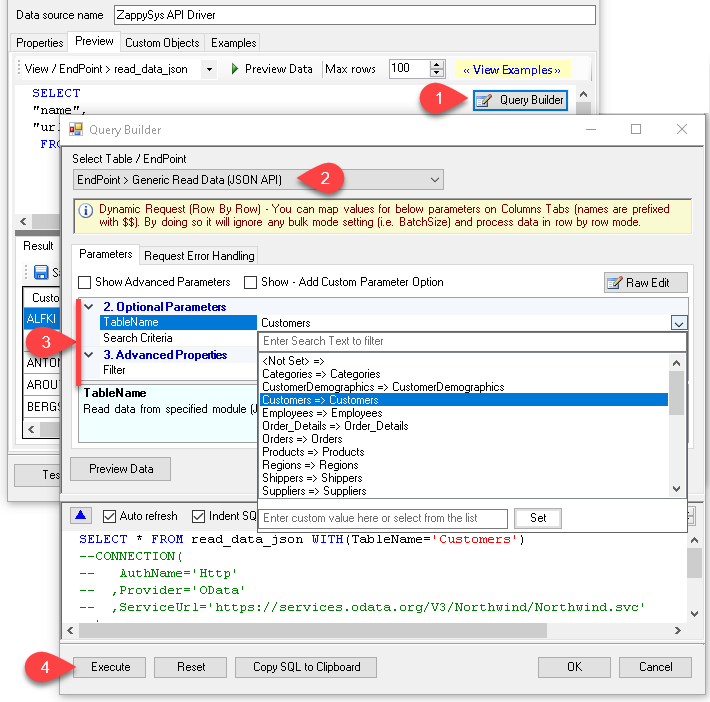
- Query Builder UI — Pick a table or endpoint, set parameters like ReportType / TimeUnit / Metrics, preview rows, and copy the generated SQL
- Server-Side Report Parameters — Pass report grouping, metrics, and date ranges through the Query Builder so filtering runs in Amazon Ads, not the client
- Built-In Retry for Throttling — Default RetryMode
RetryWhenStatusCodeMatch handles HTTP 429 with configurable retry count and exponential backoff
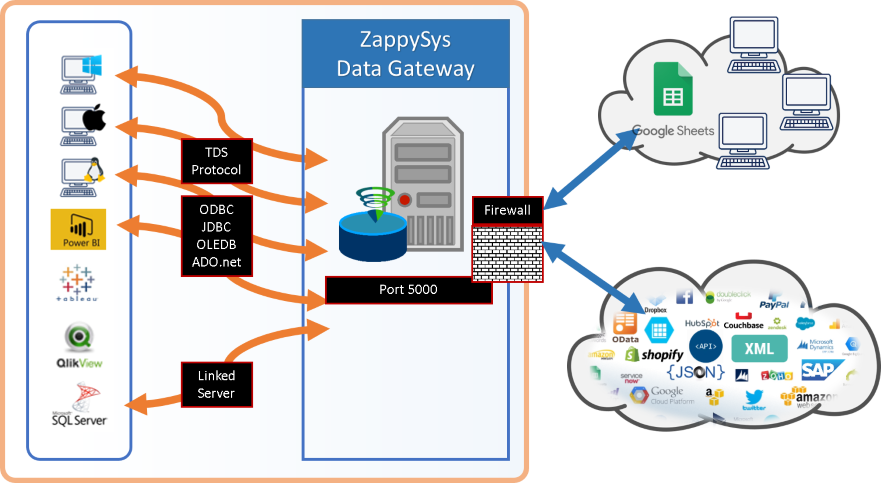
- Centralized Access — Share the DSN via ZappySys Data Gateway so JDBC, Linux, or remote apps can read Amazon Ads without installing the driver locally
📸 Visual Overview & Setup
|
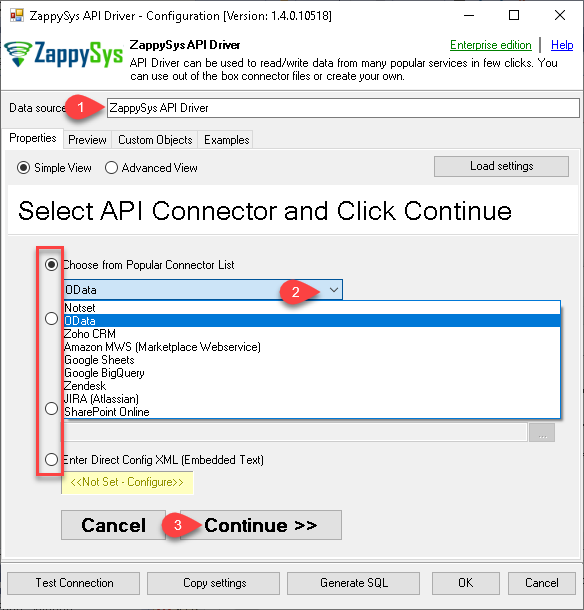
1. Pick Amazon Ads Connector
|
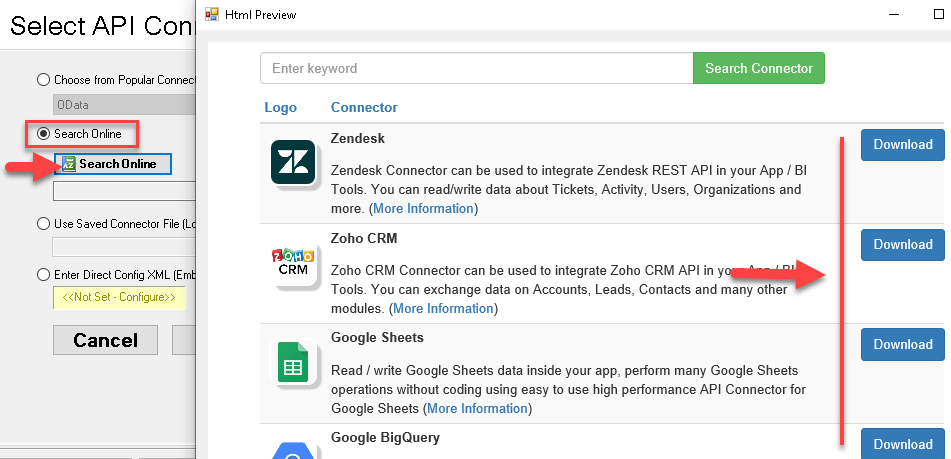
2. Search Online if Not Listed
|
3. Build & Preview SQL Query
|
|
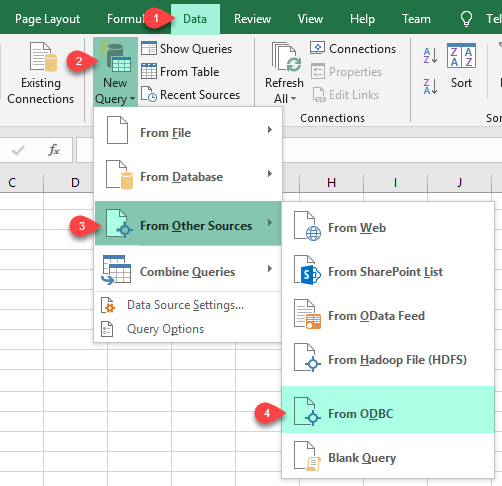
4. Load Amazon Ads Rows into Excel
|
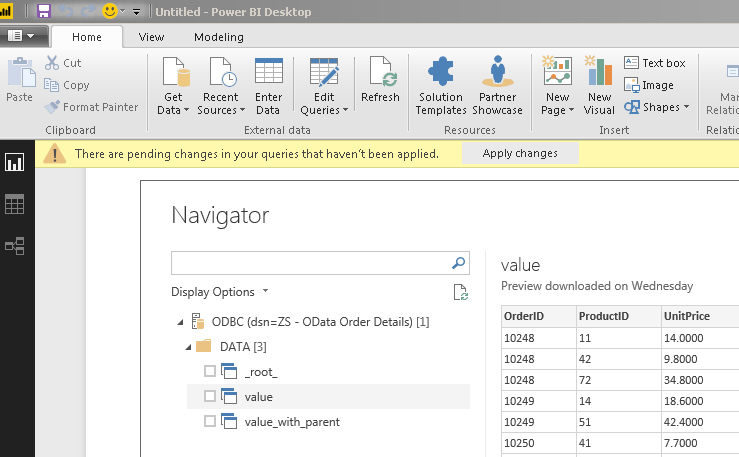
5. Connect from Power BI
|
6. Share via Data Gateway
|
🔗 Seamless SQL Query Integration
Real example: generate a Sponsored Products report using the beta reporting API
-- Get Sponsored Products report via SQL (Amazon Ads)
SELECT *
FROM get_beta_report
WITH (
    ReportName                = 'Test Name'
    , ReportType              = 'spCampaigns'
    , TimeUnit                = 'SUMMARY'
    , GroupByCampaignReportType = 'campaign'
    , GroupByCampaignMetrics  = 'impressions,clicks,cost'
)
✔ Query APIs like a database
✔ No ETL or custom scripts needed
✔ Works inside SQL Server, Power BI, Excel
🔧 Key Features
Read & Query
- SELECT with WHERE, ORDER BY, and parameterised Query Builder for server-side filtering
- Read
Profiles to list advertising accounts and profile IDs across marketplaces
- Run
Get Beta Report or Get Report actions to retrieve Sponsored Products / Sponsored Brands metrics
- Configure
ReportType, TimeUnit, GroupBy, Metrics, and date ranges directly from the Query Builder
Write & Generic Operations
Make Generic REST API Request action for any Amazon Ads endpoint not yet wrapped by a named actionMake Generic REST API Request (Bulk Write) for large payloads where a single bulk call is preferableTest Connection action to validate your OAuth token and API base URL before running jobs
Authentication
- OAuth Authentication — Use an Amazon Developer Security Profile with Client ID, Client Secret, Authorization URL, Return URL, and Scope
- One-click Generate Token in the DSN wizard to obtain and refresh the OAuth token
- Profile picker to select the advertising
Profile that subsequent queries should run under
- Works with
https://zappysys.com/oauth as a default Return URL or any Allowed Return URL you configure in Amazon Developer
Reliability & Platform Fit
- Built-in retry with
RetryMode = RetryWhenStatusCodeMatch, RetryStatusCodeList = 429, RetryCountMax = 5, and RetryMultiplyWaitTime = True
- Standard ODBC 3.x for Power BI, Tableau, Excel, SQL Server linked servers, SSIS, and custom apps
- Centralised access via ZappySys Data Gateway for JDBC, Linux, and remote clients without installing the driver locally
💡 Common Use Cases
Typical scenarios for the Amazon Ads ODBC Driver in reporting, ETL, and app development:
-
Campaign performance reporting in Power BI or Excel: Pull Sponsored Products metrics (impressions, clicks, cost) straight into models without writing API code.
Example: SELECT * FROM get_beta_report WITH (ReportType='spCampaigns', TimeUnit='SUMMARY', GroupByCampaignMetrics='impressions,clicks,cost')
-
Warehouse loads of Amazon Ads data: Schedule nightly extracts into SQL Server or a data warehouse via SSIS or ODBC jobs.
Example: load Profiles and daily Sponsored Products reports into staging tables for downstream modelling.
-
Cross-marketplace profile enumeration: List every advertising profile the account has access to before running targeted report queries.
Example: SELECT * FROM Profiles
-
Throttling-aware pipelines: Lean on the built-in retry for HTTP 429 so long-running report jobs don't fail when Amazon Ads rate-limits.
Example: override RetryCountMax and RetryMultiplyWaitTime per DSN for heavy extraction windows.
-
Ad hoc REST calls from SQL: Use
Make Generic REST API Request to hit newer Amazon Ads endpoints before a named action exists.
Example: call a new reporting endpoint with a JSON body straight from an ODBC WITH clause.
-
Centralised access from JDBC or Linux: Route queries through ZappySys Data Gateway so non-Windows clients can read Amazon Ads without installing ODBC locally.
Example: a Java service queries Amazon Ads via a SQL Server JDBC URL pointing at the gateway.
🎯 Summary
Bring Amazon Ads into the ODBC ecosystem your team already uses.
Query profiles, campaigns, and Sponsored Products reports with SQL, authenticate through Amazon OAuth, survive throttling with built-in retry, and connect from Visual Studio, BI stacks, or SQL Server — without maintaining one-off Advertising API integrations.
Trusted by Developers & IT Teams Worldwide
- Built for ODBC Workloads: One driver model across BI, ETL, databases, and custom code.
- Expert Technical Support: Engineers help with OAuth setup, Amazon Ads profiles, and report tuning.
- Proven Enterprise Scale: Thousands of teams worldwide rely on ZappySys for API and cloud connectivity.
|
ODBC PowerPack
Includes Amazon Ads ODBC Driver

Read reviews on Capterra →
|
Ready to start querying Amazon Ads?
Install the full ODBC PowerPack to unlock all drivers and start your free trial.
| |