Automate file and folder operations in SSIS — no scripting required.
Copy, move, delete, and rename files in bulk using wildcards, SQL-like filters, and Regex patterns.
Perform dynamic renaming with date-time tokens, search/replace file contents, convert encoding,
and export sorted file lists for loop processing — all from a simple drag-and-drop task UI.
Part of ZappySys SSIS PowerPack (100+ connectors & tasks).
Recommended starting point
Pro Tip: The Visual Studio download installs a basic extension.
Use the guide above to install and run the full SSIS PowerPack (all connectors & UI).
Compatibility: SQL Server 2012–2025+ (32/64-bit) | Azure Data Factory / Azure-SSIS IR Ready
⚡ Key Benefits
- Bulk File Operations — Copy, move, delete, and rename multiple files using wildcards
- SQL-like & Regex Filtering — Select files by size, date, or extension with SQL expressions and Regex patterns
- Dynamic Paths & Bulk Rename — Use date/time placeholders to timestamp folders and standardize file names
- Content Processing — Search/replace file contents and convert encoding (UTF-8, UTF-16, ASCII)
- Loop-Ready Output — Export file properties as a data table for ForEach Loop iteration without scripting
📸 Visual Overview & Setup
|
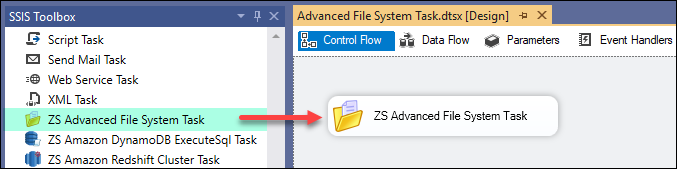
1. Drag & Drop from Toolbox
|
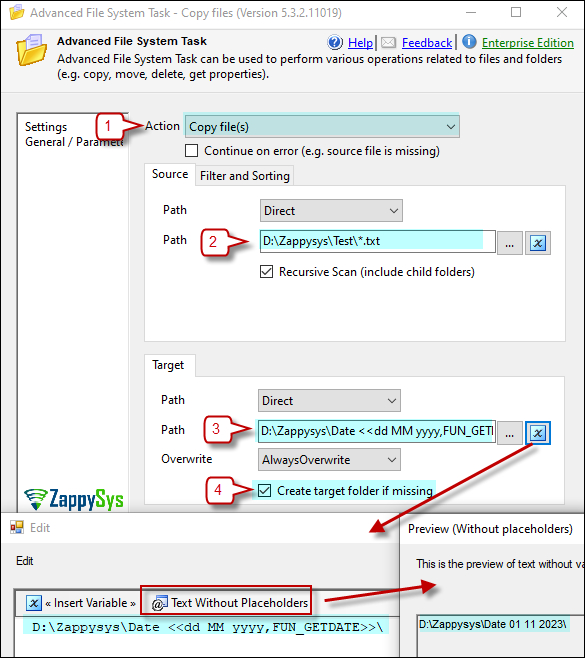
2. Copy Multiple Files (Wildcard)
|
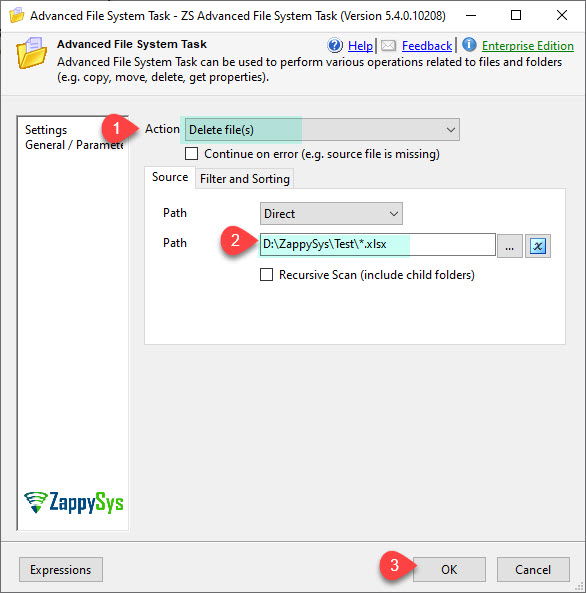
3. Delete Files Older Than X Days
|
|
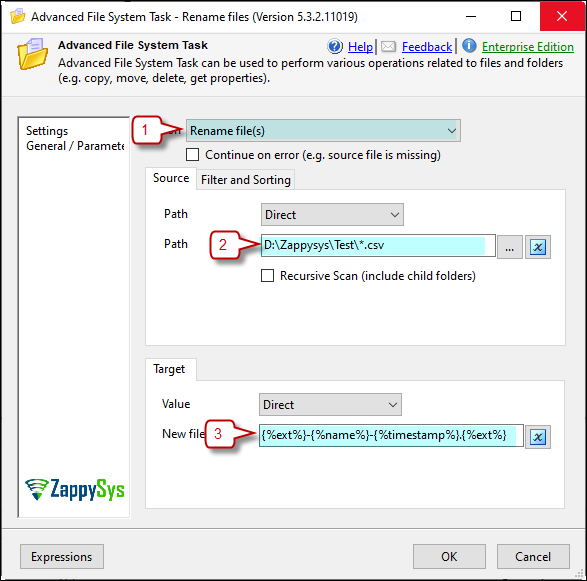
4. Rename Files with Bulk Patterns
|
5. Search & Replace in File Contents
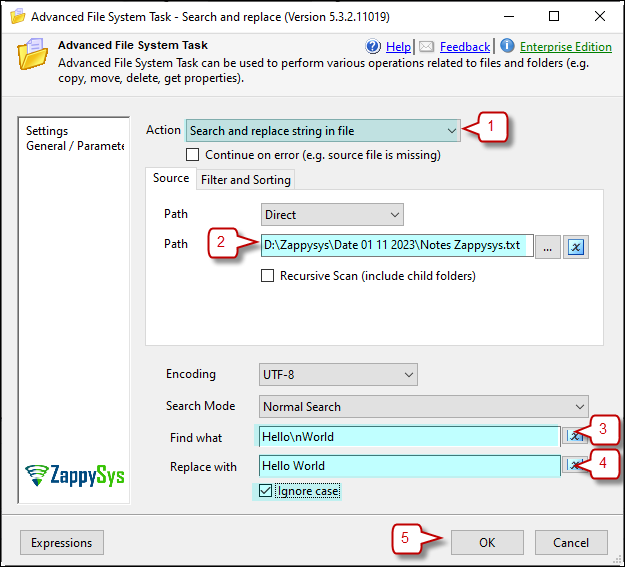
|
6. Get Sorted File List for Looping
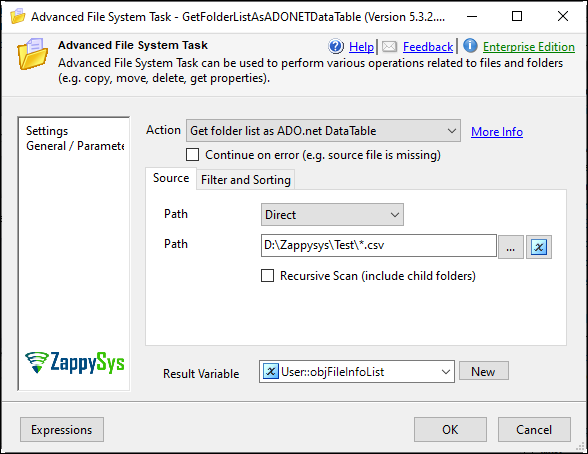
|
🔧 Key Features
File & Folder Operations
- Copy, Move, Delete, Rename files — single or bulk using wildcards (e.g.
*.csv)
- Write content to a new or existing file
- Create and delete folders
- Auto-create missing target directories
Bulk Rename & Dynamic Paths
- Rename with pattern tokens (e.g.
{%name%}.{%ext%}.old)
- Use SSIS variable placeholders for timestamped paths (e.g.
c:\Archive\{{System::StartTime,yyyyMMdd}})
Smart Filtering & Sorting
- SQL-like filter expressions (e.g.
Size > 1024 AND AgeInDays > 10 AND Extension IN ('.txt','.csv'))
- Regex Include Pattern (e.g.
^(file\d\d).(\w+)$)
- Regex Exclude Pattern (e.g.
(.exe|.msi))
- Sort by file property (e.g.
Order Size DESC) and select Top-N files
File Content Processing
- Search & Replace in file contents (Regular Expressions supported)
- Change file encoding (UTF-8, UTF-16/Unicode, ASCII)
Metadata & Loop Support
- Export file properties as an ADO.NET data table
- Use with ForEach Loop – ADO Enumerator for sorted file iteration
Reliability
- Continue on error (e.g. skip when source file is not found)
- Compatible with Azure Data Factory / Azure-SSIS IR
💡 Common Use Cases
Common real-world scenarios where this task simplifies SSIS development:
-
File Archiving & Organization: Automatically move files into structured folders.
Example: Archive daily files into c:\Archive\yyyyMMdd.
-
Log Cleanup & Retention: Delete old files based on age or size rules.
Example: Remove files older than 30 days to manage disk usage.
-
Selective File Processing: Process only files matching specific conditions.
Example: Load CSV files larger than 1 KB modified in the last 7 days.
-
Dynamic File Renaming: Standardize file names before processing.
Example: Rename files using {%name%}_{%date%}.csv.
-
Pre-Processing Before ETL: Prepare files before loading into a database.
Example: Convert encoding or replace delimiters before import.
-
ETL Staging Automation: Organize incoming files for consistent pipelines.
Example: Route files into staging folders by type or source system.
🎯 Summary
Turn SSIS into a powerful file automation engine — no scripting needed.
Handle bulk operations, smart filtering, encoding conversion, and loop-ready output with a single drag-and-drop task.
Trusted by Developers & IT Teams Worldwide
- Built for SSIS Workflows: Purpose-built for high-performance ETL and complex integration scenarios.
- Expert Technical Support: Direct access to engineers via email and remote screen-share sessions.
- Proven Enterprise Scale: Trusted by 3000+ teams across 90+ countries, including Fortune 500.
|
SSIS PowerPack
Includes SSIS Advanced File System Task

Read reviews on Capterra →
|
Start Automating Workflows with SSIS PowerPack
Includes connectors for APIs, databases & cloud apps. Build robust ETL workflows without custom scripting.
Full functionality is FREE for development within Visual Studio
| |

