Skip to content
| Marketplace
Sign in
Visual Studio>Tools>Solution Alias
Solution Alias

Solution Alias

WilloAndCo

|
4 installs
| (0) | Free
Shows a coloured label next to the solution name in the title bar: the solution file's path, or an alias in colours you choose.
Download

Solution Alias

Make solutions unique with a customisable label in Visual Studio's title bar.

Solution Alias adds a coloured label next to the solution name: an alias you choose, such as Main Branch or Release Branch, or the solution file's path.

Three Visual Studio windows on the same solution, labelled Main Branch, Release Branch and the solution file's path

Set an alias

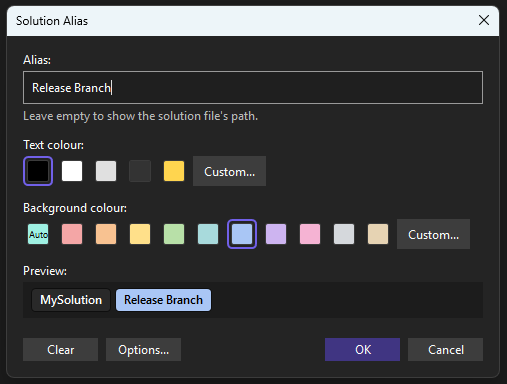
Click the label, or right-click the solution in Solution Explorer and choose Set Solution Alias....

The Solution Alias dialog with the alias Release Branch and a blue background

  • Alias: the text to show. Leave it empty to show the solution file's path.
  • Text colour and Background colour: pick a preset or Custom.... Auto picks a background based on the solution's path.
  • Preview: shows how the title bar will look.

Each solution keeps its own alias, saved in .vs\<SolutionName>\SolutionAlias.json next to the solution.

Without an alias

The label shows the solution file's path, shortened to the last few folders, for example ...\LocalRepo\MySolution\MySolution.sln.

Options

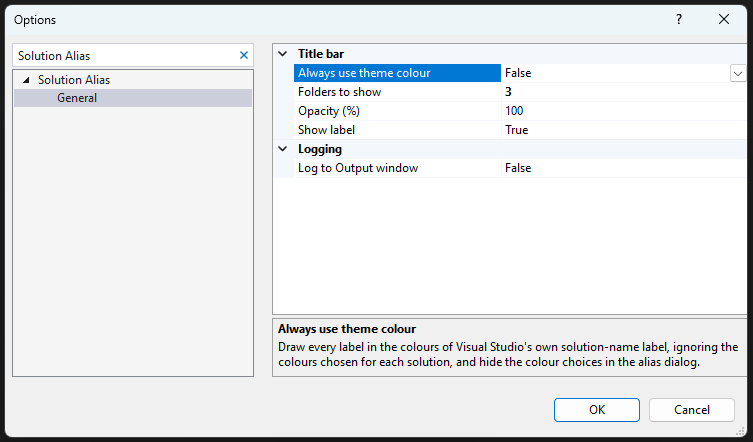
Tools > Options > Solution Alias > General

The Solution Alias options page

  • Show label: turn the label off completely.
  • Folders to show: how many folders of the path to show.
  • Always use theme colour: draw the label in the Visual Studio theme style.
  • Opacity (%): fade the whole label, from 10 to 100.

Compatibility

  • Works with Visual Studio 2022 version 17.14 or later, and Visual Studio 2026, on x64.
  • Solution must be saved for an Alias to show.

Licence

MIT

  • Contact us
  • Jobs
  • Privacy
  • Manage cookies
  • Terms of use
  • Trademarks
  • Your Privacy Choices
  • Consumer Health Privacy
© 2026 Microsoft