Read your Terraform plans like code reviews, not CLI dumps.
A native Plan Review tab for Azure DevOps build summaries. The task attaches your terraform plan output to the build; the tab renders it as a structured, searchable, themed view — the kind of thing you actually want a teammate to look at before they hit Approve.
Why this exists
Most Azure DevOps pipelines do one of two things with a Terraform plan:
- Dump it as text into the build log — review means scrolling through thousands of ANSI-coded lines and hoping
Ctrl+F finds what matters.
- Generate a static HTML report at pipeline time — locked to one theme, can't be filtered, can't be searched, and goes stale the moment requirements shift.
Neither is built for the moment that matters: a human deciding whether the change is safe to apply.
This extension treats the plan as structured data, not text — so the tab can do everything a code reviewer needs.
What you get
Module-grouped tree, not a flat list
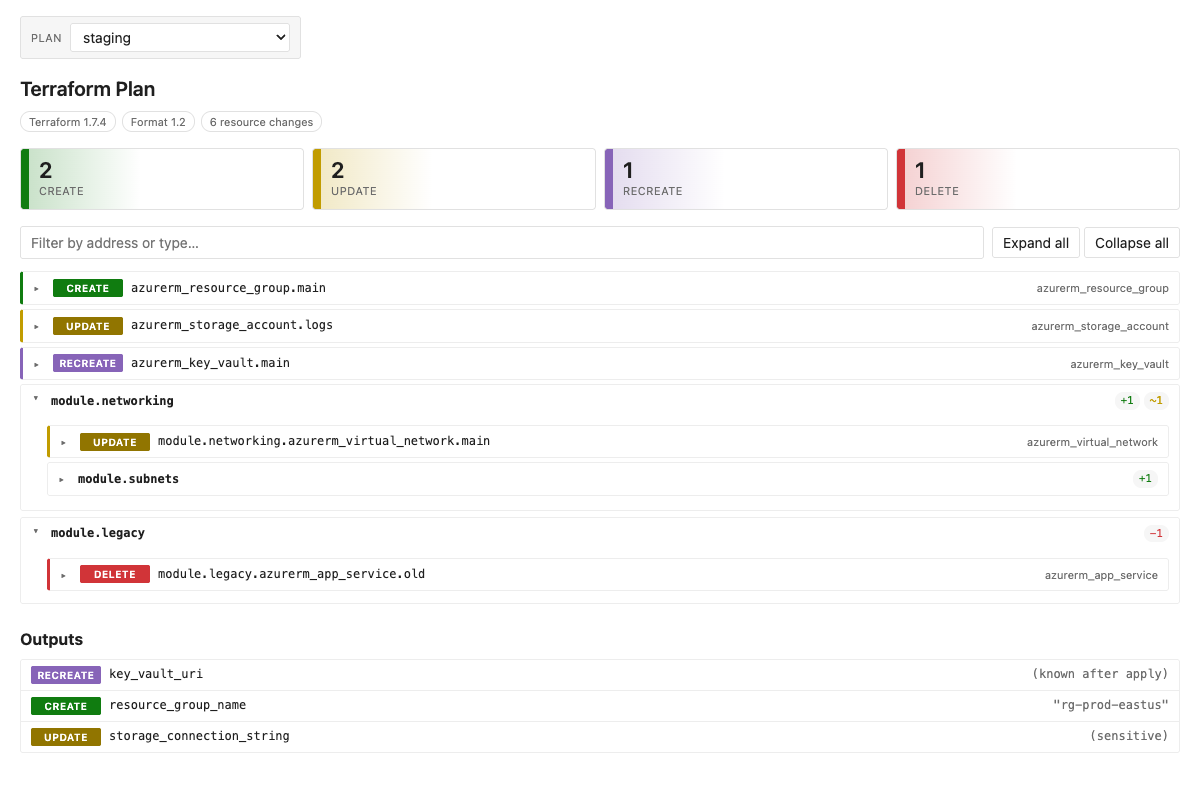
Resources nest by their module address (module.networking.module.subnets). Each module shows rolled-up counts (+1 ~1 −1) so you can read the shape of the change before drilling in.
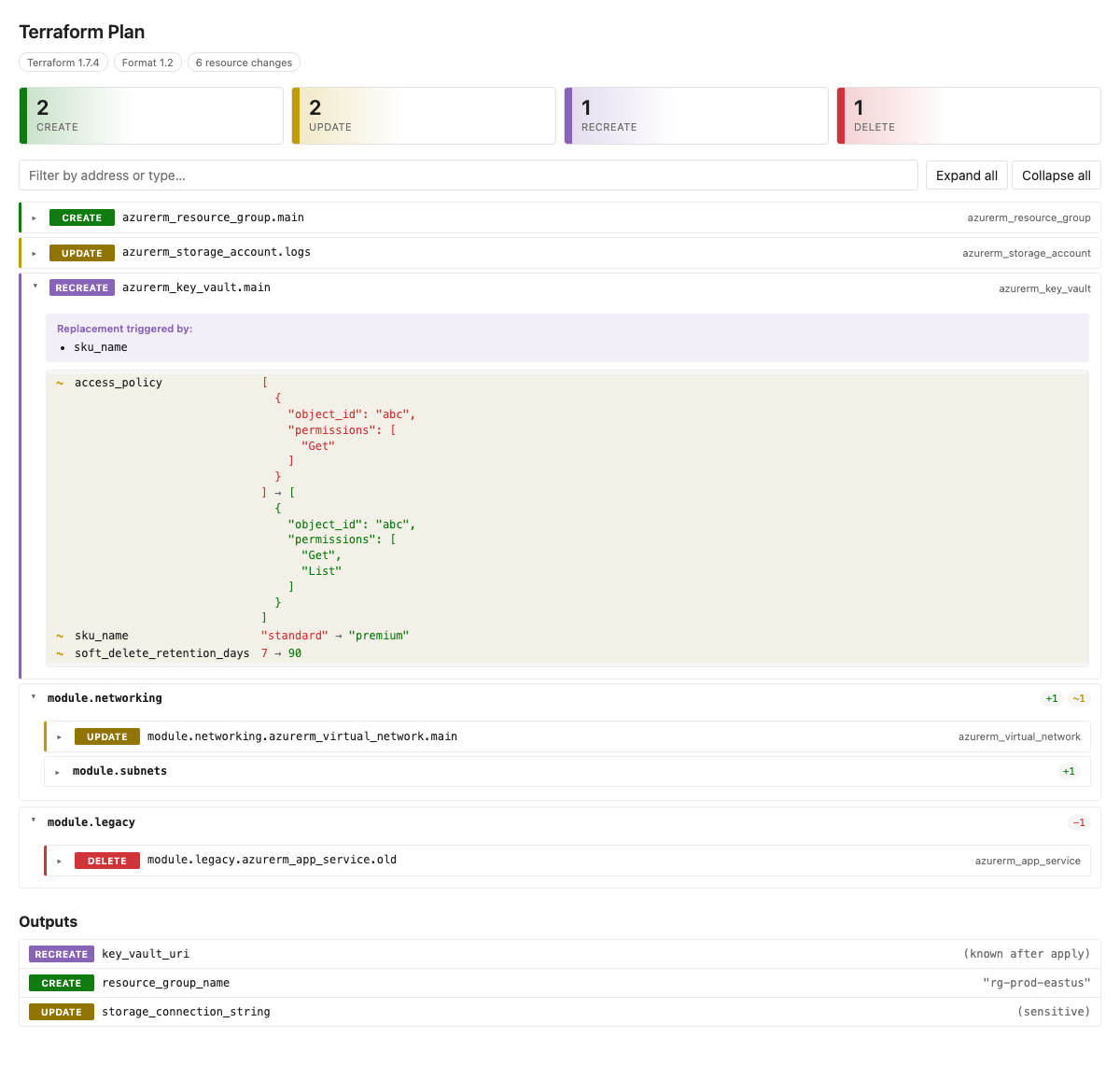
Attribute-level diffs with replace reasons
Expand any resource and you see exactly which keys changed, before → after, with + - ~ markers. Computed values render as (known after apply). Sensitive values render as (sensitive) — the actual content never reaches your browser.
For replaces ([delete, create]), the tab surfaces the plan's replace_paths — so the question "why is this being recreated?" has a one-line answer instead of a guessing game.
Click-to-filter summary
Four cards at the top — Create / Update / Recreate / Delete — each with its count and a colored gradient accent. Click one to filter the tree to that action. Click again to clear. Combine with the search box for address / type matching.
Multi-stage pipelines, one tab
Run the task once per stage (dev, staging, prod) with distinct names. The tab lists all attached plans in a dropdown — switching is instant once a plan is loaded, with a skeleton state and named caption (Loading plan: prod…) on first fetch.
The selector hides itself when only one plan is attached, so single-plan pipelines look exactly the same as before.
Outputs section
Output changes are rendered separately. New outputs, removed outputs, and updated outputs each get their own row — so downstream consumers don't get blindsided by a removed connection_string.
Themed for ADO
The tab uses the same CSS theme tokens Azure DevOps uses for the rest of the portal — light mode, dark mode, and high-contrast all just work. Fonts match azure-devops-ui exactly, monospace uses Cascadia Mono (no programming ligatures) so literal attribute values like != and -> render as written.
Quick start
- task: TerraformInstaller@0
  inputs:
    terraformVersion: 'latest'

- task: Bash@3
  displayName: 'Terraform Plan'
  inputs:
    targetType: 'inline'
    script: |
      terraform init
      terraform plan -out=tfplan

- task: TerraformPlanViewer@1
  displayName: 'Publish Terraform Plan'
  inputs:
    planPath: '$(System.DefaultWorkingDirectory)/tfplan'
That's it. Run the pipeline; the Plan Review tab will appear on the build results page.
The task accepts either form of plan:
- A binary plan (
terraform plan -out=tfplan) — converted on the agent via terraform show -json automatically.
- The JSON form (
terraform show -json tfplan > tfplan.json) — useful if you don't have the terraform CLI on the publishing agent.
Version pinning
TerraformPlanViewer@1 references the major version and automatically picks up the latest minor/patch within major 1 — the recommended form for most pipelines, since you get bug fixes without editing YAML.
Azure DevOps also accepts a complete version, which some supply-chain and SAST policies (e.g. SonarCloud's "Use complete version number" hotspot) require:
- task: TerraformPlanViewer@1.3.0 # full pin = the version shown at the top of this listing
The task version matches the extension version shown at the top of this listing — they're stamped from one source, so the listing number is the number you pin.
Before pinning the full version:
- The exact version must be installed in your organization. The extension ships one build per major, so only the latest minor/patch is present. Pinning an older build such as
@1.0.0 resolves to nothing and the pipeline fails with "task not found" — use the current version from this listing.
- A full pin is not auto-updating: when a new version publishes you must bump the pin yourself.
Multi-stage example
- task: TerraformPlanViewer@1
  displayName: 'Publish dev plan'
  inputs:
    planPath: '$(System.DefaultWorkingDirectory)/dev/tfplan'
    attachmentName: 'dev'

- task: TerraformPlanViewer@1
  displayName: 'Publish prod plan'
  inputs:
    planPath: '$(System.DefaultWorkingDirectory)/prod/tfplan'
    attachmentName: 'prod'
Each attachmentName becomes a label in the dropdown. Sorted alphabetically, the first is selected by default.
How it works
The task takes your plan file, validates it (binary plans get converted with terraform show -json), and uploads the JSON as a build attachment with the type terraform-plan-viewer.plan. The tab calls Azure DevOps's Build REST API to download the attachment, parses it client-side, and renders it.
There's no server, no database, no third-party endpoint. Plan data sits in your Azure DevOps organization the same way build logs do.
Privacy & security
- No third-party calls. Plan JSON lives as a build attachment in your Azure DevOps organization. The tab fetches it from your own ADO API. Nothing leaves your tenant.
- Sensitive values are masked. Anything Terraform marks as
sensitive in before_sensitive / after_sensitive renders as (sensitive) — the underlying value is not rendered to the DOM.
- DOM-safe rendering. Plan content goes through
textContent / createElement, never as an HTML string — so a malicious resource address can't inject script.
FAQ
Do I need the terraform CLI on the publishing agent?
Only if you pass a binary plan. If you've already converted to JSON yourself, no CLI is needed.
Will this work with OpenTofu / Terraform Cloud plans?
Yes — anything that emits the standard Terraform plan JSON schema works. The tab doesn't care which CLI produced it.
My plan is huge. Will it render?
The task supports plans up to 256 MiB. The tab parses and renders client-side; multi-thousand-resource plans render in well under a second on modern laptops.
Does it work in dark mode / high-contrast?
Yes. All colors use ADO's theme tokens with safe fallbacks.
Can I use this with classic (non-YAML) build pipelines?
Yes — the task and tab are both surfaced through the standard build results view, which works in classic and YAML pipelines.
Source, issues, contributions
Open source on GitHub: WayneGoosen/azdo-tf-plan-viewer. Issues and PRs welcome.

