Raaghu Spec Kit
Raaghu Spec Kit brings specification-driven development into Azure DevOps. PMs, BAs, and QAs can generate, review, and manage structured specs, delivery plans, task breakdowns, and quality checklists — then create and refine Azure Boards work items — all from a guided AI workspace inside your project.
Works with Azure DevOps Services and Azure DevOps Server (on-premises).
For setup instructions, feature guides, tutorials, troubleshooting, and release notes, see the Raaghu Spec Kit documentation.
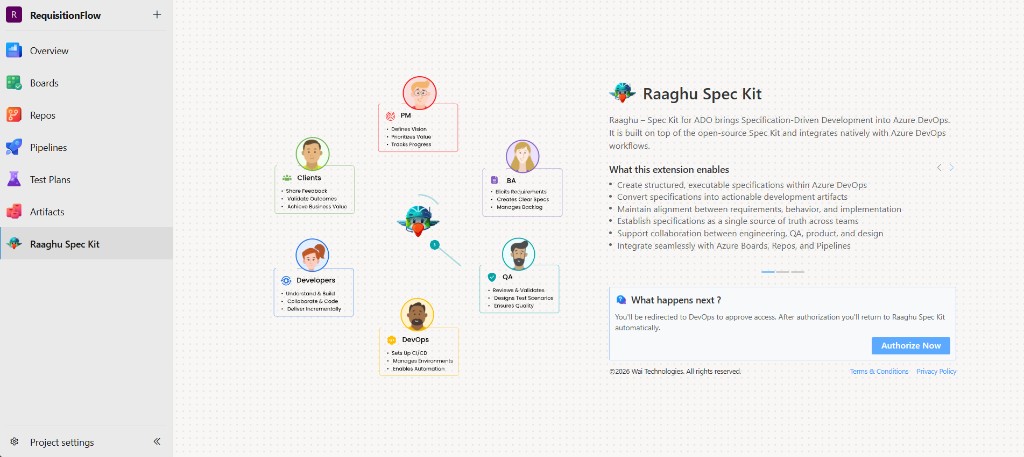
Secure Sign-In
Sign in with your Microsoft account to get started. Raaghu Spec Kit uses Microsoft authentication to securely connect with your Azure DevOps organization or collection.
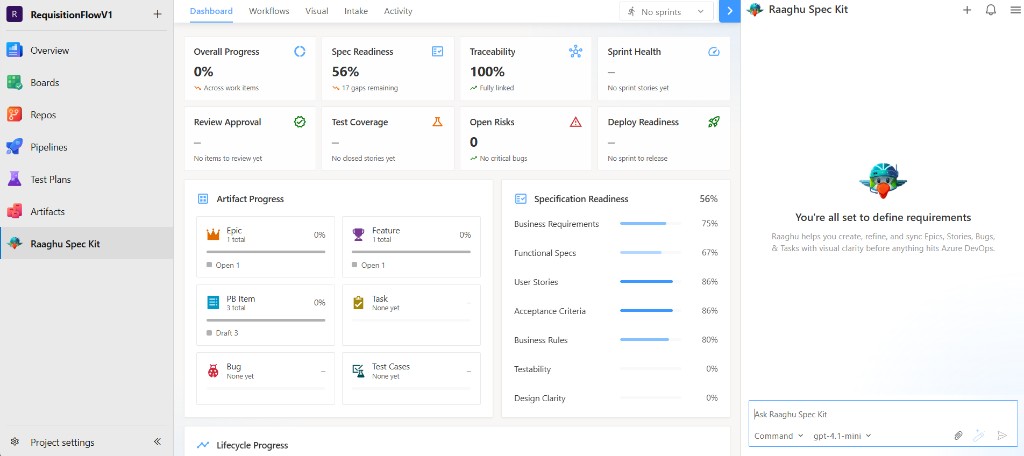
Workspace — Five Tabs, One Flow
The left workspace is organized into five tabs so teams can move from intelligence → action → backlog → documents → audit:
| Tab |
Purpose |
| Dashboard |
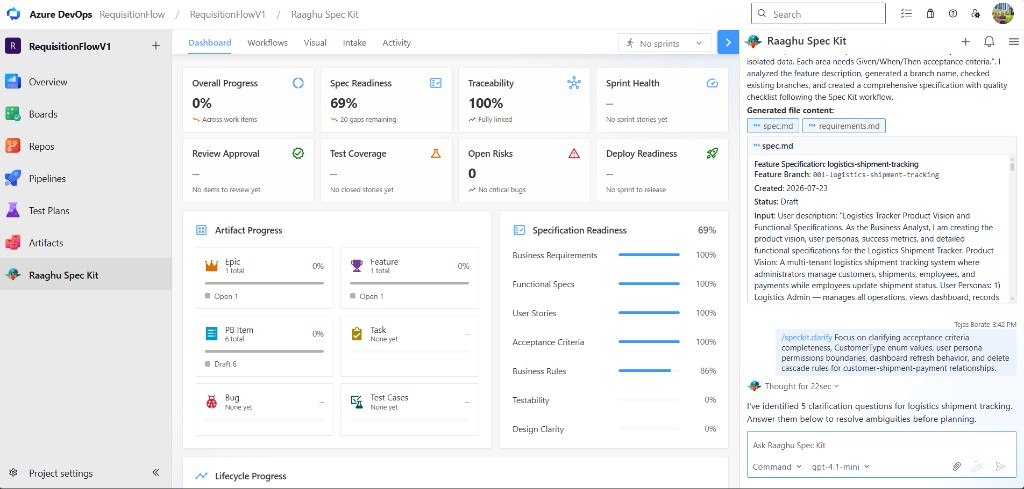
Project intelligence — progress, spec readiness, traceability, sprint health, risks, and deploy readiness |
| Workflows |
Curated AI actions by delivery phase — pick a capability and start a guided chat |
| Visual |
Interactive Epic → Feature → User Story → Task hierarchy with scan, pan, and zoom |
| Intake |
Analyze BRD/PRD and project docs from the wiki; extract requirements and open questions |
| Activity |
Audit trail of Spec Kit work-item creates and updates by day, week, or month |
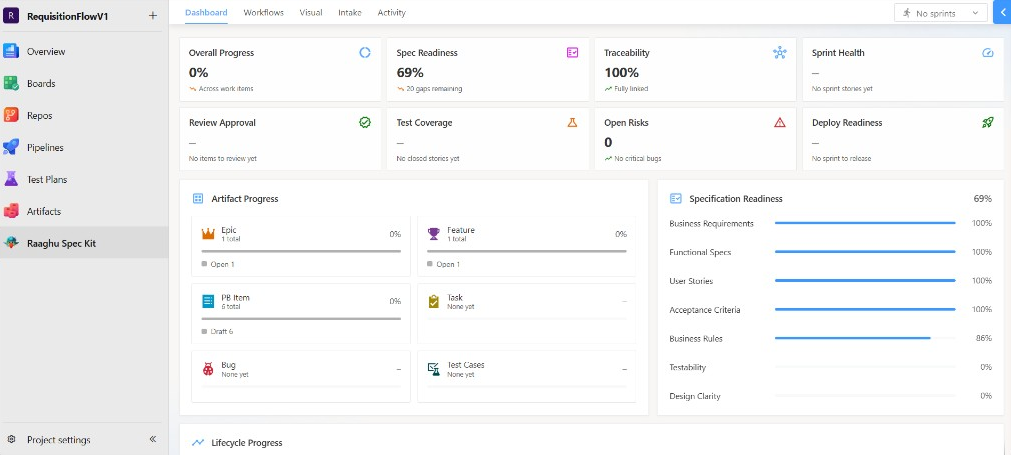
Dashboard — Project Intelligence
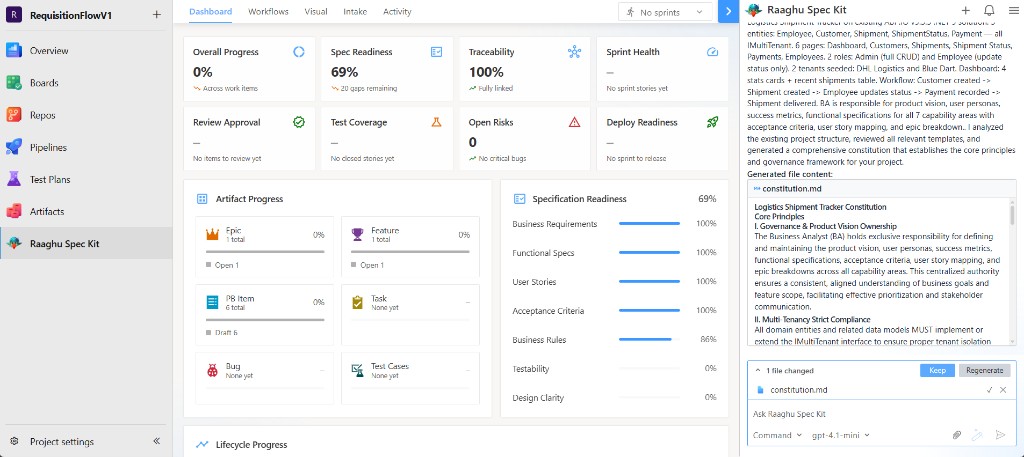
The Dashboard gives PMs a live view of delivery health grounded in Azure Boards and Spec Kit artifacts:
- Overall Progress — completion across stories and tasks
- Spec Readiness — gaps in acceptance criteria, testability, and related dimensions
- Traceability — how well work items stay linked through the hierarchy
- Sprint Health — Healthy / Watch / At Risk for the current iteration
- Review Approval, Test Coverage, Open Risks, and Deploy Readiness
- Artifact progress and specification readiness panels with drill-down into Boards items
- Lifecycle progress across the Spec Kit delivery pipeline
Use filters and KPI drill-downs to jump from a metric to the work items that need attention.
Workflows — Guided AI Actions
The Workflows tab is your command center — AI-powered actions organized by delivery phase. Select any action to start a guided conversation in the chat panel. Search workflows or browse by phase.
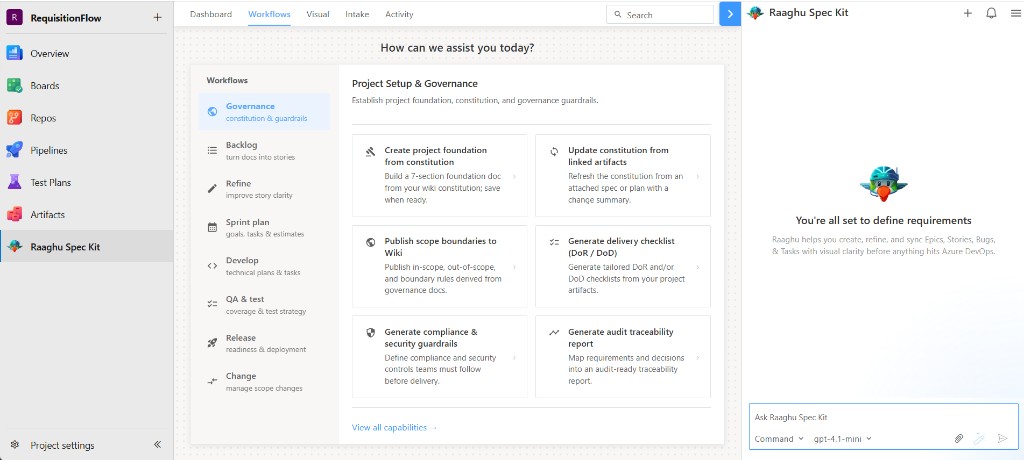
| Phase |
What You Can Do |
| Project Setup & Governance |
Create project foundation from constitution, update constitution from linked artifacts, publish scope boundaries to Wiki, generate delivery checklist (DoR / DoD), generate compliance & security guardrails, generate audit traceability report |
| Backlog Creation |
Generate epics from linked artifacts, split epics into features, generate stories from selected feature, generate stories from linked artifacts, generate intake summary from BRD/PRD, link artifacts to selected work item |
| Backlog Refinement |
Refine selected stories, standardize acceptance criteria, detect missing requirements, attach NFRs to stories, detect duplicates or overlaps, highlight unclear or risky stories |
| Sprint Planning & Breakdown |
Generate sprint goal from selected items, generate dev tasks from selected stories, estimate tasks from plan, identify cross-team dependencies, run readiness check (DoR validation) |
| Execution Support |
Generate technical plan for selected feature, refine tasks into implementation steps, generate test cases from selected stories, convert bug to linked dev task, track work items status from implementation progress |
| Quality & Validation |
Generate test strategy for selected epic, generate negative / edge test cases, generate test data matrix, validate acceptance criteria completeness, generate UAT checklist |
| Release & DevOps |
Generate CI pipeline checklist from constitution, generate release gates from compliance rules, generate runbooks (deploy / rollback), generate release notes from completed work items, publish release notes to Wiki |
| Change Management |
Detect scope drift from latest artifacts, highlight changes since last PRD version, draft change request with impact analysis, mark items requiring approval, generate stakeholder approval checklist |
Visual — Work Item Hierarchy
The Visual tab shows your Azure Boards hierarchy as an interactive chart — Epics, Features, User Stories, and Tasks — with drag-to-pan navigation, zoom, scan, and one-click child generation from Spec Kit artifacts.
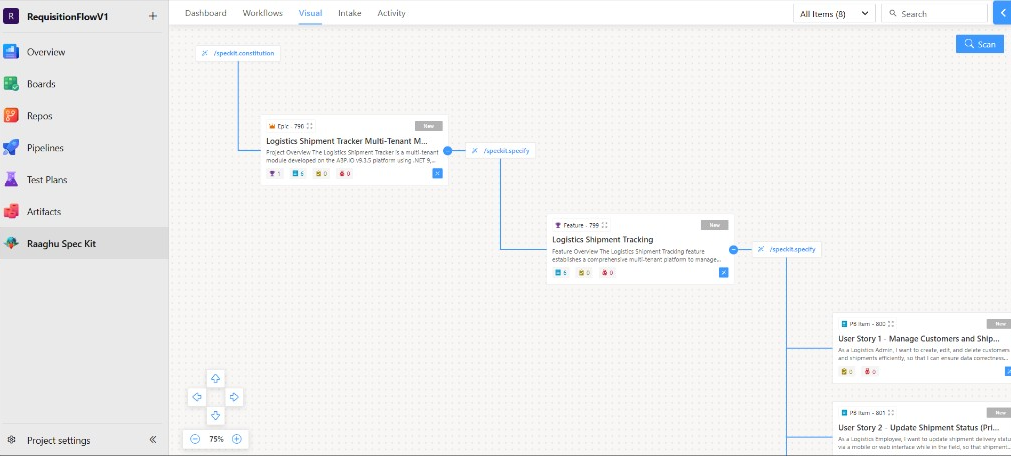
- Tree visualization — connected cards with Azure DevOps icons and status badges
- Scan — discover and reconcile Spec Kit–linked work items in the project
- One-click creation — generate child items from wiki specs (e.g. Epic → Features & Stories)
- Pan & zoom — navigate large backlogs comfortably
- Process templates — Agile, Scrum, CMMI, and Basic
Intake — Documents to Backlog
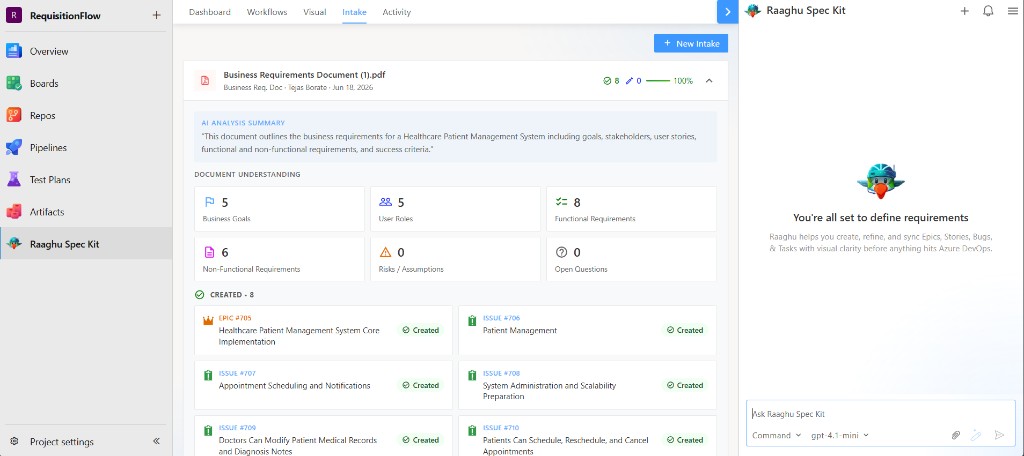
The Intake tab turns project documents into structured understanding:
- Place BRDs, PRDs, and related docs under Spec Kit/Intake in your project wiki
- Spec Kit analyzes each document for scope, requirements, risks, assumptions, and open questions
- Link findings to Azure Boards artifacts and continue refinement in chat or Workflows
- Track remaining open questions and risks until they are resolved
Ideal for onboarding existing product docs before /speckit.specify and backlog creation.
Activity Feed
The Activity tab is a real-time audit trail of what Raaghu Spec Kit has done in your project. Browse by Day, Week, or Month, and search across all activity.
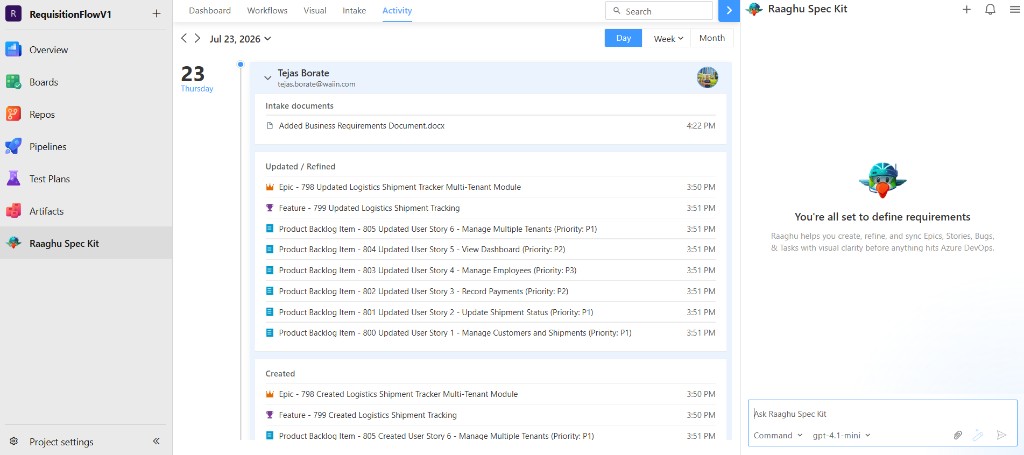
- Date navigation — step forward or backward by day, week, or month
- Per-user grouping — see who generated or updated what
- Work item audit trail — Epics, Features, User Stories, and Tasks with ID, title, and timestamp
- Change labels — tagged entries (e.g. Updated / Refined) for quick scanning
- Search — filter by keyword
Key Features
Conversational AI Chat
Natural-language interface for context-aware specification engineering. Ask questions, run /speckit.* commands, and generate structured deliverables — all within Azure DevOps.
Repository-Aware Context
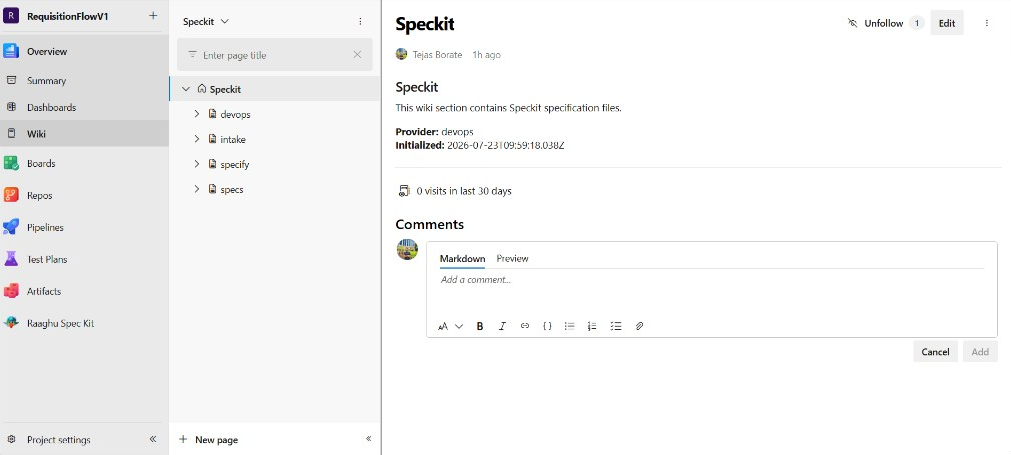
Automatically scans your wiki file tree and repository sources to give the AI project context — README, existing specs, constitution, and structure.
Wiki-Based Storage
Built on GitHub Spec Kit. Spec Kit artifacts (constitution, spec, plan, tasks, checklists, and related files) are saved to your Azure DevOps Wiki with full version history — no Git commits required for Spec Kit content.
Flexible AI — BYOK or Raaghu Hosted AI
Use your own AI provider, or switch on Raaghu-hosted AI for the whole organization.
| Option |
How it works |
| Bring Your Own Key (BYOK) |
Configure Azure OpenAI, OpenAI, or Anthropic Claude in Project Settings or Organization Settings. Requests go from the browser to your provider. |
| Raaghu AI (hosted) |
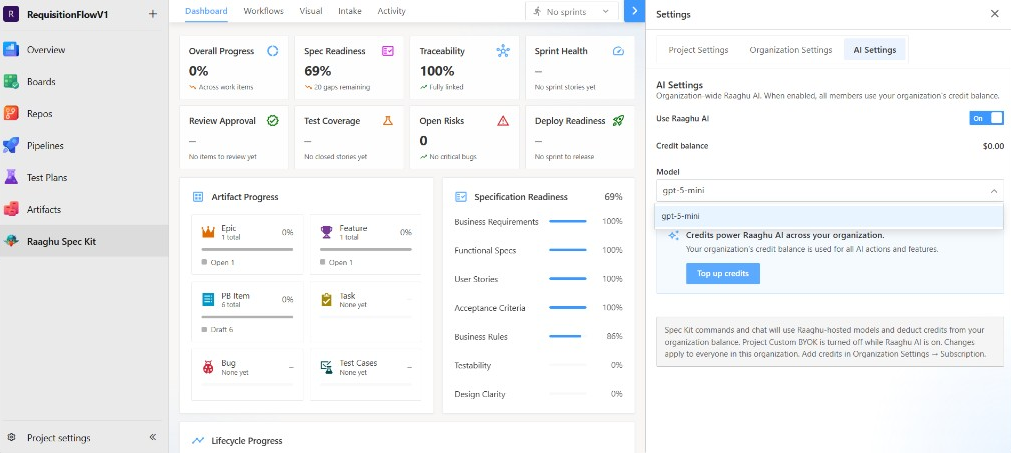
Enable from AI Settings. Spec Kit uses organization-hosted models and deducts from your credit balance. When on, Raaghu AI overrides project Custom BYOK. |
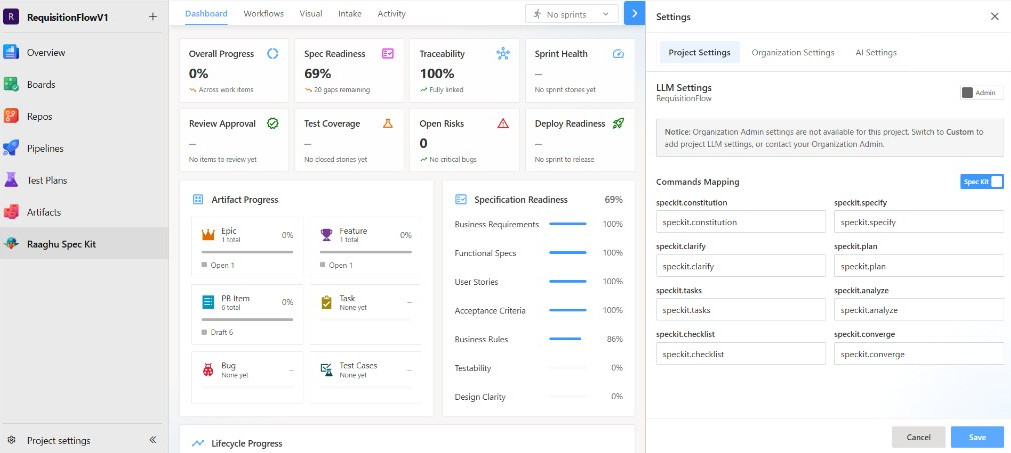
In-Extension Settings
Open Settings from the Spec Kit project hub:
| Tab |
What you configure |
| Project Settings |
Provider, API key, model, and endpoint for this project. Use Default to inherit the org LLM config, or Custom to override. Remap /speckit.* commands if needed. |
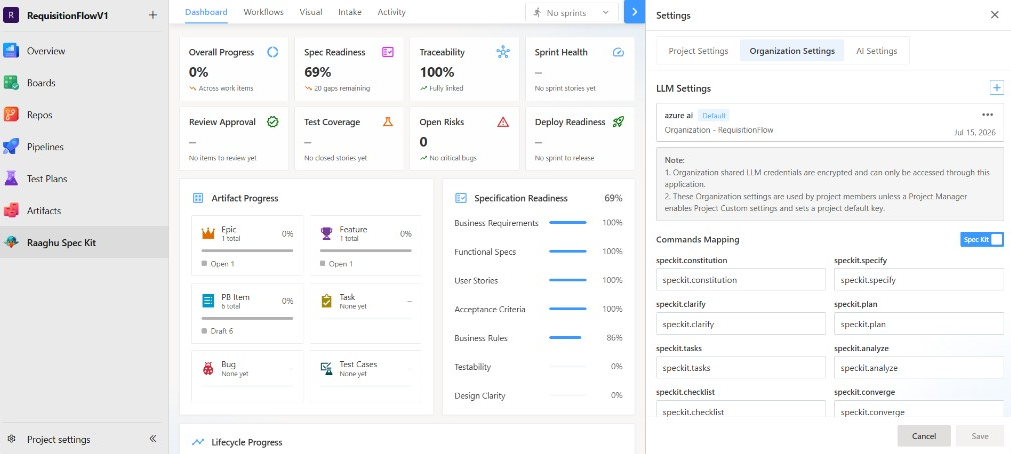
| Organization Settings |
Shared LLM configs for the organization (title, provider, model, endpoint, key, expiration) plus org-level command mappings that projects can inherit. |
| AI Settings |
Turn Raaghu AI on or off, pick the hosted model, view credit balance, and top up credits. |
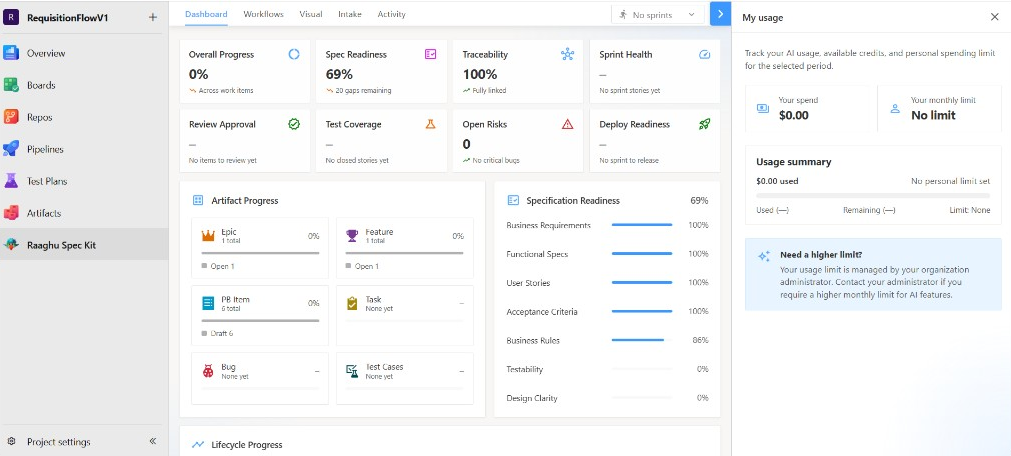
My Usage
Track your personal AI spend from the extension header:
- Spend for a selected date range
- Your monthly limit (set by an organization admin, or no limit)
- Clear guidance when you need a higher limit
AI Chat on Work Items
Open AI chat from Boards, Backlogs, or Queries to discuss and refine a work item — then apply changes back to Azure Boards when ready.
Organization Settings Hub
Organization admins manage seats, billing, AI credits, and usage from:
Azure DevOps → Organization Settings → Raaghu Spec Kit
(On Azure DevOps Server, open the same hub from Collection Settings.)
| Tab |
Purpose |
| Subscription |
Plan, seats, billing, and credit top-ups |
| Users |
Assign or revoke seats |
| License Keys |
Activate a standalone license key |
| Credits |
Credit balance and spending limits |
| Usage |
Spend by project and member |
Subscription
Subscribe to the Professional Plan at $9 USD / seat / month, then manage seats and billing in one place.
Getting started (eligible new organizations)
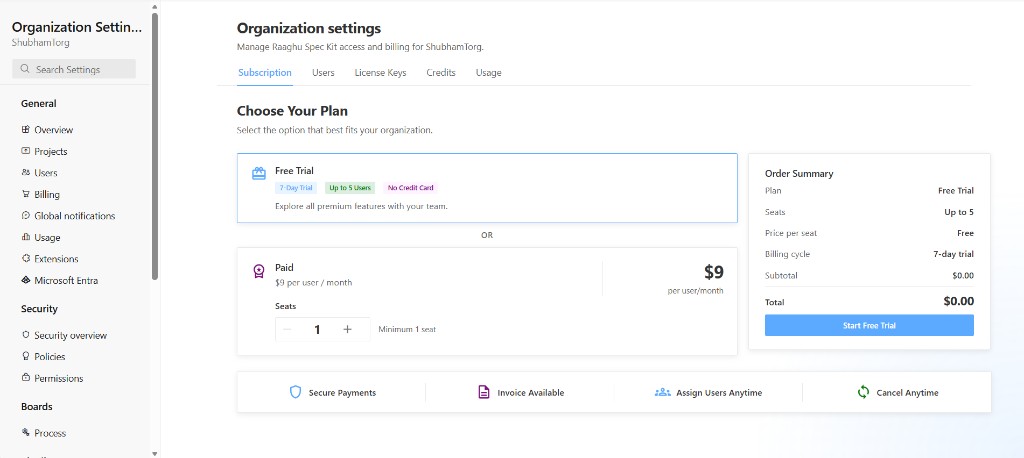
Tenant admins see Choose Your Plan when the organization is trial-eligible:
- Select Free Trial or Paid
- For Free Trial — click Start Free Trial (up to 5 seats, no credit card required)
- For Paid — set seats with − / +, then click Subscribe Now and complete Stripe checkout. At Stripe checkout, you can enter a promotion code if one was issued to you.
- Assign seats to team members on the Users tab
If the organization is not trial-eligible, use the paid-only path (Subscribe for $…/month) or activate a key on License Keys.
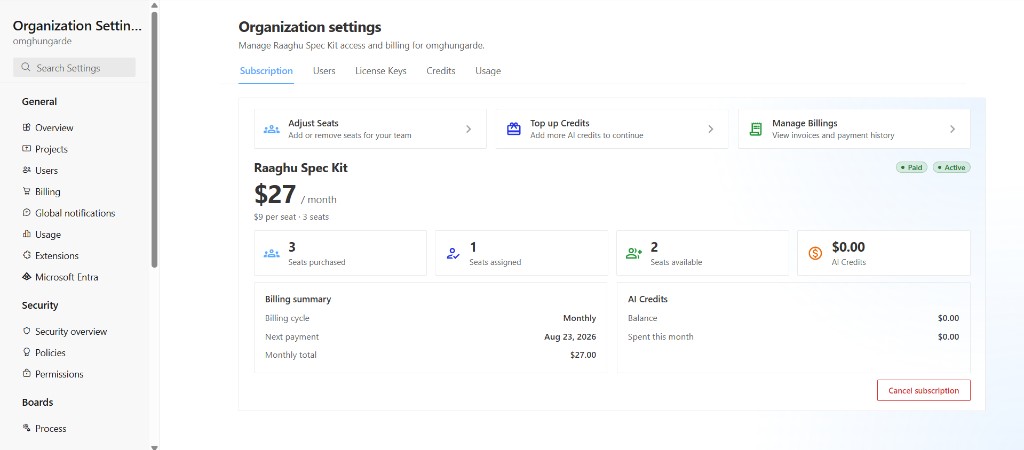
After you subscribe (paid, trial, or license key), you can:
| Action |
Description |
| Adjust Seats |
Add or remove seats. Seat reductions take effect at the end of the billing period and can be undone. During a free trial, adding seats is free until the trial ends. |
| Top up Credits |
Add AI credits (preset or custom amount between $5 and $10,000). Credits do not expire. |
| Manage Billing |
Open the Stripe portal for invoices, payment methods, and payment history. During a free trial, use this when you are ready to upgrade to paid. |
| Cancel / Undo |
Cancel at period end, or undo cancellation before it takes effect. Cancel is hidden while the organization is on a free trial. |
You also see seats purchased / assigned / available and AI credit balance vs spend.
- Paid (card billing): Billing summary shows billing cycle, next payment date, and monthly total. Plan badge: Paid.
- Free trial: Plan badge shows Free trial. The summary panel is Trial summary (plan, Trial ends on, seats) instead of next payment / monthly total.
- License key: Plan badge shows License key instead of Paid, and Billing summary shows only Expires on.
Users
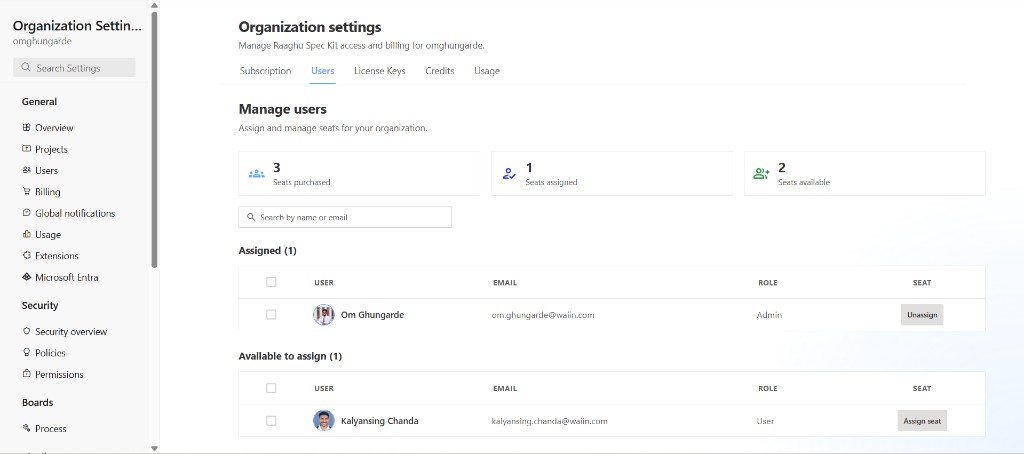
Give team members access by assigning seats.
| Capability |
Description |
| Seat summary |
Purchased, assigned, and available seats at a glance |
| Search |
Find people by name or email |
| Assign |
Assign seats one-by-one or in bulk from Available to assign |
| Unassign / Revoke |
Remove seats from Assigned users individually or in bulk |
| Roles |
See whether each person is an Admin or Member |
Important: Members need an assigned seat to use Spec Kit — even when the organization is subscribed, on trial, or using a license key.
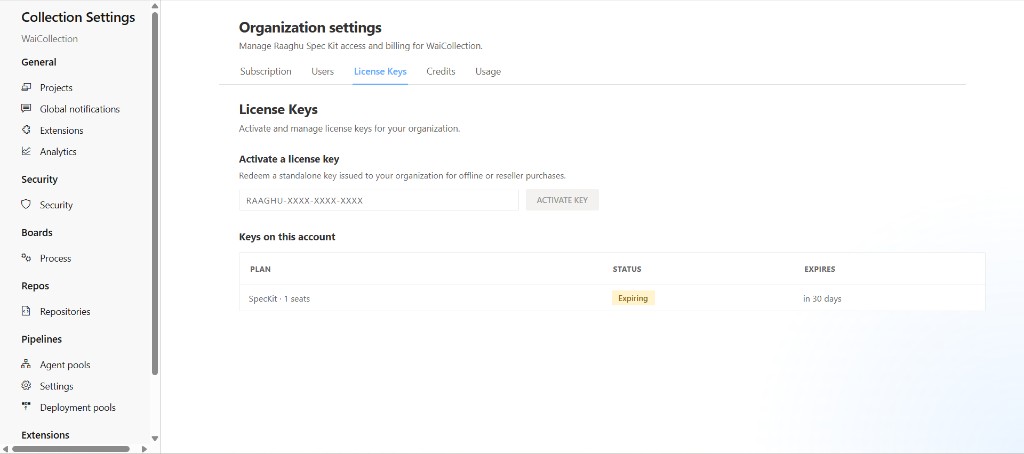
License Keys
Redeem a standalone key issued to your organization — no Stripe checkout required.
Activate a key
- Open License Keys
- Enter the key (format
RAAGHU-XXXX-XXXX-XXXX)
- Click ACTIVATE KEY — Spec Kit validates first and shows a preview (plan, type, validity)
- Click Confirm & activate to redeem, or Cancel to go back without activating
Keys on this account lists active entitlements with:
| Column |
Description |
| Plan |
Plan tier and seat count (e.g. SpecKit · 1 seats) |
| Status |
Active, Expiring (≤30 days left), or Expired |
| Expires |
Relative expiry (e.g. in 30 days) or the end date |
After activation, billing method becomes License key. On Subscription, the plan badge shows License key, and Billing summary shows only Expires on.
Credits
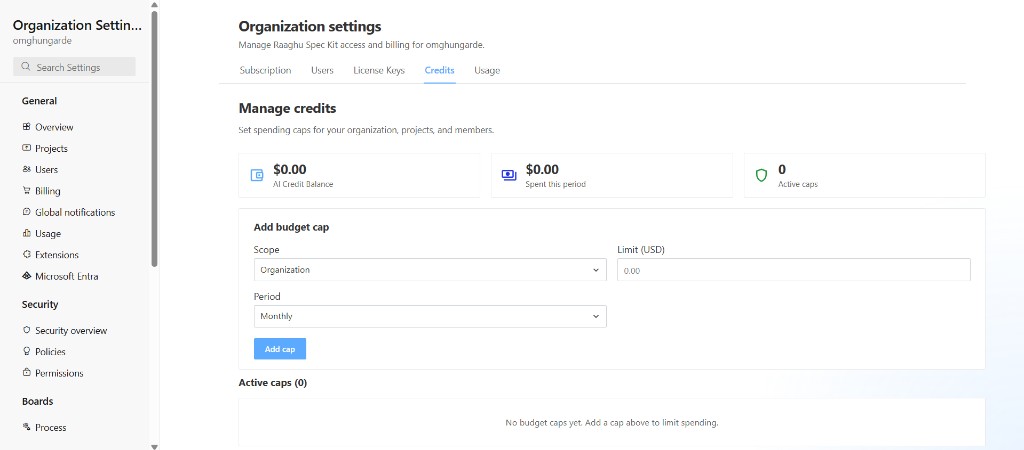
Control AI spend with budget caps.
| Metric |
Meaning |
| AI Credit Balance |
Credits available for Raaghu AI |
| Spent this period |
How much has been used |
| Active caps |
How many spending limits are in place |
Create or edit a budget cap
| Field |
Options |
| Scope |
Organization · Project · User in a project |
| Limit |
Spending ceiling in USD |
| Period |
Monthly or Lifetime |
Review active caps in a table (scope, limit, period, reset date, status) and Edit or Remove anytime.
Use organization caps for global limits, project caps for team budgets, and user caps for individual limits.
Usage
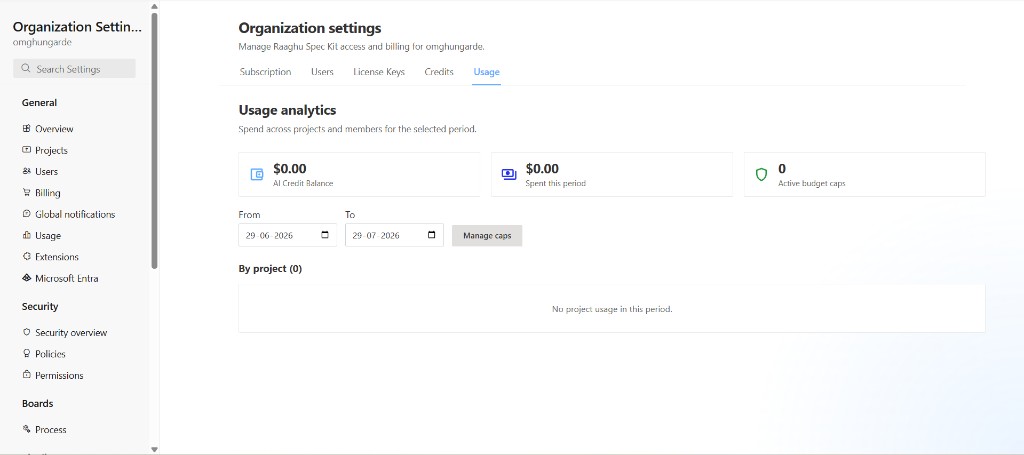
See where AI credits are going.
| Feature |
Description |
| Summary tiles |
Credit balance, spend this period, and active budget caps |
| Date range |
Filter analytics with From / To dates |
| By project |
Expand a project to see each member’s spend and credit limit |
| Set / Edit limit |
Create or update a cap directly from the usage list |
| Manage caps |
Jump to the Credits tab for full budget management |
Admins see organization-wide project and member spend. Other members see Your spend by project for the selected period.
Spec Kit Workflow
Raaghu Spec Kit follows a structured specification workflow using slash commands:
Define Project Standards (/speckit.constitution)
Establish constitutional principles. The AI generates a constitution that guides later specs and keeps the project consistent.
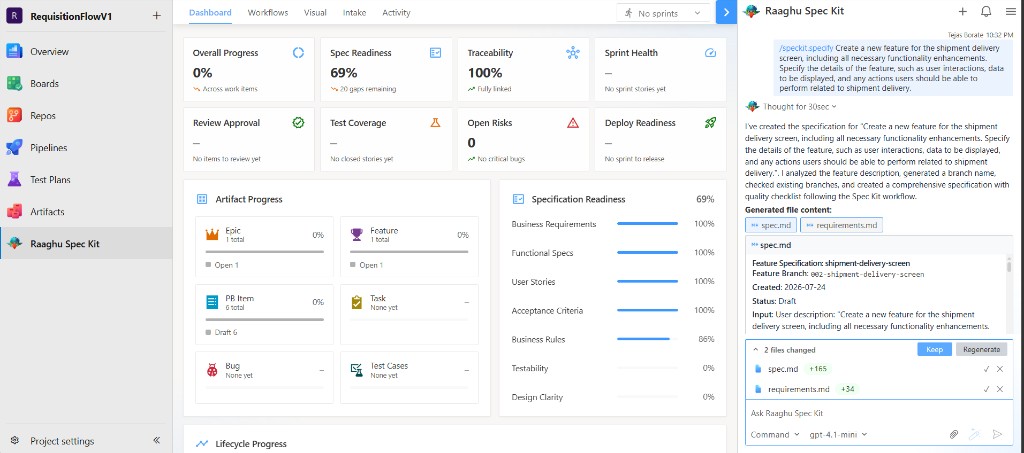
Create Specification (/speckit.specify)
Create or update feature specifications with structured sections, acceptance criteria, and a quality checklist.
Clarify Requirements (/speckit.clarify)
Identify gaps and ambiguities, ask targeted clarification questions, and fold answers back into the specification.
Create Implementation Plan (/speckit.plan)
Generate delivery and technical plans — including research, data model, quickstart, and API contract artifacts where applicable.
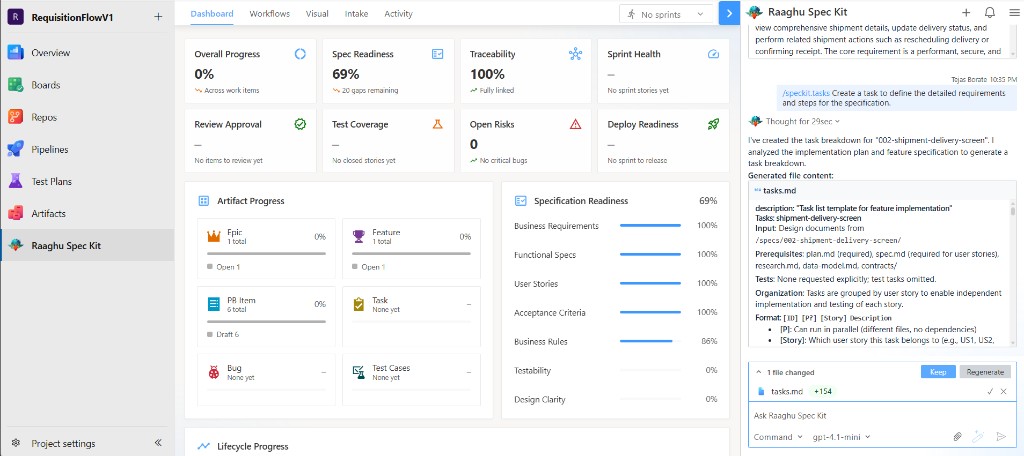
Generate Implementation Tasks (/speckit.tasks)
Produce phase-based task breakdowns with task IDs, parallel markers, and user-story links — ready to sync with Azure Boards.
Analyze Requirements and Plan (/speckit.analyze)
Cross-check specs, plans, and tasks for duplication, ambiguity, underspecification, and coverage gaps. Findings are severity-rated (Critical, High, Medium, Low) with remediation guidance.
Run Readiness Checklist (/speckit.checklist)
Generate domain-specific quality checklists (UX, API, Security, and more) — “unit tests for requirements.”
Converge Implementation (/speckit.converge)
After developers push code, assess the selected repository branch against the feature’s wiki artifacts (spec, plan, tasks, constitution). Remaining work is appended to tasks.md. Converge does not generate or commit application code.
File Management
- Generate files — AI creates structured Spec Kit artifacts (
spec, plan, tasks, and related pages)
- Edit view — review AI-generated changes before saving
- Keep — save generated content to the wiki
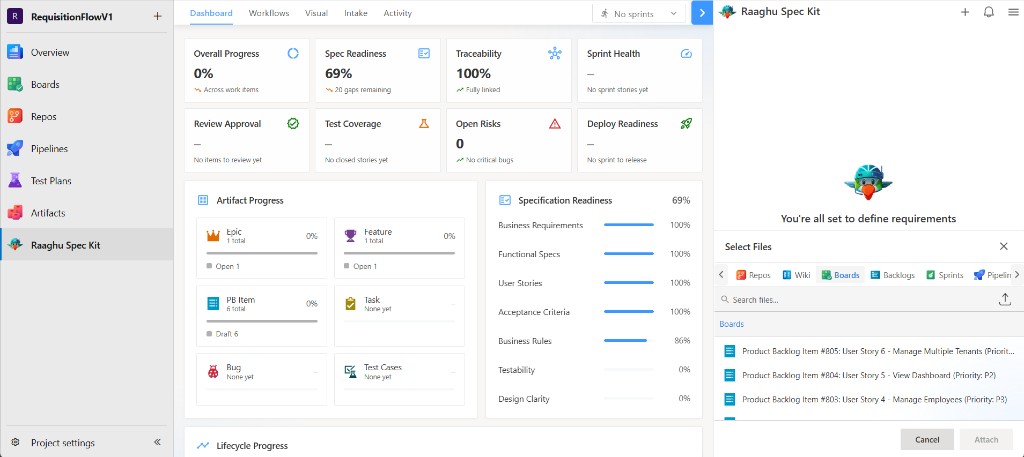
- Attach context — attach wiki pages, repo files, or work items to the conversation
Chat History
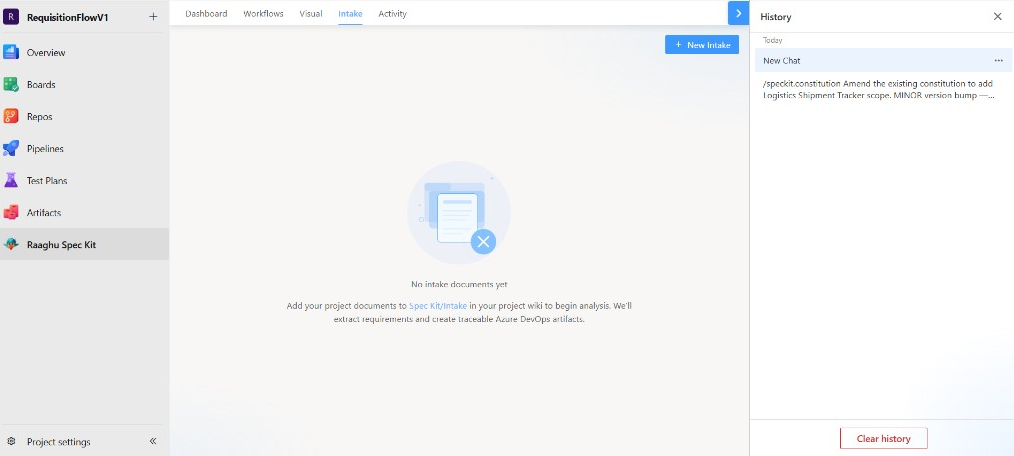
Persistent, project-scoped chat sessions let you resume any conversation:
- Browse sessions — all past conversations for the current project
- Resume anytime — reopen with full message context
- Rename sessions — descriptive names for easy navigation
- Delete sessions — remove one session or clear history
- New chat — start fresh without losing prior sessions
Pricing & Trial
| Item |
Details |
| Plan |
Professional — $9 USD per seat / month |
| Trial |
7 days free for eligible new orgs — Choose Your Plan → Start Free Trial (up to 5 seats, no card required) |
| Manage |
Organization Settings → Raaghu Spec Kit |
After the trial: subscribe on Subscription, assign seats on Users, then manage credits and spend on Credits / Usage. Organizations can also activate a key on License Keys instead of Stripe checkout.
See the Pricing tab on this Marketplace listing for full details.
Created using Raaghu Design System leveraging Spec Kit.
©2026 Wai Technologies. All rights reserved.

