Skip to content
| Marketplace
Sign in
Azure DevOps>Azure Boards>Gherkin Test Cases
Gherkin Test Cases

Gherkin Test Cases

Vovk

|
3 installs
| (0) | Free
Adds Xray-like Gherkin style test case editing to Azure DevOps.
Get it free

Gherkin Test Cases for Azure DevOps

Bring the power of Gherkin syntax directly into your Azure Boards workflow.

Gherkin Test Cases adds an Xray-style editing experience to Azure DevOps, allowing teams to define, edit, and view test scenarios using the familiar "Given/When/Then" syntax.


🚀 Key Features

📝 Xray-like Gherkin Editor

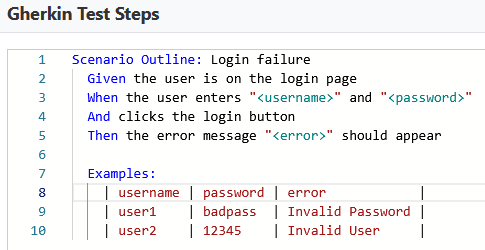
Define your test cases with full Gherkin syntax support. A dedicated "Gherkin Steps" tab appears on your Test Case work items.

Gherkin Editor

🔄 Automatic Sync

Seamlessly store raw Gherkin steps in a custom field (Custom.GherkinSteps), ensuring your scenarios are always accessible and searchable.

🎯 Native Integration

Built specifically for Azure DevOps. It feels like a core part of the UI, supporting standard work item workflows.


🛠 How it Works

  1. Open any Test Case: Navigate to your Azure Boards and open a Test Case work item.
  2. Switch to Gherkin Steps: Look for the "Gherkin Steps" tab/section in the work item form.
  3. Write your Scenario: Use standard Gherkin keywords (Feature, Scenario, Given, When, Then).
  4. Save: Your changes are automatically synced to the work item fields.

📦 Getting Started

Prerequisites

  • An Azure DevOps Organization.
  • The Custom.GherkinSteps field must be added to your Test Case work item type (see Configuration).

Installation

  1. Install the extension from the Marketplace.
  2. Ensure you have the necessary permissions to edit work items.

Configuration

To enable the editor, ensure your project process includes a custom multi-line text field named Gherkin Steps with the reference name Custom.GherkinSteps.


💻 Developer Information

If you are looking to contribute or build the project locally, please refer to the structure below:

  • Frontend: React + TypeScript + Vite.
  • Packaging: Use tfx-cli to create the .vsix bundle.
npm install
npm run build
tfx extension create --manifest-globs vss-extension.json

Developed by Mykhaylo Vovk.

  • Contact us
  • Jobs
  • Privacy
  • Manage cookies
  • Terms of use
  • Trademarks
© 2026 Microsoft