Flowboards: story map, roadmap, flowA story map board, backlog tree, roadmap, dependencies, calendar, a story scheduler, sprint planning, flow metrics, pull requests, health checks and tag tidying for your team. Free and open source. |

FlowboardsA complete re-imagining of the Azure DevOps UI experience, taken to the next level. Once tried, never go back. One page under Boards that shows a team's work in many ways and lets you change it in place. Free and open source: https://github.com/Volodymyr-Usov/flowboards. Made by Volodymyr Usov: usovvova.com. Azure DevOps stores your work. Flowboards shows you what it means.Your board, backlog and sprints tell you what the work is. The questions a team lead asks every week (when will it be done, where is it stuck, what is missing) usually take several screens, a query or another extension. Flowboards answers them on one page under Boards. Free, open source, nothing to host.
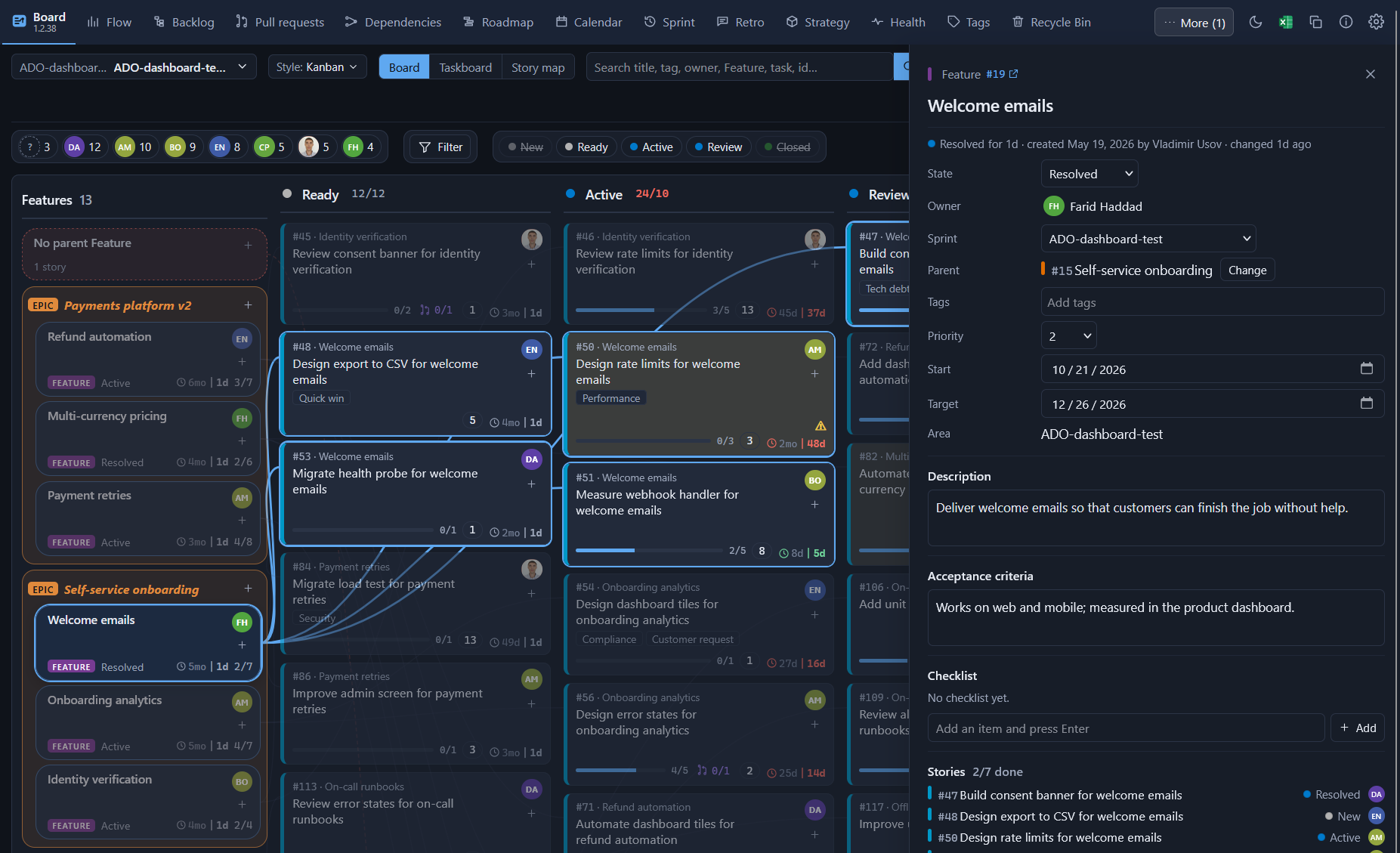
The board, in dark mode. Pick a Feature and its stories light up, joined to it by lines, with its details open on the right: stories, dependencies and pull requests. Flowboards follows Azure DevOps's light or dark theme. The five things teams notice first
Extremely flexible, and a lot in one place. Almost everything can be shown, hidden or moved to taste, for you alone: every tab, every control of the two bars, every Board column (an eye on its title, arrows to bring it back), menu titles, card details, colouring rules, a switch for the ⚠ marks, filters on any property and the team's working style. Settings come in tabs, each setting with an icon and a description; one button resets the layout; pointing at anything explains it. Around that sit a backlog tree, a roadmap across teams, dependencies, a calendar with days off, sprint planning with capacity and burndown, retros, planning poker, health checks, tag tidying, a recycle bin, checklists and standard tasks. Safe to try
Azure DevOps's own boards, burndown, velocity and Delivery Plans stay where they are. Flowboards adds to them; it does not replace them. Try it for one sprintInstall it for one team. If by the end of the sprint nobody is using the forecast or the story map, uninstall it. It cost nothing, and your data never left Azure DevOps. All featuresPlan
The same filters work on every page with work items: click a person to see only their work, right-click to hide it, or press Filter to filter on any property. Each page keeps its own filters. Every page looks the same, in two lines. The top line: the team, the working style, the tabs, then the theme, Excel, Copy, a Reset button (the layout back to the default), About and Settings. The second line: the person chips and Filter first, then the Search field and the page's own buttons; what does not fit goes under a ⋯ button. A tiny × that appears when you point at a tab or control hides it, and Settings > Menu & bars lists everything that can show or hide, each with an icon and a description. Excel and Copy take what the page shows: the Board's cards, or every table on the page, filters and sorting included. Choosing a team. The first time you open the dashboard in a project it asks which team to show: your own teams first, then all teams of the project, with a search box and a project list. Your team opens directly when it is the one Azure DevOps opened and is not too big. The choice is kept in your browser; the team button at the start of the top line changes it (type to search, arrows and Enter, or click). A team whose area covers the whole project (more than 500 open stories) gets a note with a Choose a team button, and the Board stays fast: each column draws its first 50 cards with Show more below (the story map: 20 per cell and 30 Features at first), while search, filters, Excel and "Pick my next" still use every card.
Measure
Check
Priority and urgencyEvery story has an urgency from 0 to 100, drawn as five bars on its right edge (100 is five bars, 20 is one). It is worked out live from the story's priority, the priority of its Feature, how long it waits, the end of its sprint, the items waiting for it and (when you want) its value for the size. A deadline adds up to half the score on top as it comes closer. In Settings > Priority the team sets how much each counts. Nothing is written to Azure DevOps. The team's peopleAzure DevOps lists everyone with access as a team member. In Settings > Team you untick those who only have access and add people who work with the team; the Scheduler's turns, the sprint capacity, the calendar's days off and the team's pull requests follow that list. Rules on movesSet what work needs before it moves from one state or column to another: any fields that must be filled, plus description, acceptance criteria, owner, tasks present or done, pull requests merged and more, and who alone may make the move. A rule holds in its column and in every column to its right (a rule can start afresh at its column). The ⚠ on a card says which rule it still misses. A move that breaks a rule is stopped, and the message lets you move anyway or fill in what is missing (a description, a task, an owner…) and move in one go. Checklists and definition of doneEvery work item can have a checklist in its details panel: add, tick, rename, reorder and remove items; the panel's top shows how many are ticked (3/5). The team keeps a default list per work item type in Settings (its "definition of done"); an item with no checklist yet offers it with one click. The rule "Checklist done" stops a move until every item is ticked. An item with no checklist passes, unless the team has a list for its type. Checklists are kept in this extension's storage, not in the work items. Standard tasksSet the tasks a team adds under almost every story (for example "Write tests", "Update documentation"), with an optional activity and hours. One click in a story's details panel adds the ones that are missing; a new story can get them at once.
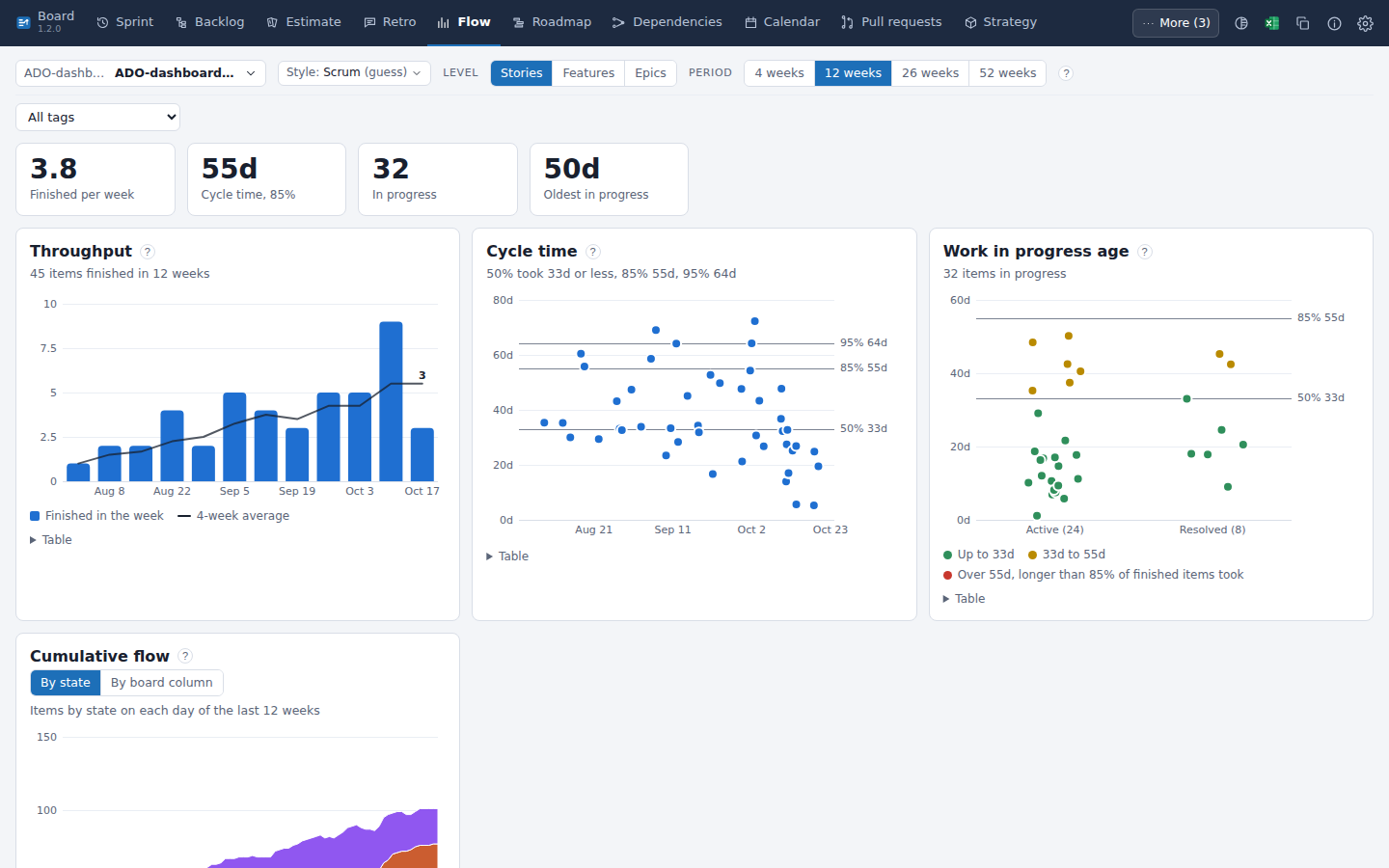
Flow, in light mode. Throughput, cycle time and work-in-progress age of the last 12 weeks, read from the team's own work items. Questions and answersIs it free? Yes. Flowboards is free and open source under the MIT license. What permissions does it ask for, and why? Work items, read and write (to show your work and save the changes you make). Code, read only (to show pull requests: it can never change your code or approve, merge or abandon a pull request). Project and team, read (teams, sprints, board columns). Graph, read (people's pictures). Where is my data kept? Your work stays in your work items. The team's settings (rules on moves, checklists, standard tasks, pillars), retros and planning poker are kept in this extension's storage in your organization. Your own view choices, such as filters, are kept in your browser. Nothing is sent anywhere else. Does it change my process, board or fields? No. Moving a card changes the same fields the Azure DevOps board changes (state, board column, sprint, parent, order). Nothing is added to your process. Do the rules on moves also apply on the Azure DevOps board? No. They apply to moves made in Flowboards. Azure DevOps's own pages follow your process rules only. Does it work with Azure DevOps Server (on-premises)? No, only with Azure DevOps Services (dev.azure.com). We use Kanban, not sprints. Is it for us? Yes. Each team has a working style (Scrum, Kanban or Scrumban), guessed from its sprints and changeable in Settings. For a Kanban team the board opens as the flow board, with the team's columns, WIP limits and days in column; Flow and Pull requests come first (every tab stays; you can switch off the ones you never use). Cumulative flow can show your board columns, and the forecast needs no sprints. How does the forecast work? It takes how many items the team finished on each day of the last weeks (4 to 52, your choice) and plays the future 10,000 times, drawing each day at random from those days. "85% likely by 14 Nov" means 85 of those 10,000 runs finished by that date. It assumes the team keeps working as it did. Are anonymous retro notes really anonymous? Yes. On a retro set to anonymous, notes are saved without the author's name. Notes stay hidden until they are revealed. Our project is big. Will it be slow? A team whose area holds more than 500 open stories is asked to pick a smaller team, and the Board draws the first 50 cards per column with "Show more"; search, filters and Excel still use every card. What happens if we uninstall it? Every change made with Flowboards stays in your work items. Rules, checklists and retros live in the extension's storage and are not shown without it. Is there AI? Not in this release. How do I report a problem or ask for a feature? Use the Q&A tab of this page, or write through usovvova.com. PrivacyEverything runs in your browser with your own Azure DevOps sign-in. Settings are kept in this extension's storage in your organization. No data goes anywhere else. AuthorFlowboards is made by Volodymyr Usov. More about me and my work: usovvova.com. |