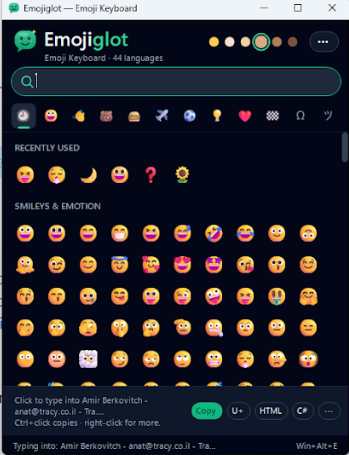
EmojiglotEmoji keyboard for Windows – types emoji straight into any app, with emoji search in 44 languages |

EmojiglotAn emoji keyboard for Windows – search emoji in 44 languages and type them straight into any app. Type emoji anywhereClick in Word, your browser, Visual Studio or any other app, then click an emoji – it is typed right there. The keyboard never takes the focus away from the app you're working in. Press Win+Alt+E from anywhere, type a word and press Enter – the first match is inserted instantly. Search in your own languageSearch works in 44 languages: "heart", "cœur", "corazón", "心" or "сердце" all find ❤️. Skin tones, recently used and the most popular emoji are one click away. FeaturesTypes emoji directly into any Windows app Emoji search in 44 languages, based on Unicode CLDR data Global shortcut Win+Alt+E – type a word, press Enter Skin tones, recent and popular emoji Special characters – arrows, math symbols, fractions, currency signs, Greek and accented letters, box drawing and invisible characters such as the non-breaking space Kaomoji ¯\(ツ)/¯ For developers – copy any character as U+1F600, an HTML entity, a C# or JavaScript escape, JSON, CSS, URL encoding or a shortcode Full-color emoji, up to Unicode Emoji 17.0 Tray icon, stay on top, start with Windows App in 10 languages – English, Spanish, French, Portuguese, Russian, German, Italian, Polish, Ukrainian and Dutch Private and offlineAll emoji data is built in. No internet connection, no account and no administrator rights needed. System requirementsWindows 10 or Windows 11 (64-bit). |