Expression Tree Explorer
A Visual Studio debugger visualizer for C# expression trees.
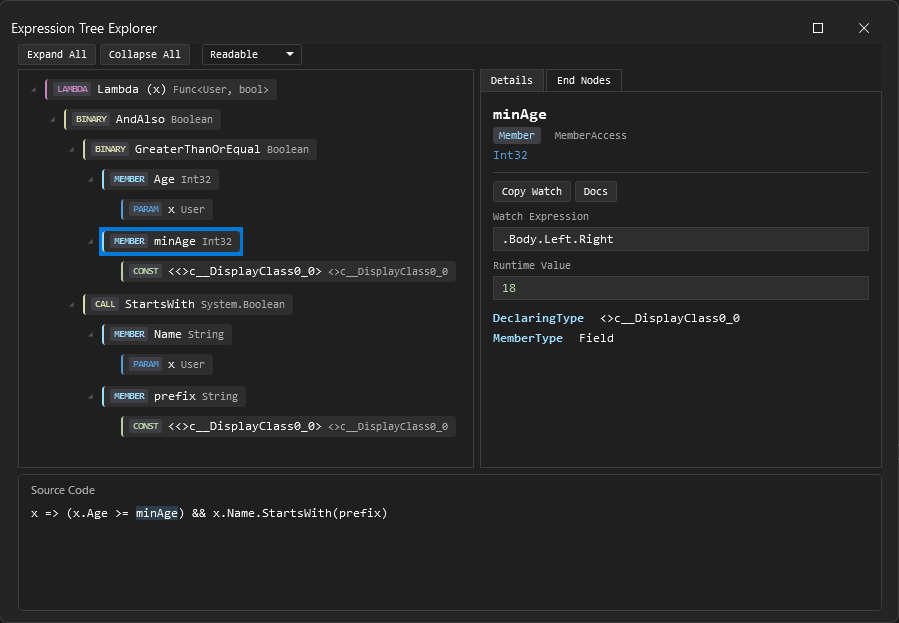
Description
Expression Tree Explorer is a debugger visualizer for Expression<TDelegate> variables. Open it from the debugger and the expression is broken into four linked views:
- Tree view - the full node tree with color-coded badges (node kind,
ExpressionType, static type). Expand/collapse all from the toolbar.
- Detail panel - properties of the selected node (operator, method, member, lifted flags, runtime values), a watch expression you can copy, a Copy Watch button, and a link to the MS docs for that node type.
- Source panel - the expression as readable C#. Clicking a tree node highlights the matching span. Switch between Readable,
ToString, and DebugView from the toolbar.
- End nodes tab - a flat list of all terminal nodes: parameters, constants, closed-over variables, and defaults. Useful when the tree gets deep.
Supported node types
Lambda, Binary, Member, Constant, Parameter, MethodCall, Unary, MemberInit, Conditional, New, TypeBinary, Invocation, NewArray, ListInit, Index, Default, Block, Try, Switch, Goto, Label, Loop. Everything else falls back to a generic node so the tree never fails to render.
Getting started
1. Install from the Visual Studio Marketplace.
2. Set a breakpoint where you have an Expression<TDelegate> in scope:
int minAge = 18;
string prefix = "A";
Expression<Func<User, bool>> filter = x => x.Age >= minAge && x.Name.StartsWith(prefix);
3. Hover over the variable, click the magnifier, pick Expression Tree Explorer.
Requirements
- Visual Studio 2022 (17.9+) or Visual Studio 2026, any edition.
- The variable must be statically typed as
Expression<TDelegate> (plain Expression or LambdaExpression won't trigger the visualizer).
Limitations
The extension uses the VisualStudio.Extensibility out-of-process model (Remote UI), which has a few hard limits:
- Source highlighting is one-way: tree -> source. You can't click in the source panel to select a node.
- Runtime value extraction only reads
ConstantExpression.Value and closure fields. No user code is executed.
- No multi-select and no "open in new window" (Remote UI doesn't support either).
Privacy
Everything runs locally. The expression tree is serialized inside your debuggee process and displayed in Visual Studio. No telemetry or network calls.
Credits

