Sprint Backlog Organizer
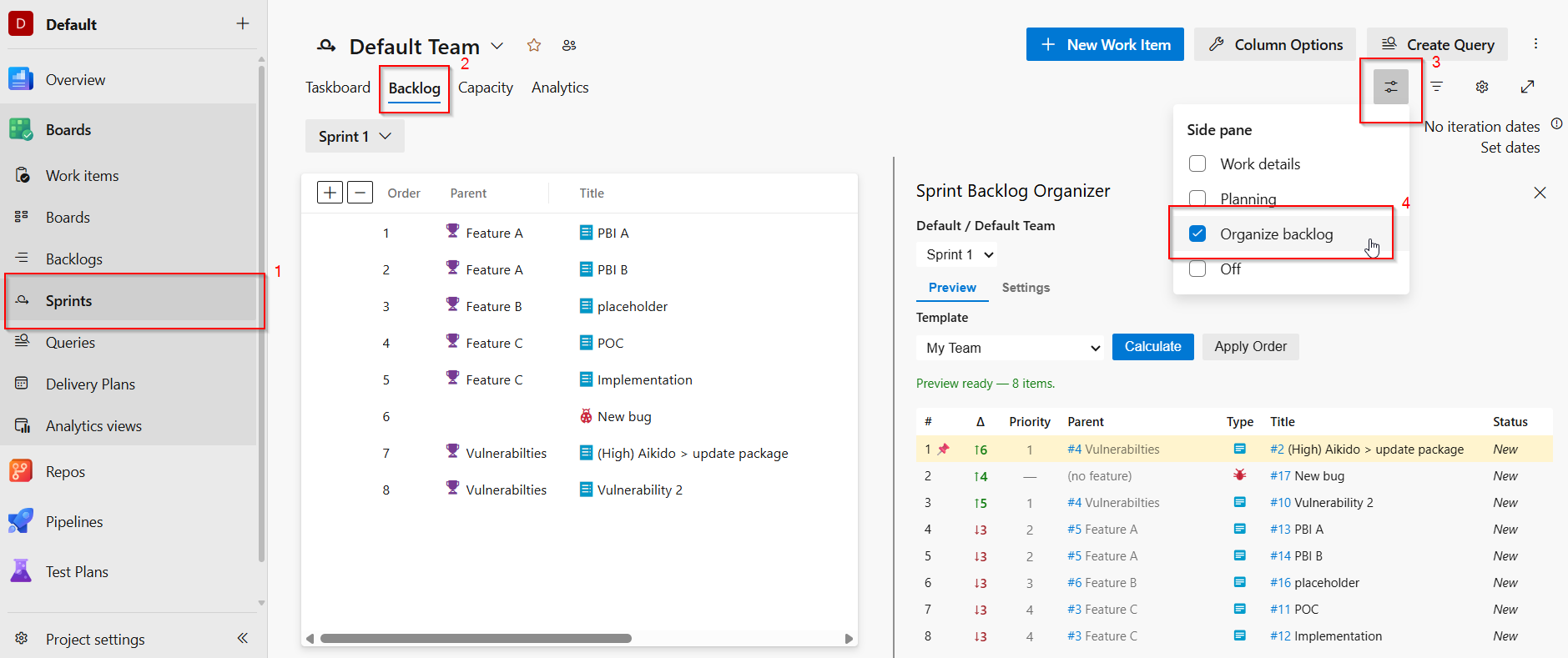
Sort your Azure DevOps sprint backlog by Feature backlog priority directly from the Sprint Backlog page via View Options → Organize backlog.
Features
- Sort by feature priority - items group by their parent Feature, ordered as they appear in the Feature backlog
- Configurable "Done" placement - push completed items to the bottom automatically
- Pinned items - pin specific items or features to always appear at the top
- Unparented & cross-team placement - control where items with no feature (or a cross-team feature) appear
- Committed item placement - promote Committed items to the top of the backlog
- Previous-sprint committed - items committed in a prior sprint float to the top for visibility
- Preview before applying - see the calculated order preview before applying changes
- Save & reuse templates - save and share your sort configuration of your team as a named template and quickly apply it to future sprints
How to use
- Navigate to Boards → Sprints → [Your Sprint] → Backlog tab, then click the View Options icon and select Organize backlog
- Select a sprint, configure sort options, and click Calculate
- Review the preview table
- Click Apply Order to reorder the backlog
Permissions
This extension requires Work Items (read and write) (vso.work_write) to read sprint and feature backlog data and reorder items.
| |

