Folder Git Status
Visual Studio extension that colors the folders, projects, solution folders and files that contain Git changes in Solution Explorer.
Visual Studio shows a glyph on a changed file, but nothing on the folders above it. With this extension the whole tree inherits the state of the files inside it: if a file three levels down is modified, every folder up to the solution is colored.
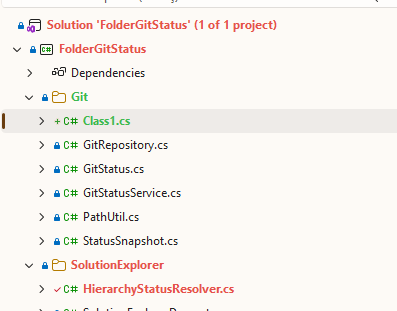
Colors
| Color (default) |
Meaning |
| 🔴 Red |
Contains modified, deleted or renamed files |
| 🟢 Green |
Contains only new files (added or untracked) |
| 🟠 Amber |
Contains files with merge conflicts |
When a folder has changes of different kinds, the most severe one wins: conflict > modified > new.
Features
- Recursive propagation up to the root: physical folders, projects, solution folders (including
.slnx) and the solution node.
- Automatic refresh when files are saved, created, deleted or renamed, and on stage, commit, checkout or merge.
- Multiple repositories and submodules in the same solution.
- Also works in Open Folder mode.
- Folders that change all the time (
bin, obj, .vs, node_modules) are ignored, so builds don't trigger refreshes.
Requirements
- Visual Studio 2022 (17.14 or later) or Visual Studio 2026, x64 or Arm64.
- Git installed (on the
PATH, or with its path set in the options).
Settings
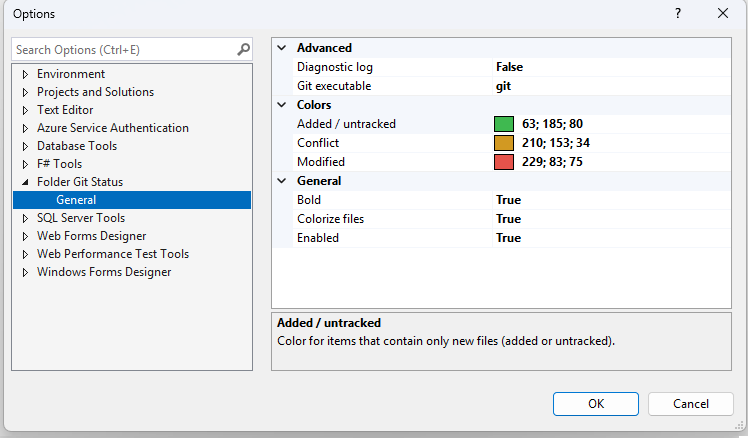
Under Tools > Options > Folder Git Status > General:
| Option |
Default |
Description |
| Enabled |
True |
Turns the extension on or off |
| Colorize files |
True |
Also colors the names of changed files |
| Bold |
False |
Shows items with changes in bold |
| Modified / Added / Conflict |
Red / Green / Amber |
Color for each status |
| Git executable |
git |
Path to git.exe |
| Diagnostic log |
False |
Writes details to the Output window and to %LOCALAPPDATA%\FolderGitStatus\log.txt |
How it works
Visual Studio has no public API to decorate Solution Explorer items. The extension:
- Runs
git --no-optional-locks status --porcelain=v1 -z in the background and computes each folder's status from the changed files.
- Watches the working tree and the Git index with
FileSystemWatcher and reruns the status (debounced) when something changes.
- Finds the Solution Explorer tree and, for each visible item, resolves its physical path through
IVsHierarchy and colors the name text.
Known limitations
- Items linked into a project from outside the project folder are not considered.
- On the selected item, the text color is drawn over the selection highlight.
- In worktrees (when
.git is a file), stage-only changes show up only after another working tree file changes.
- The integration relies on the internal structure of Solution Explorer, which may change in future Visual Studio versions. If the colors stop showing, turn on Diagnostic log and open an issue with the log contents.
Building
Requires the Visual Studio extension development workload.
& "C:\Program Files\Microsoft Visual Studio\18\Community\MSBuild\Current\Bin\MSBuild.exe" FolderGitStatus.slnx -restore -p:Configuration=Release
The installer is produced at src\FolderGitStatus\bin\Release\net48\FolderGitStatus.vsix. To debug, open FolderGitStatus.slnx and press F5: the project starts an experimental instance (/rootsuffix Exp) with the extension installed.
Repository layout
├── src/FolderGitStatus/        VSIX project
│   ├── Git/                    git status, file watching and per-folder propagation
│   ├── SolutionExplorer/       Solution Explorer tree discovery and painting
│   ├── Resources/              extension icon
│   ├── FolderGitStatusPackage.cs
│   ├── OptionsPage.cs
│   └── source.extension.vsixmanifest
├── docs/images/                screenshots used by this README and the Marketplace page
├── publishManifest.json        Marketplace metadata (VsixPublisher)
└── FolderGitStatus.slnx
License
MIT

