Test Execution Tracker
Track manual test execution against a target date, right on your Azure DevOps dashboard.
Pick a Test Plan and Test Suite, set a reporting period, and the widget shows how much testing is left, the daily rate you need, the rate you're actually achieving, and when you'll finish at that pace.
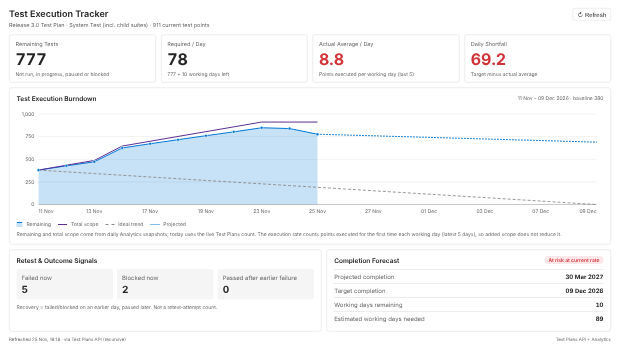
What it shows
- Remaining Tests: live count of test points still to be executed in the selected suite (child suites included by default).
- Required / Day: worked out for you: Remaining ÷ working days left until the target date.
- Actual Average / Day: test points executed for the first time per working day, averaged over the last few working days. Test cases added to the suite don't drag it down.
- Daily Shortfall: Required / Day minus Actual Average / Day.
- Test Execution Burndown: a sprint-burndown style chart with Remaining (blue area), Total scope, Ideal trend and a Projected line at the current rate.
- Retest & Outcome Signals: points failed now, blocked now, and points that passed after an earlier failure.
- Completion Forecast: projected completion date, target date, working days remaining and working days needed.
Getting started
- Install the extension in your Azure DevOps organization.
- Open a project dashboard, choose Edit → Add a widget, search for Test Execution Tracker and add it.
- Open the widget's Configure panel:
- Name: the title shown on the widget.
- Test Plan and Test Suite: chosen from dropdowns, no IDs to type. Tick Include test points from child suites to count the whole suite tree (default).
- Reporting period: start date and target completion date.
- Outcomes counted as Remaining: lists the statuses present in the selected suite, with counts. Default: Not run, In progress, Paused and Blocked.
- Working calendar: working weekdays and holidays.
- Save.
The baseline (where the ideal line starts) and Required / Day are calculated automatically from your data, so there are no numbers to keep up to date by hand.
Sizes
Minimum 4 × 4. Any size from 4 to 8 columns and 4 to 6 rows is supported; the chart grows to fill the space.
How the numbers are calculated
- Remaining counts test points whose current outcome is one of the statuses you selected. "Not run" covers None, Unspecified and Not executed.
- History comes from Azure DevOps Analytics daily test-point snapshots (
TestPointHistorySnapshot). Today's value always uses the live Test Plans count.
- Actual Average / Day counts points that moved from a remaining status (or didn't exist yet) to an executed status between consecutive working days. Today is excluded because the day isn't finished. It needs two completed working days of history; until then you can show an optional fallback value, clearly labelled.
- Baseline = Remaining on the reporting start date (from Analytics), or today's live count if the start date is today or later.
- Required / Day = current Remaining ÷ working days after today up to the target date, rounded up.
- Passed after earlier failure is a recovery signal based on daily snapshots, not a count of retest attempts.
Requirements
- Azure DevOps Services (dev.azure.com).
- Users need permission to view the selected Test Plan and to view Analytics.
- Analytics must be enabled for the project (it's on by default in Azure DevOps Services).
Permissions and privacy
- The extension requests read-only scopes: vso.test (Test Plans) and vso.analytics (Analytics).
- All data is read in the viewer's browser, as the signed-in user, directly from your Azure DevOps organization's APIs.
- No data is sent to the publisher or any third-party service. There is no telemetry and no external server.
- Widget settings (plan, suite, dates, selections) are stored by Azure DevOps in the dashboard's widget configuration.
- The widget never changes Test Plans data.
Support
Questions, problems and suggestions: use the Q & A tab on this Marketplace page.
| |

