VsBrushes Color Picker
A Visual Studio extension that provides an easy way to browse and explore all available VsBrushes colors used in Visual Studio's theming system.
Features
- Browse All VsBrushes Colors: View a complete list of all colors from the
Microsoft.VisualStudio.Shell.VsBrushes class
- Live Preview: See real-time color swatches with their current values based on the active theme
- Search & Filter: Quickly find colors by name using the built-in filter box
- Auto-Refresh on Theme Change: Colors automatically update when you change Visual Studio's theme or system theme
- Manual Refresh: Refresh button to manually reload colors if needed
- Detailed Information: View color name, class, and type information for each color
Screenshots
Dark Theme
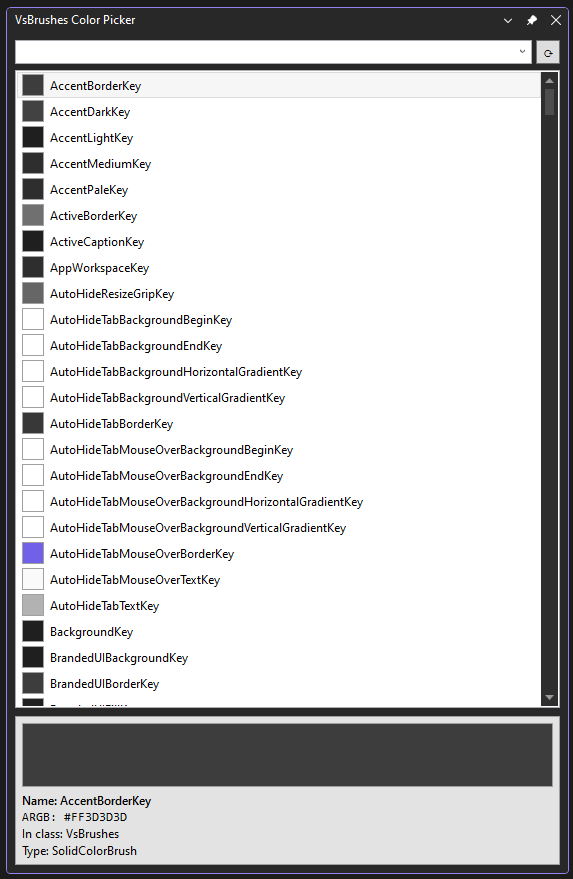
Light Theme
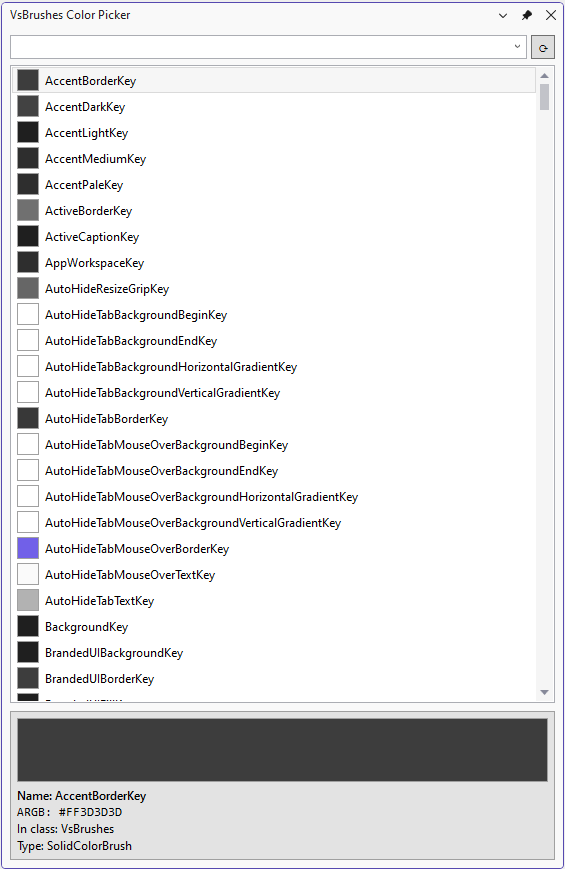
Installation
- Download the latest release from the Visual Studio Marketplace or GitHub Releases
- Double-click the
.vsix file to install
- Restart Visual Studio if prompted
Usage
- Go to View ? Other Windows ? VsBrushes Color Picker
- The tool window will appear, showing a list of all available VsBrushes colors
Features in Action
Browsing Colors
- Scroll through the list to see all available colors
- Each color is displayed with a color swatch showing its current value
- Select any color to see detailed information in the preview pane
Filtering Colors
- Type in the filter box at the top to search for specific colors
- The list updates in real-time as you type
- Search is case-insensitive and matches any part of the color name
Refreshing Colors
- Click the refresh button (?) next to the filter box to manually reload colors
- Colors automatically refresh when you change Visual Studio themes
- Supports both VS theme changes and OS theme changes (when "Use system setting" is enabled)
Preview Pane
The preview pane at the bottom shows:
- Color Swatch: Large preview of the selected color
- Name: The property name (e.g.,
ToolWindowBackgroundBrushKey)
- In class: The class containing the color (VsBrushes)
- Type: The full type name
Why Use This Extension?
When developing Visual Studio extensions, it's crucial to use the correct theme colors to ensure your UI matches the Visual Studio environment and respects user theme preferences. This tool helps you:
- Discover Available Colors: Explore all the colors available in the VsBrushes class
- Test Theme Compatibility: See how colors change across different themes (Dark, Light, Blue, High Contrast)
- Choose the Right Color: Find the most appropriate color for your extension's UI elements
- Maintain Consistency: Ensure your extension looks native to Visual Studio
For Extension Developers
When building Visual Studio extensions, use colors from VsBrushes to ensure your UI adapts to the user's chosen theme:
using Microsoft.VisualStudio.Shell;

// Example: Setting a background color
myControl.Background = VsBrushes.ToolWindowBackgroundBrushKey;

// Example: Setting a foreground color
myControl.Foreground = VsBrushes.ToolWindowTextBrushKey;
In XAML:
<UserControl xmlns:platformUi="clr-namespace:Microsoft.VisualStudio.PlatformUI;assembly=Microsoft.VisualStudio.Shell.15.0">
    <Grid Background="{DynamicResource {x:Static platformUi:EnvironmentColors.ToolWindowBackgroundBrushKey}}">
        <TextBlock Foreground="{DynamicResource {x:Static platformUi:EnvironmentColors.ToolWindowTextBrushKey}}" />
    </Grid>
</UserControl>
Requirements
- Visual Studio 2022 (17.0 or later)
- .NET Framework 4.8
Known Issues
Please report issues on the GitHub Issues page.
Changelog
Version 1.0
- Initial release
- Browse all VsBrushes colors
- Search and filter functionality
- Live theme change detection
- Manual refresh button
- Color preview pane
Contributing
Contributions are welcome! Please feel free to submit a Pull Request on GitHub.
License
MIT License
Author
Stephane Etienne
Acknowledgments
Inspired by the VSx Color List extension.
Enjoy exploring Visual Studio colors!

