Todoist for Visual Studio (Preview)
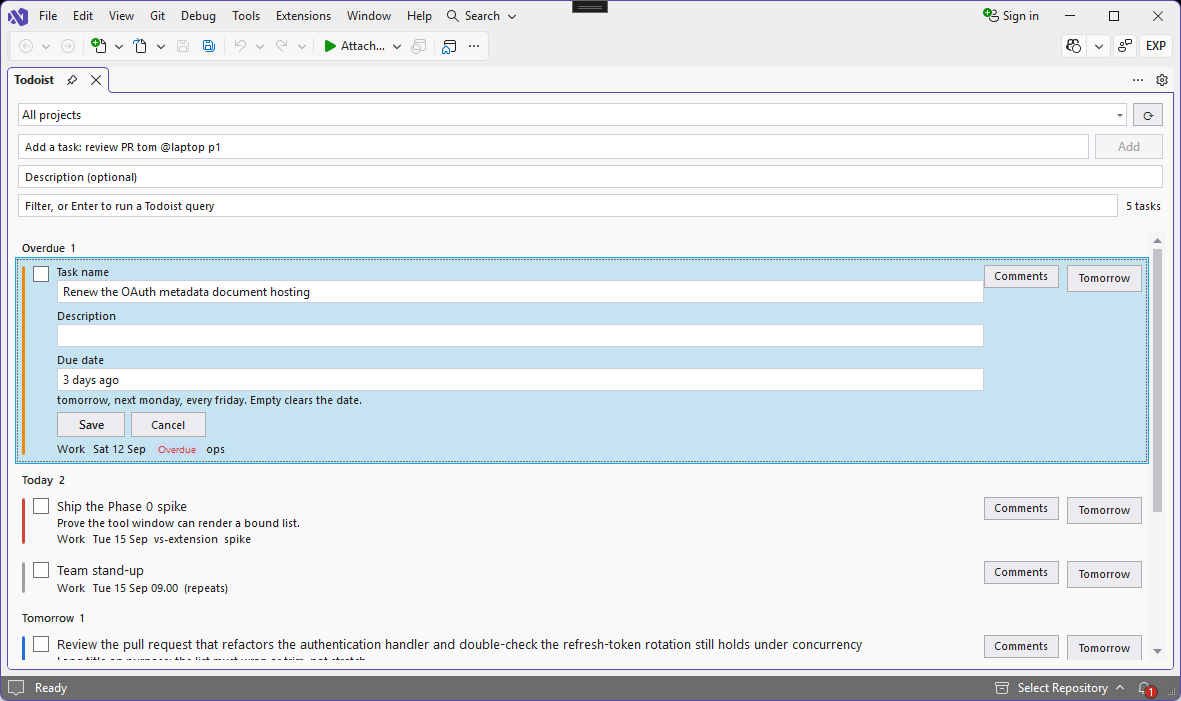
Manage your Todoist tasks without leaving Visual Studio. Browse, add, edit and complete tasks in a tool window, and turn the code you're looking at into a task in one step.
Unofficial. This extension is an independent integration. It is not affiliated with, endorsed by, or sponsored by Doist Ltd. Todoist is a trademark of Doist Ltd.
Features
- Your tasks in a tool window. Open tasks are grouped by Overdue, Today, Tomorrow, Next 7 days, Later and No date, with priority colours, labels and projects.
- One project per window. Pick All projects or a single project. Each Visual Studio window remembers its own choice, so two solutions open side by side stay separate — and new tasks go to that window's project.
- Quick add with Todoist's own parser:
Review PR #Work @code p1 tomorrow 9am
creates Review PR, labelled code, in Work, priority 1, due tomorrow at 9:00. It is parsed by Todoist itself, so /section, +assignee, {deadline} and !30m reminders work exactly as they do in Todoist's own apps. Type # or @ for project and label suggestions.
- Capture a task from code. Select code, then choose Add Todoist task from selection (Ctrl+Alt+Shift+A) from the editor's right-click menu. The first line becomes the title, the file and line number go in the description, and a longer selection is attached as a comment. A Go to code command takes you back to that exact line.
- Edit, complete, snooze. Tick a task to complete it, use Reschedule to tomorrow to snooze it, and edit its title, description and due date in place.
- Comments and attachments. Read a task's comments in the IDE, and open an attachment in one click.
- Filter and search. Type to filter the loaded tasks instantly, or press Enter to run a Todoist filter query such as
today & p1 or @code & !no date against your whole account.
Getting started
- In Visual Studio, choose Extensions > Sign in to Todoist.
- Your browser opens Todoist's own sign-in page. Approve access, and the browser hands you straight back.
- Open the window from View > Other Windows > Todoist Tasks (Ctrl+Alt+Shift+T).
There is nothing to copy, paste or configure, and your Todoist password is never seen by the extension.
Due dates
Type dates in plain text: today, tomorrow, fri, next week, in 3 days, every monday, 5 Oct or 2026-10-05, optionally with a time such as 14:30, 9am or noon. Short forms like tod, tmrw, nw and eom are expanded for you. Leave the field empty to clear the date.
Privacy and security
- No telemetry. The extension has no server, no analytics and no crash reporting. It talks only to
api.todoist.com.
- No client secret. Sign-in uses OAuth 2.0 with PKCE as a public client, so there is nothing sensitive inside the package to extract.
- Your tokens stay on your machine. They are encrypted with Windows DPAPI for your Windows user only, and deliberately kept out of Visual Studio's roaming settings so they never sync to another device.
- Least privilege. Only the
data:read_write scope is requested — not deletion, not backups. You see the full list on Todoist's consent screen.
- Signing out revokes the token with Todoist, rather than only forgetting it locally.
- Code is sent only when you ask. Add Todoist task from selection uploads the selected snippet to your Todoist account. Nothing else reads or sends your code.
Known limitations in this preview
- Completed tasks are not listed; the window shows open tasks only.
- Task descriptions are shown as plain text, so Todoist's formatting appears as raw Markdown.
- Sections are supported when adding a task, but tasks are not grouped by section in the window.
- Recurring dates are shown, and can be set with text such as
every friday, but there is no recurrence picker.
Requirements
Visual Studio 2022 17.14 or later, or Visual Studio 2026.
Feedback
Found a bug or have a suggestion? Email support@somaraj.com.
| |

