BoardwalkDesk is a customer
support portal on top of Azure Boards. Your customers raise and follow tickets on your desk's portal or by email; each ticket is a
work item in your own Azure DevOps project, so your team works it on the boards it already uses. It is priced per desk, never per
agent.
This extension brings BoardwalkDesk into the work item itself.
On the work item form
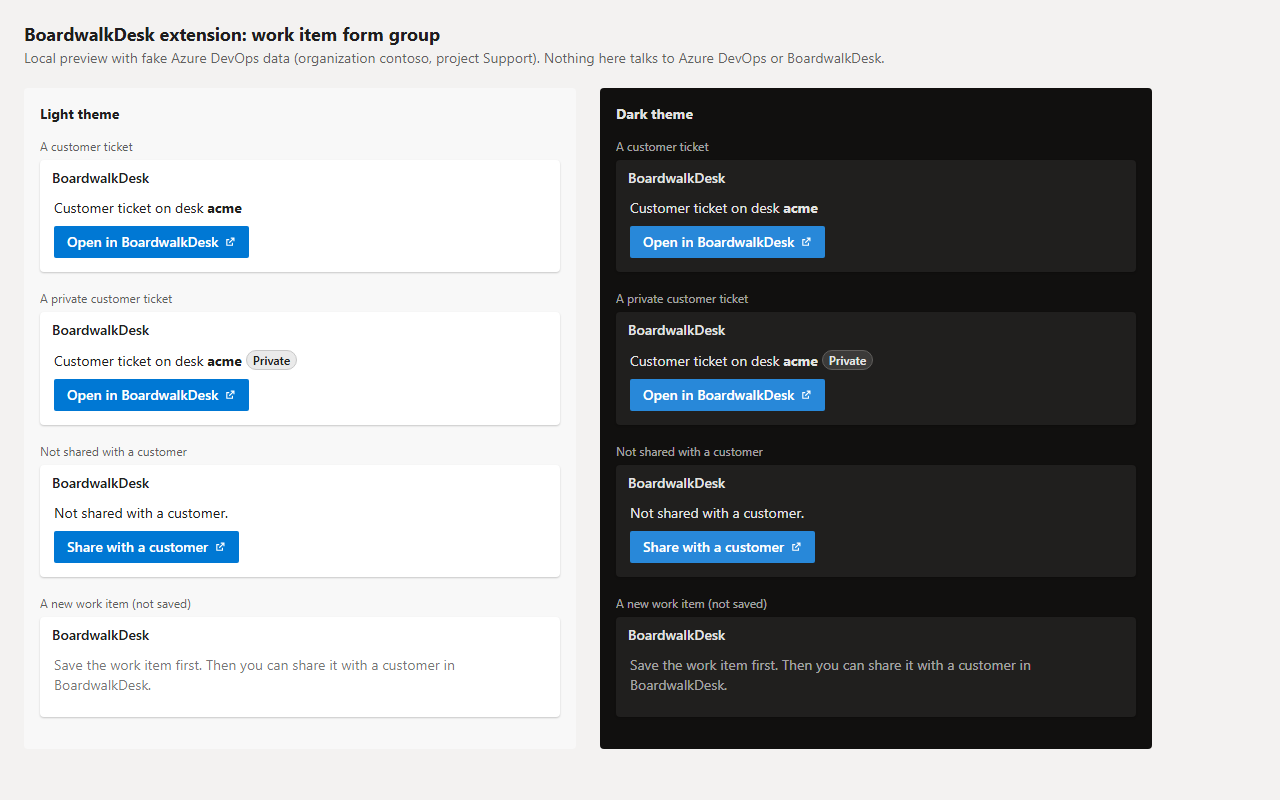
A BoardwalkDesk group on the work item form shows, at a glance:
A customer ticket: "Customer ticket on desk your-desk", a Private badge when only the customer who raised it can see it,
and Open in BoardwalkDesk, which opens the ticket's page in your desk's team area (hide comments from the customer, share
attachments, make it private).
Any other work item: "Not shared with a customer." and Share with a customer, which opens Link a work item to a customer
on your desk with the work item number filled in. You check exactly what the customer will see before anything changes.
A new work item: a short hint to save it first.
The group follows your Azure DevOps light or dark theme and updates when the work item's tags change.
On the work item menu
Backlogs and query results get Open in BoardwalkDesk on a work item's menu: the same link as the form group's button.
Get started
Create a desk for your
Azure DevOps project: sign in with the Microsoft account you use for Azure DevOps. A desk starts with a free 14-day trial, no card
needed.
Install this extension in your Azure DevOps organization.
Open any work item. If none of your desks uses its project yet, Share with a customer takes you to creating one.
The extension asks only for Work items (read) (vso.work). It changes nothing in Azure DevOps.
It reads the open work item's number and tags and its organization and project inside Azure DevOps, only to show the group and
build its link. It sends no data anywhere and loads nothing from other sites: no tracking, no external scripts.
Its buttons are plain links. BoardwalkDesk opens in a new tab, asks you to sign in with Microsoft, and shows only desks you are an
admin of.