MediatRItemExtension scaffolds the MediatR + FluentValidation boilerplate you write by hand on every feature: the operation class (Query, Command, Notification, or Stream), its handler, and its validator. You fill in a name and a few options in a tool window, click confirm, and the extension creates the files in the selected project folder — using directives included.
It targets developers working in Visual Studio 2019 or 2022 (also works on 2026) who already use MediatR and FluentValidation in their projects and want to stop writing the same structural boilerplate for every operation.
Prerequisites: the target project must already reference the MediatR and FluentValidation NuGet packages. The extension adds using directives that reference those namespaces; it does not install the packages itself.
Overview
Activate the extension from any project folder via right-click → MediatR Items Creation, or with the keyboard shortcut SHIFT + INSERT + M.
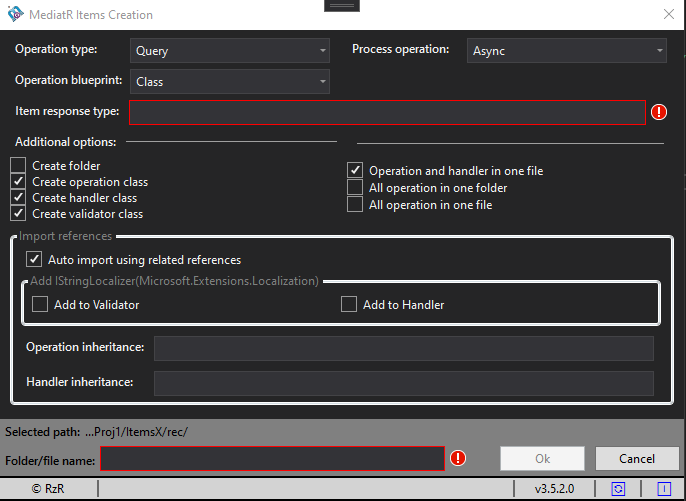
The tool window lets you configure the operation type, execution model (sync/async), blueprint type (class or record), response type, file layout, and the operation name — then generates all required files in one step.
Features
- Save all classes in one file
- Create a file for each class
- Add import references (for
MediatR and FluentValidation)
- Select how the request will be executed:
Sync or Async
- Select which type of operation you want to create
- Specify the name of the folder/file
- Use one name for the folder/file where information will be stored
- Select option if you want to add
IStringLocalizer to the Validator or/and to the Handler
- Specify any base class to add to the operation class (
Query, Command, Notification, Stream)
- Select the operation blueprint:
Class or Record
Example output
The examples below show what the extension generates. Class names and namespaces are derived from the name you enter in the tool window.
Query operation and handler
using System.Threading;
using MediatR;
using System;
using System.Threading.Tasks;

namespace ProjectNamespace.GetArticle
{
    public class GetArticleQuery : IRequest<int>
    {
    }

    public class GetArticleHandler : IRequestHandler<GetArticleQuery, int>
    {
        public async Task<int> Handle(GetArticleQuery request, CancellationToken cancellationToken)
        {
            throw new NotImplementedException();
        }
    }
}
Validator
using FluentValidation;

namespace ProjectNamespace.GetArticle
{
    public class GetArticleValidator : AbstractValidator<GetArticleQuery>
    {
    }
}
With IStringLocalizer injected
When you check Add to Validator and Add to Handler, the extension adds the IStringLocalizer constructor parameter to both generated classes:
using Microsoft.Extensions.Localization;
using FluentValidation;

namespace ProjectNamespace.GetArticle
{
    public class GetArticleValidator : AbstractValidator<GetArticleQuery>
    {
        public GetArticleValidator(IStringLocalizer stringLocalizer)
        {
        }
    }
}
using Microsoft.Extensions.Localization;
using System.Threading;
using MediatR;
using System;
using System.Threading.Tasks;

namespace ProjectNamespace.GetArticle
{
    public class GetArticleHandler : IRequestHandler<GetArticleQuery, int>
    {
        public GetArticleHandler(IStringLocalizer stringLocalizer)
        {
        }

        public async Task<int> Handle(GetArticleQuery request, CancellationToken cancellationToken)
        {
            throw new NotImplementedException();
        }
    }
}
Class vs Record blueprint
Selecting Record as the blueprint type changes the operation declaration keyword. Everything else (handler, validator, file layout) stays the same.
// Blueprint: Class
public class GetArticleQuery : IRequest<int>
{
}

// Blueprint: Record
public record GetArticleQuery : IRequest<int>
{
}
Operation inheritance
When you fill in the Operation inheritance field, the specified base class is inserted before the MediatR interface in the declaration:
public class GetArticleQuery : BaseClass, IRequest<int>
{
}

