Remove Obj And BinPreviewRemoves obj and bin folders for the current solution or selected project directly from Visual Studio. |

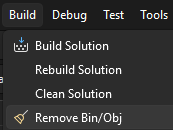
Remove Obj And BinRemove generated Remove Obj And Bin provides both an interactive cleanup dialog and a silent cleanup mode. It safely scans the selected root directory, removes only exact Supports Visual Studio 2022 version 17.14.36 or later and Visual Studio 2026. Source code: https://bitbucket.org/keepquesting/removeobjandbin/src/master/ UsageBuild menuOpen a solution and select:
When Silent mode is disabled, the cleanup dialog opens with the configured path for the current solution. Review or edit the path and select Clean. When Silent mode is enabled, cleanup starts immediately without opening the dialog.
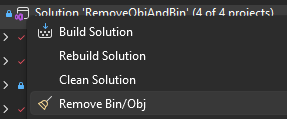
Solution ExplorerRight-click a solution or project and select:
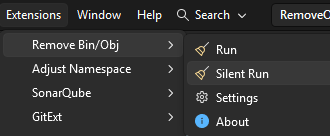
Extensions menuOpen:
Available commands:
The explicit Run and Silent Run commands are not affected by the global Silent mode setting.
SettingsOpen:
Default pathDefines the default cleanup directory for the current solution. The value is stored separately for each solution. If no custom path is configured, the directory containing the current solution file is used. Silent modeControls whether commands from the Build menu and Solution Explorer run without opening the cleanup dialog. Silent mode is a global setting shared by all solutions. Silent mode panelChoose how the progress panel behaves during silent cleanup:
Cleanup resultsThe extension reports:
Results are written to the dedicated Remove Bin/Obj channel in the Visual Studio Output window. Features
SafetyThe extension removes only directories named exactly:
It does not select similar names such as The cleanup dialog displays the complete root path before the operation starts. Selecting Clean starts the cleanup immediately without additional confirmation prompts. The Visual Studio extension does not remove the |