PointCloudWatch 1.1.1
An ImageWatch-like Visual Studio extension for point cloud debugging and visualization — inspect point cloud variables in real time during breakpoint debugging, and click to pick specific coordinates.
A Visual Studio 点云调试可视化扩展,对标 ImageWatch:让你在断点调试中实时查看点云变量,并点选具体坐标。
PointCloudWatch 1.1.1 (English)
An ImageWatch-like Visual Studio extension for point cloud debugging and visualization — inspect point cloud variables in real time during breakpoint debugging, and click to pick specific coordinates.
Introduction
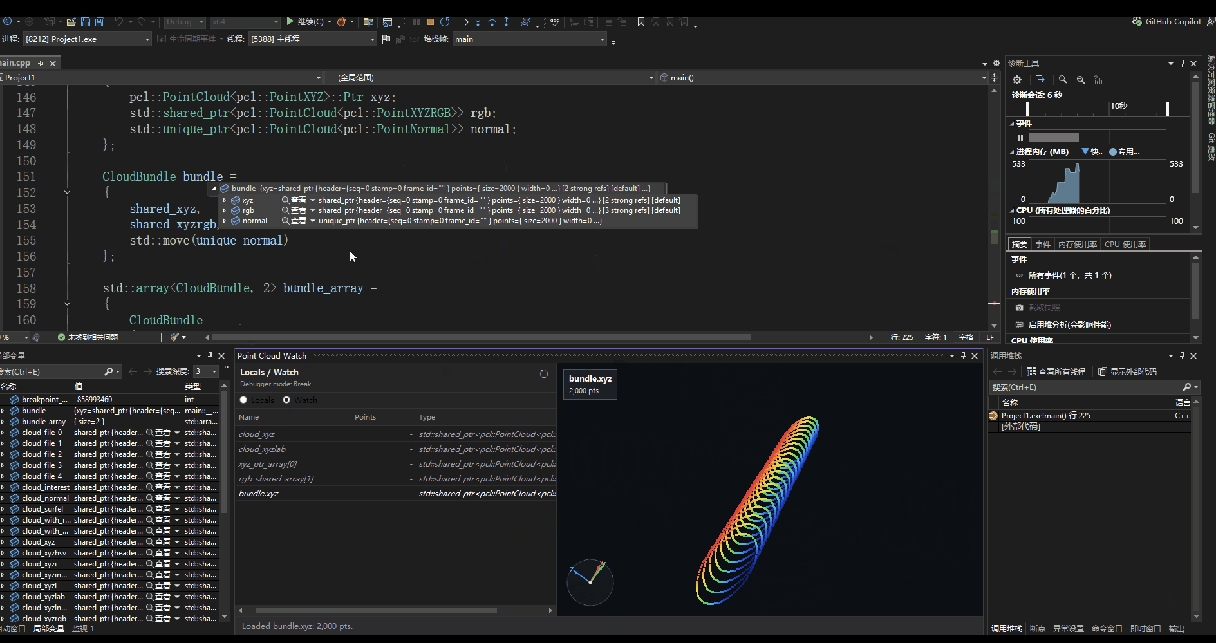
When debugging native C++ point cloud programs with Visual Studio on Windows, there is no ready-made point cloud preview extension. Developers usually have to export the point cloud to disk first and then open it in an external tool such as CloudCompare — constant context switching, very low efficiency. PointCloudWatch brings point cloud viewing directly into the VS debugging scene, so you can quickly check the state of a point cloud right at a breakpoint. It is not a standalone point cloud editor, but part of the debugging workflow — just like ImageWatch for image debugging, except that the target shifts from 2D images to 3D point clouds.
Features
| Capability |
Description |
| Automatic discovery |
Automatically discovers point cloud objects in the current debugging context |
| Watch management |
Supports manually adding variables to Watch for continuous observation |
| Basic info |
Shows point cloud name, type, point count and other basic information |
| 3D preview |
Provides a 3D point cloud preview |
| View interaction |
Supports rotate, zoom, pan, view reset and fit-to-view |
| Point picking |
Supports Ctrl + left mouse button to pick points; select multiple points and view their exact coordinates |
| Status hints |
Gives clear messages for empty variables, unreadable variables and unsupported types |
Target Users
Designers and maintainers of point cloud processing algorithms.
Pain Points Solved
In point cloud algorithm development and maintenance, the traditional troubleshooting flow requires saving the point cloud variable to disk first and then opening it in an external tool — a tedious process with delayed feedback. PointCloudWatch embeds the viewing capability directly into the debugging workflow:
- No need to save to disk — inspect point cloud variables in real time during debugging;
- Significantly improves the development and maintenance efficiency of point cloud algorithms.
Typical Workflow
- The program hits a breakpoint and Visual Studio pauses at the current debugging scene;
- The extension automatically scans the current context for point cloud objects;
- Quickly discover available variables in
Locals, or continuously monitor specific variables in Watch;
- Hover to check basic info — whether the point cloud is empty, whether the point count is normal, whether the type is supported;
- Open the 3D preview to directly view the spatial distribution of the point cloud;
- Use dragging, zooming, panning and view reset to inspect local details or the overall shape.
Installation and Usage
Installation
- Double-click
PointCloudWatch.vsix to install the extension (exit Visual Studio before installing);
- Activate the extension via Point Cloud Watch under the Tools menu.
Point Cloud Preview
- Set a breakpoint and start debugging. The
Locals pane shows automatically scanned variables, and the Watch pane shows manually added variables;
- Double-click a variable and the right pane renders the point cloud: scroll wheel to zoom, hold the left mouse button to rotate.
Viewing Coordinates of Selected Points
- Use
Ctrl + left mouse button to pick points; multiple points can be selected at once. The bottom-left corner shows the coordinates of the point currently marked with a blue circle;
- Click Show List, then click a point in the list: its marker turns blue and the corresponding coordinates are displayed.
Supported Variable Types
| Variable form |
Example |
| Direct point cloud object |
pcl::PointCloud<pcl::PointXYZ> cloud |
| Raw pointer |
pcl::PointCloud<pcl::PointXYZ>* cloud |
std::shared_ptr |
std::shared_ptr<pcl::PointCloud<pcl::PointXYZ>> |
std::unique_ptr |
std::unique_ptr<pcl::PointCloud<pcl::PointXYZ>> |
boost::shared_ptr |
boost::shared_ptr<pcl::PointCloud<pcl::PointXYZ>> |
pcl::shared_ptr |
pcl::shared_ptr<pcl::PointCloud<pcl::PointXYZ>> |
std::reference_wrapper |
std::reference_wrapper<pcl::PointCloud<pcl::PointXYZ>> |
boost::reference_wrapper |
boost::reference_wrapper<pcl::PointCloud<pcl::PointXYZ>> |
| Struct member |
Foo::cloud / foo.cloud |
| Array element |
arr[0] / points[i] |
| Point cloud member inside a container |
item.cloud inside vector<Item> |
| Point cloud objects inside a container |
vector<pcl::PointCloud<...>> |
The extension identifies point cloud variables from the debugger-visible member tree and expression results. The current scan depth is 2 levels, with at most 256 children per level.
Scope and Limitations
Environment Requirements
| Condition |
Requirement |
| Operating system |
Windows x64 |
| Visual Studio |
Visual Studio 2022 Community 64-bit (17.0 up to, but not including, 18.0) |
| .NET runtime |
.NET Framework 4.8 |
| VS component |
Visual Studio core editor |
| Usage scenario |
Native C++ point cloud debugging |
Not Supported in the Following Cases
- The variable has been optimized out by the compiler and the debugger cannot provide a valid value;
- The debugger is not currently in Break (breakpoint pause) mode;
- The variable expression cannot be evaluated, or struct/container members are not visible in the debugger;
- The point cloud object does not follow the PCL style and has no recognizable
x/y/z layout;
- The installation target is outside the supported Visual Studio version range.
The extension is intended for viewing point clouds at the debugging scene only, and is not a general-purpose point cloud browser.
Test environment: Visual Studio 2022 Community 64-bit. Resource usage by point cloud size (rendering runs on the GPU):
| Point cloud size |
Memory usage |
| 5.58 million points |
1838.6 MB |
| 4 million points |
823.1 MB |
| 3.54 million points |
854 MB |
| 1.3 million points |
882.6 MB |
No noticeable lag within 1.3 million points; above 1.3 million points loading shows a noticeable hiccup, but preview interaction stays smooth.
Team
Shu Dengdeng, Ji Xuefeng
Organization: Shanghai Friendess Electronic Technology Co., Ltd.
PointCloudWatch 1.1.1(中文)
对标 ImageWatch 的 Visual Studio 点云调试可视化扩展,让你在断点调试中实时查看点云变量,并点选具体坐标。
简介
在 Windows 上用 Visual Studio 调试 C++ 点云程序时,VS 没有现成的点云预览插件,开发者通常只能先把点云导出,再借助 CloudCompare 等外部工具查看,反复切换、效率很低。PointCloudWatch 把「看点云」这件事直接放到 VS 的调试现场里,让你在断点处就能快速确认点云状态。它不是独立的点云编辑器,而是调试流程的一部分——就像图像调试里的 ImageWatch,只是对象从二维图像变成了三维点云。
功能说明
| 能力 |
说明 |
| 自动发现 |
自动发现当前调试上下文中的点云对象 |
| Watch 管理 |
支持手动加入 Watch 持续观察 |
| 基础信息 |
显示点云名称、类型、点数等基础信息 |
| 三维预览 |
提供三维点云预览 |
| 视角交互 |
支持旋转、缩放、平移、视图重置和自适应显示 |
| 选点坐标 |
支持 Ctrl + 鼠标左键选点,同时选中多个点并查看具体坐标 |
| 状态提示 |
对空变量、不可读变量和未支持类型提供明确提示 |
目标用户
点云处理算法的设计与维护者。
解决的痛点
点云算法的开发与维护中,传统排查方式需要先把点云变量落盘保存,再借助外部工具打开查看,流程繁琐、反馈滞后。PointCloudWatch 把查看能力直接嵌入调试流程:
- 无需落盘,直接在调试过程中实时查看点云变量;
- 显著提升点云处理算法的开发与维护效率。
典型使用流程
- 程序运行到断点,Visual Studio 暂停在当前调试现场;
- 插件自动扫描当前上下文中的点云对象;
- 在
Locals 中快速发现可用变量,或在 Watch 中持续关注指定变量;
- 鼠标悬停查看基础信息,确认点云是否为空、点数是否正常、类型是否受支持;
- 打开三维预览,直接查看点云的空间分布;
- 通过拖拽、缩放、平移和视角重置,观察局部或整体形态。
安装与使用
安装
- 双击
PointCloudWatch.vsix 安装插件(安装前需先退出 Visual Studio);
- 点击菜单栏「工具」下的 Point Cloud Watch 激活扩展。
点云预览
- 设置断点并运行调试,插件
Locals 区域会自动显示扫描到的变量,Watch 区域显示手动添加的变量;
- 双击变量,插件右侧区域即渲染显示点云:滚轮缩放、按住鼠标左键旋转。
查看选中点的坐标
- 使用
Ctrl + 鼠标左键选点,可同时选中多个点,左下角显示的是当前蓝色圆圈标记点的坐标;
- 点击 Show List,在列表中点击要查看的点,该点标记变为蓝色并显示对应坐标。
支持的变量类型
| 变量形态 |
示例 |
| 直接点云对象 |
pcl::PointCloud<pcl::PointXYZ> cloud |
| 原始指针 |
pcl::PointCloud<pcl::PointXYZ>* cloud |
std::shared_ptr |
std::shared_ptr<pcl::PointCloud<pcl::PointXYZ>> |
std::unique_ptr |
std::unique_ptr<pcl::PointCloud<pcl::PointXYZ>> |
boost::shared_ptr |
boost::shared_ptr<pcl::PointCloud<pcl::PointXYZ>> |
pcl::shared_ptr |
pcl::shared_ptr<pcl::PointCloud<pcl::PointXYZ>> |
std::reference_wrapper |
std::reference_wrapper<pcl::PointCloud<pcl::PointXYZ>> |
boost::reference_wrapper |
boost::reference_wrapper<pcl::PointCloud<pcl::PointXYZ>> |
| 结构体成员 |
Foo::cloud / foo.cloud |
| 数组元素 |
arr[0] / points[i] |
| 容器中的点云成员 |
vector<Item> 内的 item.cloud |
| 容器中的点云对象 |
vector<pcl::PointCloud<...>> |
插件支持从调试器可见的成员树和表达式结果中识别点云变量,当前扫描深度为 2 层、单层最多 256 个子项。
场景边界
环境要求
| 条件 |
要求 |
| 操作系统 |
Windows x64 |
| Visual Studio |
Visual Studio 2022 Community 64 位(17.0 至 18.0 之前) |
| .NET 运行时 |
.NET Framework 4.8 |
| VS 组件 |
Visual Studio core editor |
| 使用场景 |
native C++ 点云调试 |
不支持以下场景
- 变量已被编译优化,调试器无法提供有效值;
- 当前未进入 Break(断点暂停)模式;
- 变量表达式不可求值,或结构体/容器成员在调试器中不可见;
- 点云对象不符合 PCL 风格、不具备可识别的
x/y/z 布局;
- 安装目标不属于当前支持的 Visual Studio 版本范围。
插件仅用于调试现场的点云查看,不作为通用点云浏览器使用。
性能参考
测试环境:Visual Studio 2022 Community 64 位。点云规模与资源占用如下(渲染走 GPU):
| 点云规模 |
内存占用 |
| 558 万 |
1838.6 MB |
| 400 万 |
823.1 MB |
| 354 万 |
854 MB |
| 130 万 |
882.6 MB |
130 万点以内无明显卡顿;130 万点以上加载时有明显卡顿,但预览交互流畅。
团队成员
舒登登、季学丰
组织:上海柏楚电子科技股份有限公司

