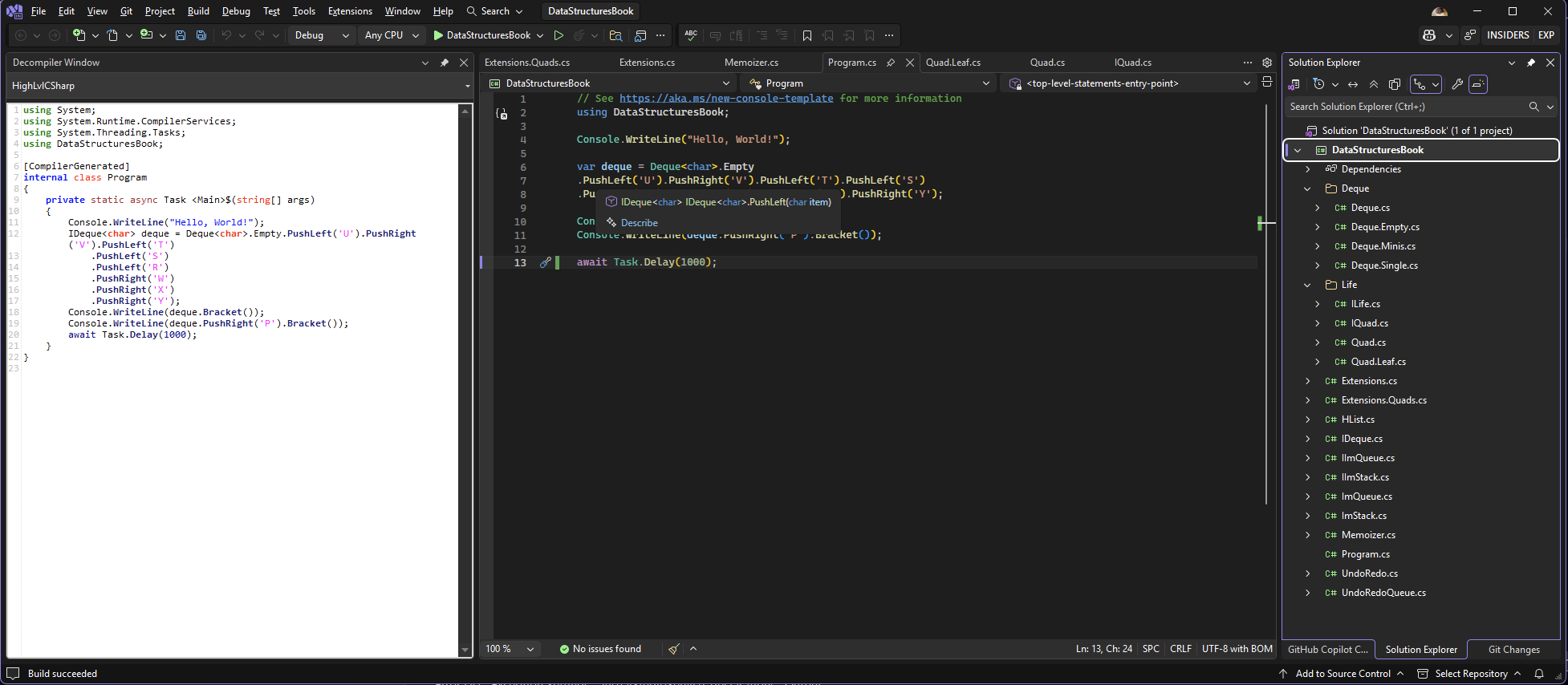
SaciSharp is a Visual Studio extension that lets you see the compiled output of your C# code in real-time. Perfect for understanding what the compiler actually generates, learning low-level C# patterns, or debugging complex code transformations.
✨ Key Features
🔄 Automatic Decompilation
Decompiles your code as you switch between files
No manual steps required - just open a file and see the results
Updates automatically after successful builds
🎨 Multiple Viewing Modes
Choose how you want to view your decompiled code:
High-Level C# - Modern syntax with all C# features (async/await, pattern matching, etc.)
Low-Level C# - See the simplified patterns the compiler generates
⚡ Smart & Fast
Built-in LRU cache for instant decompilation of recently viewed files
Powered by Roslyn for accurate type information
Handles multi-targeted projects automatically
🎯 Syntax Highlighting
Beautiful C# syntax highlighting powered by AvalonEdit makes the decompiled code easy to read.
🚀 Getting Started
Opening the Decompiler Window
In Visual Studio, go to Tools → SaciSharp Decompiler
The decompiler window will appear (you can dock it anywhere)
Open any C# file in your solution
The decompiled code appears automatically!
Switching Decompilation Modes
Use the dropdown at the top of the window to switch between:
High-Level C# - See your code as modern C#
Low-Level C# - See the simplified patterns without syntactic sugar
💡 Use Cases
For Learning
Understand async/await: See how the compiler transforms async methods into state machines
Pattern matching: See how modern C# features compile to basic IL
LINQ: Understand what happens under the hood with your queries
For Debugging
Unexpected behavior: See if the compiler is doing something you didn't expect
Performance issues: Identify unnecessary allocations or boxing
Code generation: Verify that source generators produce what you expect
For Optimization
Compare patterns: See which coding style produces more efficient IL
Measure overhead: Understand the cost of language features
Validate assumptions: Confirm your mental model of how C# works
Main Window
The SaciSharp tool window showing decompiled code with syntax highlighting.
Mode Switching
Easily switch between High-Level and Low-Level C# views.
🐛 Known Issues
IL decompilation mode is not yet implemented (coming soon)
Top-level statements in program files may require special handling
🛠️ Troubleshooting
Decompiler window is empty
Make sure your project is built (F6)
Verify the active file is a C# file in your solution
Check that the DLL was generated in the bin folder
Decompilation fails after switching files
Try rebuilding the project (Ctrl+Shift+B)
Restart Visual Studio if the issue persists
Wrong code is displayed
The extension caches decompilation results. After building, switch to another file and back to refresh.