Skip to content
| Marketplace
Sign in
Visual Studio>Tools>Solution Highlighter
Solution Highlighter

Solution Highlighter

Papini Lorenzo

|
6 installs
| (1) | Free
Color-code your Solution Explorer rows and document tabs by project, with built-in and custom palettes making it easy to tell projects apart at a glance in large solutions.
Download

Solution Highlighter

Color-code your projects in Visual Studio so you never lose track of them again.

Working in a large solution with dozens of projects? Solution Highlighter paints each project with its own color, in both the Solution Explorer and the document tab strip, so you can tell at a glance which project you're looking at or editing.


Features

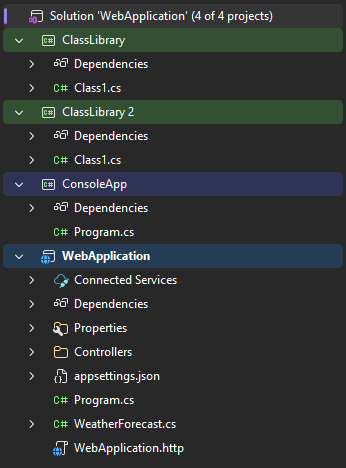
Solution Explorer row coloring

Each project row gets a subtle colored overlay, making the hierarchy instantly readable — even in solutions with 50+ projects.

SolutionExplorer.png

Document tab coloring

Open document tabs inherit the color of their owning project, so you always know where the file you're editing lives.

Tabs.png

Smart auto-assignment

Colors are assigned automatically from a palette, with stable mapping per project. You can also override any project's color manually.

Built-in & custom palettes

  • Built-in palettes curated to look great on both light and dark VS themes.
  • Custom palettes: define your own color sets in the options dialog and switch between them at any time.

Getting started

  1. Install the extension and restart Visual Studio.
  2. Open any solution — projects are colored automatically.
  3. Fine-tune colors under Tools → Options → Solution Highlighter → Project Colors:
    • Pick a built-in palette, or create your own.
    • Override specific projects with a color of your choice.
    • Click Apply to see changes live.

Compatibility

  • Visual Studio 2026 (17.14 or newer) — Community, Professional, and Enterprise.
  • Works with any project type that appears in Solution Explorer (C#, C++, F#, SDK-style, legacy, shared projects, solution folders, etc.).

Release notes

1.0

  • Initial release.
  • Solution Explorer project row coloring.
  • Document tab coloring.
  • Built-in and custom palettes with live apply.
  • Per-project color overrides.

Designed by Alessio Ragnacci

Made by Lorenzo Papini

  • Contact us
  • Jobs
  • Privacy
  • Manage cookies
  • Terms of use
  • Trademarks
© 2026 Microsoft